Customer Ratings & Reviews



- Model:
- HW-Q950T
- SKU:
- 6420988
Rating by feature
- Value
Rating 3.6 out of 5 stars
- Quality
Rating 4.0 out of 5 stars
- Ease of Use
Rating 3.9 out of 5 stars
Customers are saying
Customers are satisfied with the phenomenal sound quality and easy setup process. However, some have concerns about the product's price, subwoofer performance, display location, connectivity issues, and lack of LPCM support.
This summary was generated by AI based on customer reviews.
- Pros mentioned:Sound quality
Excellent Soundbar!!!! - Things You Need To Know!
||Posted . Owned for 2 months when reviewed.This reviewer received promo considerations or sweepstakes entry for writing a review.I researched for several months which surround system to install with my brand-new Samsung Q-LED Q90t 65" TV. I researched every brand of surround system and more and kept coming back to the matching Samsung HW-Q950T ATMOS Surround Soundbar with Sub and rear speakers. I was very concerned with all the complaints I read about!! I have not had ANY complaints with mine whatsoever! But I have learned a lot and may help those who have issues with my review. First, Be Sure to run your DVD player or ROKU directly into the soundbar FIRST using a good HDMI cable then the Soundbar to the TV in the ARC HDMI port. Yes, the TV has smart features but you will not enjoy deep loud bass or good surround sound using the Smart features off the tv. You MUST use a separate ROKU that can connect directly to the Soundbar first. I have a separate 2020 4K ROKU ULTRA stand-alone box and using good brand-new 4K HDMI cables run the ROKU into the Samsung Soundbar and then the Soundbar into the TV. I do this also with my Samsung 4K UHD DVD Blu-ray Player. The Sound is MUCH better with Deep Bass!!!! Again, You MUST run your Source THROUGH the Soundbar. If you use the built-in Apps or watch Free local tv channels you will not have much Surround sound and the Bass will be so poor. BIG Difference when you run the source THRU the Soundbar first and select the input of the device on your soundbar. I am using HDMI-1 on the Soundbar for ROKU and HDMI-2 on the Soundbar for my Blu-ray player. The Difference is AMAZING!!!! If I watch a Netflix movie on the built-in APP on the Smart TV I will NOT have good bass and little surround sound. BUT If I run my separate stand-alone ROKU 4K Ultra box on its Netflix APP the Sound is 4X louder and the Bass will knock the potted plant I have on it off the top by the end of the Movie!!! I had to learn this by trial and error because I had poor surround sound and hardly any bass until I learned this is the way it MUST be connected. NOW the Soundbar will display ATMOS when playing my 4K UHD Blu-ray DVD Player! It's better than being at the Movies!!!! I also found some REALLY NICE speaker stands for the rear speaker. They are made especially for this HW-Q950T rear speakers and fit them perfectly, you can see the attached photos. Look Under Amazon for: "Vebos Floor Stand HW-Q950T Black Set - Compatible with Samsung Q950T, Samsung HW-N950 and Samsung HW-K950" They are VERY WELL made!!!!! Worth the high price tag of $165 plus $75 shipping and arrived in just days from the Netherlands. You can even order longer AC cords up to 10ft for these speaker stands, just standard Samsung cords, or cut and add length to make your own. I am so happy with my Samsung Q950T Surround System. It fits PERFECTLY under my 65" Q90t with a little space left over. It was made to fit the Q90t perfectly in every way! My internet box is only 3 feet away running dual-band 2.1 GHz and 5GHz and I have not had ANY problems at all in the past month since installing everything. When I installed my system I took it out of the box and read all instructions and watched every YouTube video. I updated the software FIRST THING. Because when I first installed it and tried the system it cut out often and sounded bad. I thought I was experiencing all the bad issues I had read. Then I did the update successfully and everything has worked 100% Flawlessly since that day without any issues whatsoever. - Use Good 4K UHD HDMI Cables (one will come with the system) - Run your Source (ROKU, DVD, Cable/Sat Box) directly into your Soundbar using good HDMI cables. - Then Run the Soundbar to the tv's ARC HDMI port - Select the Input on the Soundbar for the device you want to listen to (ROKU, DVD, Cable/Sat Box) Example: My ROKU is HDMI1 and Blu-ray is HDMI2 on the Soundbar's input. - Set your settings like others have suggested using the remote for the Soundbar. - If you have everything connected correctly, You will see ATMOS displayed on the Soundbar when you are playing a 4K UHD Movie on your 4K UHD Blu-ray DVD player and you will HEAR the difference!! - If you are still having issues then unplug your source (ROKU, DVD player) to reset it and then try playing the device to hear a much better sound. The Raw ATMOS Audio needs to go straight into the Soundbar unmodified so the Soundbar can effectively decode it. Adjust your settings accordingly on the Soundbar. I've enclosed some photos of my setup to help. It is a clean set up with my Samsung Q90t 65" TV and Samsung HW-Q950T Soundbar and you can read more about my full set up under my other reviews. I have a Panamax surge suppressor and many other devices hidden inside my BDI Mirage 8227 Media Center which I purchased ALL thru BestBuy. I could not be happier with my system. It looks and sounds great!
I would recommend this to a friend - Pros mentioned:Easy setup, Sound quality
Great when it works!
||Posted .This reviewer received promo considerations or sweepstakes entry for writing a review.For the price of this thing it should work flawlessly! But it doesn't. Out if the box setting everything up was easy. Followed the directions and everything synced up fine. The sound is good. Front center speakers sound a little flat when listening to dialogue. Yes you can hear speaking parts clearly over the rest of the movie. Music sounds awesome! Depending on your house size it’ll fill your whole house with clear uncrackly music at volume 20. But you won’t wanna be in the same room as the sound bar cause it’ll be LOUD! Atmos movies sound good. Depending on the movie you do get that feeling of something above and around you. Bass is great. For movies and music. ISSUES: while listening to music through Alexa ever once in awhile (every other song) music just drops for a split second? Movies, at first the sound wouldn’t play and when it did it would drop completely to the point I really wanted to return the unit. I have it ran with HDMI using the eARC to my Q90 TV. After messing with setting and modes I’d have to physically unplug the power to the sound bar in order to get the sound to work. Very annoying. It seems to be working better now. Maybe there was an update? Remote is basic but that’s all you really need. The display on top is very dumb! To have to get up and see what’s going on the stupid! While yes this eliminates any glow while watching movies in the dark, it just sucks. And the app works good for some settings but not all setting can be adjusted through the app. CONCLUSION: when it works it sounds great! Do Not pay full retail for this! Not worth it. Even at the sale price of $1399 is high for it not performing flawlessly. Hopefully Samsung continues fixing and updating the issues plagued with this unit.
No, I would not recommend this to a friendBrand response from Samsung
Posted .Hi SilentJ,
Thank you for purchasing the HW-Q950T Samsung Soundbar and for your review. We greatly appreciate the details you have provided, and will share this with our internal teams.
If you are having trouble with Alexa, follow these steps on your smart phone:
1. First delete the Soundbar from your SmartThings account: At the top left corner of the main page, tap on the 3 horizontal bars > Devices > tap on the 3 vertical dots on the top right corner > Delete > select the Soundbar > Delete
2. Uninstall the SmartThings app from your smart phone
3. Reinstall the SmartThings app from the app store
4. Sign in to your SmartThings account
5. Tap the + button at the top right of the main page > select Device > AV > Samsung > Soundbar
6. After the Soundbar has been added, select the Soundbar from the main page
7. Tap on the 3 vertical dots on the top right corner and tap on “Alexa Settings” to log in to your Amazon account
To see why your soundbar may occasionally be losing sound, you may want to check that the cable connection is not loose. Remove the cable and connect again.
You may also want to initialize your soundbar again by pressing the - + (volume) buttons at the same time for at least 5 seconds. “INIT” appears on the display when the soundbar is initialized.
Please also know there was a new firmware update (ver. 1019.5 released 4/6/21) released for your soundbar. You can update your firmware by Auto Update, using the SmartThings app, or by using a USB device.
Should you need further assistance with these issues, or have any questions about features or operation, please know that Samsung is here to help. You can contact us via any of the below options:
1-800-SAMSUNG (ask for Soundbars), available 8AM -12AM EST, 7 days a week. Or text HELP to 62913.
For additional support resources, visit us on the Samsung website and click on the ‘Support’ link in the upper right corner of the homepage for:
1) More ‘Contact Us’ options – LiveChat, Facebook, Twitter, Samsung Community, Samsung Members app
2) Manuals & Software
3) Warranty Info
4) Product Registration: For access to easy warranty support, convenient opt-in to special promos and offers, faster troubleshooting and service, and quick notification of system updates.
We look forward to hearing from you.
~ Samsung Specialist
- Pros mentioned:Sound quality
I’m sure my neighbors can hear this
||Posted . Owned for less than 1 week when reviewed.This reviewer received promo considerations or sweepstakes entry for writing a review.Set up is a pain in the butt. But hang in there. It is amazing. The first movie I could “crank the sound” for was fast and the furious. It sounded like I was in the car with them. The boom boom is true. It’s not screechy. I have this hooked up to an 85in Q80 and it’s like I’m at the theater. I would 10 out of 10 recommend. Even on a low setting I’m sure the neighbors can hear this.
I would recommend this to a friend - Pros mentioned:Sound quality
Dolby Stadium Theater
||Posted . Owned for 3 weeks when reviewed.This reviewer received promo considerations or sweepstakes entry for writing a review.Excellent JBL far exceeded my expectations better than Bose
I would recommend this to a friend - Cons mentioned:Display location, Subwoofer

Amazing Atmos System, but Who Stole the Bass?
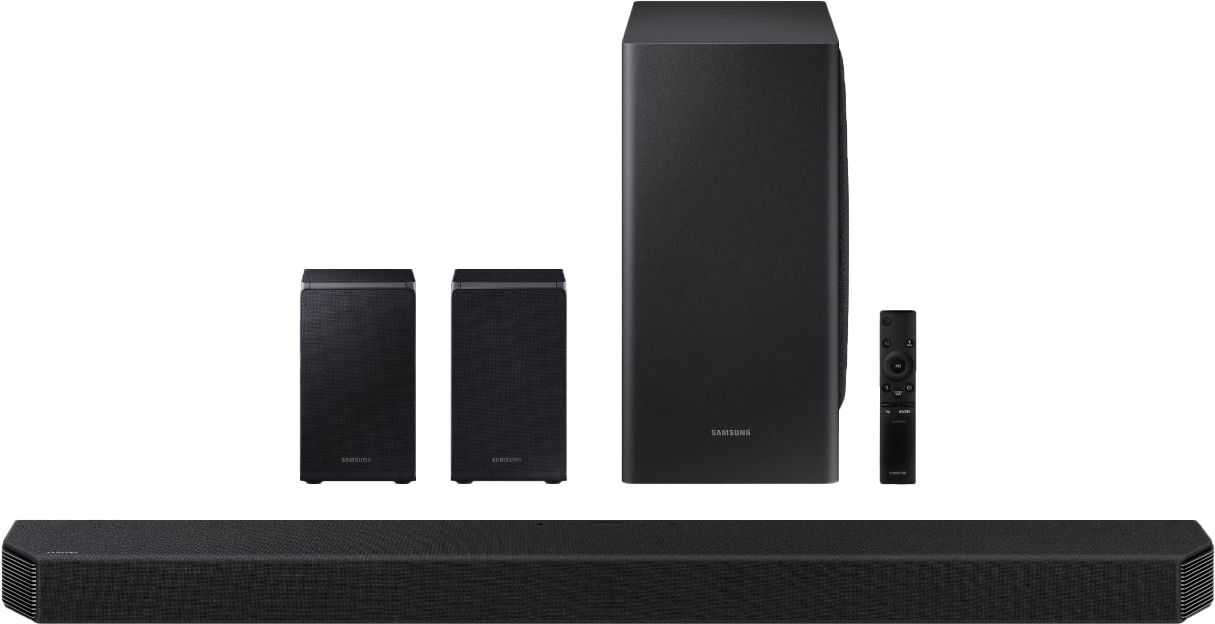
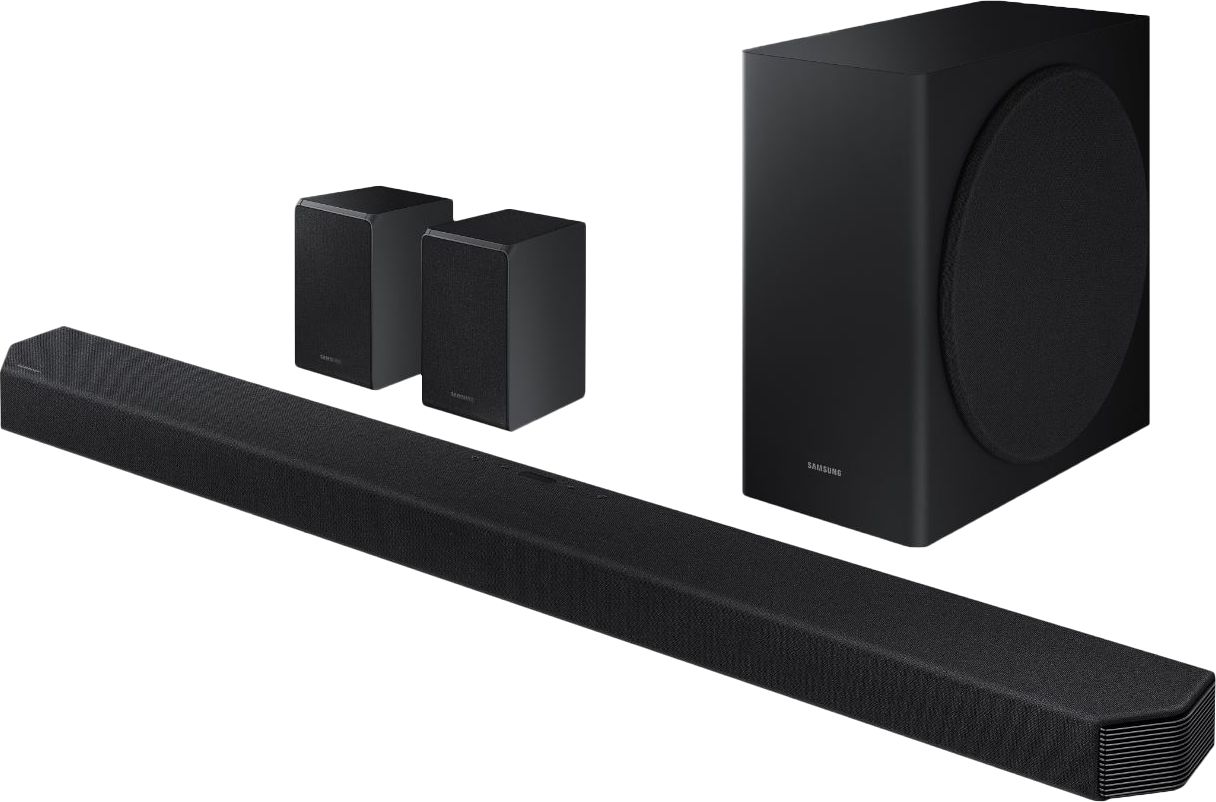
|Posted .This reviewer received promo considerations or sweepstakes entry for writing a review.On paper, the Samsung Soundbar Q950T is a really nice piece of kit. In reality, it has two main shortcomings. There is a distinct, and concerning lack of bass from the subwoofer. The system sounds decent when cranked up, when you get the speakers working, you hear the bass kick in, but even then it isn’t anywhere near as defined and sonorous as I expected it to be, especially in this price range. The display is in totally the wrong place. It makes absolutely no sense at all to be on top of the soundbar. When sat enjoying your soundbar, you cannot see the display at all. Even the viewing angle is sharp, so you have to be pretty much on top of it to view it. A self-dimming, larger front display would have been a much better option on device. Out of the box, you get the main sound bar, the subwoofer, two rear wireless speakers, an HDMI cable and 4 power cables. (The rear speakers have power cables to them, but the audio signal is wireless). Set up was simple, all speakers paired up straight away with the soundbar and I was able to connect via Bluetooth to my phone very easily. I chose to purchase additional wall mount brackets for the rear speakers and attached them to the wall, near power outlets in my son’s playroom. They are relatively unobtrusive as far as rear surround speakers go. They have front firing and Atmos top firing speakers built into them. Being an immersive Dolby Atmos 9.1.4 system, it definitely throws the sound around the room and is one of the better soundbars I’ve tested at moving the sound around the room. The .4 in the name is for the 4 Dolby Atmos speakers, 2 of which are on top of the rear speakers and 2 are on the top of the sound bar. The soundbar throws the sound far and wide very well. The first show I watched was Lost in Space on Netflix. With a 4K passthrough and Dolby Atmos signal, it really looked and sounded great in the room. But as I mentioned above, the bass response is next to nothing at lower volumes, and fairly mild at higher volumes. I even disconnected the sub from the soundbar and re-paired them together and it didn’t make any difference. I power cycled it as well, still with no improvement. The soundbar has 3D Audio Codec Support, offering up an immersive 3D soundscape, using either a Dolby Atmos or DTS:X signal. The sound really does surround you, far better than other soundbars I’ve used. The soundbar is also optimized for the Samsung QLED Q-Symphony TVs which expands the soundscape further. The wireless speakers have performed flawlessly, remained connected consistently, and offer a warm, and present sound, helping engulf you in your audio experience. The soundbar also has ‘Alexa Built-In’, and I thought it was neat to know that when you power down the soundbar, you can say ‘Alexa’ and the soundbar will wake up and respond. It was quick to respond and accurate with the information. Pairing the soundbar to the Samsung Smart Things App was easy, but didn’t really add a lot of benefit. You can adjust the subwoofer input, but moving the slider really didn’t make a lot of difference to me at all. You can adjust the equalizer as well, but again, didn’t make a huge amount of difference at all either. You can check your wifi connectivity/and perform software updates (there are none at this time). I found that you get the full impact of the bass at 100% volume, but at that volume, the center channel and additional sound becomes tinny and overbearing, with the want to keep that bass sound, but tone down the rest of the sound, but you simply can’t do it. In contrast, I have another soundbar at a similar price point in my study and even in it’s lowest volume settings, the bass is present and thumping. So I was really disappointed to find the Samsung really lacking in the bass department. In summary, the Dolby Atmos sound really is impressive from this soundbar, but listening to that amazing sound without a strong and competent bass not to accompany it, you are missing half the experience. Explosions don’t sound like explosions, they sound like an inconvenience. And the display being on top of the soundbar is a complete oversight by the designers. I was really excited to get the soundbar set up, and came away disappointed.
No, I would not recommend this to a friendBrand response from Samsung
Posted .Hi Cupra,
Thank you for purchasing the Samsung HW-Q950T Soundbar and for your review. Thank you for sharing your thoughts on the LED display placement. We appreciate your feedback on the design and will share it with our design teams.
I am very sorry that you are not completely happy with the bass performance. There are two adjustments that can be made to maximize bass from the soundbar and subwoofer:
1) Using the WOOFER button on the remote, you can adjust the volume of the subwoofer between -6 to +6 by toggling the button up or down. To set the subwoofer volume level to 0, press the button in.
2) Adjust the bass control by pressing the SOUND CONTROL button (gear icon) on the remote control, then select BASS to increase the level. You can adjust the volume between -6 to +6 by using the Up/Down buttons.
For precise audio adjustments, you can use the 7-band frequency equalizer to optimize the sound for your room acoustics.
If there is anything we can do to improve your sound such as helping to optimize settings, please let us know. You can reach Samsung Customer Support at:
1) Phone: 1-800-SAMSUNG, (available 8AM to 12AM EST - 7 days a week)
2) LiveChat: https://www.samsung.com/us/support/#contact_us_for_support
3) Facebook Messenger: https://www.facebook.com/samsungsupport
4) Twitter: https://twitter.com/SamsungSupport
5) The Samsung Members Community is also a great resource for getting help from Samsung moderators and customers: https://us.community.samsung.com
If you have not already done so, we invite you to register your new Samsung product at:
https://www.samsung.com/us/account/signin/?redirect=https%3A%2F%2Fwww.samsung.com%2Fus%2Fsupport%2Fregister%2F
Registering your product gives you access to easy warranty support, convenient opt-in to special promos and offers, faster troubleshooting and service, and quick notification of system updates.
~ Samsung Ambassador
I’m Happy
||Posted . Owned for 3 weeks when reviewed.This reviewer received promo considerations or sweepstakes entry for writing a review.The Q90 R had many problems with it. The rear speakers of the Q90R were always losing connections with the sound bar and the sub was always crackling or distorted. The Q950 has resolved all of those previous issues. The Dolby atmos feature that’s built into the Q950 is amazing!!!
I would recommend this to a friend- Pros mentioned:Sound quality
A great soundbar, but leaves some to be desired...
|Posted .This reviewer received promo considerations or sweepstakes entry for writing a review.I love Samsung Soundbars. I've got a Q90R in my gaming room and I love it. When I seen this Q950T soundbar, I knew I had to get it. I wanted to replace the Q90R with this one and move the Q90R into the front room for movies and such. However, that didn't happen and this was due to one specific reason, which I will cover below. First of all, let me say that the packaging for this Q950T soundbar is HUGE! Everything is very well packaged and despite some pretty bad damage to the box by UPS...it was packaged well enough so that nothing inside was damaged or scratched/scuffed, etc. Unboxing was really easy. Included, you get the Soundbar itself, which is humongous, the sub and two rear speakers, along with accessories (remote, batteries, HDMI cable...the usual stuff). The remote has not changed in a while and is exactly the same as my Q90R. While I was awaiting delivery of this Q950T soundbar, I was so excited, I had to go ahead and start looking a details online. Overall, impressions seemed to be good, but there was one glaring issue that others were experiencing and in the end - would put a huge damper on this soundbar...if you're a gamer... This is the lack of LPCM support. This breaks my heart and immediately make me regret getting this soundbar. I was disappointed, before I even got it. I mean, the Q90R, which was the previous years flagship supports LPCM. Why would 2020's not?? Anyway, I decided I still wanted to go into it open-minded because, you know, sometimes the internet tends to blow things out of proportion and make a big deal out of something that isn't too big of a deal. But, I decided to hook it up in the front room instead of my game room where my Q90R is...just to test it and see how the issue was. After I received it, I unboxed it and hooked it up. It was stupid easy to hook up and also has eARC support. So, the soundbar goes to the ARC port of the TV. Normally, other devices can then go into the HDMI ports of the TV and use ARC to send the sound to the soundbar...but since I don't have any HDMI 2.1 devices in that room yet and the TV in there does not support eARC, I just hooked them into the soundbar itself for the best compatibility. I already had the SmartThings app on my phone that I used with my Q90R. So, I went into the app after powering on the new Q950T soundbar to begin setup. I was amazed with how easy the setup was and it automatically updated the firmware. There has not yet been a firmware update since the current one that updated when I setup the soundbar. I tested the soundbar for a solid 4-5 days in order to make my decision. Will I just keep it in this room...or will I move it into my gaming room and put the Q90R in here? After a call to Samsung, it was decided. They confirmed with me via phone that this Q950T soundbar does NOT support LPCM. Now, I did try gaming on the PS4 in the front room and tried several different games on it. Without LPCM support, I did have to keep it on the Surround sound mode to get the best sound out of it and even then, it was kind of spotty, depending on the game being played. Given this, I made the decision to just keep it in the front room, as it was FANTASTIC for movies and music...and just "meh" for gaming. One other thing I wanted to point out about this soundbar. The fabric covering over it does FEEL and LOOK fantastic...but it is a fur and dust magnet. If you have more than one animal, you may want to look for a different soundbar. We have one dog who sheds a metric-TON and a cat. All this fur draws to the soundbar like a magnet and after 3-5 days, it can get pretty unsightly. Luckily, it's easy to clean. Just get a lint roller and go over the top and sides of the soundbar. Good as new. The final thing I want to mention...which is a HUGE design flaw of the soundbar. Some genius at Samsung decided that they would put the display on TOP of the soundbar. Yep...right where you can't see it. Every time I need to adjust the volume, I either have to do so via the SmartThings app or get up, waddle over to the soundbar and change the volume to see the number. This is absolutely horrible! I mean, I get with the type of fabric covering, it would make the display hard to see...but surely there could have been a better solution? In the end, I'm going to give the Samsung Q950T a 3.5 out of 5 stars. Since the review system here will not allow me to give it half stars, it'll get a 3.0 there. This thing is HUGE...so make sure you have the room for it. The actual sound itself from the soundbar is spectacular when watching movies and music, but not for gaming. I never experienced any drop-outs or crackling of the rear speakers. However, the (dumb) lack of LPCM support kills this soundbar for gamers and those that use Apple TV. The fabric makes the soundbar look great, but that's about it - it's attracts so much dust and pet hair, you're forced to lint-roll it 1-2x per week. I purposefully did not dust/lint roll prior to taking pics for this review, just so you can see what it will look like in a real environment. Oh and the fact that the display is on TOP of the soundbar instead of the front is also another major issue I have. If you watch movies or listen to music, this is one of the best soundbars you can get at this time...if you can deal with the fabric and the location of the display. If you're a gamer...skip this completely. Instead, see if you can find the Q90R soundbar, as it sounds miles better for gaming than the Q950T does (and is probably much cheaper now). OR check out their just-announced (from CES 2021) Q950A soundbar. It looks like a beast. It's 11.1.4 channels, has AVA "Active Voice Amplification", along with "spacefit" room calibration - a first for Samsung brand soundbars. I'll be keeping my eye on this one. In the meantime, I'm walking away from the Q950T feeling kinda "meh" about it, while drooling for the future. I mean, yeah, they may add LPCM support in a future firmware update...but don't buy this soundbar with that hope.
No, I would not recommend this to a friendBrand response from Samsung
Posted .Hi Namdnas,
Thank you for purchasing our top of the line Samsung 9.1.4ch HW-Q950T soundbar with Dolby Atmos and DTS:X bringing you 3D true surround sound. Your soundbar system is engineered with 20 speakers immersing you in sound.
Your feedback regarding this model is important to us and will be shared with our internal teams.
Should you have questions or need assistance with settings, setup, or features, please know we are always here to help.
For further assistance, please contact Samsung Customer Support.
1) Phone: 1-800-SAMSUNG, (available 8AM to 12AM EST - 7 days a week)
2) LiveChat: https://www.samsung.com/us/support/#contact_us_for_support
3) Facebook Messenger: https://www.facebook.com/samsungsupport
4) Twitter: https://twitter.com/SamsungSupport
5) The Samsung Members Community is also a great resource for getting help from Samsung moderators and customers: https://us.community.samsung.com
If you have not already done so, we invite you to register your new Samsung product at:
https://www.samsung.com/us/account/signin/?redirect=https%3A%2F%2Fwww.samsung.com%2Fus%2Fsupport%2Fregister%2F
Registering your product gives you access to easy warranty support, convenient opt-in to special promos and offers, faster troubleshooting and service, and quick notification of system updates.
~ Samsung Ambassador
------------------------
Ver 2: (if product has already been returned, do not include registration info as above)
1) Phone: 1-800-SAMSUNG, (available 8AM to 12AM EST - 7 days a week)
2) LiveChat: https://www.samsung.com/us/support/#contact_us_for_support
3) Facebook Messenger: https://www.facebook.com/samsungsupport
4) Twitter: https://twitter.com/SamsungSupport
5) The Samsung Members Community is also a great resource for getting help from Samsung moderators and customers: https://us.community.samsung.com
~ Samsung Ambassador
- Cons mentioned:Price
Great sound but pricey for a sound bar...
|Posted .This reviewer received promo considerations or sweepstakes entry for writing a review.This sound bar does provide some great quality sound but for this price you could almost assemble an entire Dolby Atmos 9.1 speaker setup with an actual amplifier. If you are looking for a simple solution in a tight space then this sound bar is a nice option but is definitely on the higher side at this price. The sound is excellent with voices and sounds coming through crisp and clear with some good throaty bass from the wireless sub. I haven't noticed any sort of delays from TV, Movies, or Games that I have been enjoying. I have it connected to my TCL 4K tv via a 4K HDMI on the ARC input. No issues with setup, I actually got this so that I could mount underneath my TV in my home office/mancave which is tight on space. It came with a mounting template and all the necessary hardware which made mounting it very easy and something that I was impressed with. The rear wireless Bluetooth speakers are a nice addition over some of the other sound bars and were able to be mounted on my existing speaker stands without any issues. Synching them with the sound bar was seamless and very easy. The subwoofer also connected easily and after about a month of use I haven't experienced any issues with connectivity or the sub or rear speakers disconnecting. Overall I am happy with the sound quality from this system but at this price point it is tough to pick one up at full price. If you can catch it on sale and have a tight space but want Dolby Atmos sound this sound bar should definitely be a contender for you.
I would recommend this to a friend - Pros mentioned:Sound quality
Epic Dolby Atmos Soundbar
|Posted .This reviewer received promo considerations or sweepstakes entry for writing a review.It has pretty much everything I could ask for. Outside of a few questionable design choices this is the best soundbar I’ve ever used. It sounds great, supports every major surround sound format, and is easy to use. I would have liked to have seen an on-screen menu for settings and/or a better LED display, but overall it’s hard to say too many bad things about this. Getting everything setup was pretty straightforward, though the individual components of this system are quite a bit larger than other soundbar systems I’ve used in the past. Not a knock against it necessarily, but something to be aware of and make room for. I do think the overall size of this system suits it better to TVs that are 65” or larger. I connected to my TV via the HDMI out. The HDMI supports both ARC and eARC for lossless audio, but also has 2 additional HDMI inputs, which was handy for me since my TV doesn’t support eARC and I wanted to make sure my Xbox was passing the highest quality audio through for movies. With HDMI CEC the TV will automatically adjust volume and power the soundbar on and off. To my surprise my TV actually shows a separate input for my Xbox connected through soundbar, so even though it’s not directly connected to my TV I can switch to it just like it is (I’m using this with a 2019 Vizio TV, so your results on this may vary). There isn’t too much to setup on the soundbar, but I do wish there was an onscreen interface for better granular control because the LED display on the soundbar is tiny and also in the worst possible place. In general it’s not an issue if everything is all dialed in, but it’s still frustrating not being able to see it from the couch. There are some dot LEDs on the front hidden behind the fabric that will give you a basic indication of when volume is changing or the soundbar powers up or down, but I don’t think it would have killed the aesthetics of the thing to move the LED display to the front. The sound quality has been excellent for all of the content I’ve listened to, especially Dolby Atmos tracks. The height channels work by bouncing sound off of your ceiling back down to you and the effectiveness is very much dependent on your room, but for my 8ft ceilings it works very well. There are 4 sound modes to choose from, 3 of which upmix all content up to 9.4.1. I chose to stick with the standard mode, which outputs all audio in its original format. For both gaming and movies/TV shows the sound really fills the room. To my ear it’s full and each channel has good separation from the others. My previous soundbar also had Dolby Atmos support, but it was virtualized through the front channels; it was good, but this experience is so much better. The wireless connection between the subwoofer and satellites also has been stable and I have noticed any dropped connections or anomalies. Overall I’m really happy with the Q950T and it adds a lot to my home theater experience. I’m not currently utilizing the built-in Alexa support, but since they’re integrating the microphone array it’d be cool to see some kind of room correction feature in the future.
I would recommend this to a friend - Pros mentioned:Sound quality
A Thrilling and Captivating Experience
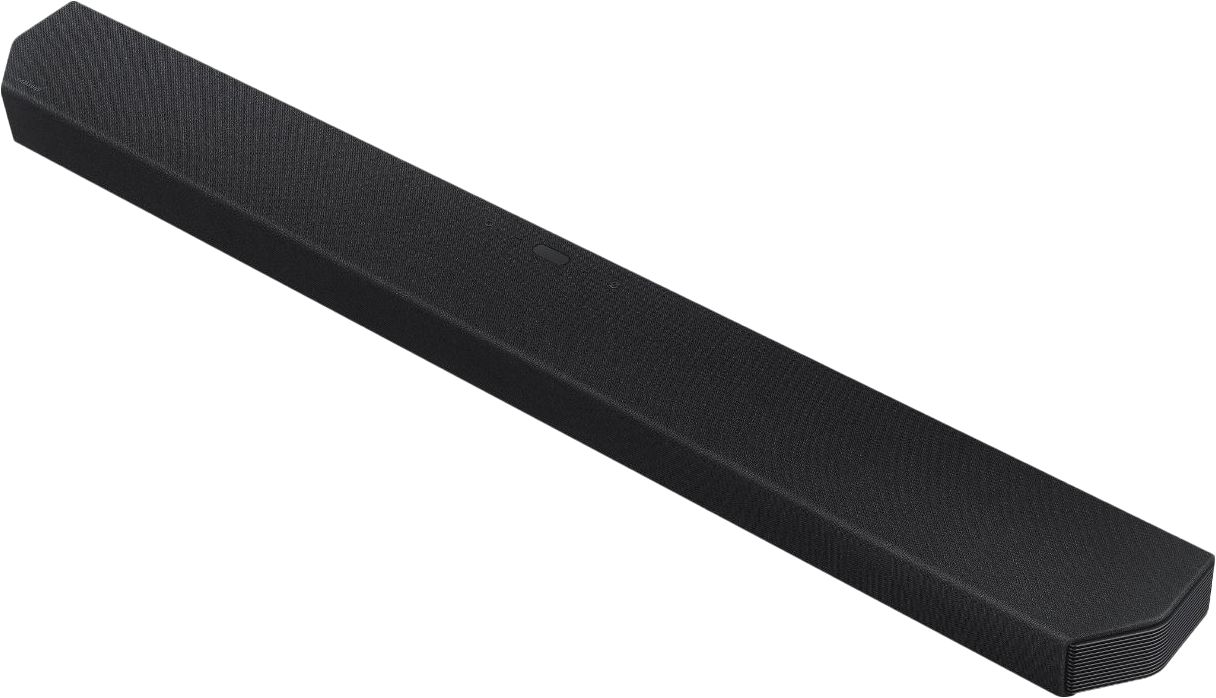
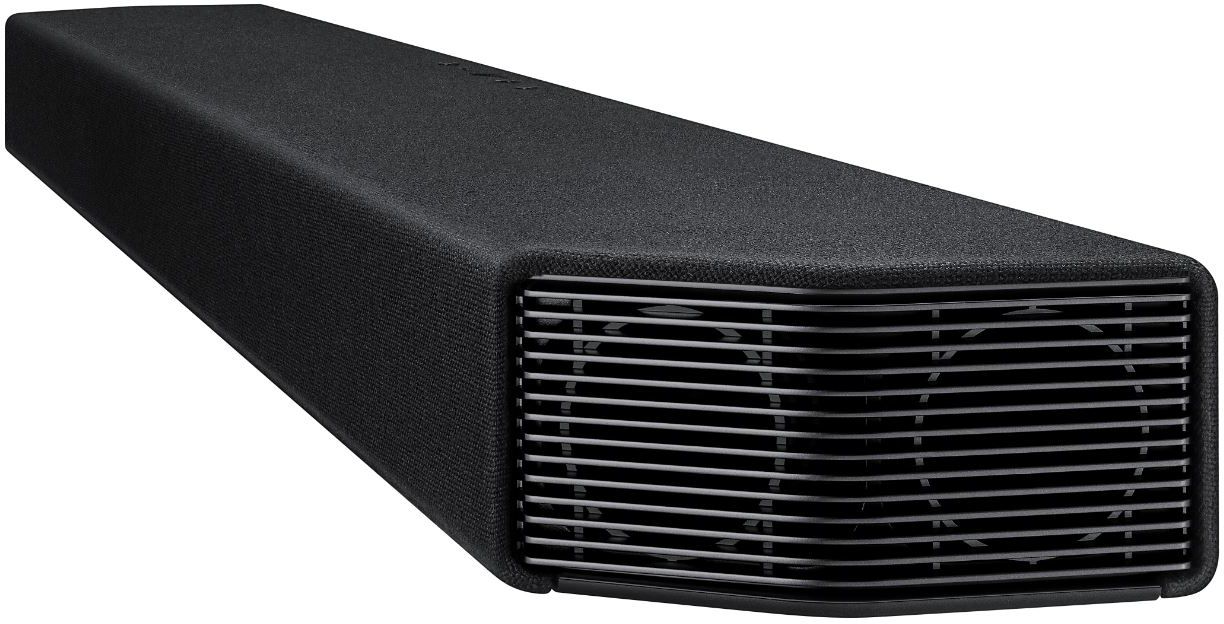
|Posted .This reviewer received promo considerations or sweepstakes entry for writing a review.---- Summary ---- Verdict: Samsung’s HW-Q950T soundbar delivers exceptional power while maintaining a compact form. Its ability to provide incredibly captivating sound is remarkable, especially when playing Dolby Atmos and DTS:X content. At its price, the big question is, is it worth it? My answer is yes. Its easy setup, elegant design, thrilling sound performance, and features have exceeded my expectations. Putting it to the test was such a joy. Pros: - Sleek and elegant design - Excellent build quality - Dolby Atmos & DTS:X support - Incredibly powerful and immersive sound - Amazon Alexa built-in Cons: - Display isn’t visible when seated ---- Review ---- Setup: Setting up the HW-Q950T was simple. Although the setup process for a soundbar is intuitive since it requires plugging in each component, I made sure to follow the instructions and I’d advise you do the same. This is because the order in which you plug each component into an outlet matters. First, you need to plug in the subwoofer, then the surround speakers, and finally the soundbar. Additionally, it matters which side of the room you place the surround speakers on. They’re labeled left and right on the back, which can be easy to overlook. After following the few easy steps as instructed in the manual, all components of the system (soundbar, subwoofer, and surround speakers) were automatically linked. No pairing process was required, aside from pairing my phone for Bluetooth playback. If for some reason all components don’t link automatically, the instruction manual tells you how to do it manually. The only hiccup I had during the setup process wasn’t related to the HW-Q950T but rather my TV. I correctly connected the soundbar to my TV via HDMI ARC (Audio Return Channel) and was not hearing any sound, then found out that my TV had HDMI ARC disabled. I thought this was worth mentioning in case you experience the same thing and have to enable HDMI ARC on your TV. The other connections available include two HDMI inputs and an optical digital input (which you’ll need to use if your TV doesn’t support ARC). I always appreciate a straightforward and pain-free setup process and based on my experience setting up the HW-Q950T, Samsung provided that. Design: The HW-Q950T is a hefty system due to the whopping 20 speakers packed into it and true 9.1.4-channel sound, which translates to 9 channels, 1 subwoofer channel, and 4 up-firing channels. The soundbar alone weighs over 15 pounds, but it’s heavier than it looks. At just 2.7 inches high, the soundbar is sleek, so it shouldn’t block your TV, but you might want to measure just to make sure. I have the soundbar sitting on the ledge of my fireplace mantle, but it can be mounted to the wall with the included brackets. It’s almost entirely covered in a very nice Kvadrat fabric that evokes elegance, and the front edges where the side-firing speakers reside are angled with a grille pattern which adds to the aesthetic. The subwoofer and surround speakers also have angled edges and Kvadrat fabric components that match the soundbar. I do wonder if this fabric will be prone to dust/fuzz collection over time, but it’s too early for me to tell. Aesthetically, I’m a fan of the HW-Q950T and wouldn’t change a thing, but I question the choice to put the display on top of the soundbar. If you’re seated, there’s no way to see the display that provides helpful information like input source or audio format. The front of the soundbar has lights to indicate power and volume, so I just wish the other display functions were on the front as well. There are physical buttons on top of the soundbar that control input, power, volume, manual Alexa summoning, and mic on/off if you’d prefer to turn off Alexa voice assistant. The included remote can do everything the controls on the soundbar can do, except disabling the mic, but there are additional controls on the remote like Bluetooth pairing, play/pause, sound settings, mute, and subwoofer level. The SmartThings mobile app can also be used to adjust the volume, sound mode, bass/treble, and subwoofer level. Overall, I like that the HW-Q950T is reassuringly heavy due to the power that’s packed into its slender design, and the Kvadrat fabric is a nice touch. It’s an excellent design that can complement any room it’s in. The one con I found with the design is the unhelpful display placement. Though it’s just a minor inconvenience, for a soundbar at this high price point, I’m being highly critical in my review. Sound: Despite my very high expectations for this premium soundbar, it still managed to surpass them. The sound produced by HW-Q950T is stunning, especially when playing Dolby Atmos or DTS:X content. Dialogue is clear, intricate sounds like the pitter-patter of raindrops or other background noise are audible when they otherwise wouldn’t be, and bass-heavy sounds like explosions in an action movie rumble my house. I’m blown away by the sound immersion. The HW-Q950T has this amazing ability to blur perception and reality. It’s a movie theater-like experience in the comfort of your home. The volume level can get extremely high (beyond what I can bear) without distortion too. Whether I’m watching TV, a movie, playing a video game, or listening to music, the variety of sounds work harmoniously to deliver a thrilling experience that has brought a smile to my face on multiple occasions. The HW-Q950T has given new life to shows, movies, games, or music I’ve played in the past because I’ve never heard them like this before. The sound produced by this soundbar is simply spectacular. Features: The HW-Q950T has a host of features like Samsung’s “Q-Symphony”, Tap Sound, Adaptive Sound, Game Pro Mode, Amazon Alexa built-in, Wi-Fi support that enables music streaming, Bluetooth, and last but certainly not least, Dolby Atmos and DTS:X support. If the content you’re playing supports it, Dolby Atmos and DTS:X technologies can provide lifelike 3D sound. Since I already raved about how great the sound is, I’ll leave it at that. What I couldn’t test is Q-Symphony, which synchronizes the speakers of a Samsung QLED TV (which I don’t own) with the soundbar for an even more immersive experience. Tap Sound is a feature that seamlessly transfers music playback from a Samsung device (with Android 8.1 or later) to the soundbar. After enabling this feature in the SmartThings app, all you have to do to switch music playback from your phone to the soundbar is tap the two together. Easy as that. Adaptive Sound and Game Pro Mode are each designed to optimize the sound of content. As in the name, Game Pro Mode aims to boost your gaming experience by providing greater immersion, whereas Adaptive Sound automatically refines sound based on the content, which I’ve noticed can be especially helpful with boosting vocal clarity. The increased vocal clarity with Adaptive Sound on is a noticeable difference but in Game Pro Mode, I struggled to notice any significant differences. Regardless, even on the standard sound mode, games sound much better than I’ve ever heard before. After completing Wi-Fi and Amazon Alexa setup in the SmartThings app, Alexa can be summoned with your voice. Along with the normal functions you’d expect out of Alexa, the soundbar’s volume can be controlled with your voice too. The SmartThings app and Alexa enable music streaming from services like Spotify, Apple Music, Amazon Music, and more. I use Spotify, and it worked great. Audio can be played from a Bluetooth connected device as well.
I would recommend this to a friend - Pros mentioned:Sound qualityCons mentioned:Display location
Samsung HW-Q950T - Over-promises and Under-deliver
||Posted . Owned for 1 week when reviewed.This reviewer received promo considerations or sweepstakes entry for writing a review.I bought the Samsung HW-Q950T from Bestbuy and I’ve had the Soundbar for more than a week now. I have mixed feelings about this soundbar. The two Soundbars I’ve had are Samsung HW-Q90R and Nakamichi Shockwave Elite 7.2.4 - so I will compare Q950T with these soundbars. Also, I did not test eARC or Q-Symphony (as my Samsung Q900R is not compatible with either of them). Pros: - I did not have any issues unboxing the soundbar and setting it up. While some folks have reported connection issues with the Subwoofer and Rear speakers, I have not faced any issues so far! - The Atmos effects are indeed good! I do not see much difference between Q90R (7.1) and Q950T (9.1) here, but the Q950T is significantly better than my Nakamichi 7.2.4 system (which does not have up-firing drivers). The Atmos Bubble is amazing and created the 3D surround sound effect dang well! - The Bass is spectacular! It seems on par with Q90R and way better than the Nakamichi (which has two Subwoofers). Cons: - The first frustrating aspect I encountered was the LED display. Who puts the display on top of the soundbar? You basically can see the display only when you are hovering over it! Whoever at Samsung thought this was a good idea needs to be made the VP of Innovation (sarcasm alert). - The weird thing about the display is that sometimes I see it showing actual digits when increasing or decreasing the volume - other times it shows just + or - (and not actual digits). - The display only shows Dolby Atmos or DTS:X (when such content is played) - but no other audio formats. My Nakamichi, for example, shows the format of any audio currently being played (Dolby D+, PCM, LPCM 5.1, DTX HD, etc.) - The quality of the dialog/voice is terrible! Q90R seemed way better here. Bumping up the Central channel to +5 seems to help, but not completely. I was watching Project Power on Netflix and I could barely hear the dialog. The same movie was better on my Nakamichi. Especially for Atmos content, the dialog is inaudible and the effects drown the voice. If you increase the volume to be able to hear the dialog, then the effects get too overwhelming. - There are four sound modes - Standard, Surround, Adaptive, and Gamer - and I can’t say that I love any of these modes yet. Initially, I tried Adaptive the most, as this is the most advertised by Samsung (did I read it is AI-enabled?) - but I cannot frankly tell if it is indeed as “high-tech” and AI-fueled as Samsung claims. Adaptive has better dialog, but rear speakers seem quieter, while Surround gives me better rear speaker performance, at the cost of dialog. - Recently, I found out from users on AV forums who tested the Soundbar that it does not handle LPCM at all! It seems to simply downscale LPCM 5.1/7.1 to PCM! This practically makes the soundbar useless to Apple TV users like me! I am surprised that Samsung decided to push this bar out to the market with such a serious limitation! - The SmartThings app is as basic as it gets, and unless its capabilities get a major overhaul, there is not much you can do with it to configure the Soundbar. I am hearing that a firmware update will become available “soon” - and I plan to use the app then. Other than that, the app is practically useless. - There is no option for room calibration which LG soundbars offer (their flagship model costs $200 less and offers this feature). - The user manual is not very helpful. It misses basic stuff like - how to factory reset the bar, what on freaking earth does “Virtual” setting do, etc. Overall, for a price of nearly $2K, the soundbar almost feels like a white elephant in my living room, that over-promises and under-delivers. Unless a firmware update with fixes comes soon, I am on the verge of returning this Soundbar.
No, I would not recommend this to a friendBrand response from Samsung
Posted .InTheBay:
Thank you for purchasing our top of the line Samsung 9.1.4ch HW-Q950T soundbar with Dolby Atmos and DTS:X bringing you 3D true surround sound. Your soundbar system is engineered with 20 speakers immersing you in sound.
We appreciate your review of this soundbar system and your feedback regarding the various design features and sound quality is very much appreciated and will be shared with our teams.
With regards to the display you are seeing when changing volume, it depends on which remote you are using. If using the Soundbar remote, the numbers appear. If using the TV remote, the TV is controlling the volume, so + / – appear.
To factory reset your soundbar, with the soundbar on, press the volume buttons (+) and (-) on the soundbar body at the same time for at least 5 seconds. "INIT" appears on the display once it has reset.
Your soundbar's Virtual feature us used to simulate surround when the input source is not surround.
Should you ever have any further questions or concerns or need help with settings or features, please contact Samsung Customer Support.
1) Phone: 1-800-SAMSUNG, (available 8AM to 12AM EST - 7 days a week)
2) LiveChat: https://www.samsung.com/us/support/#contact_us_for_support
3) Facebook Messenger: https://www.facebook.com/samsungsupport
4) Twitter: https://twitter.com/SamsungSupport
5) The Samsung Members Community is also a great resource for getting help from Samsung moderators and customers: https://us.community.samsung.com
If you have not already done so, we invite you to register your new Samsung product at:
https://www.samsung.com/us/account/signin/?redirect=https%3A%2F%2Fwww.samsung.com%2Fus%2Fsupport%2Fregister%2F&user=dsr-registration
Registering your product gives you access to easy warranty support, convenient opt-in to special promos and offers, faster troubleshooting and service, and quick notification of system updates.
~ Samsung Solutions
- Pros mentioned:Sound qualityCons mentioned:Price
Great sound, typical awful UI from Samsung
||Posted . Owned for 2 months when reviewed.This reviewer received promo considerations or sweepstakes entry for writing a review.Not certain why Samsung can’t get their UI to be any good with seemingly any of their products. I am judging this from my terrible experience with a Samsung Galaxy phone, my Samsung Q70, and now this sound bar. One would assume that this sound bar would pair perfectly with a TV of the same manufacturer, and for the most part it does, but there are some instances where it will glitch out and either won’t keep settings it had previously, or increasing volume will do strange things with the sound cutting out. I mainly blame the Samsung Q70 TV with its completely terrible operating system, but the trickle down affect makes for a worse experience with this sound bar than should be expected, especially at this price point. Sound wise this unit is fantastic. I am no audiophile, but do have a bit of a picky ear. And in that regard, this speaker system doesn’t disappoint. The setup was also pretty simple with the rear speakers and sub pairing quickly. I have yet to experience any cutting out (knock on wood). The display facing the ceiling is a bit dumb, but it’s not too much of an inconvenience and overall this is a great speaker system, albeit on the pricey side.
I would recommend this to a friend - Pros mentioned:Sound quality
Best Sound Bar I have found
||Posted . Owned for less than 1 week when reviewed.This reviewer received promo considerations or sweepstakes entry for writing a review.Just received this yesterday and couldn't wait to write the review. First off let me thank the Samsung rep who happened to be at the store when I went to listen. Initially my impressions of the Samsung demo units on display was bad, they sounded terrible in multiple stores. I asked the rep what the best sound bar they had was and he said Samsung of course, since he was the rep. I told him they sounded terrible and I hit the demo button on one of the display models, he said hold on and checked some cables and made some setting changes and it was a night and day difference. He said the demo models don't always stay set up the way they are supposed to. Needless to say after this visit I purchased the Samsung. Here is some history on my journey looking for a sound bar. Started out with separate speakers and a receiver for a 5.1 system, decided to simplify and reduce clutter in my living room. Had a Sony 1070 receiver, B&W left, center and right speakers, an SVS Sub and SVS rear speakers. It sounded great but I wanted ATMOS and to eliminate wiring and clutter. So the search began. I initially tried a Sonos Arc, Gen 3 sub and One SL surrounds, I returned it as I found the sound to be overly bright. If you listen to the demo in the stores for Sonos it grabs your attention because it is so detailed but be aware and ask yourself, will this sound wear on you over time. To me it caused listening fatigue because it was so over the top in terms of slap you in the face kind of sound. The demo is meant to grab your attention and it does, but I found it to become irritating over time. Also I found the lack of HDMI inputs a big negative and that you use the ARC on your TV to feed sound to the Sonos. If you don't have an eARC TV you will not get ATMOS from a few sources, like XBOX One and I found my Apple TV did not deliver ATMOS, even though I thought it was supposed to.(Could be me not configuring it correctly) So the Sonos system got returned. Next up was the Sony HT-ST5000, this unit sounded really good but the lack of rear speaker support made it get returned as too much sound was missing for a full surround effect. Next up was the JBL Bar 9.1, when I first hooked this up I was thinking I found the best soundbar out there for the money. I started my tests using ATMOS and Dolby Digital Surround and it sounded amazing and really sounded smooth, dialog was great and bass was great as well. Where this sound bar takes a hit is with basic sound, like Youtube TV which outputs 2.0 stereo. With the system set up for ATMOS content when you switch to Youtube TV it sounds like you are in an echo chamber as the rear speakers carry alot of the dialog in them causing this to sound like the main voices were behind you. You can eliminate this by turning off the rear speakers or re-attach the speakers to the main sound bar but this is inconvenient and the wife factor of having to move or change settings based on content was a no go. You can also disable Smart Mode which simulates surround but as soon as you turn off the soundbar it gets re-enabled, so this got returned. So this is how I got to the Samsung HW-Q950T, upon set up the clarity and smoothness of the system was amazing. It blew everything I had ever tried out of the water. It does not accentuate any particular part of the sound spectrum, it just does what it is supposed to and that is reproduce sound tremendously. The feeling of being in a theater is there with this bar, the voices from the Avengers movies have the theater feel to it, Tony Starks monologue during one of the trailers gave me chills it sounded so good. The bass gets your attention when it needs to but doesn't rumble when it shouldn't. Youtube TV dialog from shows sounds clear and distinct even output as 2.0 stereo. I am sold on this unit and I will be keeping this one. I was hesitant to buy this based off the bad user reviews but if you check most reputable review sites no one disputes the sound quality of this unit, the biggest knock is connectivity issues to the sub and surrounds, so far I have not noticed this but I did do a firmware update immediately and this may be why I have not noticed it. I am not trying to knock any of the soundbars here, as I am sure some of you will love the other soundbars but for me this seems like the best fit
I would recommend this to a friend - Pros mentioned:Sound qualityCons mentioned:Price
Great soundbar to combine with Q Symphony
||Posted . Owned for 3 weeks when reviewed.This reviewer received promo considerations or sweepstakes entry for writing a review.We purchased this soundbar to go along with a 75" Q90T television and it sounds great! It's a bit expensive, but worth the money. The soundbar alone is awesome, but using the Q Symphony function, which combines the tv speakers with the soundbar makes it that much better. It easily pairs with the television and also your smartphone to play your favorite tunes. You'll need to tweak the volumes of the center, side, and rear speakers just a little depending on your room to pull the voices to the right volume, but after that you'll have a great viewing and listening experience. Some reviews state that the sub could be a little louder, but I think it works well. There is one item: For some reason Samsung put the display on top of the bar, which means that you'll need to be standing over top of it to make your sound adjustments. I don't know what they were thinking with that design.
I would recommend this to a friend - Pros mentioned:Sound qualityCons mentioned:Subwoofer
Great performance - but lacking needed bass.
||Posted .This reviewer received promo considerations or sweepstakes entry for writing a review.I give this 3 stars because the surround sound and atmos is superb - the bass not so much. I have tried multiple attempts reconnecting and hard resetting to see if the subwoofer would ever BOOM but it feels like it is stuck at one level no matter how high i go. This is my SECOND 950t because i thought i had a faulty one. The first subwoofer just wasnt hitting the low notes very well. I heard them such as in Aquaman, but nothing ever chest pounding like my previous Samsung Q80r. Sometimes it would sound like nothing is there. My q80r could never go past -3 for the subwoofer because it would be too much for the apartment. For this 950t i beg to get that same feeling at +6 (max). I thought hmm maybe it is faulty? I returned and got another one. Well guess what, the same exact thing. Its really strange because i can hear the bass but increasing it does absolutely nothing. This unit has also had volume problems where i cant lower the subwoofer all of a sudden, and when i lower the main bar’s volume down only the bar level goes down and not the rears. All in all, idk how these customer have had no issues when ive had two units in a row giving the same issue for the sub - the second unit even causing more problems such as the random volume issue. Do not buy if you are looking for a movie theater experience with moving bass. I promise you, you will regret it.
No, I would not recommend this to a friendBrand response from Samsung
Posted .Hi Helping,
I am very sorry that you are experiencing subwoofer volume issues with your Samsung HW-Q950T soundbar. Please make sure you are running the latest firmware update. Updating the firmware on your soundbar gives you all the benefits of the latest improvements. You can update your firmware ver. 1017.5 by Auto Update or by using a USB device. You can find the update on the product page of your HW-Q950T on the Samsung website.
If you need additional help, please reach out to Samsung Customer Support directly so that we can better understand your issue and provide you with troubleshooting.
For further assistance, please contact Samsung Customer Support.
1) Phone: 1-800-SAMSUNG, (available 8AM to 12AM EST - 7 days a week)
2) LiveChat: https://www.samsung.com/us/support/#contact_us_for_support
3) Facebook Messenger: https://www.facebook.com/samsungsupport
4) Twitter: https://twitter.com/SamsungSupport
5) The Samsung Members Community is also a great resource for getting help from Samsung moderators and customers: https://us.community.samsung.com
If you have not already done so, we invite you to register your new Samsung product at:
https://www.samsung.com/us/account/signin/?redirect=https%3A%2F%2Fwww.samsung.com%2Fus%2Fsupport%2Fregister%2F
Registering your product gives you access to easy warranty support, convenient opt-in to special promos and offers, faster troubleshooting and service, and quick notification of system updates.
~ Samsung Ambassador
- Pros mentioned:Easy setup, Sound quality
Definitely Worth The Money
||Posted . Owned for 2 weeks when reviewed.This reviewer received promo considerations or sweepstakes entry for writing a review.This system as a absolute beast. Setup was a breeze. I followed directions and watched video to make sure I knew exactly how to set things up to avoid any issues. I was up and running in no time. Make sure you follow the instructions to make your speakers connect properly. I've tried a few times to turn the volume all the way up and failed. This system loves to be played loud. Make sure you setup the EQ and speaker volumes to your liking.
I would recommend this to a friend - Pros mentioned:Sound qualityCons mentioned:Display location
Samsung 9.1.4 soundbar
||Posted . Owned for 3 months when reviewed.This reviewer received promo considerations or sweepstakes entry for writing a review.Good sound bar with quality sound. Lack of built-in calibration makes balancing sound between sound bar and satellite speakers challenging. The top operating display is major inconvenience and requires standing at sound bar to see what features are being activated (display should be front facing to allow viewing while sitting). Price was very good but not great.
I would recommend this to a friend - Pros mentioned:Sound qualityCons mentioned:Display location, Price
9.1.4 sound
||Posted . Owned for 1 month when reviewed.This reviewer received promo considerations or sweepstakes entry for writing a review.Love the sound all speakers work fine rear speakers could be a little louder i hooked to (arc) on Samsung TV. I think the soundbar info display should be on the front it is a little more work when you change inputs to see without getting up and walking over to set. I did get on sale price full price was too high.
I would recommend this to a friend - Pros mentioned:Sound qualityCons mentioned:Price
Great system if you have the money
||Posted . Owned for 2 months when reviewed.This reviewer received promo considerations or sweepstakes entry for writing a review.This system has the best power and volume you can get. The sound is incredible. Crisp clear and punchy. Yes it is expensive, but if you have the money, it is well worth it. I would not suggest this unit for a small area, as it will rattle windows. Net type cover will get dusty so be ready to clean it.
I would recommend this to a friend - Pros mentioned:Sound qualityCons mentioned:Defective product
Great Soundbar when it worked.
||Posted .This reviewer received promo considerations or sweepstakes entry for writing a review.Purchased Jan 1, 2020. Really amazing sound, impressive dolby atmos emersion for 3 months March 15, 2020, then out of the blue, while watching TV, the LED display on the Q90R cycled the update firmware process. Called Samsung and walked through update procedure w/o success. They told me to send it to Geek Squad. Praise the LORD I paid for the 4 year extended warranty. Due to Corona I was unable to send it into Geek Squad until much later. When I was able to finally send it in, I was told after replacement of board, firmware and subwoofer, they were still unable to get it running. So I was entitled to Full Replacement. Went to Best Buy to arrange it 08/15/2020. Waiting for my replacement of the new Flagship Soundbar Q950T as the Q90R were Sold Out at Best Buy at the time. Here's hoping things work out for the better. Like I said, it was great while it worked.
I would recommend this to a friendBrand response from Samsung
Posted .Randy:
I am very sorry for the issue you experienced with your Samsung HW-Q90R Soundbar. When you are able to test out your new HW-Q950T, please update your review with your feedback. We would love to hear how it works out for you.
Should you ever have any questions or concerns or need help with settings or features, please contact Samsung Customer Support.
1) Phone: 1-800-SAMSUNG, (available 8AM to 12AM EST - 7 days a week)
2) LiveChat: https://www.samsung.com/us/support/#contact_us_for_support
3) Facebook Messenger: https://www.facebook.com/samsungsupport
4) Twitter: https://twitter.com/SamsungSupport
5) The Samsung Members Community is also a great resource for getting help from Samsung moderators and customers: https://us.community.samsung.com
If you have not already done so, we invite you to register your new Samsung product at:
https://www.samsung.com/us/account/signin/?redirect=https%3A%2F%2Fwww.samsung.com%2Fus%2Fsupport%2Fregister%2F&user=dsr-registration
Registering your product gives you access to easy warranty support, convenient opt-in to special promos and offers, faster troubleshooting and service, and quick notification of system updates.
~ Samsung Solutions