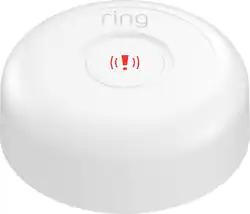
Ring - Panic Button (1st Gen) - White
- General
- Brand: Ring
- Model Number: 4AP1S9-0EN0
- Product Name: Panic Button (1st Gen)
- Color: White
- Warranty
- Warranty - Parts: 1 year
- Warranty - Labor: 1 year
- Other
- Product Width: 3.01 inches (The out of box width of the item. Width is measured as the horizontal distance from one side of the item to the other as it would be primarily used or placed.)
- Product Height: 1.01 inches (The out of box height of the item. Height is measured as the vertical distance from the bottom of the item to the top as it would be primarily used or placed.)
- Product Length: 3.01 inches (The out of box length of the item. Length is measured as the longest dimension of the item.)
- Product Weight: 0.5 ounces (The out of box weight of the item.)
- Material: Plastic
- Quantity: 1
- UPC: 842861105414
Get help whenever you have an emergency at home with Ring Alarm Panic Button. Simply press and hold the Panic Button for three seconds to sound the siren on your Ring Alarm Security Kit. If you have a subscription to a Ring Protect Plan, sold separately, with 24/7 professional monitoring, the Panic Button will also contact our monitoring team to request emergency services as soon as you need it. The Panic Button can be placed on any flat surface and moved around for portable protection, or it can be mounted on a wall for a more permanent solution. It also comes with a 3V lithium battery and free installation kit to help you set everything up in minutes.
Whats Included
- Mounting bracket, screws, double-sided tape
- Owner's manual
- Ring Panic Button (1st Gen)
- Mounting bracket, screws, double-sided tape
- Owner's manual
- Ring Panic Button (1st Gen)
Q: can i activate alarm panic from my phone
A: no only when you are at home, in your house , in person
Q: Wil this work with a 2nd gen alarm system?
A: I have the latest Ring system and it works. its capable with all the ring system .
A: Hi Scaredycat, The Ring Alarm Panic Button is a compact, wall-mountable button which, when held for three seconds or more, will send a message to the Ring Alarm Base Station that help is needed. After receiving the signal from the Panic Button, the Ring Alarm Base Station will sound Ring Alarm's sirens and, if you subscribed to professional monitoring, will alert the monitoring center to ensure emergency response is dispatched to your home. A base station and professional monitoring are required to operate your Panic Button properly. We would love to get you connected with a sale representative who may go over your home environment with you, and ensure you are getting all the protection and service you are seeking from Ring. Our priority is ensuring you to have a ring of security you can rely on, and to keep you connected to activity around your home. Please reach out to our Ring Community page, here: https://community.ring.com/, for additional tips and support! Regards, Caitlin with Ring
Q: What specific type of battery does this use? CR123?
A: Hello HawaiiResident, Yes, good question! The Ring Panic Button uses one CR123A cell battery. Here are step-by-step instructions for replacing the battery when it needs to be: https://support.ring.com/hc/en-us/articles/360022343071-Replacing-the-Battery-in-your-Ring-Panic-Button. For further questions or support, please visit: https://community.ring.com/. Thank you, Alexis from Ring