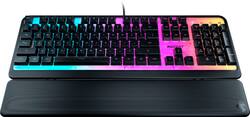
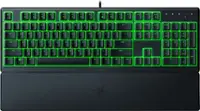
ROCCAT - Magma Full-size Wired Silent Membrane Gaming Keyboard with 5 Zone/ 10 LED AIMO RGB Top Plate and Detachable Palm Rest - Black
- Key Specs
- Lighting Type: RGB
- Form Factor: Full-size (The size, arrangement, and physical configuration of the product.)
- Keyboard Technology: Membrane (Type of technology that detects a key press.)
- Connection Type: Wired
- General
- Product Name: Magma Full-size Wired Silent Membrane Gaming Keyboard with 5 Zone/ 10 LED AIMO RGB Top Plate and Detachable Palm Rest
- Brand: ROCCAT
- Model Number: ROC-12-582
- Color: Black
- Features
- Lighting Type: RGB
- Customizable Lighting: true
- Numeric Keypad: true
- Touchpad: false
- Keyboard Type: Gaming
- Palm Rest: true
- Spill Resistant: false (Designed to resist some degree of accidental liquid spill. The level of spill-resistance is indicated by the product manufacturer, but the degree of protection may not be guaranteed after normal wear of the product.)
- Keyboard Features: Membrane keyboard, Transparent front plate, 5 AIMO light zones with 2 LEDs each, 7 shared media control keys, 26 key roll over, 1.8m USB cable, Gaming Profile, Weight: 870g, Dimensions: 452 x 157 x 39mm
- Foldable: false
- Functions
- Form Factor: Full-size (The size, arrangement, and physical configuration of the product.)
- Keyboard Technology: Membrane (Type of technology that detects a key press.)
- Adjustable Tilt Function: true
- Rollover: Full-key (Refers to the number of keys that can be correctly registered when pressed simultaneously. Rollover may be referred to as n-key rollover (KRO) or anti-ghosting.)
- Multimedia Keys: true
- Internet Keys: false
- Connectivity
- Connection Type: Wired
- Wired Connectivity: USB Type A
- Cable Length: 5.9 feet
- Detachable Cable: false
- Compatibility
- Operating System Compatibility: Windows
- Plug and Play Operation: true
- System Requirements: Windows® 7, 8 and 10 (software support), USB 2.0 (or higher), Internet connection (for driver software) (The software that a product must have for it to be able to integrate with another product.)
- Dimensions
- Product Depth: 7 inches (The out of box depth of the item. Depth is measured as the distance from the front of the item to the back as it would be primarily used or placed.)
- Mouse
- Mouse Included: false
- Other
- UPC: 731855525829
Meet the ROCCAT® Magma Membrane RGB PC Gaming Keyboard with silent rubber dome switches. The Magma is equipped with a semi-transparent top plate which presents a mesmerizing illumination display for its RGB lighting. 10 LEDs split over 5 zones diffuse the illumination effects to make it best showcase to date for ROCCAT’s proprietary lighting engine, AIMO. Customizable through the ROCCAT Swarm driver suit, the lighting is available in 16.8 million distinct colors. Get ready for vivid RGB lighting and next-level PC gaming immersion. The Magma also boasts silent membrane typing thanks to high-quality rubber dome keys. Keystrokes feel both responsive and reliable. Advanced anti-ghosting technology lets you press all the most-used keys simultaneously – all of them registering without fail. The Magma is equipped with a detachable palm rest to suit both relaxed typing and aggressive gaming styles.Rounding out this exciting keyboard is ROCCAT Easy-Shift[+] button duplicator technology that expands your command power simply by holding down the designated modifier key (Caps Lock by default).
- Silent Membrane Keys: Equipped with high quality rubber dome keys for silent typing that feels both responsive and reliable.
- Advanced Anti-Ghosting: Advanced Anti-Ghosting Technology to ensure each and every key stroke of the most-used keys is registered – no matter how frantic the gaming action gets.
- Easy-Shift[+] Technology: ROCCAT’s Easy-Shift[+] technology adds a secondary function to compatible keys. Just hold down the designated modifier key for double the command power in an instant. Fully customizable in Swarm.
- Detachable Palm Rest: Lets you adjust your setup to whatever’s comfortable for you, whether it’s a relaxed typing or aggressive gaming style.
- AIMO Illumination: ROCCAT’s proprietary lighting eco-system connects compatible devices present vivid lighting scenarios right out of the box, without the need for extensive configuration. The Magma’s top plate fully illuminates in 16.8 million colors for a stunning AIMO showcase.
- 2 Year Warranty: 2-year manufacturer warranty for peace of mind
Whats Included
- ROCCAT Magma Membrane RGB Gaming Keyboard
- Detachable Palm rest
- Quick-start guide
Q: Can I use this as a keyboard for work, on a Dell desktop?
A: Hello Martha! Thank you for your inquiry and interest in ROCCAT products. The Magma Full-size Wired Gaming Keyboard is compatible with computers running Windows® 7, 8, 10 or 11, with USB 2.0 support (or higher), and a Internet connection for driver software. If you have any other questions please reach out directly to our dedicated Support Team. They’re always happy to help and can be reached using the contact form on the official ROCCAT support page. Best Regards!
Q: How quiet are the keys on the keyboard?
A: While pressing the keys of the Magma keyboard is still audible, it is significantly more quiet when compared to a mechanical keyboard such as the Vulcan Pro.
Q: what kind of switches does the keyboard have?
A: It's a membrane keyboard which means it's not mechanical. It gives good resistance and some feedback on key press but does not have mechanical switches.
Q: Trying to see if it will fit on my desk. What is the length and Width of this keyboard?
A: Here are the dimensions of the keyboard: 452 x 157 x 39mm
Q: Does it work with a mac studio m1 max and do i plug it in the processor or display
A: The Magma is only fully supported under Windows. However, like our other keyboards, it usually is being recognized by Mac OS and works just like any other keyboard. Additional functions are not available, though, as Swarm can not be installed under Mac OS. We generally advise to connect the device to the PC directly.
Q: Can you adjust the brightness of the keyboard and does it get very bright?
A: Thanks for your inquiry! The ROCCAT Magma keyboard does have adjustable brightness. You can use the ROCCAT Swarm software to adjust the brightness. Alternatively, you can adjust the brightness on the keyboard itself. By holding the "FN" key and pressing the "Cursor Up" key, you can increase the brightness. By holding the "FN" key and pressing the "Cursor Down" key, you can decrease the brightness. If you have any other questions please reach out directly to our dedicated Support Team. They’re always happy to help and can be reached using the contact form on the official ROCCAT support page. Have a great day!
Q: Is this compatible with iPads?
A: The ROCCAT Magma was designed for use with Windows® 7, 8, 10 & 11
A: Thanks for your inquiry! The Magma's illumination is only supported by Swarm and officially can not be configured by any other software.















![Sure, here is the corrected and grouped text from the image:
**Top Row:**
- ESC
- F1
- F2
- F3
- F4
- F5
- F6
- F7
- F8
- F9
- F10
- F11
- F12
- PRTSC
- DEL
**Number Row:**
- 1
- 2
- 3
- 4
- 5
- 6
- 7
- 8
- 9
- 0
- -
- =
- \
**Letter Row:**
- TAB
- Q
- W
- E
- R
- T
- Y
- U
- I
- O
- P
- [
- ]
- \
**Letter Row:**
- CAPS
- A
- S
- D
- F
- G
- H
- J
- K
- L
- ;
- '
**Letter Row:**
- SHIFT
- Z
- X
- C
- V
- B
- N
- M
- ,
- .
- /
**Function Row:**
-](https://pisces.bbystatic.com/image2/BestBuy_US/images/products/9be10b95-8e90-4a5d-b85f-cbc6a7d8e8df.png;maxHeight=144;maxWidth=200?format=webp)



![esc 1! 2@ 3# 4$ 5% 6^ 7& 8* 9( 0) - _ + del tab Q W E R T Y U I O P [ { ] } pg up caps A S D F G H J K L ; : ' enter pg dn shift Z X C V B N M , . / ? shift ins ctrl alt fn ctrl](https://pisces.bbystatic.com/image2/BestBuy_US/images/products/df61bb42-fb75-4886-b839-2ea6cc541ed7.jpg;maxHeight=144;maxWidth=200?format=webp)
![esc F1 F2 F3 F4 F5 F6 F7 F8 F9 F10 F11 F12
Num Caps Mac Win
1 2 3 4 5 6 7 8 9 0 - = backspace
tab Q W E R T Y U I O P [ ] \
caps lock A S D F G H J K L ; '
shift Z X C V B N M , . /
control option fn control
del home pgup num clear / * -
end pgdn 7 8 9 +
enter 4 5 6
shift 1 2 3 enter
control option 28
option fn control
> o](https://pisces.bbystatic.com/image2/BestBuy_US/images/products/71a1417b-3d5f-45c1-99f0-24ab3c6d41b9.png;maxHeight=144;maxWidth=200?format=webp)

![ESC 1 TAB CAPS SHIFT CTRL ! @ 3 # 2 5 V% Q W A S Z X ALT 4 $ M E D 5 % PS R F V 6 A 16 T G 7 & Y H N f 8 * F8 U J M = + - - 0 I 9 I DEL P12 PH P10 I I 19 } [ { ] O P I POUP HOME PRINT ENTER " ; : K L PG DN END H SHIFT > / ? < CTRL ALT](https://pisces.bbystatic.com/image2/BestBuy_US/images/products/b9cc3a9c-2d36-48ab-8425-f5a6e975cced.jpg;maxHeight=144;maxWidth=200?format=webp)