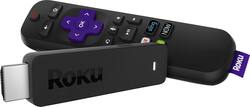
Roku - Streaming Stick with Voice Remote with TV Power and Volume
- Key Specs
- Maximum Supported Resolution: 1080p
- High Dynamic Range (HDR): true (An HDR-compatible 4K TV or other HDR-compatible product displays HDR video content when it's available from sources like 4K Ultra HD Blu-ray Discs and 4K streaming services.)
- Operating System Compatibility: None
- Remote Control Included: true
- Power Source: Battery-powered
- Media Card Slot: false
- General
- Product Name: Streaming Stick with Voice Remote with TV Power and Volume
- Brand: Roku
- TV Compatibility: Most HDTVs with an HDMI interface
- Model Number: 3800R
- Compatibility
- App Compatible: true (The product can be connected to a program or software application on a mobile device, which then receives collected data from the product.)
- Bluetooth Enabled: false (The device is capable of communicating with another device via Bluetooth, provided they are within the required range of each other. A Bluetooth-enabled device must also be the same Bluetooth version or higher than the accessory it is intended to pair with.)
- Compatible Wireless Standard(s): Wireless AC (The wireless networking standard(s) the device is backwards compatible with. This includes networking protocols based on the IEEE 802.11 standard (alphabetically ascending) and the Wi-Fi Alliance standard (numerically ascending), both of which provide high-throughput wireless local area networks (WLANs). Devices designed to work with specific standard(s) will be backwards compatible with previous versions but may not run at optimal performance when using earlier iterations.)
- Interface(s): HDMI (Refers to the types of connections that devices use to interact and communicate with each other.)
- Audio
- Surround Sound Supported: Dolby Digital Plus (Surround sound systems use multiple audio channels and speakers to create an immersive sound experience for the listener. There are also various proprietary technologies that imitate this kind of sound via a device's built-in speakers or soundbar.)
- Gameplay
- Game Controller Support: false
- Display
- High Dynamic Range Format: Dolby Vision (There are a few HDR formats that tell the TV or other HDR-compatible product how to best utilize its capabilities to display HDR content. HDR technology can support one or multiple formats, each with various benefits to picture quality.)
- Power
- Rechargeable Battery: true
- Warranty
- Manufacturer's Warranty - Parts: 1 year
- Manufacturer's Warranty - Labor: 1 year
- Other
- UPC: 829610002088
Take your favorite digital media on business trips and vacations with the Roku Streaming Stick. Its USB format offers a plug-and-play interface for a seamless setup, and it comes with a voice remote for controlling the player and finding your favorite shows hands-free. The Roku Streaming Stick provides access to 500,000+ movies and TV shows for hours of endless entertainment.
- A huge selection of entertainment: Stream movies, music, and other content using a wide range of apps, including Disney+, Apple TV+, Prime Video, Netflix, HBO, Showtime, Hulu, Pandora, ESPN, The Roku Channel and more.
- Up to 1080p HD picture quality: Get the visual rush of 1920 x 1080 HD streaming.
- Stick design: You can move it around your house or take it to a friend's. You can even hide it behind your TV.
- Use your mobile device as a fully functional remote control: Free mobile app for iOS® or Android™. Send video, music, and photos to your TV.
- High-speed wireless connectivity: Built-in 802.11ac Wi-Fi connects to the Internet through your wireless home network (wireless router is required and sold separately).
- Compatible with most TVs: Easily connect and place it on or next to your TV.
Whats Included
- Roku Streaming Stick
- IR remote control
- Two AAA batteries
- Power adapter
- USB cable
- Getting started guide
- Important product information flyer
A: I actually bought both versions of the Stick, so I can answer this pretty well. The Stick itself is supposed to be slightly faster, but I can't tell a difference at all with the new one. The interface is identical, but that's just software. The biggest change - and the reason I ended up buying the new one - is for the remote that integrates TV power and volume with the Roku. The 2016 remote only does the Roku through the WiFi. If you expect to control other things, that will require a WiFi universal remote, which is pretty pricey, considering all I wanted was to turn the TV on and off. If you've got a WiFi universal remote already or appreciate juggling 4 of them, then the 2016 Roku will work absolutely fine.
A: Roku allows you to stream movies and TV shows. There is some free content, but most of the apps require a membership that you have to pay for, ex. Netflix, Hulu, SlingTV. Streaming is shows (TV and movies) on demand, meaning you can watch them whenever you want, unlike TV where you have to be watching when it airs. The Roku channel has free movies available and there are a few other apps like PBS that you can access free shows on. You do not have to pay for service for the Roku itself, but you must have WiFi to use it.
Q: Is there a power source, or is the hdmi port the only one needed?
A: It has a micro USB port to run the power cord. Your TV's USB port might or might not produce enough power for it. I have a streaming stick for two TVs in my house. On one of them, the USB port in the TV works fine. For the other TV though, when I plug it into the TVs USB, I get a message on the Roku screen saying it is not getting enough power and to plug it into an outlet using the included USB-to-wall outlet converter, so I have the wire hanging down the wall from behind the TV down to a power strip. There is really no way to know if your particular TV's USB port will output enough power for the Roku until you get it home and try it.
A: I bought the 3800R this past weekend in order to get the You Tube TV app. It works flawlessly. Such a great device and You Tube TV is an excellent service - much better than Sling, IMO.
Q: What is the difference between the Roku stick and the Alexa fire stick?
A: Roku is an independent company. You can install almost anything on it. You can even install Amazon video. Fire Stick is an Amazon product and amazon limits what you can install. For example: CURRENTLY you will not be able to install VUDU onto a fire stick because it is direct competition with Amazon Video. I have 2 fire sticks and 2 roku sticks. There are no words to tell you how much slower a fire stick is compared to Roku.
Q: Do you need cable to use Roku?
A: No. Using Roku lets you stream video. You can watch some movies and shows sponsored by Roku but it allows you to access other services like Hulu, Directv NOW, Netflix, etc.
A: It does not have an Ethernet port. It looks like Best Buy accidently copied over the description for the Roku 2. What this does have is universal remote features to control TV while the +version does 4K. The Express model is 5X faster than 2016 model but without the remote features and this model should work better while traveling such as dorm room and hotel.
Q: Does this model have the xfinity app?
A: It has the xfinity stream beta app available.






















