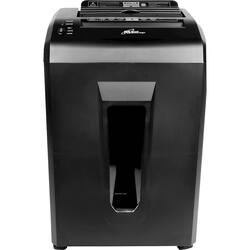
Royal Sovereign - 75-Sheet Microcut Paper Shredder
- General
- Product Name: 75-Sheet Microcut Paper Shredder
- Brand: Royal Sovereign
- Model Number: AFX-975
- Other
- Pull-out Bin: true
- Product Width: 13.6 inches (The out of box width of the item. Width is measured as the horizontal distance from one side of the item to the other as it would be primarily used or placed.)
- Product Height: 24.2 inches (The out of box height of the item. Height is measured as the vertical distance from the bottom of the item to the top as it would be primarily used or placed.)
- Product Weight: 22.3 pounds (The out of box weight of the item.)
- Overload Protection: true (Features intended to protect the product from damage and overheating caused by overload.)
- Noise Level: 55 decibels
- Power Consumption: 250 watts
- Capacity: 75 sheets
- Anti-Jam Technology: true
- Auto Start/Stop Capability: true
- Bin Capacity: 5.2 gallons
- Bin Included: true
- Cut Style: Micro-cut
- Intended Usage: Office
- Maximum Run Time: 10 minutes
- Shred Speed: 9.8 feet per minute
- Shredder Type: Non-continuous shredders
- Throat Width: 8.7 inches
- Cool-Down Time: 30 minutes
- Reverse Function: Automatic
- Security Level: Level 4
- Shreds Staples: true
- UPC: 849023020394
Destroy important paperwork and keep it from prying eyes with this Royal Sovereign paper shredder. Featuring both auto and manual feeds, the shredder can work through 75 stacks of paper automatically or seven sheets of paper with the manual feed. Auto reverse on this Royal Sovereign paper shredder easily clears up any jams.
- Crosscuts paper and staples: Keeps your sensitive information secure. Its microcut style makes shredded items unreadable.
- Shreds up to seven sheets per pass: Lets you cut down on time spent shredding.
- Shred speed of 9.8' per minute: Makes shredding a fast task.
- 8.7" paper entry slot: Accommodates standard A4 paper with plenty of room to spare.
- Overheat protection: The shredder will automatically shut itself off if there is a jam that causes the motor to heat up or if it has been continuously running for more than 10 minutes.
- Pulled-out basket protection: If the basket is taken out or placed incorrectly the power will automatically cut off.
- Auto-feed entry: The shredder will automatically begin to shred stacks of paper when inserted.
- Internal jam removal: Automatically forwards/reverses the motor for approximately two or three minutes until a jam is cleared.
Whats Included
- Royal Sovereign 75-Sheet Microcut Paper Shredder
- Owner's manual
Product Manuals
A: When using the manual feed entry, gently pull the jammed papers out. Check to make sure the quantity of paper does not exceed maximum capacity. Turn switch to STOP and back to AUTO. Re-insert paper. When using auto-feed entry, press and lift the safety cover and gently remove jammed paper. Re-stack paper neatly, ensuring quantity of paper does not exceed the maximum capacity, and stapled sheets are inserted with staples at top. Turn switch to STOP and back to AUTO. Re-insert paper making sure non-stapled side of paper enters feeding entry first. If paper cannot be pulled out from either entry, internal Jam removal function will automatically activate. Internal JAM Removal Function: When curled/crumpled paper is inserted it may result in a JAM problem. If the Auto Reverse cannot remove the paper the Internal JAM Removal Function will automatically start. During this function, red LED light will turn on/off repeatedly. Shredder will automatically run forward/reverse action for approximately 2~3 minutes until jam is cleared. Do not override control switch until process is completed. And if you need the manual to your product please email us: [email protected]
A: Hi there. Thank you for your question. The bin size for the 75-Sheet Microcut Paper Shredder is 5.2 Gallons.
Q: Will This shred CDs and credit cards?
A: Hi there. No, this doesn't shred CD's and Credit Cards. it's used for paper. Thanks!
A: 9



















