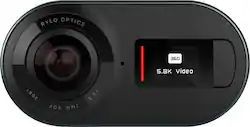
Rylo - Action Camera
- Key Specs
- Effective Pixels: 18 megapixels (The actual number of pixels which make up the viewable image.)
- Standardized Video Resolution: 4K (2160p) (An approximated measurement of the product’s video resolution. This may not be the exact resolution of the product, which may be slightly more or less when using a pixel-by-pixel measurement.)
- General
- Product Name: Action Camera
- Brand: Rylo
- Model Number: AR01-NA01-GL01/ AR01-NA02-US01
- Imaging
- Image Sensor Type: CMOS (CCD and CMOS are the two main technologies used in image sensors. CCD, the older of the two types, turns analog light signals into digital pixels. This conversion happens without distortion, resulting in high-quality images. Newer CMOS sensors use transistors at each pixel to move electrical charges. CMOS sensors are typically less expensive, but also require more light to create distortion-free images.)
- Digital Zoom: 2x (A digital zoom is accomplished electronically, with no adjustment of the camera's optics, and no optical resolution gained in the process. The existing data is not enhanced or added to, merely displayed at a lower resolution, thereby giving an illusion of an enlarged image.)
- 360 Degree Capture: true (The capability of the product to record an image incorporating a 360 degree point of view.)
- Low Light/High Sensitivity: true (High sensitivity digital imaging devices are designed to work in low light conditions to produce a high dynamic range image.)
- Exposure Control
- Maximum Aperture: f/2.8 (The limit to how wide a lens can be open, typically expressed in f-numbers. The smaller the number, the larger the aperture and the more light that can enter the lens. A larger aperture creates a shallower depth of field, helpful for keeping subjects in focus and blurring background details.)
- Effective Pixels: 18 megapixels (The actual number of pixels which make up the viewable image.)
- Display
- Varying Angle Screen: false (The camera's screen can be flipped out and adjusted to rotate, tilt, and/or swivel.)
- Video
- Standardized Video Resolution: 4K (2160p) (An approximated measurement of the product’s video resolution. This may not be the exact resolution of the product, which may be slightly more or less when using a pixel-by-pixel measurement.)
- Maximum Video Frame Rate: Up to 30 fps (The maximum frequency at which consecutive images can be captured by a video recording device.)
- Storage
- Number of Memory Card Slots: 1
- Compatibility
- Memory Card Compatibility: microSD, microSDHC, microSDXC (The type of memory card(s) recommended for use with the product.)
- Features
- Action Camera: false
- Night Recording: true (The ability to capture and record video in low-light conditions, typically via infrared light or intensifier tubes that amplify existing light to illuminate the scene.)
- Special Effects: 360-degree video; 360-degree photo (Image effects accomplished through software applied to images. These can change noise level, gradient, and other aspects of your image.)
- Connectivity
- Wireless Connectivity: None (The manner in which a device sends data to another device over a short distance without the use of wires or cables.)
- Output(s): Micro-USB Type B
- Headphone Jack: true (The device features an interface that allows for the connection of headphones.)
- Number of USB Port(s): 1
- Charging Interface(s): Micro-USB (The connection for transmitting power to charge the device.)
- Power
- Rechargeable Battery: true
- AC Adapter Compatible: true (The device is able to be charged using an external power adapter which meets input and output voltages specified by the manufacturer.)
- Removable Battery: true
- Battery Size: Battery pack (The battery size required for operation.)
- Included
- Batteries Included: true (Indicates whether the product comes with the required batteries for its operation.)
- Memory Card Included: true (Indicates whether a memory card is included.)
- Dimensions
- Product Height: 1.46 inches (The out of box height of the item. Height is measured as the vertical distance from the bottom of the item to the top as it would be primarily used or placed.)
- Product Width: 1.65 inches (The out of box width of the item. Width is measured as the horizontal distance from one side of the item to the other as it would be primarily used or placed.)
- Product Depth: 2.83 inches (The out of box depth of the item. Depth is measured as the distance from the front of the item to the back as it would be primarily used or placed.)
- Product Weight: 0.24 pounds (The out of box weight of the item.)
- Filter Diameter: 49 millimeters
- Other
- UPC: 853663008025
See the whole picture with this Rylo 360 video camera. This compact device extends your perspective by capturing 360 degrees of 5.8K video, perfect for panorama shots and immersive video. This Rylo 360 video camera provides intuitive editing tools through the Rylo iOS app to help you turn your footage into a masterpiece.
- 360° video and photo: Capture everything around you in 5.8K 360-degree video and compose the perfectly framed shot after the fact.
- Dynamic dual lenses: The ultra-wide angle lenses with 208° FOV seamlessly capture everything around you.
- Cinematic stabilization: With breakthrough stabilization and horizon leveling automatically built in, Rylo makes your videos look like they were shot on a professional stabilization rig.
- 6K panorama photo capture: With Rylo's super-wide lenses and seamless field of vision, you can capture a perfectly sharp panorama without awkward panning or blurs. One press of a button and you're done.
- FrontBack: Put yourself in the action with a picture-in-picture that shows your reactions as you capture a moment.
- Speed control: Control how fast videos play (up to 16x normal speed) and bring them to life in new and unexpected ways.
- Everyday case: Compact carrying case makes it easy to capture video when you're on the move. Compatible with most mounts.
- MicroSD card slot: With included 16GB card offers plenty of room to store recorded video footage.
- Rechargeable lithium-ion battery: Delivers approx. 60 minutes of continuous recording time.
- USB interface: Offers convenient charging and data transfer with included charge and sync cables.
- Follow feature: Lets you track the action with just a single tap in the app. Follow an object and camera's orientation automatically adjusts to keep the action in the frame.
- Mobile app with remote function: Easy-to-use, intuitive smartphone app lets you start/stop a recording, capture a photo, and change the camera mode wirelessly right from the Rylo app.
Whats Included
- 16 GB microSD card
- Charge cable
- Everyday Case
- Owner's manual
- Protective pouch
- Rechargeable Li-ion battery
- Rylo Action Camera
- Sync cable
Product Manuals
A: I would say "buyer beware" with this new price. This is probably the blow out price to get rid of the rest of the inventory. Rylo has been unresponsive to my recent questions and the store on their website appears to be shut down. The link to purchase the camera from their website redirects here. I suspect Rylo as a company is in trouble. I hope not, because i do like the camera. It takes amazing, smooth footage. They recently updated the firmware to allow 5.8k footage. You can shoot in either 4k or 5.8k. I'm guessing the spec sheet hasn't been updated.
A: Rylo was bought out by VSCO and is no longer in the hardware business. The software will be available for download until 1/31/2021 and will still work after that but as far as hardware goes they are only going to honor warranty issues. Here is the link to there press response to being bought out by VSCO: https://petapixel.com/2019/12/10/vsco-acquires-rylo-for-its-innovative-mobile-video-editing-tools/
Q: Can this be used for you tube videos and upload to laptop to edit?
A: No. There is no support for Windows PCs. They do have software for the Mac. Otherwise all editing must be done on a compatible mobile device (higher end phones).
Q: is this camera apple or android. meaning can it be used with my android phone?
A: Works with both. In fact, lightning and micro usb cables are included.
A: No. The Rylo can only transfer video by cable. It cannot record and transfer at the same time. It"s a great camera for 360 videos, but as a dash cam or back-up cam....it is not. If you want a back-up cam, there are many options available for less money.
Q: Does it have a waterproof case?
A: Yes, but d doesn't come in the box. You have to buy separately
Q: What is the largest SD card this will accept?
A: It can accept up to a 128GB SD card.
Q: When will this be back in stock?
A: undefined



















