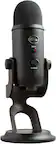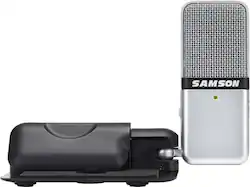
Samson - Go Mic Portable USB Microphone with Software - Gray
- Key Specs
- Polar Pattern: Cardioid
- Output(s): Mini-USB Type B
- Microphone Type: Condenser microphones
- Wireless: false
- General
- Product Name: Go Mic Portable USB Microphone with Software
- Brand: Samson
- Model Number: SAGOMICHD
- Color: Gray
- Dimensions
- Product Height: 2.8 inches (The out of box height of the item. Height is measured as the vertical distance from the bottom of the item to the top as it would be primarily used or placed.)
- Product Length: 0.9 inches (The out of box length of the item. Length is measured as the longest dimension of the item.)
- Product Width: 1.7 inches (The out of box width of the item. Width is measured as the horizontal distance from one side of the item to the other as it would be primarily used or placed.)
- Product Weight: 0.23 pounds (The out of box weight of the item.)
- Audio
- Polar Pattern: Cardioid
- Output(s): Mini-USB Type B
- Minimum Frequency Response: 20 hertz (Describes the maximum range of frequencies or musical tones a product can reproduce, from very low tones to very high treble tones. The minimum frequency or musical tone the speaker can reproduce. High treble tones have higher frequencies while low tones and deep bass have lower frequencies.)
- Maximum Frequency Response: 18 kilohertz (Describes the maximum range of frequencies or musical tones a product can reproduce, from very low tones to very high treble tones. The maximum frequency or musical tone the speaker can reproduce. High treble tones have higher frequencies while low tones and deep bass have lower frequencies.)
- Features
- Microphone Type: Condenser microphones
- Wireless: false
- Included
- Clip(s) Included: true
- Warranty
- Manufacturer's Warranty - Parts: 2 years
- Manufacturer's Warranty - Labor: 2 years
- Other
- UPC: 809164020370
Only at Best Buy
Carry a recording studio in your pocket with the Samson Go Mic. Its plug-and-play capability lets you get to work quickly, and it's compatible with Mac or PC for versatile use with your favorite studio software. This Samson Go Mic has a switchable omnidirection or cardioid pattern for custom performance.
- Windows and Mac compatible: For use with your existing device.
- USB microphone: Designed for performing vocals, chatting or podcasting. Also compatible with VoIP, including Skype.
- Electret condenser microphone: With 16-bit, 44.1/48kHz resolution ensures pristine studio-quality audio.
- Cardiod and Omnidirectional pickup patterns: Capture 360° audio or what’s directly in front of the microphone.
- 20Hz - 18kHz frequency response: Offers wide and accurate tone reproduction.
- 1/8” stereo headphone output: For zero-latency monitoring.
Whats Included
- Cable clip
- Carrying case
- MOTU AudioDesk recording software
- Samson Go Mic Portable USB Microphone with Software
- USB cable
A: The microphone is connected to a device via USB. That device will be running software to record audio, video conference, or similar. Let's go with Zoom or Skype. That software (the Zoom / Skype / etc. software client) will have a mute feature which you would need to use. I would not recommend unplugging it. Use the mute button in the software instead. Now, waaaaaay more info than you were looking for: Why don't unplug it? This unloads the device making it unavailable for any software. Seems OK so far, we are definitely muted! What about when you plug it back in? At best you need to go back into the settings of the let's say "call" you are currently on to re-select the correct microphone. With some software, you'd need to end and restart the "call" or quit the software fully and restart it, then reconnect the "call". If running Windows and only reboot the computer when absolutely forced to, unplugging and re-plugging in that USB microphone could well be the tipping point forcing that dreaded restart you've been avoiding for as long as is humanly possible!! Far easier to just press mute :) The interface of most related software will also likely have volume and other controls. Almost all the time I am interacting with the software interface anyway (chat / breakout rooms / watching presentation), so it is natural to just move the mouse cursor over 'there' and click mute / unmute. You are 'raising your hand' and other processes exactly the same, so muting is in the same flow. I very occasionally use a physical mute feature on a microphone or headset, for things like protecting from loud noise of a sudden sneeze. Muting through the software has less chance of issues, just saying. Lights and physical buttons can break but appear to function normally. More than once I've thought I'd pressed mute but hadn't or it was broken on that headset while appearing to work just fine. Fortunately I've never, ever said anything about someone having pressed mute that I would not have said to them directly, so it's been all good. Your mileage may vary though. Clicking mute in the software is a more conscious process with much better indication of whether it worked correctly. I consider it better practice than using the mute on a microphone / headset. GS
Q: how is the quality when it comes to podcasting?
A: This product is designed to provide pristine studio-quality audio for podcasting.
Q: Which direction should the light be facing? Toward you or out toward people?
A: The front should be facing whoever is talking. Recommend you stand next to each other and speak closer to the mic. The side with the light and is the side that picks up the audio.
Q: Does the microphone work like a studio mic can I sing into it.
A: Hello, Thank you for contacting Samson Technologies. You can certainly use this microphone for vocal recording. There are different pick up patterns on the microphone that will allow you to dial in the best performance possible for whatever recordings you are looking to do. If you have any other questions or inquiries, please let me know at any time. Best Regards, James (Product Specialist)
Q: Will this microphone work with a Samsung Note 10 if I use the USB-C plug to USB-A adapter>
A: Yes, it will - it is plug and play friendly
A: This mic allows you to record in two modes: omnidirectional or cartioid. The cartioid mode is for picking up voice or single sound while diminishing background noises, while the omnidirectional mode picks up the ambient noise as you hear it unfiltered. You would just want to record in the omnidirectional mode to pick up all noises in your living space. This mic does an excellent job filtering out background noises in the cartioid mode, by the way. There is a small switch on the mic, itself, that you can easily move to the other mode.
A: No
A: Yes, that should be fine. My wife is teaching piano lessons with zoom during covid-19 and she is 4-5 ft. from the go mic.