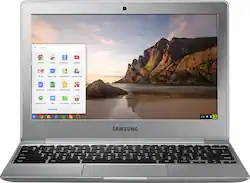
Samsung - 11.6" Chromebook 2 - Intel Celeron - 4GB Memory - 16GB eMMC flash memory - Metallic Silver
- Key Specs
- Screen Type: Widescreen LED
- Screen Size: 11.6 inches (Size of the screen, measured diagonally from corner to corner.)
- Screen Resolution: 1366 x 768 (HD) (Screens come in a range of resolutions (measured in pixels, horizontal x vertical). The higher the resolution, the greater the picture quality.)
- Touch Screen: false (Touch-screen devices make navigating more intuitive. Using a touch-screen display, you can do things such as tap to select, hold and drag to move items, swipe to scroll, and pinch to zoom.)
- Processor Model: Intel Celeron (Your computer's processor is like its brain. Working in combination with system memory, the power of the processor determines the complexity of software you can run, how many programs you can have open at the same time, and how fast those programs will run. Most computers feature an AMD, Intel or Snapdragon processor.)
- Storage Type: eMMC
- System Memory (RAM): 4 gigabytes (Random-access memory (RAM) is a computing device's short-term data storage, which allows active information to be accessed quickly. The size and type of RAM determines how efficiently the device can handle large amounts of information at one time. For example, gaming or video editing requires more RAM for optimal performance.)
- 2-in-1 Design: false (A laptop and a tablet combined in one lightweight, portable device. Sometimes referred to as "convertible" or "hybrid" laptops, these devices deliver the processing power and keyboard of a laptop. When you're ready to play, either detach the screen or fold your 2-in-1 into tablet mode to comfortably watch movies, play games, read an e-book and more.)
- Backlit Keyboard: false (Integrated lights allow for visibility of the keys in low-light conditions.)
- General
- Product Name: 11.6" Chromebook 2 - Intel Celeron - 4GB Memory - 16GB eMMC flash memory
- Brand: Samsung
- Model Number: XE500C12-K02US
- Display
- Screen Type: Widescreen LED
- Screen Size: 11.6 inches (Size of the screen, measured diagonally from corner to corner.)
- Screen Resolution: 1366 x 768 (HD) (Screens come in a range of resolutions (measured in pixels, horizontal x vertical). The higher the resolution, the greater the picture quality.)
- Touch Screen: false (Touch-screen devices make navigating more intuitive. Using a touch-screen display, you can do things such as tap to select, hold and drag to move items, swipe to scroll, and pinch to zoom.)
- Processor
- Processor Brand: Intel
- Processor Model: Intel Celeron (Your computer's processor is like its brain. Working in combination with system memory, the power of the processor determines the complexity of software you can run, how many programs you can have open at the same time, and how fast those programs will run. Most computers feature an AMD, Intel or Snapdragon processor.)
- Processor Model Number: N2840
- Storage
- Storage Type: eMMC
- Hard Drive Capacity: 16 gigabytes (The amount of data that can be stored on the device's mechanical hard drive. Hard disk drives (HDDs) typically have larger capacities than solid state drives (SSDs) but may have slower speeds.)
- eMMC Capacity: 16 gigabytes (The amount of data that can be stored on the device's embedded Multimedia Card (eMMC). eMMC is a flash-based storage used in smartphones and personal computers; it typically has a smaller capacity than HDD or SSD storage.)
- Memory
- System Memory (RAM): 4 gigabytes (Random-access memory (RAM) is a computing device's short-term data storage, which allows active information to be accessed quickly. The size and type of RAM determines how efficiently the device can handle large amounts of information at one time. For example, gaming or video editing requires more RAM for optimal performance.)
- Type of Memory (RAM): DDR3L (Each type of RAM delivers a different level of speed, bandwidth, energy efficiency and performance.)
- System Memory RAM Speed: 1333 megahertz (How fast the information-storing hardware operates. The faster the RAM, the faster memory can be transferred to other system components. Ultimately, faster RAM improves operational efficiency.)
- System Memory RAM Expandable To: 4 gigabytes (Adding more random-access memory (RAM) to a computer speeds up performance and improves efficiency. Upgrades to memory are limited by the number of expansion slots for additional RAM and existing RAM installed on the device.)
- Compatibility
- Operating System: Chrome OS (The operating system manages all software and hardware, including files, memory and connected devices. Most importantly, it lets you interact with your device and your programs in a visual way; otherwise, you'd be typing computer code to get anything done.)
- Power
- Battery Capacity: 4080 milliampere hours (The amount of energy stored in the battery.)
- Features
- 2-in-1 Design: false (A laptop and a tablet combined in one lightweight, portable device. Sometimes referred to as "convertible" or "hybrid" laptops, these devices deliver the processing power and keyboard of a laptop. When you're ready to play, either detach the screen or fold your 2-in-1 into tablet mode to comfortably watch movies, play games, read an e-book and more.)
- Backlit Keyboard: false (Integrated lights allow for visibility of the keys in low-light conditions.)
- Touchpad Type: Touchpad with multi-gesture support
- Media Card Reader: true (A hardware device that allows for access to data on a memory card and enables the transfer of its files to a computer. These devices may have one or multiple slots for various types of memory cards, and may be integrated into the computer or available as an external device.)
- Speaker Type: Stereo speakers (2 x 2W)
- Dimensions
- Product Height: 0.66 inches (The out of box height of the item. Height is measured as the vertical distance from the bottom of the item to the top as it would be primarily used or placed.)
- Product Width: 11.4 inches (The out of box width of the item. Width is measured as the horizontal distance from one side of the item to the other as it would be primarily used or placed.)
- Product Depth: 8.06 inches (The out of box depth of the item. Depth is measured as the distance from the front of the item to the back as it would be primarily used or placed.)
- Certifications Listings & Approvals
- ENERGY STAR Certified: true (Devices carrying the ENERGY STAR service mark, such as computer products and peripherals, kitchen appliances, and other products, generally use 20% to 30% less energy than required by federal standards.)
- EPEAT Qualified: true (The Electronic Product Environmental Assessment Tool (EPEAT) was designed to provide an environmental assessment tool for purchasers. In order to qualify for EPEAT, a product must meet all 23 required criteria.)
- EPEAT Level: Silver (The Electronic Product Environmental Assessment Tool (EPEAT) was designed to provide an environmental assessment tool for purchasers. In order to qualify for EPEAT, a product must meet all 23 required criteria. Products are rated Bronze, Silver or Gold based on how many of 28 optional criteria they meet (below 50%, 50%, 75%).)
- Included
- Included Software: Wunderlist, Little Bridge, AirDroid
- Numeric Keypad: false
- Other
- UPC: 887276095554
Samsung Chromebook 2: Get everything you need in a laptop with this Samsung Chromebook laptop. It's got all the usual basics, including a 16GB hard drive, 4GB of RAM and a reliable Intel processor, yet its 11.6-inch screen makes it easy to port around. A reliable Wi-Fi adapter gives this Samsung Chromebook laptop the speed it needs to connect to a local network.
Learn more about Chromebooks ›
- Google Chrome OS: Automatically downloads and installs security and software updates, so you don't have to waste your time managing patches and waiting for restarts.
- 11.6" display: Antireflective finish reduces eyestrain. Typical 1366 x 768 HD resolution. Energy-efficient LED backlight.
- Intel® Celeron® processor N2840: Entry-level dual-core processor for general e-mail, Internet and productivity tasks.
- 4GB system memory for basic multitasking: Adequate high-bandwidth RAM to smoothly run multiple applications and browser tabs all at once.
- 16GB eMMC flash memory: This ultracompact memory system is ideal for mobile devices and applications, providing enhanced storage capabilities, streamlined data management, quick boot-up times and support for high-definition video playback.
- Built-in cloud support: Easily save your files to your Google Drive account for secure access wherever you go. You can also sync with your other devices running Chrome and even work offline when needed. Fees may apply.
- Intel® HD Graphics: On-processor graphics with shared video memory provide everyday image quality for Internet use, basic photo editing and casual gaming.
- Weighs 2.6 lbs. and measures 0.66" thin: Ultrathin and ultralight for maximum portability, featuring a smaller screen size and omitting the DVD/CD drive to achieve the compact form factor. 2-cell lithium-polymer battery.
- Reinforced metal frame: Rugged design protects the device even if it does accidentally slip, but lightweight frame that withstands daily use and accidents in the hands of students.
- Bluetooth 4.0 interface syncs with compatible devices: Wirelessly transfer photos, music and other media between the laptop or tablet and your Bluetooth-enabled cell phone or MP3 player, or connect Bluetooth wireless accessories.
- 1 USB 3.0 port maximize the latest high-speed devices: Also includes 1 USB 2.0 port to connect more accessories and peripherals. The USB 3.0 port is backward-compatible with USB 2.0 devices (at 2.0 speeds).
- HDMI output expands your viewing options: Connect to an HDTV or high-def monitor to set up two screens side by side or just see more of the big picture.
- Built-in media reader for simple photo transfer: Supports microSD memory card formats.
- Next-Gen Intel® Wireless-AC connectivity (2x2, 867 Mbps): Connect to a Wireless-AC router for nearly 6x the speed, more capacity and wider coverage than Wireless-N (150 Mbps). Backward-compatible with all other Wi-Fi networks and hotspots.
- Built-in 720P HD webcam with digital microphones: Makes it easy to video chat with family and friends or teleconference with colleagues over Skype or other popular applications.
- Chrome OS keyboard: Handy one-touch function keys. Fully clickable touchpad with click-anywhere functionality and support for one-finger left click, two-finger right click, and two-finger scrolling.
- Additional ports: HDMI output. Microphone-in/headphone-out combo jack.
Whats Included
- Samsung 11.6" Chromebook 2 - Intel Celeron - 4GB Memory - 16GB eMMC flash memory
A: Yes! You are able to set up your wireless printer to a Chromebook. Please note, the following is based on classic wireless printers which are not cloud-ready. Cloud-ready printers have, I believe, a different set-up. I have two HP wireless printers, the P1102w and CP1525nw, which are not cloud-ready printers. Once I understood the process of setting-up the printers, I was able to print from both printers with one set-up. The first mistake I made was trying to set-up the printers from my Chromebook – will not work. You set-up your printer(s) from your main computer where your printers are already install, and follow the following instructions: • Turn your printer on. Open Google Chrome on your Windows or Mac computer. • Click the Menu Chrome menu (right top corner – three horizontal lines) • Click Settings then Show advanced settings. • Under "Google Cloud Print," click Add printers. (A list of printers associated with the computer shows up) • If prompted, sign in with your Google Account. • Select the printers you want to connect, and then click Add printer(s). If you have multiple Google accounts, simply share the printer(s) with those accounts. Your printer becomes associated with your Google account. So when you print from your Chromebook, just select the printer to print from and presto you are all set and printing. Hope this help :)
A: .. It is not a windows product. The operating system is CHROME (by Google).
Q: Can I add microsoft word in this laptop? Is this a good laptop for a college student?
A: You can download word online , excel , etc from the chrome web store , it's not a full working version of office but it's free , I use word online all the time with no problems
Q: Dose it take flash drives or anything from a camera?
A: It has USB 2.0 and 3.0 ports to accept flash drives.
Q: does it have a backlight keyboard?
A: This does not have a backlit keyboard.
Q: Save Photos?
A: Yes, you can save photos and upload them to the internet.
Q: Dvd Disc
A: No, this does not have an optical disc drive.
Q: Does this have Internet explorer?
A: No, the Chromebook does not have Internet explorer.


















