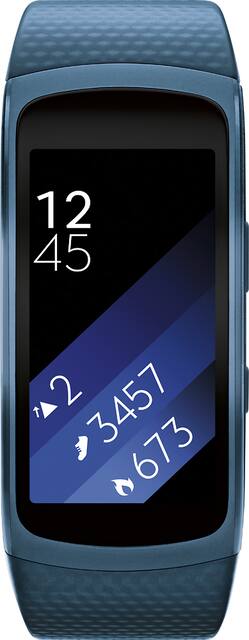
Samsung - Gear Fit2 Fitness Watch + Heart Rate (Large) - Blue
- Key Specs
- Touch Screen: true (Touch-screen devices make navigating more intuitive. Using a touch-screen display, you can do things such as tap to select, hold and drag to move items, swipe to scroll, and pinch to zoom.)
- Operating System Compatibility: Android
- App Compatible: true (The product can be connected to a program or software application on a mobile device, which then receives collected data from the product.)
- Global Positioning: GPS (A system of satellites which enables a mobile receiver to determine its precise location based on signals received from satellites such as the US Global Positioning System (GPS), the Russian Global Navigation Satellite System (GLONASS), the European Global Navigation Satellite System (Galileo), or the Japanese Quasi-Zenith Satellite System (QZSS).)
- Metrics Measured: Activity vs. inactivity, Calories burned, Distance traveled, Resting heart rate, Stairs climbed, Steps taken
- Protective Qualities: Water resistant
- Maximum Depth of Water Resistance: 5 feet (Measurement of the maximum depth of water in which the product is able to resist some degree of water penetration.)
- General
- Product Name: Gear Fit2 Fitness Watch + Heart Rate (Large)
- Brand: Samsung
- Product Type: Activity tracker
- Form Factor: Wristwatch (The size, arrangement, and physical configuration of the product.)
- Model Family: Samsung Gear Fit2
- Model Number: SM-R3600ZBAXAR
- Year of Release: 2016
- Color: Blue
- Design
- Band Color: Blue
- Display
- Display Screen: true
- Touch Screen: true (Touch-screen devices make navigating more intuitive. Using a touch-screen display, you can do things such as tap to select, hold and drag to move items, swipe to scroll, and pinch to zoom.)
- Display Type: AMOLED
- Color Display: true
- Clock Display: true
- Backlit Display: true (Integrated lights allow for visibility of the display in low-light conditions.)
- Compatibility
- Operating System Compatibility: Android
- App Compatible: true (The product can be connected to a program or software application on a mobile device, which then receives collected data from the product.)
- Connectivity
- Wireless Connectivity: Bluetooth (The manner in which a device sends data to another device over a short distance without the use of wires or cables.)
- Features
- GPS Enabled: true
- Global Positioning: GPS (A system of satellites which enables a mobile receiver to determine its precise location based on signals received from satellites such as the US Global Positioning System (GPS), the Russian Global Navigation Satellite System (GLONASS), the European Global Navigation Satellite System (Galileo), or the Japanese Quasi-Zenith Satellite System (QZSS).)
- Mobile Notifications: false
- Activity
- Metrics Measured: Activity vs. inactivity, Calories burned, Distance traveled, Resting heart rate, Stairs climbed, Steps taken
- Multi-Sport Tracking: false
- Performance
- Protective Qualities: Water resistant
- Maximum Depth of Water Resistance: 5 feet (Measurement of the maximum depth of water in which the product is able to resist some degree of water penetration.)
- Dimensions
- Product Width: 1 inches (The out of box width of the item. Width is measured as the horizontal distance from one side of the item to the other as it would be primarily used or placed.)
- Product Length: 1.5 inches (The out of box length of the item. Length is measured as the longest dimension of the item.)
- Minimum Wrist Size: 154.94 millimeters
- Maximum Wrist Size: 208.28 millimeters
- Band Size: Large
- Power
- Rechargeable: true
- Battery Strength Indicator: true
- Battery Capacity: 200 milliampere hours (The amount of energy stored in the battery.)
- Charging Interface(s): Other (The connection for transmitting power to charge the device.)
- Other
- UPC: 887276167855
Track your fitness progress with this Samsung Gear Fit2 fitness watch. It records calories burned, floors climbed and overall sleep quality, and its built-in GPS accurately logs every step you take. Its smart notifications let you receive alerts and respond to calls from compatible Android and iOS smartphones¹ and a curved display makes it easy to view activity progress. This Samsung Gear Fit2 fitness watch can automatically identify a variety of activities, including running, cycling and elliptical workouts, and it delivers smartphone notifications right to your wrist. 
- Android and iOS compatible: Samsung Gear Fit2 is compatible with both Android and iOS smartphones.¹
- Measures heart rate, calories burned, distance traveled, steps taken and speed: To help you track your fitness progress.
- Adjustable strap: its comfortably on most wrists from 6.1" to 8.2" in circumference.
- 1.5' Super AMOLED display: The curved full-color Super AMOLED display lets you easily read real-time activity reports in the sun or shade.
- Built-In GPS: You can even leave your phone behind and map your run right from your Gear Fit2.
- Auto & Multi Sport Tracking: Automatically recognizes what you’re doing whether you’re running, cycling, working out on the elliptical or a variety of other activities.
- Smart Notifications: Receive notifications for your favorite apps and even respond to calls, texts and more - all without reaching for your phone.
- Standalone Music Player: Store your favorite music on the Gear Fit2 or connect with Spotify to access millions of songs.
- Dust- and water-resistant design: Helps ensure reliable protection against damage. IP68 certified.
- Lithium-ion battery: Provides approximately 3-4 days of battery life with typical usage.
- S Health Leaderboards/Challenges: Set your goals, then give yourself an extra push by getting your friends in on the fun with S Health.
Whats Included
- Samsung Gear Fit2 Fitness Watch + Heart Rate (Large)
- Band Strap
- Charging Dock
- Owner's manual
A: Yes it does vibrate when you are away from phone and also has a tracking method to find your phone or you can find Gear fit 2 from your phone also.
A: Thank you for reaching out with your question, JW. You can set the Gear Fit to turn on the screen automatically every time you twist your arm for reading the time or notifications. However, if you don't like that or find it is too sensative for you, you can turn that feature off and simply use the small button on the side to turn the screen on instead. I hope that helped to answer your question. ^Viv
A: Yes it does. And what's great is that you can even Answer (you still need to talk on your phone) or Reject Calls, Read and Quick Reply to Text Messages and Read Emails. It is actually a bit more functional than just showing you notifications which I love. Here's a partial list of apps you can get notifications for: Alarm Calendar Emergency Alerts Gmail Google App Hangouts Incoming Call and Missed Call Messages (Text) Facebook and Facebook Messenger
A: I would think your smart for wanting to take care of your health.
A: The watch. Charger and instructions. All you need. Motivation sold separately.
A: If you start an exercise (walking, running, cycling) then the Gear Fit 2 measures the HR continuously. If the Gear Fit is not in exercise mode it will read the HR every 10mins if the Auto HR is enabled. It can also read the HR manually. In exercise mode the GPS will track your run or ride.
Q: Can you use pics from your gallery as wallpaper.
A: You can not add any custom wallpaper to your GearFit2, you can download custom watch faces from the store provided in the app.
Q: Does it dertermine your daily calories and your sleep patterns?
A: Yes, this model tracks sleep and calories.



















