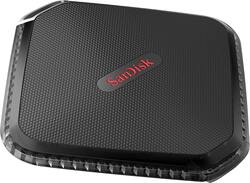
SanDisk - Extreme 500GB External USB 3.0 Portable SSD - Black
- Key Specs
- Storage Drive Type: SSD (Traditional, mechanical hard disk drives are the most common type of storage because they're relatively inexpensive and offer huge capacities. However, they also generate both noise and heat. Solid state drives, also known as SSDs, are many times faster than hard disk drives and have no moving parts to wear out, but typically offer less capacity for the same price.)
- Interface(s): USB 3.0 (Refers to the types of connections that devices use to interact and communicate with each other.)
- General
- Product Name: Extreme 500GB External USB 3.0 Portable SSD
- Brand: SanDisk
- Model Number: SDSSDEXT-500G-G25
- Performance
- Storage Drive Type: SSD (Traditional, mechanical hard disk drives are the most common type of storage because they're relatively inexpensive and offer huge capacities. However, they also generate both noise and heat. Solid state drives, also known as SSDs, are many times faster than hard disk drives and have no moving parts to wear out, but typically offer less capacity for the same price.)
- Compatibility
- Internal Or External: External
- External Hard Drive Type: Portable (Physical characteristics of the hard drive, including size, weight and how you connect to your device.)
- Interface(s): USB 3.0 (Refers to the types of connections that devices use to interact and communicate with each other.)
- Minimum System Requirements: Microsoft Windows 7, Microsoft Windows Vista, Apple MacOS X 10.6 or later, Windows 8, Windows 8.1
- Features
- Security Features: Software
- Data Encryption: true
- Power
- Power Source: USB port
- Dimensions
- Product Height: 3 inches (The out of box height of the item. Height is measured as the vertical distance from the bottom of the item to the top as it would be primarily used or placed.)
- Product Width: 3 inches (The out of box width of the item. Width is measured as the horizontal distance from one side of the item to the other as it would be primarily used or placed.)
- Product Weight: 2.8 ounces (The out of box weight of the item.)
- Included
- Included Software: SanDisk SecureAccess
- Other
- UPC: 619659153359
Transfer and protect digital files under harsh conditions with this 500GB SanDisk Extreme portable solid-state drive. It performs up to four times faster than external hard drives with its respective read and write speeds of up to 430MB/sec. and 415MB/sec. This rugged SanDisk Extreme portable solid-state drive withstands temperatures ranging from -4 to 158 degrees F.
- 500GB storage capacity: Provides plenty of space to store music and other media files.
- USB 3.0 interface: Offers an easy-to-use connection to devices. Backward compatible with USB 2.0 for simple connection to your computer.
- Data transfer rates up to 5 Gbps with USB 3.0: Enable a rapid response when updating files.
- Password protection and 128-bit AES hardware encryption: Help keep your files secure.
- Solid state drive with no moving parts: Ensures cool, quiet operation.
- Portable design: Lets you take your data on the go.
- Compatible with PC and Mac: For flexible installation options.
Whats Included
- SanDisk Extreme 500 Portable - solid state drive
- Software
Q: Does it include a data transfer cable?
A: Yes, and USB 3 cable
A: Your question does not really apply to the SSD. Any external SSD will connect to any PC or Linux system. Typically, you would not use any" backup" program if you want to put files on the SSD that can be read by another PC - just copy them from your PC to the SSD with windows explorer; then, on a different PC you can either open those files from the SSD or you can copy them with Windows Explorer from the SSD to the second PC's hard drive, and then use them. I keep all of my active files on an external SSD that I carry with me. That way, no matter where I am, or what PC I am using, I have all my files. That has worked great for me for at least the last 10 years.
Q: dose anyone know if this will work with the gpd win 2?
A: undefined
Q: dose anyone know if this will work on a gpd win 2 ?
A: Yes it will. Plug the usb cable to the USB port on the back of the gpd win 2..plug the other end in to the external hard drive.use the cable that came with your drive.you should be fine. Hope that helps.
Q: Will this be a good ssd for PS4 gaming system?
A: BE CAREFUL...Im not sure if it will be good for the PS4. I bought it and didnt use it before the return time was up. When I first used it I noticed that the USB Port connection INSIDE the device was really a very very tight fit. I could hardly remove the cord again. The second time I used it, because it was so tight, the plug began to pull out the inside connector with the plug. I had to leave the cord connected because I was afraid it would come all the way out and I wouldnt be able to access my important files on it. To me its Worthless and Money Thrown away because I needed a small, portable device that could be packed easily. Without being able to take the small cord out, it's not what I needed. Check other reviews and you will see same problem for many. But if u want to take a chance of losing your backed up data if it's not that important, or leave the small cord in at all times, then it might work for you. Still I think until it drops really low in price, maybe for holidays, I think it way overpriced to take that chance.
Q: Can I use this on XBox One OG?
A: yes you can and i am using it right now on my Xbox one.
Q: Does this external hard drive fail? I'm looking for one that can last a long time.
A: Tommy, No external or internal drive lasts indefinitely. You should always keep a copy of any drive you have, just in case. Out of 4 hard drives I purchased in 1998, two of them are still readable (if one has suitably obsolete interface hardware). But I had several hard drives in laptop PCs that died after two years. In a situation where you really, really, don't want the surprise of a drive dying, my suggestion based on my 20 years of experience is to replace your drives every two years, even if they appear to be working just fine.














