SanDisk Professional - G-DRIVE 6TB External USB-C 3.2 Gen2 Hard Drive - Black
Storage Capacity
6000GBFREE shipping to
More Buying Options
Related Item

Specifications
- Storage Capacity6000 gigabytesStorage Drive TypeHDDRotational Speed7200 revolutions per minuteMaximum Read Speed250 megabytes per secondMaximum Write Speed250 megabytes per secondInterface(s)USB Type C (USB 3.2 Gen2)
- Key Specs
- Storage Capacity: 6000 gigabytes (Measured in megabytes (MB), gigabytes (GB) and terabytes (TB), this is the amount available for storing files, music, movies, photos and more. The total includes the capacity of the hard disk drive and solid state drive if both are included on the computer.)
- Storage Drive Type: HDD (Traditional, mechanical hard disk drives are the most common type of storage because they're relatively inexpensive and offer huge capacities. However, they also generate both noise and heat. Solid state drives, also known as SSDs, are many times faster than hard disk drives and have no moving parts to wear out, but typically offer less capacity for the same price.)
- Rotational Speed: 7200 revolutions per minute (The rate at which the hard drive spins its platters. The higher the rotational speed, the faster the drive can read and write data.)
- Maximum Read Speed: 250 megabytes per second (The greatest speed at which the device can read information; for example, opening files.)
- Maximum Write Speed: 250 megabytes per second (The greatest speed at which the device can write information; for example, saving files.)
- Interface(s): USB Type C (USB 3.2 Gen2) (Refers to the types of connections that devices use to interact and communicate with each other.)
- General
- Brand: SanDisk Professional
- Model Number: SDPHF1A-006T-NBAAD
- Product Name: G-DRIVE 6TB External USB-C 3.2 Gen2 Hard Drive
- Color: Black
- Capacity
- Storage Capacity: 6000 gigabytes (Measured in megabytes (MB), gigabytes (GB) and terabytes (TB), this is the amount available for storing files, music, movies, photos and more. The total includes the capacity of the hard disk drive and solid state drive if both are included on the computer.)
- Performance
- Storage Drive Type: HDD (Traditional, mechanical hard disk drives are the most common type of storage because they're relatively inexpensive and offer huge capacities. However, they also generate both noise and heat. Solid state drives, also known as SSDs, are many times faster than hard disk drives and have no moving parts to wear out, but typically offer less capacity for the same price.)
- Rotational Speed: 7200 revolutions per minute (The rate at which the hard drive spins its platters. The higher the rotational speed, the faster the drive can read and write data.)
- Maximum Read Speed: 250 megabytes per second (The greatest speed at which the device can read information; for example, opening files.)
- Maximum Write Speed: 250 megabytes per second (The greatest speed at which the device can write information; for example, saving files.)
- Compatibility
- Internal Or External: External
- External Hard Drive Type: Desktop (Physical characteristics of the hard drive, including size, weight and how you connect to your device.)
- Interface(s): USB Type C (USB 3.2 Gen2) (Refers to the types of connections that devices use to interact and communicate with each other.)
- Operating System Compatibility: Mac, Windows
- Minimum System Requirements: Formatted APFS macOS 10.15+ (Time Machine compatible Windows® 10+ (via reformat)
- Features
- Usage: Backup
- Lighting Type: Single color
- Power
- Power Source: AC adapter
- Dimensions
- Product Height: 1.61 inches (The out of box height of the item. Height is measured as the vertical distance from the bottom of the item to the top as it would be primarily used or placed.)
- Product Width: 8.27 inches (The out of box width of the item. Width is measured as the horizontal distance from one side of the item to the other as it would be primarily used or placed.)
- Product Weight: 3.04 ounces (The out of box weight of the item.)
- Other
- UPC: 718037899091
The SanDisk Professional G-DRIVE enterprise-class hard drive with a USB-C (10Gbps) interface delivers ultra-reliable, high-capacity storage in a premium, stylish design. The 7200RPM Ultrastar drive inside features powerful performance with speeds up to 250MB/s read and 250MB/s write2 (6TB1 capacity) that is perfect for fast backup and access to your HD videos, photos, music, and other high-value content. The stackable, anodized all-aluminum enclosure offers premium durability and anchor points for attaching to a DIT cart, a mounting plate, or other gear for your production needs. The G-DRIVE desktop hard drive also offers LED light brightness customization with three modes to choose from, comes ready for Mac, and is easily reformatted for Windows.
- Customize your workstation: G-DRIVE features two anchor points on each side so you can attach to a DIT cart, cheese plate, or other gear to support your production needs.
- Adjustable brightness: Turn off or choose from three modes of brightness (off, default, and bright) to easily adjust the LED lights.
- Data transfer rates up to 250MB/sec.: Enable a rapid response when updating files.
- 7200 rpm enterprise-class Ultrastar drive: Perfect for all your demanding workloads and mission-critical content.
- Three-year limited warranty: Backed by a three-year limited warranty, so you know you have storage you can rely on.
- Compatible with Mac and PC: Ready for use with Mac computers and Apple Time Machine backup right out of the box. Easily reformat for Windows.
- Anodized aluminum enclosure: Pairs beautifully with your high-end computer and gives the durable strength you can feel.
- 6TB storage capacity: Provides ample space for storing documents, photos, music and more.
- USB 3.2 Gen 2 Type-C interface: Allows you to quickly move your HD images and 4K footage, so you can spend less time waiting and more time creating.
Whats Included
- SanDisk Professional G-DRIVE 6TB External USB-C 3.2 Gen2 Hard Drive
- USB-C to USB-C cable
- Power cable
- Power adapter
- Owner's manual
A: There is no base for vertical, I wouldn't recommend it. I'm not sure but think it will be alright to stack another drive when flat.
A: The enclosure is metal. I’ve never attempted to open it, since I buy new hd’s when one is filled. An excellent product that I recommend without hesitation.
A: HDD
A: I had the same issue, it was solved by reformatting this disc on Mac OS system
A: Mine only came with a USB-c cable. although adapters work ok. don't know how speed Is affected with adapters.
Q: Will it connect to dish hopper?
A: undefined
Q: Can it connect to Smart TV and Blu-Ray Player
A: undefined
A: Good question. Does not appear to functional on my Mac OS M1
Compare similar products
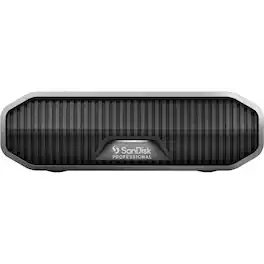
The SanDisk Professional G-DRIVE enterprise-class hard drive with a USB-C (10Gbps) interface delivers ultra-reliable, high-capacity storage in a premium, stylish design. The 7200RPM Ultrastar drive inside features powerful performance with speeds up to 250MB/s read and 250MB/s write2 (6TB1 capacity) that is perfect for fast backup and access to your HD videos, photos, music, and other high-value content. The stackable, anodized all-aluminum enclosure offers premium durability and anchor points for attaching to a DIT cart, a mounting plate, or other gear for your production needs. The G-DRIVE desktop hard drive also offers LED light brightness customization with three modes to choose from, comes ready for Mac, and is easily reformatted for Windows.

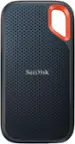
Your life’s an adventure. To capture and keep its best moments, you need fast, high-capacity storage that accelerates every move. With up to 1050MB/s read and 1000MB/s write speeds, store your content and creations on a fast drive that fits seamlessly into your active lifestyle. Up to three-meter drop protection, with IP65 water and dust resistance, a carabiner loop for securing the drive, and a 5-year limited warranty give you the peace of mind to take it with you on travels near and far. From a brand trusted by professional photographers, the SanDisk Extreme Portable SSD provides fast solid state performance in a tough, reliable storage solution.
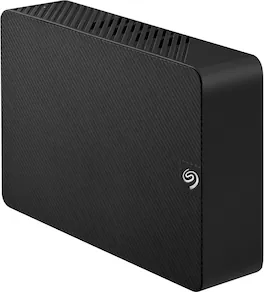
Ideal for the home, office, or dorm, Seagate Expansion desktop drive offers enormous desktop storage for photos, movies, music and more. Backing up and transferring content is incredibly easy — just drag and drop! To get set up, connect the USB hard drive to Windows or Mac — no software required. For Apple Time Machine, simply reformat. Included is an 18-inch USB 3.0 cable and 18W power adapter. Plus, Seagate Expansion comes with Rescue Data Recovery Services for additional peace of mind.
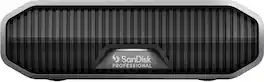
The SanDisk Professional G-DRIVE enterprise-class hard drive with a USB-C (10Gbps) interface delivers ultra-reliable, high-capacity storage in a premium, stylish design. The 7200RPM Ultrastar drive inside features powerful performance with speeds up to 250MB/s read and 250MB/s write2 (12TB1 capacity) that is perfect for fast backup and access to your HD videos, photos, music, and other high-value content. The stackable, anodized all-aluminum enclosure offers premium durability and anchor points for attaching to a DIT cart, a mounting plate, or other gear for your production needs. The G-DRIVE desktop hard drive also offers LED light brightness customization with three modes to choose from, comes ready for Mac, and is easily reformatted for Windows.
| Pros for SanDisk Professional - G-DRIVE 6TB External USB-C 3.2 Gen2 Hard Drive - Black | |||
|---|---|---|---|
| There were no pros for this product— | Speed, Overall Performance, Storage Capacity, Portability, Size | Storage Capacity, Overall Performance, Speed, Ease of use, Price | There were no pros for this product— |
| Cons for SanDisk Professional - G-DRIVE 6TB External USB-C 3.2 Gen2 Hard Drive - Black | |||
| There were no cons for this product— | Heat Dissipation, Cable Length, Price | There were no cons for this product— | There were no cons for this product— |
Specs
Reviews
Customer Images
The vast majority of our reviews come from verified purchases. Reviews from customers may include My Best Buy members, employees, and Tech Insider Network members (as tagged). Select reviewers may receive discounted products, promotional considerations or entries into drawings for honest, helpful reviews.
- Rated 4 out of 5 stars
Good enough for most tasks
Turned out to be too slow for editing videos, but I feel like that's my fault for not researching it enough. I suspect it's fast enough for most computing. I didn't return it, I'm using it as a back-up drive. I back up my computer and transfer completed videos onto it. But I work off a faster, smaller drive. If you're still learning, like me, it's best to talk to a knowledgeable sales person to find the right drive for your needs. Also the size/shape is nice.
This review is from SanDisk Professional - G-DRIVE 6TB External USB-C 3.2 Gen2 Hard Drive - Black
Posted by Sharon
- Rated 1 out of 5 stars
Not Built For Editing Photo/Video
Had this hard drive for about a year now, and I am extremely disappointed with it from a day to day use perspective. If you are going to use it primarily for storage, it's fine. BUT, if you plan to do any photo/video work off of this drive, I would look for something else. Recently, I have been having lots of issues with it on Mac, as it will intermittently self-eject while I am editing projects linked to its data. I will get the "did not eject properly alert" all the time, need to turn it off then on, or try relinking all my footage. Additionally, the drive seems to put itself to sleep after a very short period of time, which makes workflow very slow if you are doing something like editing color for a specific video file and not physically playing/scrubbing through anything for a few minutes. When you go to watch through your project, you can hear the drive start spinning again, and it takes minutes for it to talk with my editing programs (Premiere and Davinci Resolve).
This review is from SanDisk Professional - G-DRIVE 6TB External USB-C 3.2 Gen2 Hard Drive - Black
Posted by LoganM
- Rated 4 out of 5 stars
Good drive, about the power button
I've purchased six G-drives over the past few years, four of which are the previous generation and they have flip power swtiches so powering them on and off is quite simple. The new version, on the other hand, has a press button swtich that works quite differently, it would be good for sandisk to include at least some instructions regarding the new design, but they didn't do it. To power the drive off, you'll have to press and hold the power button for 5 seconds, in Windows this is more noticable as the system will make the 'unplug sound' when the drive is powered off. Since the drive is automatically powered on when connected to the AC adapter and the LED light is not associated with the on/off condition of the drive, it is pretty tricky to figure out how the power button actually works. The first time I got the new version drive I thought the power button is broken, now I bought another one and both act the same.
This review is from SanDisk Professional - G-DRIVE 6TB External USB-C 3.2 Gen2 Hard Drive - Black
Posted by Patrick