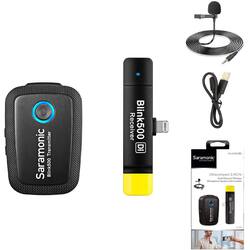
Saramonic - 2.4 GHz Wireless Clip-On Mic System w/ Lav & Dual Lightning Receiver for iPhone & iPad (Blink 500 B3) - Black
- Key Specs
- Polar Pattern: Omnidirectional
- Microphone Type: Lavaliers
- Wireless: true
- General
- Product Name: 2.4 GHz Wireless Clip-On Mic System w/ Lav & Dual Lightning Receiver for iPhone & iPad (Blink 500 B3)
- Brand: Saramonic
- Model Number: BLINK500B3
- Dimensions
- Product Height: 0.01 inches (The out of box height of the item. Height is measured as the vertical distance from the bottom of the item to the top as it would be primarily used or placed.)
- Product Length: 0.02 inches (The out of box length of the item. Length is measured as the longest dimension of the item.)
- Product Width: 0.02 inches (The out of box width of the item. Width is measured as the horizontal distance from one side of the item to the other as it would be primarily used or placed.)
- Product Weight: 0.1 pounds (The out of box weight of the item.)
- Audio
- Polar Pattern: Omnidirectional
- Minimum Frequency Response: 50 hertz (Describes the maximum range of frequencies or musical tones a product can reproduce, from very low tones to very high treble tones. The minimum frequency or musical tone the speaker can reproduce. High treble tones have higher frequencies while low tones and deep bass have lower frequencies.)
- Maximum Frequency Response: 18 kilohertz (Describes the maximum range of frequencies or musical tones a product can reproduce, from very low tones to very high treble tones. The maximum frequency or musical tone the speaker can reproduce. High treble tones have higher frequencies while low tones and deep bass have lower frequencies.)
- Maximum Operating Range: 164 feet
- Features
- Microphone Type: Lavaliers
- Wireless: true
- Power
- Battery Size: 3.7V (The battery size required for operation.)
- Warranty
- Manufacturer's Warranty - Parts: 1-Year
- Manufacturer's Warranty - Labor: 1-Year
- Other
- UPC: 6971008024531
The Saramonic Blink 500 B3 is an incredibly compact, lightweight, and professional sounding wireless microphone systems for the Apple iPhone and iPad. The included clip-on transmitter is small enough to clip directly to your shirt collar, and the included RXDi MFi Certified Lighting dual-channel receiver is so lightweight and unobtrusive that it won’t get in your way at all. It can easily be used on devices that are mounted in handheld gimbals, and the receiver is even capable of accepting the signal from two microphones if you add another Blink 500 TX transmitter (sold separately). The Blink 500 B3 is impossibly compact and lightweight, yet it delivers crystal-clear professional sound quality. The versatile transmitter features an excellent sounding built-in microphone that captures voices perfectly. Small enough to clip to a shirt or slide into a pocket and versatile enough to set on a table or podium, or even used handheld. It also operates as a traditional bodypack transmitter with the included SR-M1 professional omnidirectional clip-on lavalier microphone, providing an even more professional and visually discreet miking solution. The sleek, featherweight RXDi receiver plugs directly into the Lightning port of your Apple device and doesn’t require any batteries or charging to operate. There are no controls to fuss with, either. You just plug it in, and it works. Some wireless microphone systems are complicated to operate and require detailed knowledge of their menus and settings, but the Blink 500 B3 is so technically advanced that it couldn’t be easier to use. Even though there are no controls to adjust, behind the scenes the Blink 500 is doing a lot to ensure excellent performance. It operates on the interference-free 2.4GHz spectrum, and automatically hops channels to avoid static noise and audio dropouts. Pairing the transmitter to the receiver is simple, and all of the complicated aspects of using wireless microphones happen seamlessly in the background with the Blink 500, letting you concentrate on storytelling and getting a great shot.One of the tricky aspects of capturing sound for video is controlling the audio levels. Some people speak very loudly, while others speak very softly. That’s why Blink 500 transmitters have easy-to-use gain buttons to raise or lower the levels at the touch of a button, and an intelligent LED display shows you where they’re set. The transmitter’s internal Lithium battery gets 5 hours of life from a charge with the included charging cables, and the USB-C port can be used to power or recharge the transmitter in the field with portable USB battery packs. The 10-milliwatt power of the transmitter gives you an impressive range of 98 feet (30 meters) with obstacles, and 164 feet (50 meters) in open spaces.Handheld gimbals have the amazing ability to deliver cinematically smooth video footage that makes it feel like the camera is floating, but one area where they suffer is audio. It’s simply too difficult to attach external microphones or wireless receivers without throwing off the balance of the device. The RXDi receiver, included in your Blink 500 B3 kit changes this story. It’s small and lightweight enough to remain mounted to your Apple device and won’t interfere with the motors or arm of your gimbal. You can finally capture perfect sound with your mobile gimbal footage, and if you add a second Blink 500 TX transmitter (sold separately) you can easily put mics on two separate people.
- Ultracompact Wireless Mic System for iPhone and iPad with Lightning: Amazingly lightweight, ultracompact and easy-to-use wireless microphone system for iPhone and iPad that provides broadcast-quality sound
- Compact Dual Receiver is ideal for Handheld and Gimbal Filming: RXDi dual-channel MFi Certified Lighting receiver is extremely lightweight, space efficient and works perfectly when used in handheld gimbals
- Use Built-in Mic on Transmitter or with Lavalier: Clip-On Transmitter has a great sounding built-in mic and it’s small and light enough to clip to shirts and clothing, or you can use the included SR-M1 Professional Lavalier Microphone
- Easy-to-Use, Just Turn on and Record: No technical knowledge of audio is required to use. Operates on the interference-free 2.4GHz spectrum and automatically hops to free channels to avoid static noise and audio dropouts
- Add Another Blink 500 TX Transmitter Anytime: Dual-Channel Receiver can handle mics from two separate people by adding a second Blink 500 TX transmitter (sold separately)
Whats Included
- Saramonic BLINK 500 B3
- Microphone clip, wireless microphone receiver, lapel microphone, shoe mount adapter
A: I’m having this problem too.
A: This is a new problem with iOS14 and Facebook. Until they properly apply updates that allow this, it will not work. That can take time and I suggest contacting Facebook support to speed up the process. BUT... I have created a work-around that fixes this. Please contact [email protected] and we will provide an easy how-to. It is too involved for this medium. Speak soon!
A: Yes, in Mono mode. As long as the application you're using allows external lightning microphones.
A: I am not certain because I do not have an iPhone and AirPods to test, but from my research it does not seem like it's likely. I have done research on forums and no one has tested this yet, or got external mics to work. I would recommend asking Apple support to see if external Lightning microphones work with Live Listen.
A: Unfortunately this is a limitation of those applications. Zoom and FaceTime only allow one source for microphone in and speaker out. So when you use a lightning microphone, unfortunately those applications do not give you the option to select the speaker on the phone as an output. This is a limitation of the app, and not this or any microphone. I have been in discussions with Zoom to let them know that expended audio preferences for their mobile applications are a necessity, but unfortunately they have not added that functionality yet. FaceTime is unlikely to add that functionality because they expect users to be using the iPhone's microphone and speaker.
A: I am not familiar with the MindBody app and it is a very real possibility that the app does not allow external Lightning microphones. I would contact the MindBody app support and ask them if their app supports external Lightning microphones.
A: MacBooks don't have a Lightning port. There is no Lightning to USB or USB-C adapter I've seen that works. So, you cannot use the RXDI receiver with any computer, you can only use it with iPads and iPhones with Lightning. You can use the Blink systems (B5 & B6) with the RXUC receiver, or add the RXUC receiver à la carte to the B3 system and have both.
A: Yes it will work with the native video app. Make sure you plug in the receiver before you start the video app. I have use the AirPods with Filmic Pro and was able to monitor in real-time.


















