Saramonic - Ultracompact 2.4 GHz 2-Person Wireless Clip-On Mic System w/ Lavs for Cameras & Mobile (Blink 500 B2) - Black
- Key Specs
- Polar Pattern: Omnidirectional
- Microphone Type: Lavaliers
- Wireless: true
- General
- Brand: Saramonic
- Model Number: BLINK500B2
- Product Name: Ultracompact 2.4 GHz 2-Person Wireless Clip-On Mic System w/ Lavs for Cameras & Mobile (Blink 500 B2)
- Color: Black
- Dimensions
- Product Height: 0.01 inches (The out of box height of the item. Height is measured as the vertical distance from the bottom of the item to the top as it would be primarily used or placed.)
- Product Length: 0.02 inches (The out of box length of the item. Length is measured as the longest dimension of the item.)
- Product Width: 0.02 inches (The out of box width of the item. Width is measured as the horizontal distance from one side of the item to the other as it would be primarily used or placed.)
- Product Weight: 0.21 pounds (The out of box weight of the item.)
- Audio
- Polar Pattern: Omnidirectional
- Minimum Frequency Response: 50 hertz (Describes the maximum range of frequencies or musical tones a product can reproduce, from very low tones to very high treble tones. The minimum frequency or musical tone the speaker can reproduce. High treble tones have higher frequencies while low tones and deep bass have lower frequencies.)
- Maximum Frequency Response: 18 kilohertz (Describes the maximum range of frequencies or musical tones a product can reproduce, from very low tones to very high treble tones. The maximum frequency or musical tone the speaker can reproduce. High treble tones have higher frequencies while low tones and deep bass have lower frequencies.)
- Features
- Microphone Type: Lavaliers
- Wireless: true
- Included
- Number of Microphones Included: 4
- Power
- Rechargeable Battery: false
- Battery Size: 3.7V (The battery size required for operation.)
- Battery Chemistry: Lithium-ion
- Warranty
- Warranty - Parts: 1 year
- Warranty - Labor: 1 year
- Other
- UPC: 6971008024524
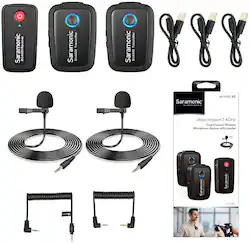
If you want an extremely small, feather-weight wireless microphone system that delivers broadcast-quality sound to use with cameras and mobile devices, with the ability to handle two wireless transmitters so you can put mics on two separate people, nothing is capable of doing this—except for the Saramonic Blink 500 B2. It comes with two clip-on wireless transmitters that have built-in mics, two professional lavalier microphones, and a dual-channel receiver that mounts to the shoe of your camera. You can put mics on two separate people, and it will work perfectly with the included ultracompact dual receiver.. . Tiny body, huge sound.. The Blink 500 B2 is impossibly compact and lightweight, yet it delivers crystal-clear professional sound quality. The versatile transmitters feature excellent sounding built-in microphones that capture voices perfectly. Small enough to clip to a shirt or slide into a pocket and versatile enough to set on a table or podium, or even used handheld. They also operate as traditional bodypack transmitters with the included SR-M1 professional omnidirectional clip-on lavalier microphones, providing even more professional and inconspicuous miking solutions. . . So advanced it’s effortless.. Some wireless microphone systems are complicated to operate and require detailed knowledge of their menus and settings, but the Blink 500 B2 is so technically advanced that it couldn’t be easier to use. You just turn it on, and it works. But behind the scenes the Blink 500 is doing a lot to ensure excellent performance. It operates on the interference-free 2.4GHz spectrum, and automatically hops channels to avoid static noise and audio dropouts. Pairing the transmitters with the receiver is simple, and all of the complicated aspects of using wireless microphones happen seamlessly in the background, letting you concentrate on storytelling and getting a great shot.. . Perfect levels and power.. One of the tricky aspects of capturing sound for video is controlling the audio levels. Some people speak very loudly, while others speak very softly. That’s why Blink 500 transmitters have easy-to-use gain buttons to raise or lower the levels at the touch of a button, and intelligent LED displays that show you where they’re set. The internal Lithium batteries get 5 hours of life from a charge with the included charging cables, and the USB-C ports can be used to power or recharge the units in the field with portable USB battery packs. The 10-milliwatt power of the transmitters gives you an impressive range of 98 feet (30 meters) with obstacles, and 164 feet (50 meters) in open spaces.. . Loves cameras & mobile devices equally.. Both TRS and TRRS output cables are included so the system will work perfectly with DSLR, mirrorless, and other kinds of cameras, as well as smartphones and tablets that have headphone jacks. The output of the receiver provides a strong, noise-free level, so when you plug it in you can adjust the input level of your camera to its lowest setting to avoid hearing the noisy preamp of your camera. . . An ideal wireless system.. Portable, compact wireless microphone systems are completely essential tools for anyone who shoots video, and the fact that the Blink 500 is one of the smallest and most lightweight systems you can get—yet it still delivers professional quality sound—makes it ideal for filmmakers, journalists, vloggers, YouTube creators, corporate video producers, or any content creator that needs an incredibly easy-to-use 2-person wireless system that won’t slow them down. It’s small enough to tuck away into any camera bag, backpack or even your pocket, so you can effortlessly bring it with you everywhere you go. Plus, the Blink 500 series is an evolving system of products that will soon be expanding, giving users even more options and versatility.
- Ultracompact 2-Person Wireless Mic System for Cameras and Mobile Devices: Incredibly lightweight, ultracompact and easy-to-use 2-person wireless microphone system for DSLR, Mirrorless and Video cameras, or mobile devices that delivers detailed, broadcast-quality sound
- Use Built-in Mic on Transmitters or with Lavaliers: Clip-On Transmitters have great sounding built-in mics and they're small and light enough to clip to shirts and clothing, or you can use the included SR-M1 Professional Lavalier Microphones
- Easy-to-Use, Just Turn on and Record: No technical knowledge of audio is required to use. Operates on the interference-free 2.4GHz spectrum and automatically hops to free channels to avoid static noise and audio dropouts
- Mount on Camera or Device and Includes TRS and TRRS Output Cables: Belt clip on the receiver acts as a camera-shoe mount for easy attachment, two output cables are included, TRS for cameras and TRRS for smartphones or tablets
- Charge via USB-C, Even While in Use: Built-in Lithium batteries charge via USB-C with included cables and can be powered when in use
- Ultracompact 2-Person Wireless Mic System for Cameras and Mobile Devices: Incredibly lightweight, ultracompact and easy-to-use 2-person wireless microphone system for DSLR, Mirrorless and Video cameras, or mobile devices that delivers detailed, broadcast-quality sound
- Use Built-in Mic on Transmitters or with Lavaliers: Clip-On Transmitters have great sounding built-in mics and they're small and light enough to clip to shirts and clothing, or you can use the included SR-M1 Professional Lavalier Microphones
- Easy-to-Use, Just Turn on and Record: No technical knowledge of audio is required to use. Operates on the interference-free 2.4GHz spectrum and automatically hops to free channels to avoid static noise and audio dropouts
- Mount on Camera or Device and Includes TRS and TRRS Output Cables: Belt clip on the receiver acts as a camera-shoe mount for easy attachment, two output cables are included, TRS for cameras and TRRS for smartphones or tablets
- Charge via USB-C, Even While in Use: Built-in Lithium batteries charge via USB-C with included cables and can be powered when in use
Whats Included
- Saramonic BLINK 500 B2
- Microphone clip, 2 lapel microphones, shoe mount adapter, wireless microphone transmitter, 2 wireless transmitters
- Saramonic BLINK 500 B2
- Microphone clip, 2 lapel microphones, shoe mount adapter, wireless microphone transmitter, 2 wireless transmitters
Q: Is this compatible with Iphone X?
A: Yes, just plug in the TRRS output cable into your 3.5mm headphones to Lightning adapter. https://www.bestbuy.com/site/apple-lightning-to-3-5mm-headphone-adapter-white/5622278.p?skuId=5622278
Q: Is it good for recording sports? Like mic'n up players during practice?
A: Yes, if on the side of the field for interviews. No, if you are trying to mic them up while they practice. You will see the NFL do this and it is possible, but what they use are exceptionally high end systems that usually go for about $3000 to $4000 per mic and they have antenna paddles on both sides of the field about every 10-20'. If you're trying to do that, you need a serious wireless system with serious antenna distribution.
Q: Can it be used with a laptop for a conference meeting and how are the mics charged (battery)?
A: Yes. You can use the TRS cable into a computer's microphone input, or the TRRS cable to go into the headphone port on modern computers that have a TRRS headphone port (check your computer's spec). The microphone transmitters and receiver are powered by internal Li-Ion batteries and charged via the USB-C port and included cables.
Q: Will it connect to a Bluetooth speaker to project a voice?
A: Yes, you can connect the 3.5mm output to the 3.5mm input of a Bluetooth speaker to project the voice. But please try to be away from the speaker or have the speaker pointed away from you as you have the microphone on you to avoid feedback.
Q: What is the range on this Mic. I’m looking to record from 50ft.
A: 300 Feet from Mic to receiver.
Q: Would this work to enhance FB live audio?
A: Absolutely. It's easy to use and delivers great sound. You'll be able to mic to people individually, can't get much better audio of each person.
A: You need to make sure you are using the proper cable and proper side of the cable going into the Lightning adapter and have a Lightning adapter that accepts TRRS inputs. 1st: Is you Lighting adapter the correct one? If it is the Apple 3.5mm Lightning Headphone adapter it is. If it is a 3rd party, you need to check and make sure it has a TRRS connector and not just TRS. 2nd: You want to make sure to use the TRS to TRRS cable. This is the right-angle (into Blink Receiver) and the straight side (into phone or Lightning adapter) 3rd: Make sure you are using a proper recording app. The iPhone's video app will work great, but make sure you connect the Lighting adapter AND Blink System while on BEFORE you start the app. I would guarentee one of those above issues was missed and that is what is causing the issue.