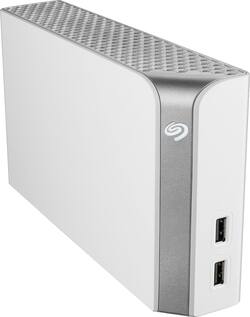
Seagate - Backup Plus Hub for Mac 8TB External USB 3.0 Portable Hard Drive - White
- Key Specs
- Storage Drive Type: HDD (Traditional, mechanical hard disk drives are the most common type of storage because they're relatively inexpensive and offer huge capacities. However, they also generate both noise and heat. Solid state drives, also known as SSDs, are many times faster than hard disk drives and have no moving parts to wear out, but typically offer less capacity for the same price.)
- Rotational Speed: 5400 revolutions per minute (The rate at which the hard drive spins its platters. The higher the rotational speed, the faster the drive can read and write data.)
- Interface(s): USB 2.0, USB 3.0 (Refers to the types of connections that devices use to interact and communicate with each other.)
- General
- Product Name: Backup Plus Hub for Mac 8TB External USB 3.0 Portable Hard Drive
- Brand: Seagate
- Model Number: STEM8000400
- Performance
- Storage Drive Type: HDD (Traditional, mechanical hard disk drives are the most common type of storage because they're relatively inexpensive and offer huge capacities. However, they also generate both noise and heat. Solid state drives, also known as SSDs, are many times faster than hard disk drives and have no moving parts to wear out, but typically offer less capacity for the same price.)
- Rotational Speed: 5400 revolutions per minute (The rate at which the hard drive spins its platters. The higher the rotational speed, the faster the drive can read and write data.)
- Compatibility
- Internal Or External: External
- External Hard Drive Type: Desktop (Physical characteristics of the hard drive, including size, weight and how you connect to your device.)
- Interface(s): USB 2.0, USB 3.0 (Refers to the types of connections that devices use to interact and communicate with each other.)
- Minimum System Requirements: Windows® 7 or higher, or Mac OS® X 10.9 or higher operating system, SuperSpeed USB 3.0 port (required for USB 3.0 transfer speeds or backwards compatible with USB 2.0 ports at USB 2.0 transfer speeds)
- Features
- Security Features: None
- Power
- Power Source: AC adapter
- Dimensions
- Product Height: 4.6 inches (The out of box height of the item. Height is measured as the vertical distance from the bottom of the item to the top as it would be primarily used or placed.)
- Product Width: 1.6 inches (The out of box width of the item. Width is measured as the horizontal distance from one side of the item to the other as it would be primarily used or placed.)
- Product Weight: 37.4 ounces (The out of box weight of the item.)
- Included
- Included Software: Seagate backup software, NTFS driver for Mac
- Other
- UPC: 763649093856
Safeguard digital files by backing them up on this Seagate Backup Plus Hub for Mac. Download the Windows PC driver to make this hub compatible with multiple computer types, and use the front USB ports to charge your device as you transfer files. This Seagate Backup Plus Hub for Mac provides a whopping 8TB of digital storage capacity.
- 8TB storage capacity: Provides ample space for storing documents, photos, music and more.
- USB 3.0 interface: Offers an easy-to-use connection to devices. Backward compatible with USB 2.0 for simple connection to your computer.
- Data transfer rates up to 5 Gbps with USB 3.0: Enable a rapid response when updating files.
- Portable design: Lets you take your data on the go.
- Compatible with PC and Mac: For flexible installation options.
Whats Included
- Seagate Backup Plus Hub for Mac 8TB External USB 3.0 Portable Hard Drive
A: NO! This will NOT work on a PS4, I am sitting in front of my PS4 now trying it and it will not accept it because it has a HUB, you want the version without a HUB! You will get an Error message that says it will not work, then you will be given a list of HDD requirements for it to work, which this drive meets, except for the Hub. I tried it plugging in and letting it do it's thing and I tried reformatting before plug in, neither work. Get the one WITHOUT the HUB. On Sony's website I believe the fine print mentions this too, which sucks, plus they have a disclaimer that not all hdd will work. Sucks after Spending so much.
A: Let's start by reiterating that this is NOT a wireless device but a device being displayed without wires. Welcome to the wonderful world of promotional advertising where things need to look as appealing as possible regardless of functionality. In this case, the photo is selling you on the fact that you can plug your phone into the front of the drive to charge or interact with it via the built-in USB (*feature*). Cables running out the back and disappearing behind the desk would draw your attention away from this feature and remind you that, yes, this DOES, indeed, cause desktop clutter and that you'll need an open plug on a power bar or outlet to power it and a USB plug on your computer for data. Honestly, I'm surprised they didn't cut the power cable off of the lamp, too.
Q: Is this compatible with Xbox One?
A: Yes, should work w/no hitches, although it will take 500 gigs away from your external drive to download the operating system compatibility for it, I have AWD 5 terabyte external hard drive and this is something that is never mentioned the fact that when you buy a large over 2 terabyte hard drive that in order to transfer all of the content seamlessly it has to essentially download a clone of the operating system from the console and that takes up some serious space but 8 terabytes you'll never ever have to worry about space even if you have three to four people on your console
Q: What RAID level? Does it use drive mirroring in case one drive fails?
A: This is a single unit drive enclosure so there is no RAID redundancy.
A: It's pre-formatted for Mac. Windows uses NTFS and Mac OS uses HFS and they're incompatible with each other. However, you can format the drive to work with both Windows and Mac by using the exFAT filesystem. Prior to use, I would recommend reformatting the drive in exFAT.
A: Yes, yes and yes. I use mine to store videos. It doesn't force you to mirror-backup anything. It is just "Drive F:" in 'My Computer'. I think it is only 7.2 TB or something instead of 8 terrabytes, which is always disappointing. But every brand does that.
Q: What is the RPMs for this drive?
A: 5900rpm (estimate)
A: Sure. To make partitions you just need a partition program, and there are plenty of free and paid programs available if you search online. It's been about 3 years since the last time I used one, so I don't feel informed enough to make a suggestion, but there are guides and lists that explain the pros and cons of many partition programs. However, for the purposes of transferring to a new computer you should check Microsoft's guide for doing so. Some of your drives probably don't have program referenced files, so you can move their contents however you want, but programs and their files may need to be reinstalled if drive letters (and therefore file addresses) change.




















