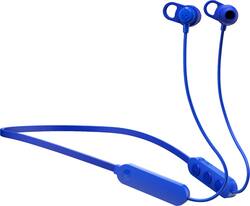
Skullcandy - Jib+ Wireless In-Ear Headphones - Blue
- Key Specs
- Sound Mode: Stereo
- Connection Type: Wireless
- Wireless Connectivity: Bluetooth (The manner in which a device sends data to another device over a short distance without the use of wires or cables.)
- True Wireless: false (These headphones not only lack wires between the device and headphones, they also lack wires between the headphones themselves. (true wireless is really only possible with in-ear headphones))
- Water Resistant: true (Resists some degree of water penetration.)
- Built-In Microphone: true
- Headphone Fit: In-Ear
- Battery Life: 6 hours (Battery life will vary depending on the product configuration, product model, applications loaded on the product, power management setting of the product and the product features used by the customer. As with all batteries, the maximum capacity of this battery will decrease with time and usage.)
- General
- Product Name: Jib+ Wireless In-Ear Headphones
- Brand: Skullcandy
- Ear Cushions: true
- Model Number: S2JPW-M101
- Audio
- Sound Isolating: true
- Sound Mode: Stereo
- Connectivity
- Connection Type: Wireless
- Wireless Connectivity: Bluetooth (The manner in which a device sends data to another device over a short distance without the use of wires or cables.)
- True Wireless: false (These headphones not only lack wires between the device and headphones, they also lack wires between the headphones themselves. (true wireless is really only possible with in-ear headphones))
- Features
- Water Resistant: true (Resists some degree of water penetration.)
- Built-In Microphone: true
- Controls: Call, Track selection, Volume
- Maximum Talk Time: 6 hours
- Design
- Headphone Fit: In-Ear
- Power
- Rechargeable: true
- Battery Life: 6 hours (Battery life will vary depending on the product configuration, product model, applications loaded on the product, power management setting of the product and the product features used by the customer. As with all batteries, the maximum capacity of this battery will decrease with time and usage.)
- Charging Interface(s): Micro USB (The connection for transmitting power to charge the device.)
- Other
- UPC: 878615098541
Enjoy your favorite tunes with these Skullcandy Jib+ wireless earbuds. The six hours of battery life ensure uninterrupted entertainment during long commutes, while the in-line microphone enables hands-free calls. These Skullcandy Jib+ wireless earbuds have a noise-isolating fit to deliver an immersive acoustic experience and are water-resistant for outdoor adventures.
- Rechargeable battery: Offers up to 6 hours of use on a charge.
- Built-in microphone: Enables simple hands-free chatting via a compatible device.
- Bluetooth interface: Enables simple wireless pairing with your Bluetooth-enabled device.
- In-ear design: Fits securely and directs music into your ears for full, uninterrupted audio.
- Headset controls: Include volume, answer/end and next/previous track.
- Stereo design: Delivers crisp tones.
Whats Included
- Skullcandy Jib+ Wireless
- 3 pairs of gel ear tips, micro-USB charging cable, secure clip
A: I just had this issue with these headphones and my phone. I think it has to do with which device is sending the pair request. What i did was this and i don't know why it worked: 1. Opened up found/nearby bluetooth devices on my phone 2. Turned on headphones and waited until i saw them pop up on phone. 3. Did NOT try to connect 4. Turned off headphones, but they still appeared on my phone screen because I hadn't refreshed the search for nearby devices 5. Try to connect to headphones even though I know they're powered off 6. Wait until it says cannot connect. 7. Turn on headphones. 8. Click them one last time and try to pair from the phone 9. This time it said "a device would like to pair" and I clicked yes and it paired So anyway good luck
A: WOW! how was no one able to answer this question after 3 pages of trouble shooting... Let me guess..... Your head phones aren't showing up as discoverable on your list of available devices? HERE IS HOW YOU PAIR YOUR SKULLCANDY HEADPHONES! The power button is, indeed, also the pairing button.... However..... 1.) Make sure your headphones are OFF. 2.) Press and hold power button (MIDDLE button) for 5 seconds. Do not release the power button until 5 seconds has passed. After 3 seconds, your headphones will power on. Continue to hold for 2 seconds longer after the head phones have turned on, and then your head phones will go into discoverable pairing mode. =)
Q: Do u have to charge up before u can use and how long
A: Usually every rechargable battery require a pre-charging break-in period. It usually fully empty and fully charged for 16 hrs twice at the begining of its lifetime
Q: How to charge ? Red light ? model Jib
A: When the Jib+ wireless earbuds are fully uncharged there will be a red light next to the charging port. You can use any USB port to plug the micro USB into to charge the Jib+ wireless earbuds.
A: Good Afternoon, When using your JIB Wireless headphones for calling, there should be no issue with the receiving end having audio quality problems. Please feel free to visit Skullcandy.com and submit a claim direct through our help platform. This is the best way to get you taken care of if the mic is not working properly on your headphones. Thanks again for reaching out and choosing Skullcandy! Best, SKDY
Q: On the regular, If I put it on the charger after it gets low how long does it take to recharge?
A: from 0 to 100% 2.5 hours maximum. With my experience 2 hours
Q: Does it work with calling? Does it have a microphone? Is there noise cancellation?
A: To answer in order: Yes it works with calling. Picking up the phone is play/pause, same with hanging up. Yes it has a microphone It does not have ACTIVE Noise cancellation, but there is a good amount of passive noise cancellation if you get the eartip size right
Q: How do you pair with headphones?
A: Hold power button until after you hear “power on” continue holding and you will hear “pairing.” Open your Bluetooth settings and click on the headphones.