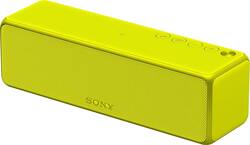
Sony - HG1 Hi-Res Portable Wireless Speaker - Yellow
- Key Specs
- Speaker Pairing: true (Wirelessly connect the speaker to another compatible speaker for a more immersive sound experience or multi-room audio. Pairing may require use of an app or additional setup.)
- Wireless: true
- Rechargeable: true
- USB Device Charging: true
- General
- Brand: Sony
- Model Number: SRSHG1/YEL
- Product Name: HG1 Hi-Res Portable Wireless Speaker
- Color: Yellow
- Audio
- High Resolution Audio: true (Hear music the way musicians and sound technicians intended it to be heard. Products that support hi-res audio deliver audio signals with a dynamic range and bandwidth far greater than that of a standard CD so you'll be able to enjoy pure music with outstanding sound quality. The device supports high-resolution audio signals, which more closely resemble the quality of music as it was originally recorded, with more texture and detail than can be heard via typical music streaming services or CDs.)
- Number of Speakers: 2
- Minimum Frequency Response: 20 hertz (Describes the maximum range of frequencies or musical tones a product can reproduce, from very low tones to very high treble tones. The minimum frequency or musical tone the speaker can reproduce. High treble tones have higher frequencies while low tones and deep bass have lower frequencies.)
- Maximum Frequency Response: 20000 hertz (Describes the maximum range of frequencies or musical tones a product can reproduce, from very low tones to very high treble tones. The maximum frequency or musical tone the speaker can reproduce. High treble tones have higher frequencies while low tones and deep bass have lower frequencies.)
- Speaker Pairing: true (Wirelessly connect the speaker to another compatible speaker for a more immersive sound experience or multi-room audio. Pairing may require use of an app or additional setup.)
- Connectivity
- Wireless Multi-Room Audio: true (Technology that allows multiple speakers and/or soundbars to be connected wirelessly and play audio in separate rooms.)
- Wireless: true
- Maximum Wireless Range: 98.4 feet
- Wireless Connectivity: Bluetooth, Wi-Fi (The manner in which a device sends data to another device over a short distance without the use of wires or cables.)
- Headphone Jack: false (The device features an interface that allows for the connection of headphones.)
- Auxiliary Input: true
- Features
- Remote Control Included: false
- Digital Display: false
- Clip-on: false
- Power
- Rechargeable: true
- Battery Life (up to): 12 hours (Battery life will vary depending on the product configuration, product model, applications loaded on the product, power management setting of the product and the product features used by the customer. As with all batteries, the maximum capacity of this battery will decrease with time and usage.)
- USB Device Charging: true
- Dimensions
- Product Height: 2.4 inches (The out of box height of the item. Height is measured as the vertical distance from the bottom of the item to the top as it would be primarily used or placed.)
- Product Width: 8 inches (The out of box width of the item. Width is measured as the horizontal distance from one side of the item to the other as it would be primarily used or placed.)
- Product Depth: 2.4 inches (The out of box depth of the item. Depth is measured as the distance from the front of the item to the back as it would be primarily used or placed.)
- Product Weight: 1.7 pounds (The out of box weight of the item.)
- Warranty
- Warranty - Parts: 1 year
- Warranty - Labor: 1 year
- Other
- UPC: 027242896093
Hear all the subtleties of your favorite music with the Sony h.ear go speaker. This portable speaker isolates the left and right channels for audio clarity and greater sound resolution. Connect the Sony h.ear go speaker wirelessly to multiple speakers for a multi-surround sound system experience, or share music via Bluetooth from your smartphone or tablet.
- Multiroom compatible portable speaker: Plays music in multiple rooms at once.
- Wireless streaming lets you access all the music you love in one place: Enjoy your music library, radio stations and online services.
- Play a different song in every room, at the same time: Tune in to an Internet radio station in the bedroom, stream a music service in the kitchen and play a song from your music library in the living room - simultaneously.
- DSEE HX technology: Offers rich audio.
- SBC sound decoders: Provide rich, detailed sound.
- Supports LDAC format: For high-resolution sound.
- Rich, powerful sound: Includes 2 full-ranges.
- Simple setup: Put your Sony wireless speaker in any room where you want music and connect it to your home Wi-Fi network. With the touch of a few buttons, you're ready to enjoy multiroom music.
- More ways to connect with the music you love: Wi-Fi and Bluetooth capability for pairing wireless devices, plus 3.5mm stereo mini input for wide-ranging compatibility.
- Multiroom compatible portable speaker: Plays music in multiple rooms at once.
- Wireless streaming lets you access all the music you love in one place: Enjoy your music library, radio stations and online services.
- Play a different song in every room, at the same time: Tune in to an Internet radio station in the bedroom, stream a music service in the kitchen and play a song from your music library in the living room - simultaneously.
- DSEE HX technology: Offers rich audio.
- SBC sound decoders: Provide rich, detailed sound.
- Supports LDAC format: For high-resolution sound.
- Rich, powerful sound: Includes 2 full-ranges.
- Simple setup: Put your Sony wireless speaker in any room where you want music and connect it to your home Wi-Fi network. With the touch of a few buttons, you're ready to enjoy multiroom music.
- More ways to connect with the music you love: Wi-Fi and Bluetooth capability for pairing wireless devices, plus 3.5mm stereo mini input for wide-ranging compatibility.
Whats Included
- Sony HG1 Hi-Res Portable Wireless Speaker
- Sony HG1 Hi-Res Portable Wireless Speaker
Product Manuals
A: Lithium ion and no not removable.
Q: Does this speaker function with wi-fi in addition to bluetooth?
A: Yes it works with both
A: The speaker is not really designed for TV use but if you want it closer you may need to purchase a Bluetooth receiver to connect to your TV.
A: This item does not have a radio.
A: Hi fizzEd, thanks for bringing this up. Please reach us at [email protected] with your concern so we can further assist you. Please also include your contact and product information. We will do our best to help you. Regards, ^Ron
A: Unfortunately, a regular USB thumb (or external hard) drive with music files on it definitely will NOT work. The USB port on the Sony SRS-HG1 cannot convert a digital signal to analog. You must use a USC DAC (Digital to Analog Converter) between the USB drive and the speaker in order to use the USB DAC port. The DAC converts the signal to a format the speaker can play. The Sony speakers that have DAC converters built-in, and thus can indeed play music files directly from a USB drive plugged into them are the Sony SRS-X88 ($499), SRS-X99 ($699), SRS-ZR7 ($299) & SRS-ZR5 ($199). In the attached screen shots you'll see my SRS-HG1 only has the "USB DAC" option, whereas my Sony SRS-X99 has both "USB DAC" (requires converter) and simply "USB" which would use the speaker's built-in DAC to convert the files - which is what you're looking for. The Sony SRS-HG1 is an awesome high-fidelity speaker with a decent amount of bass for its size, but it's best used in a network setup - be it using Spotify Connect or Google Cast, or Bluetooth as a last resort. USB DAC or plugging in a music player (like an iPod) via the 3.5mm auxiliary audio input are also options though.
A: Hi Kitty, We're sorry to hear that it's not pairing with your phone. Kindly refer to page 248 for troubleshooting steps to help isolate the issue. You may also check page 257 to reset the unit: https://docs.sony.com/release//Help_4589712115.pdf ~Ralph
Q: Will it be possible to run this speaker from Windows 10 on a pc?
A: Hi Pro, yes. The SRS-HG1 speaker works great with PCs running on Windows 10. Thanks, -Mark