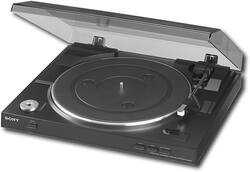
Sony - USB Stereo Turntable - Black
- Key Specs
- Drive Type: Belt drive
- Operation Type: Automatic (Automatic turntables move the tonearm into position to begin playing a record and remove it when the record is finished, typically with a single push of a button. Semi-automatic turntables require user interaction to place the tonearm inititally, but will automatically remove it after playback. Manual turntables require the user to place and remove the tonearm as needed.)
- Integrated Preamp: true (An audio component that amplifies the turntable's audio signal to a level compatible for connection to a sound system.)
- General
- Product Name: USB Stereo Turntable
- Brand: Sony
- Model Number: PSLX300USB
- Color: Black
- Audio
- Drive Type: Belt drive
- Operation Type: Automatic (Automatic turntables move the tonearm into position to begin playing a record and remove it when the record is finished, typically with a single push of a button. Semi-automatic turntables require user interaction to place the tonearm inititally, but will automatically remove it after playback. Manual turntables require the user to place and remove the tonearm as needed.)
- Integrated Preamp: true (An audio component that amplifies the turntable's audio signal to a level compatible for connection to a sound system.)
- Cartridge & Tonearm
- Stylus Shape: Diamond (A narrower contact radius produces better sound and reduces wear.)
- Dimensions
- Product Height: 13.5 inches (The out of box height of the item. Height is measured as the vertical distance from the bottom of the item to the top as it would be primarily used or placed.)
- Product Width: 15.7 inches (The out of box width of the item. Width is measured as the horizontal distance from one side of the item to the other as it would be primarily used or placed.)
- Product Depth: 13.5 inches (The out of box depth of the item. Depth is measured as the distance from the front of the item to the back as it would be primarily used or placed.)
- Product Weight: 6 pounds (The out of box weight of the item.)
- Included
- Speaker(s) Included: false
- Dust Cover Included: true
- Other
- UPC: 027242731271
Experience the nostalgic sound of vinyl with this fully automatic belt-driven turntable that supports 33-1/3 and 45 rpm record playback speeds and features a USB output for importing your favorite records' tracks to a PC.
Q: Can you use this turntable with your computer to make CDs?
A: Yes. You connect the USB cable, included, from the back of the turntable to your computer and install the Sony Sound Forge Studio software. The program has a wizard that walks you through recording LPs. Basically you open the wizard and it waits for you to click the "record" button on the screen. You start playing your album and after the needle drops click record. You can see it creating the wav file. When your song or LP is done playing you click "stop". The wizard will then ask you to enter the Artist name, Album Title, and Song Title(s). If you did record one whole side it will recognize the separate tracks and create separate wav files for each track. After the process completes you can use the wav files or click File, Save As and change the format to whatever else format you want (there are many options). You can burn it to a CD or listen using RealPlayer or MediaPlayer. It is very easy! I love it!
Q: can you hook it to a stereo system also
A: It has one cable with standard RCA Red/White jacks which you can connect to your receiver or stereo. If your stereo doesn't accept the Red/White jacks but has an AUX port (auxiliary) you can buy a short adapter cable that converts the two jack ends Red/White to one and then plug that into the AUX port.
Q: does the arm auto-reject at the end of an LP?
A: Absolutely. The Sony PS-LX300USB turntable operating instructions indicate on page 8 that, “When playback is finished, the tone arm returns to the arm stand automatically, then the platter stops rotating.” Good Luck.
Q: does it take the static noise out of lp
A: It does a beautiful job playing LP's but if your album has scratches and smudges you will hear it. It really helps if you clean your LP's with an electronic alcohol wipe, just once at least, to remove dust, hairs and smudges. You can use the Sony Sound Forge Studio software to remove the noise. It has editing and effects tools just for that purpose, as well as other things such as reverb, etc.
Q: Amplifier
A: Hello Judy. Welcome to the Best Buy community. Thank you for your question. Absolutely. You are correct that the Sony PS-LX300USB turntable does feature a built-in phono preamp and user adjustable equalizer switch that enables this unit to be compatible with any amplifier that does not feature a dedicated phono input. Rest assured, that you can connect the Sony turntable to your new receiver that is without a phono input. The built-in phono preamp brings the audio output of the turntable up to that of an ordinary line level input device such as a CD player, or cassette deck, etc. However, the operating instructions indicate on page 16 that the sound may become low or distorted if the turntable is not connected to an amplifier’s phono input. It is my opinion, that for best audio performance of the Sony turntable, this unit should be connected to an amplifier that features a dedicated phono input. Good Luck.
Q: What cartridge is in Model: PS-LX300USB
A: It's a Moving Magnet cartridge - the Sony part number is 9-885-117-76.
Q: Is the arm automatic or manual?
A: Hi there! the arm of this Sony PSLX300USB is fully automatic. When playback is finished, the tone arm returns to the arm stand automatically, then the platter stops rotating. -Ely
Q: Does this turntable work with windows 7? I have heard it does not
A: Yes, it works with Windows 7, I have windows 7 and it works great.














