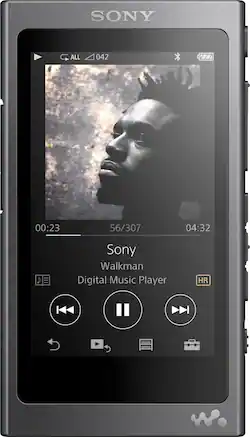
Sony - Walkman NW-A35 Hi-Res 16GB* MP3 Player - Charcoal black
- Key Specs
- Bluetooth Enabled: true (The device is capable of communicating with another device via Bluetooth, provided they are within the required range of each other. A Bluetooth-enabled device must also be the same Bluetooth version or higher than the accessory it is intended to pair with.)
- Storage Capacity: 16 gigabytes (Measured in megabytes (MB), gigabytes (GB) and terabytes (TB), this is the amount available for storing files, music, movies, photos and more. The total includes the capacity of the hard disk drive and solid state drive if both are included on the computer.)
- General
- Brand: Sony
- Model Number: NWA35/B
- Product Name: Walkman NW-A35 Hi-Res 16GB* MP3 Player
- Color: Charcoal black
- Audio
- High Resolution Audio: true (Hear music the way musicians and sound technicians intended it to be heard. Products that support hi-res audio deliver audio signals with a dynamic range and bandwidth far greater than that of a standard CD so you'll be able to enjoy pure music with outstanding sound quality. The device supports high-resolution audio signals, which more closely resemble the quality of music as it was originally recorded, with more texture and detail than can be heard via typical music streaming services or CDs.)
- Supported File Formats: AAC, AIFF, MP3, FLAC, Apple Lossless, Linear PCM, HE-AAC, ATRAC, DSD
- Connectivity
- Wi-Fi Compatible: false
- Input(s): USB 2.0
- Display
- Screen Size: 3.1 inches (Size of the screen, measured diagonally from corner to corner.)
- Display Screen: true
- Screen Resolution: 800 x 480 (Screens come in a range of resolutions (measured in pixels, horizontal x vertical). The higher the resolution, the greater the picture quality.)
- Touch Screen: true (Touch-screen devices make navigating more intuitive. Using a touch-screen display, you can do things such as tap to select, hold and drag to move items, swipe to scroll, and pinch to zoom.)
- Features
- Memory Card Slot: true
- Power
- Battery Chemistry: Lithium-ion
- Included
- Integrated Speaker(s): false
- Integrated Microphone: false
- Integrated Camera: None
- Cable(s) Included: true
- Software Included: true
- Dimensions
- Product Height: 3.8 inches (The out of box height of the item. Height is measured as the vertical distance from the bottom of the item to the top as it would be primarily used or placed.)
- Product Width: 2.2 inches (The out of box width of the item. Width is measured as the horizontal distance from one side of the item to the other as it would be primarily used or placed.)
- Product Length: 0.4 inches (The out of box length of the item. Length is measured as the longest dimension of the item.)
- Product Weight: 0.2 pounds (The out of box weight of the item.)
- Other
- UPC: 027242904644
Take your tunes wherever you go with this innovative Sony Walkman MP3 player. The 3.1-inch touch screen has an intuitive interface for easy control, and the S-Master HX and DSEE HX technology helps reduce distortion for crystal-clear sound. With expandable storage and a 45-hour battery life, this Sony Walkman MP3 player lets you listen longer.
- 16GB* internal flash memory: Offers ample space for storing media. Also supports microSDHC, microSD and microSDXC for expanded storage options.
- High resolution audio compatible: Enjoy up to 45 hours MP3, and 30 hours Hi-Res playback on a single charge.
- Supported formats: Include Apple® Lossless, WMA, AAC, AIFF and more audio formats so you can enjoy your music collection.
- 3.1" LCD display: Features touch screen.
- Radio FM tuner: Allows playing of your favorite FM stations.
- Adjustable equalizer: Lets you adjust the sound according to genre.
- Bluetooth: Enables easy connectivity. The mini-phone stereo 3.5 mm headphone jack enable private listening.
- Sony Media Go: Software included.
- PC compatible: For multifunctional use.
- 16GB* internal flash memory: Offers ample space for storing media. Also supports microSDHC, microSD and microSDXC for expanded storage options.
- High resolution audio compatible: Enjoy up to 45 hours MP3, and 30 hours Hi-Res playback on a single charge.
- Supported formats: Include Apple® Lossless, WMA, AAC, AIFF and more audio formats so you can enjoy your music collection.
- 3.1" LCD display: Features touch screen.
- Radio FM tuner: Allows playing of your favorite FM stations.
- Adjustable equalizer: Lets you adjust the sound according to genre.
- Bluetooth: Enables easy connectivity. The mini-phone stereo 3.5 mm headphone jack enable private listening.
- Sony Media Go: Software included.
- PC compatible: For multifunctional use.
Whats Included
- Sony Walkman NW-A35
- USB cable, WM-Port cap
- Sony Walkman NW-A35
- USB cable, WM-Port cap
Product Manuals
Q: Can I transfer my iTunes library from my Mac to this Sony device and what file formats will it play?
A: I can answer this question from firsthand experience. Yes, you can drag and drop entire playlists, individual songs, albums, artist collections, directly from iTunes on the Mac. Here's the details... you can only do this after downloading the Sony app from their website. It's a really basic application that becomes the place you drop the songs onto, and it converts some of the unsupported formats to what will work with the Walkman. You can also set the conversion settings in the Sony app to save space on the Walkman if you want to. The download link is included in the user manual. You can find the user manual on the Sony website if you want to check out the software before you buy the Walkman device. What formats will work with the Walkman? Here's what I've tried so far: M4A, ALAC, FLAC, MP3, WAV. What formats will not work? I have found that the protected type files will not work. For example, like 10 years ago I bought some songs from iTunes and those are protected format, meaning I have to sign in to iTunes to play them, and so they will not transfer to the Walkman.
A: Hi 1000XM2, yes, this Walkman works excellently with the 1000XM2 headphones. Our headphone application is great to have, but not required when using the headphone, even when using it with this Walkman. You may check this link for more information about this Walkman: https://www.sony.com/electronics/walkman/nw-a30-series Regards, -Mark
A: Sony does not like answering this question. I've asked them directly before and only received canned/circular responses. Here's my experience: Lower impedance headphones work better since this device can't push heavy drivers well at all. Personally, I use the Shure SE846 IEM buds when I'm at work. And I use the Sennheiser HD25-1 ii on ears at home. Both of these are low impedance and they both sound awesome and loud. I've tried high impedance headphones, specifically the T1 Tesla, and the perceived volume is very quiet due to the high resistance in those cans. For higher impedance cans I connect the Sony player to an RME ADI-2 Pro via USB. When I want to hear the Sony player's ClearAudio presentation, I will connect it to the RME's line input. I know you didn't ask this, but the frequency range is 20-40kHz. That should help you find low impedance headphones if you want to really enjoy this product.
Q: Will this play my audio books from my Audible library?'
A: Hi Jmcc, Yes, it will. Please check the supported formats of this Walkman in the link below. https://docs.sony.com/release//Help_4593956111.pdf Thanks, >Joffrey
Q: Will it support to view video
A: No, this item is not capable of video playback.
A: Yes, I plug mine to my car stereo everyday using the Aux cable. I don't know about the second part of your question. My stereo is a factory stereo and it doesn't show up on it.
Q: Does this come with the Remote control option in the Bluetooth settings?
A: Hi Obb6909, no a remote control option is not available in the Walkman's Bluetooth settings. You may check this link for additional information on this Walkman: https://docs.sony.com/release//SPECS/NWA35B_mksp.pdf Thanks, -Mark
Q: Is it easy to upload your cd collection to this walkman?
A: Sony has a downloadable app to help import CDs and send them to the Walkman. For PC: If you don't want to use the Sony app, you can use Windows Media Player to rip to FLAC, download the album art, go to the file location where you ripped the tracks, then drag/drop them onto the SD card or internal memory location found under "This PC" or "My Computer". There's a MUSIC folder you have to drop them onto though. So make sure you double-click the location and drop the files there. You can google each of those steps if you get stuck. For Mac: You can rip to iTunes, find the file location, drag/drop the album folder onto the SD card or internal memory location on your desktop (if you can't find it on your desktop, hit CMD+SHIFT+G, type /, hit enter, and find it there.