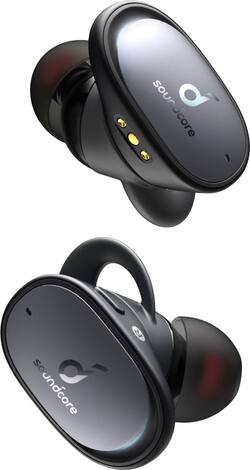
Soundcore - by Anker Liberty 2 Pro Earbuds True Wireless In-Ear Headphones - Black
- Key Specs
- Sound Mode: Stereo
- Connection Type: Wireless
- Wireless Connectivity: Bluetooth (The manner in which a device sends data to another device over a short distance without the use of wires or cables.)
- True Wireless: true (These headphones not only lack wires between the device and headphones, they also lack wires between the headphones themselves. (true wireless is really only possible with in-ear headphones))
- Built-In Microphone: true
- Headphone Fit: In-Ear
- Battery Life: 8 hours (Battery life will vary depending on the product configuration, product model, applications loaded on the product, power management setting of the product and the product features used by the customer. As with all batteries, the maximum capacity of this battery will decrease with time and usage.)
- General
- Product Name: by Anker Liberty 2 Pro Earbuds True Wireless In-Ear Headphones
- Brand: Soundcore
- Ear Cushions: true
- Model Number: A3909Z11
- Color: Black
- Audio
- Sound Isolating: false
- Sound Mode: Stereo
- Driver Size: 11 millimeters
- Connectivity
- Connection Type: Wireless
- Wireless Connectivity: Bluetooth (The manner in which a device sends data to another device over a short distance without the use of wires or cables.)
- True Wireless: true (These headphones not only lack wires between the device and headphones, they also lack wires between the headphones themselves. (true wireless is really only possible with in-ear headphones))
- Bluetooth Version: Other (The Bluetooth specification formalized by the Bluetooth Special Interest Group. All versions of the Bluetooth standard are backwards compatible with previous versions.)
- Features
- Built-In Microphone: true
- Maximum Talk Time: 8 hours
- Design
- Headphone Fit: In-Ear
- Power
- Rechargeable: true
- Battery Life: 8 hours (Battery life will vary depending on the product configuration, product model, applications loaded on the product, power management setting of the product and the product features used by the customer. As with all batteries, the maximum capacity of this battery will decrease with time and usage.)
- Warranty
- Manufacturer's Warranty - Parts: 18 months
- Manufacturer's Warranty - Labor: 18 months
- Other
- UPC: 194644015169
Create your customized sound profile for a more immersive listening experience with these Anker Soundcore Liberty 2 Pro earphones. The 11mm dynamic driver and in-ear design eliminate interference, delivering harmonized treble and bass for a full-bodied sound, while four microphones with noise-canceling technology let you pick and make calls with clarity from any location. These Anker Soundcore Liberty 2 Pro earphones are Qi-certified for rapid wireless charging.
- HearID customized sound: Hearing and ear analysis that intelligently creates your ideal sound profile for sublime sound. Also includes complete EQ control and 22 preset profiles.
- Astria coaxial acoustic architecture: Integrates a customized Knowles balanced armature and an 11mm dynamic driver into a single body. Aligned direct-to-ear, Astria completely eliminates interference while producing harmonised treble and bass for jaw-dropping sound.
- Truly-wireless earphones: Let you listen to your favorite tracks, so you won't be held back by wires.
- Rechargeable battery: Offers up to 8 hours of use on a charge.
- Quad-microphone calls: With 4 microphones and cVc 8.0 noise reduction, your voice is isolated and transmitted in high-clarity for a seamless hands-free experience.
- Bluetooth 5.0 interface: Enables simple wireless pairing with your Bluetooth-enabled device.
- In-ear design: Fits securely and directs music into your ears for full, uninterrupted audio.
- 11mm drivers: Deliver powerful sound.
- Several ways of charging: Charge via fast-charge USB-C or a Qi-certified wireless charger. Charge in the case for 10 minutes for 2 hours of listening.
- Extended playtime: 8-Hours of audio from a single charge to the earbuds, extended 4 times (32 hours) with the pebble charging case.
- Stereo design: Delivers crisp tones.
Whats Included
- 7 pairs of ear tips
- Anker Soundcore Liberty 2 Pro True Wireless In-Ear Headphones
A: I can't answer all of these questions but they do support one ear operation. Phone call quality is questionable. Sometimes they are good and sometimes the person on the other end can barely hear me
Q: Can you control the volume with the button on the headphone?
A: Yes. Go into the Soundcore app, and under settings, set up your preferences for each button on the left and right earbuds to control volume. I set mine up as a long press on the right earbud as volume up and a long press on the left earbud as volume down. Works perfect.
Q: What an where do I get a charger unit for soundcore ear buds
A: The charging case comes in the box. And you can charge it in a fast charging pad.
Q: Is one if the headphones slave or can they each be used independently of one another?
A: They can both be used independently.
Q: Are these the updated version?
A: No. They are not. Buy the AirPro 2 version because if you remove the right ear bud the left one automatically turns off. Great quality just horrible response from the convience side as a listener.
Q: can you end a call or make call with ear bud
A: Yes, you can do both...
A: 87dB~93dB If you have any further questions, please feel free to contact us via [email protected] or call us at +1 (800) 988 7973.
Q: How come only my right earbud is working
A: You really should read the instruction booklet that came in the box. It clearly states: In the pairing process, some devices are incompatible with Qualcomm True Wireless Primary-Secondary dual pairing names, it may notice “connection unsuccessful” when you tap “Pair” or even no screen popped out. Don’t worry and it will not influence the using. • Once successfully paired, the primary earbud connects with your device and transfers signal to the secondary earbud, the latter one will not connect with your device. As a result, in the Bluetooth pairing list on your device, it may indicate that only one side is connected while the other side is not Hope this helps...




















