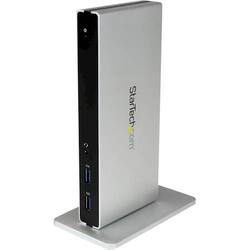
StarTech.com - DVI Dual-Monitor USB 3.0 Docking Station - Black / Silver
- Key Specs
- Maximum Number of Displays Supported: 2
- Maximum Supported Resolution: 4K (2160p)
- Number of DisplayPort Outputs (Total): 0
- Passthrough Power: true (Indicates whether the device allows power to passthrough, possibly with some loss, to another device, typically to charge that other device.)
- General
- Product Name: DVI Dual-Monitor USB 3.0 Docking Station
- Brand: StarTech.com
- Model Number: USB3SDOCKDD
- Display
- Maximum Number of Displays Supported: 2
- Maximum Supported Resolution: 4K (2160p)
- Ports
- Number of DisplayPort Outputs (Total): 0
- Number of HDMI Ports (Total): 1
- Number of VGA Ports: 1 (VGA (Video Graphics Adapter or Video Graphics Array) is a display standard that transmits via analog signals. This type of interface is typically used to connect a computer to a display device such as a monitor, projector, or TV.)
- Headphone Jack: true (The device features an interface that allows for the connection of headphones.)
- Power
- Powered: true
- Power Supply Included: true
- Cable Length: 3.2 feet
- Power Supply Input: USB Type C
- Maximum Input Power: 240 watts (The maximum amount of power allowed to come into the device.)
- Maximum Input Voltage: 240 volts
- Maximum Input Amperage: 0.7 amperes (The maximum amount of amperage allowed to come into the device.)
- Passthrough Power: true (Indicates whether the device allows power to passthrough, possibly with some loss, to another device, typically to charge that other device.)
- Power Supply Output: USB Type C (The connector type(s) used by the device to send electrical power to another device.)
- Maximum Output Power: 12 watts (The maximum amount of power produced or allowed to flow through the device.)
- Maximum Output Voltage: 12 volts
- Maximum Output Amperage: 2 amperes (The maximum amount of amperage produced or allowed to flow through the device.)
- Compatibility
- Maximum Data Speed: 5 megabits per second
- Brand Compatibility: Universal
- Model Compatibility: Universal
- Features
- Indicator Light(s): true
- Dimensions
- Product Height: 7 inches (The out of box height of the item. Height is measured as the vertical distance from the bottom of the item to the top as it would be primarily used or placed.)
- Product Length: 3.3 inches (The out of box length of the item. Length is measured as the longest dimension of the item.)
- Product Width: 0.9 inches (The out of box width of the item. Width is measured as the horizontal distance from one side of the item to the other as it would be primarily used or placed.)
- Product Weight: 10.1 ounces (The out of box weight of the item.)
- Other
- UPC: 065030858267
Connect two monitors to your laptop with this DVI dual-monitor docking station. It includes adapters to connect a DVI monitor to HDMI or VGA connections, and the front panel has two USB ports, so you can charge devices without a host connection. Use this DVI dual-monitor docking station horizontally or vertically to suit your setup.
- Universal compatibility: Works with USB-enabled laptops and Windows-based tablets, such as Microsoft Surface Pro 4 and Surface Book.
- 5 USB 3.0 ports: Including two front panel USB 3.0 Fast-charge & synchronization ports.
- Dual-monitor output: Dual DVI connection; includes DVI to HDMI, and DVI to VGA adapters.
- Gigabit Ethernet connectivity: Allows you to access the Internet at high speed.
- Customize your workspace: Neatly set up in mixed environments with upright or horizontal positioning through an included optional stand.
- Audio/microphone combo port: Allows you to connect your headset to the docking station.
- AC adapter and 3.28ft. USB 3.0 cable: Simplify setup and get started right away.
Whats Included
- StarTech.com DVI Dual-Monitor USB 3.0 Docking Station
- 1m USB 3.0 cable (USB-A to USB-B)
- DVI to HDMI and DVI to VGA adapters
- Stand and 2x stand screws
- Screwdriver
- 4x rubber feet
- Universal power adapter (NA/JP, EU, UK, ANZ)
- Driver CD
- Instruction manual
Q: Does it charge laptop or do I need to use my laptop power cord also?
A: No, you will still need the laptop's AC adapter.
Q: What is the docking station needed for? Advantages?
A: The docking station is great for adding monitors to a laptop. You use one USB port in your laptop and can attach two monitors. I currently am using 2 external monitors and my laptop display so I have 3 monitors to spread my work over. It also has additional USB ports so you are not losing the one you plug the docking station into. When I want to take my laptop on the road, I only have that one cable and the power to unplug, instead of two monitor cables, USB printer and power.
A: Yes, once you have your dual monitor set-up, you will just need to change the Display Setting on your laptop to "Extend" instead of "Duplicate" what's on your laptop to the monitors.
A: Yes you can! That's the same thing I'm using my docking station for!
A: The disc for the USB3SDOCKDD includes the manual and drivers which can also be found on our website for download. Atha, StarTech.com Support
Q: Is it compatible with Windows 7 and Windows 10?
A: Works with both operating systems.
Q: Does this allow extending monitors or is it mirroring only?
A: I use it to extend. I have my small 11.1" laptop screen extended across 2 and sometimes 3 monitors with this.