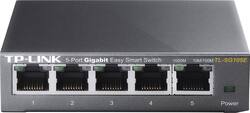
TP-Link - 5-Port 10/100/1000 Mbps Gigabit Smart Ethernet Metal Switch - Gray
- Key Specs
- Number of LAN Ports: 5 (Number of devices able to be connected to the Local Area Network (LAN). LAN ports allow wired connections to other networking devices (wireless access points, range extenders, etc.) in order to share the internet connection received through a WAN port.)
- General
- Product Name: 5-Port 10/100/1000 Mbps Gigabit Smart Ethernet Metal Switch
- Brand: TP-Link
- Model Number: TL-SG105E
- Color: Gray
- Features
- Auto Detecting: true
- Auto Speed Sensing: true
- Speed
- Gigabit Ethernet Speed: true (Supports the gigabit Ethernet networking standard, which has a data rate of at least one gigabit per second, or 1,000 Mbps.)
- Compatibility
- System Requirements: PC: Windows XP, Vista, 7 or 8 (The software that a product must have for it to be able to integrate with another product.)
- Dimensions
- Product Height: 1 inches (The out of box height of the item. Height is measured as the vertical distance from the bottom of the item to the top as it would be primarily used or placed.)
- Product Length: 3.9 inches (The out of box length of the item. Length is measured as the longest dimension of the item.)
- Product Width: 3.9 inches (The out of box width of the item. Width is measured as the horizontal distance from one side of the item to the other as it would be primarily used or placed.)
- Warranty
- Manufacturer's Warranty - Parts: 5 years limited
- Manufacturer's Warranty - Labor: 5 years limited
- Other
- UPC: 845973022037
Upgrade your equipment for your small or medium business network with this TP-LINK TL-SG105E Gigabit smart switch, which offers 5 10/100/1000 Mbps ports with port-based priority setup, making it easy to integrate with your infrastructure.
- 5-port Gigabit easy smart switch: Allows you to upgrade the equipment on your small or medium business network, to suit your needs.
- Port-based priority management setup: Helps ensure clear, smooth, lag-free voice and video.
- Power-down idle ports: Auto sense when connected equipment is off or idling to help conserve energy.
- Auto MDI/MDI-X crossover on all ports: Eliminates the need for crossover cables or uplink ports, facilitating setup.
- Compact size: Ideal for placement on desktops with limited space. Switch can also be mounted on a rack for flexible placement.
- Green Ethernet technology: Helps reduce power consumption.
- 16K jumbo frame: Boosts performance when transferring large amounts of data.
- Port Mirroring, Loop Prevention and Cable Diagnostics: Enable effective network monitoring.
Whats Included
- 5-Port 10/100/1000 Mbps Gigabit Smart Ethernet Metal Switch
- Owner's manual
- Power cord
A: Yes that's what I use it for my TP.
Q: Is this an "Unmanaged" Switch device?
A: I'm just using it in default mode but I know it can be configured to do things like add or strip VLAN tags on the ports, etc, because I know someone else who is using one that way.
Q: Does it matter what brand you get of port extender
A: If you are looking for a simple, unmanaged network switch that supports Gigabit Ethernet connectivity, this model will work just fine and is universally compatible with routers that provide Ethernet connections.
Q: Can I run a line from my modem to this and then run another line out of this to run 2 devices ?
A: If by modem you mean combo modem/router then yes, that is what this device is for. If you're trying to split the signal before it gets to a router, this device isn't going to work for you.
A: Absolutely! Simply connect the switch to one of the LAN ports on your CenturyLink gateway to provide additional Ethernet connectivity to your home. Regards, TP-Link Support
A: Both will work. More speed is possible only if you can get wired connection from the switch and True speed depends on the internet plan.
Q: Can this switch provide power over ethernet?
A: Hi! No, the TL-SG105E is not a PoE switch. For a PoE alternative, please consider our TL-SG105PE model instead.
A: Yes, you can segment the network (set up a VLAN). See the TPLink website for the instructions on how to do it.