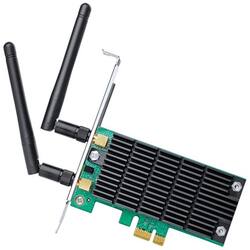
TP-Link - AC1300 Dual-Band Wireless PCI Express Card - Black
- Key Specs
- Wireless Networking Standard: Wi-Fi 5 (The wireless networking standard used by the device. Each iteration of the standard developed by the Wi-Fi Alliance corresponds to an existing IEEE 802.11 protocol; for example, standard 802.11ac (or AC) is termed Wi-Fi 5. Refers specifically to the standard the device is designed to use, but ultimately determines product interoperability and backward compatibility including previous versions.)
- General
- Product Name: AC1300 Dual-Band Wireless PCI Express Card
- Brand: TP-Link
- Model Number: ARCHER T6E
- Color: Black
- Network
- Wireless Networking Standard: Wi-Fi 5 (The wireless networking standard used by the device. Each iteration of the standard developed by the Wi-Fi Alliance corresponds to an existing IEEE 802.11 protocol; for example, standard 802.11ac (or AC) is termed Wi-Fi 5. Refers specifically to the standard the device is designed to use, but ultimately determines product interoperability and backward compatibility including previous versions.)
- Wireless Standard: AC, N (The wireless networking protocol used by the device. Each iteration of the protocol is based on the 802.11 standard developed by the Institute of Electrical and Electronics Engineers (IEEE) Standards Association. Denoted by letters following 802.11 (802.11a, 802.11ac, etc.), each version, published in alphabetical order, encompasses all previous versions.)
- Compatibility
- System Requirements: Microsoft Windows XP / 7 / 8 / 8.1 (32/64 bits) (The software that a product must have for it to be able to integrate with another product.)
- Operating System Compatibility: Windows XP, Windows 7, Windows 8, Windows 8.1
- Dimensions
- Product Height: 4.8 inches (The out of box height of the item. Height is measured as the vertical distance from the bottom of the item to the top as it would be primarily used or placed.)
- Product Length: 4.5 inches (The out of box length of the item. Length is measured as the longest dimension of the item.)
- Product Width: 0.8 inches (The out of box width of the item. Width is measured as the horizontal distance from one side of the item to the other as it would be primarily used or placed.)
- Warranty
- Manufacturer's Warranty - Parts: 2 years
- Manufacturer's Warranty - Labor: 2 years
- Other
- UPC: 845973092559
Transform your desktop with this TP-Link dual-band wireless PCI Express adapter. It provides high-speed Wi-Fi up to 1300 Mbps for exceptional gaming capability and has two external antennae to ensure a stable connection. This TP-Link dual-band wireless PCI Express adapter is three times faster than the 802.11n standard for high-intensity network usage.
- Wireless-AC: Enjoy a high speed Internet connection with data speeds of up to 1200 Mbps on a dual-band 2.4GHz/5.0GHz frequency.
- Compatible with 802.11ac: Backward compatible with 802.11b/a/g/n networks for versatile use.
- Plug-in card network adapter for wireless devices: So you can connect an additional device.
- Network security: Guard your information with 128-bit WEP, 64-bit WEP, WPA-PSK and WPA2-PSK encryption.
- PC system requirements: Microsoft Windows XP/7/8/8.1 (32/64 bits).
Whats Included
- TP-Link AC1300 Dual-Band Wireless PCI Express Card
Q: Hi, Does this network card provide bluetooth functionality as well?
A: No, the Archer T6E is designed to provide dual-band AC1300 WiFi connectivity; not Bluetooth. Regards, TP-Link Support
A: We recommend ensuring the latest official driver is installed, which can be downloaded from our website here: https://www.tp-link.com/us/support/download/archer-t6e/#Driver We also suggest connecting via the 5GHz band, which offers higher bandwidth and lower latency, as long as your router supports 5GHz and is providing sufficient signal. Regards, TP-Link Support
A: A Wireless NIC is a WiFi adapter. If your computer already has a functioning wireless NIC, you should not need to install another one unless you have a specific purpose in mind.
A: Yes, as long as you configure your system appropriately using your operating system's control panel or device manager options. Regards, TP-Link Support
A: Yes it provides a dual band, wireless connection. Works out of the box with Win10 once the software is installed.
A: We would first recommend installing the Archer T4E driver from our official website here: https://www.tp-link.com/us/support/download/archer-t6e/#Driver If you have any remaining concerns, please reach out to our official TP-Link support team using any of the options available on our official website here: https://www.tp-link.com/us/support/contact-technical-support/
A: Your PCIe WiFi card should not be emitting any noise whatsoever. Please reach out to our support team using any of the options here and they'll gladly help troubleshoot this for you: https://www.tp-link.com/us/support/contact-technical-support/
Q: Will this work with windows 11?
A: Yes.