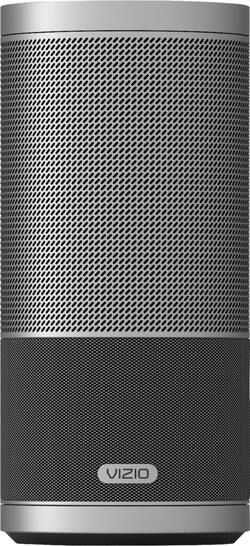
VIZIO - SmartCast Crave 360 Wireless Speaker for Streaming Music (1-Pack) - Silver
- Key Specs
- Speaker Type: All-In-One
- General
- Product Name: SmartCast Crave 360 Wireless Speaker for Streaming Music (1-Pack)
- Brand: VIZIO
- Model Number: SP50-D5
- Color: Silver
- Audio
- Speaker Type: All-In-One
- Minimum Frequency Response: 50 hertz (Describes the maximum range of frequencies or musical tones a product can reproduce, from very low tones to very high treble tones. The minimum frequency or musical tone the speaker can reproduce. High treble tones have higher frequencies while low tones and deep bass have lower frequencies.)
- Maximum Frequency Response: 20 kilohertz (Describes the maximum range of frequencies or musical tones a product can reproduce, from very low tones to very high treble tones. The maximum frequency or musical tone the speaker can reproduce. High treble tones have higher frequencies while low tones and deep bass have lower frequencies.)
- Number of Speakers: 4
- Connectivity
- Wireless Multi-Room Audio: true (Technology that allows multiple speakers and/or soundbars to be connected wirelessly and play audio in separate rooms.)
- Dimensions
- Product Height: 10 inches (The out of box height of the item. Height is measured as the vertical distance from the bottom of the item to the top as it would be primarily used or placed.)
- Product Width: 7.4 inches (The out of box width of the item. Width is measured as the horizontal distance from one side of the item to the other as it would be primarily used or placed.)
- Product Depth: 8.15 inches (The out of box depth of the item. Depth is measured as the distance from the front of the item to the back as it would be primarily used or placed.)
- Product Weight: 5 pounds (The out of box weight of the item.)
- Included
- Cable(s) Included: None
- Certifications Listings & Approvals
- ENERGY STAR Certified: true (Devices carrying the ENERGY STAR service mark, such as computer products and peripherals, kitchen appliances, and other products, generally use 20% to 30% less energy than required by federal standards.)
- Other
- UPC: 845226043765
Play music with omnidirectional sound by using this VIZIO SmartCast speaker. This portable 2.1-channel speaker produces an amazing 360 degrees of perfect stereo sound. Simply tap the intuitive touch surface of the VIZIO SmartCast speaker to play or pause, swipe to skip the song and twist to control the volume.
- Multiroom compatible speaker: Plays music in multiple rooms at once.
- Wireless streaming lets you access all the music you love in one place: Enjoy your music library, radio stations and online services.
- VIZIO SmartCast™: Download the app to turn your smartphone or tablet into a touchscreen remote. Easily search, discover and browse for content and control multiple VIZIO SmartCast enabled sound bars or speakers from anywhere in your home.
- Google Cast connectivity: Transfer music straight from your phone or tablet.
- Works with Google Home powered by the Google Assistant: Stream your favorite entertainment using just your voice. Turn up the volume, play your favorite show, or stop the music - all without having to raise a finger.
- DTS Studio Sound technology: Offers rich audio.
- DTS TruVolume sound decoders: Provide rich, detailed sound.
- 2.1-channel speaker system: Sends the right frequencies to the right speakers for outstanding audio.
- Rich, powerful sound: Includes a subwoofer and 4 full-ranges.
- Simple setup: Put your VIZIO wireless speaker in any room where you want music and connect it to your home Wi-Fi network. With the touch of a few buttons, you're ready to enjoy multiroom music.
- More ways to connect with the music you love: Wi-Fi and Bluetooth capability for pairing wireless devices.
Whats Included
- VIZIO SmartCast Crave 360 Wireless Speaker for Streaming Music (1-Pack)
Q: I lost my charging base. How do I get a replacement; and is there an alternative way to charge it?
A: You cannot get a replacement charger. And there is no way to alternatively charge the speaker. I lost my charger as well. I contacted Vizio about this. And they at first gave me the run around, before finally just saying what I said above...
A: YES you can! Attach a Bluetooth transmitter to your tv’s audio out & transmit to your Crave via Bluetooth.
A: Hello, Typical battery life is about 8 hours. Thanks for your question!
Q: Will it pair with an Iphone 11 Pro Max to play music from Apple Music or Youtube?
A: I have an iPhone XR with current Bluetooth and it pairs with the speaker perfectly. I can only presume it will connect with your iPhone 11.
Q: Is this compatible with Amazon Echo devices allowing multi-room set ups?
A: Yes. It work great
Q: Can you pair two of these speakers together in bluetooth mode for stereo?
A: If your device supports multiple Bluetooth outputs then this may work however the speakers can not pair together using Bluetooth. You can add both devices to a Google Home group and cast audio to both devices at the same time.
A: Make sure you have pressed the Bluetooth button only once - if you press it again it will turn off Bluetooth on the speaker. It should announce that it is in pairing mode via a voice prompt from the speaker. On your phone, you may sometimes need to go to Settings and Bluetooth and turn Bluetooth off then on while the speaker is looking for your phone. I needed to do this and then also hit the refresh symbol on the phone screen. Suddenly the Sport appeared as in the pairing list on the phone.




















