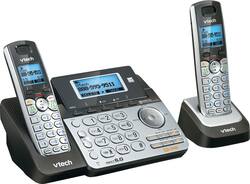
VTech - DS6151-2 DECT 6.0 Expandable Cordless Phone System with Digital Answering System - Black/Silver
- Key Specs
- Speakerphone: true
- Expandable: true
- Frequency: DECT 6.0 Digital (A measurement of the electromagnetic radio waves a device emits.)
- Paging Locator: true
- Answering System Included: true
- General
- Product Name: DS6151-2 DECT 6.0 Expandable Cordless Phone System with Digital Answering System
- Brand: VTech
- Model Number: DS6151-2
- Features
- Backlit Keypad: true (Integrated lights allow for visibility of the keys in low-light conditions.)
- Volume Control: true
- Time/Day Stamp: true
- Intercom: true (Allow two or more people to carry on a conversation over a wired circuit.)
- Display Type: LCD
- Dialing Mode(s): Pulse, Tone
- Call Waiting: true
- Caller ID: true
- Number Of Incoming Lines: 2
- Call Conferencing: true
- Message Counter Display: true
- Call Functions
- Flash Function: false
- Hold Button: true
- Conference Call Capability: Yes
- Included
- Handsets Included: true
- Number Of Expansion Base Stations Included: 1
- Number Of Expansion Handsets Included: 2
- Compatibility
- Hearing Aid Compatible: true
- Number Of Expansion Handsets Supported: 12
- Storage
- Caller ID Memory: 50 gigabytes
- Phone Book Memory Size: 50 gigabytes
- Total Record Time: 13 minutes
- Certifications Listings & Approvals
- ENERGY STAR Certified: false (Devices carrying the ENERGY STAR service mark, such as computer products and peripherals, kitchen appliances, and other products, generally use 20% to 30% less energy than required by federal standards.)
- Other
- Battery Capacity: 500 milliampere hours (The amount of energy stored in the battery.)
- UPC: 735078041579
Manage personal and business calls with this VTech dual-line answering system. Its two handsets enable call transfers, phone conferencing and intercom functionality, and its dual caller ID feature lets you know who's on the line. Talk hands-free and include more people in a call via the speakerphone function of this VTech dual-line answering system.
- Expandable Two-line phone system: Includes cordless base station with digital answering system and two line operation plus 2 cordless handsets and is expandable to 12 handsets.
- DECT 6.0 digital technology: For interference-free, secure calls and clear sound.
- Answering system: Features up to 13 minutes of record time. Retrieve messages from a handset from anywhere in your home. Date-and-time stamp on every message helps you keep track of calls.
- Backlit base unit and handset displays: For a clear view of call and message information. Backlit keypads make dialing easy.
- Call waiting/caller ID with 50-name-and-number memory: Displays the name and number of incoming calls and remembers up to 50 callers for convenient callback.
- Intercom: Enables communication between the handset and the base unit.
- 50-name-and-number phone book: Keeps contact information close at hand. Last-20-number redial makes it easy to reach recent callers.
- Call conferencing and speakerphone options: Make group calls simple.
- Volume control: Lets you adjust the sound level to suit your preferences.
Whats Included
- VTech DS6151
- Additional handset
- Power adapter
- 2 x phone line cable
Product Manuals
Q: VTECH-DS6151-2 Can I retrieve messages REMOTELY from another location than home???
A: Lucy - Yes, you can listen to messages left on the built in answering machine of the DS6151 remotely. You can follow the instructions below. 1. Dial your telephone number from any touch-tone telephone. 2. When the system plays your announcement, enter the two-digit security code. (security code is set to 19 by default unless you changed it) 3. The system will then play all new messages. If there are no new messages, all old messages play. You can also enter one of the following remote commands Command Function Press 1 - Play all messages. Press 2 - Play only new messages. Press 3 - Delete the current message (during playback). Press 33 - Delete all old messages. Press 4 - Repeat the current message (during playback). Press 44 - Skip to the previous message (during playback). Press 5 - Stop. Press *5 - Hear a list of remote commands. Press 6 - Skip to the next message (during playback). Press *7 - Record a new announcement. Press 8 - End the call. Press 0 - Turn the answering system on or off. Hang up or press 8 to end the call. Hope this helps!
A: Hi - The call screening feature of the VTech DS6151 can be set to off. Here's how you can turn off the said feature. Step 1: Press the MENU softkey on the cordless handset when not in use. Step 2: Press the SELECT softkey, to select answering system, Step 3: Press the arrow down button to scroll to Mailbox 1 or 2, then press the SELECT softkey. Step 4: Press the arrow down button to scroll to Ans sys setup, then press the SELECT softkey. Step 5: Press the arrow down button to scroll to Call screening, then press the SELECT softkey. Step 6: : Press the arrow down button to scroll to OFF, then press the SELECT softkey. Hope this helps!
Q: Does the base beep when you have a message
A: Hello Lesley - Yes, the VTech DS6151-2 has a message alert tone feature. The telephone base beeps every 10 seconds to alert you of new messages when the said feature is set to on. Thank you, -VTech Support
A: Tama - The VTech DS6151 does not have Music on Hold feature. You can check the CM18445 phone model if you are interested on a multi-line unit with Music on Hold. Thank you, -VTech Support
A: This phone will go through a single moden concrete and pan floor but not 2. We tried in in a building in LA and it worked for single floor but not 2, it will go through 3 drywall walls with one a firewall.
A: undefined



















