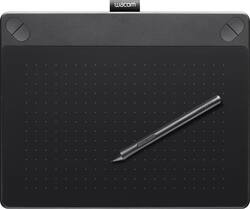
Wacom - Intuos Art Creative Medium Pen and Touch Tablet - Black
- Key Specs
- Number of Buttons (Total): 4
- General
- Product Name: Intuos Art Creative Medium Pen and Touch Tablet
- Brand: Wacom
- System Requirements: PC: Windows 7, 8 or 10; Mac: OS X 10.8.5 or later; USB port; CD-ROM or DVD-ROM drive; Internet connection (The software that a product must have for it to be able to integrate with another product.)
- Model Number: CTH690AK
- Features
- Mouse Type: Touchpad
- Performance
- Mouse Operation: Other
- Handedness: Ambidextrous
- Tracking Method: Touchpad (There are several types of computer mice, optical and laser being among the most common. Optical mice detect less detail and provide more precise and accurate movement. Laser mice detect more detail and can be used on a wider variety of surfaces, but are more sensitive to small movements.)
- Number of Buttons (Total): 4
- Connectivity
- Wired Connectivity: USB
- Operating System Compatibility: Windows
- Power
- Mouse Power Source: Wired
- Included
- Mouse Pad Included: false
- Dimensions
- Product Height: 0.43 inches (The out of box height of the item. Height is measured as the vertical distance from the bottom of the item to the top as it would be primarily used or placed.)
- Product Length: 8.75 inches (The out of box length of the item. Length is measured as the longest dimension of the item.)
- Product Width: 10.75 inches (The out of box width of the item. Width is measured as the horizontal distance from one side of the item to the other as it would be primarily used or placed.)
- Product Weight: 20 ounces (The out of box weight of the item.)
- Warranty
- Manufacturer's Warranty - Parts: 1 year
- Manufacturer's Warranty - Labor: 1 year
- Other
- UPC: 753218989260
Wacom Intuos Art Creative Medium Pen and Touch Tablet: Create memorable graphic designs with this intuitive tablet, which lets you mirror a variety of brushstrokes with the pen and offers multitouch gesture support for simple navigation. ExpressKeys make customization easy.
- Take your artwork to the next level: Sketch, paint, design and edit with a pressure-sensitive pen on a digital canvas. Create with a natural line in paint, pastels, ink, charcoal and more.
- Battery-free, pressure-sensitive pen: Helps you draw thick and thin lines depending on how hard you push on the pen.
- Create stunning digital artwork: Multitouch tablet offers gesture support, so you can zoom, scroll and navigate your work.
- Comes with an art pack: With Corel Painter Essentials drawing and painting software, online tutorials and redeemable Shutterfly perks.
- Assign important functions for fast access: ExpressKeys allow easy customization, so you can quickly change tips or tools.
- Stay comfortable while you work: The ergonomic design helps minimize strain and discomfort for right- and left-handed users during long sessions.
- Wired connection is quick and easy: Simply plug into 1 of your computer's USB ports. Supports wireless connectivity with optional accessory kit (not included).
- Compatible with PC and Mac computers: For wide-ranging use.
Whats Included
- Intuos Art Creative Medium Pen and Touch Tablet
- Software CD
- Owner's manual
Q: what is the difference between the small pen and the medium pen
A: It's the same pen. It is the tablet size that is different. Medium active area is 8.5 in x 5.3 in. Small active area is 6.0 in x 3.7 in.
Q: Does it make a huge difference between the small and med tablet size as far as drawing ability ?
A: It doesn't affect drawing ability, but may affect usability. This may require a bit of explanation. With any size tablet you can zoom in or out on your artwork in your paint program, so the tablet size doesn't affect the level of detail or precision you get. The tablets typically map out to the size of your screen, so you have to move the pen farther on a larger tablet to reach user interface elements on your screen. If you're primarily using the tablet for drawing that's probably not a big issue, but if you switch back and forth between different programs while using the tablet you'll find you're moving your arm much more if you use the large (or larger) size tablet vs. the medium tablet. The small tablet has the opposite problem: it's size doesn't allow you to hit user interface elements with precision, you have to concentrate to get it right without hunting. Larger tablets may have more space for virtual buttons and macro triggers, which may also affect usability.
A: If you do not have a CD drive the software can be downloaded online.
A: The Intuos family had received an update through the driver that allowed the mechanism in the pen to adapt and support 2048 levels of pressure. The current Intuos family now supports 2048 levels of pressure
A: Travel is easiest with a laptop.
Q: Is this 3 D?
A: No. This is the Medium Size Intuous Art. Here are the Product Codes for that series: Small: CTH-490AK (Black) CTH-490AB (Blue) Medium: CTH-690AK (Black) CTH-690AB (Blue) You are looking for Product Code CTH690TK. It will be a purple box with a dragon on it. The words Intuos 3D in the upper left hand corner. In the lower left corner it will read: Creative Pen & Touch Table + ZBrushCore software Everything you need to create amazing 3D models Finally, there will be a purple label that states: "Includes 3D Pack" I will attempt to add a photo.
Q: Is there any software that you suggest my daugther should get to interact with this tablet?
A: I Use FireAlpaca and Krita to draw with my tablet. They're both free, fun, and simple. Perfect for beginners.
Q: The programs included are they 30 day trials?
A: No they are not trials, they are yours forever.













