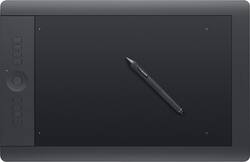
Wacom - Intuos Professional Pen and Large Touch Tablet - Black
- General
- Product Name: Intuos Professional Pen and Large Touch Tablet
- Brand: Wacom
- Model Number: PTH851
- Features
- Mouse Type: Touchpad
- Performance
- Mouse Operation: Other
- Handedness: Ambidextrous
- Tracking Method: Touchpad (There are several types of computer mice, optical and laser being among the most common. Optical mice detect less detail and provide more precise and accurate movement. Laser mice detect more detail and can be used on a wider variety of surfaces, but are more sensitive to small movements.)
- Connectivity
- Wireless Connectivity: Bluetooth (The manner in which a device sends data to another device over a short distance without the use of wires or cables.)
- Wired Connectivity: USB
- Operating System Compatibility: Windows
- Power
- Mouse Power Source: Wired
- Batteries Included: true (Indicates whether the product comes with the required batteries for its operation.)
- Dimensions
- Product Height: 0.6 inches (The out of box height of the item. Height is measured as the vertical distance from the bottom of the item to the top as it would be primarily used or placed.)
- Product Length: 19.1 inches (The out of box length of the item. Length is measured as the longest dimension of the item.)
- Product Width: 12.5 inches (The out of box width of the item. Width is measured as the horizontal distance from one side of the item to the other as it would be primarily used or placed.)
- Product Weight: 62.4 ounces (The out of box weight of the item.)
- Warranty
- Manufacturer's Warranty - Parts: 2 years
- Manufacturer's Warranty - Labor: 2 years
- Other
- UPC: 753218990938
Easily create expressive digital artwork with this Wacom Intuos Professional PTH851 pen and tablet, which offer a large workspace and intuitive multitouch interface, enabling sweeping, broad motions to accommodate your artistic style.
- Multitouch tablet: Lets you pan, zoom and navigate on-screen content naturally using gestures for intuitive operation. The generous workspace accommodates full-range-of-motion artistic styles and creative professionals who work in large formats.
- ±60 levels of tilt recognition: Provide a responsive interface.
- Pen: With 2,048 levels of pressure sensitivity in both the pen's tip and eraser offers the accuracy and feel of traditional brushes, pens and markers, so you can easily draw on the tablet. Ambidextrous design enables right- or left-handed use.
- 8 customizable, application-specific ExpressKeys: Along with a finger-sensitive Touch Ring with 4 customizable functions provide quick and easy access to your favorite shortcuts.
- Custom radial menus and an Express View display: Simplify operation.
- Included wireless kit: Allows cord-free use for flexible placement options. USB interface enables easy wired connection to your PC or Mac via an included 6.6' USB cable.
Whats Included
- Wacom Intuos Professional Pen and Large Touch Tablet
- Pen stand, assorted replacement pen tips
- Wireless kit, 6.6' USB cable
- Color identification rings
- Installation CD-ROM with driver, software download instructions
- Owner's manual
Q: What is the difference between the professional and the pro bc one cost more. Just wondering
A: Thank you for your question. To judge by the description it looks like you are referring to the current line of intuos pro and the previous generation of Intuos Pro, that one you call Professional is the previous generation and there is a number of improvements with the last model. The new model for example the pen has 4 times the pen pressure levels and the the tilt is more smooth. The tablet counts with Bluetooth built in. The overall size of the tablet is more compact but the active area is the same, it also brings the active area closer to your desk with a lower profile. The new model also counts with the ability to turn into Paper mode and this allows you to use real ink and paper (special pen needed for this) to capture the digital input on paper. Hope that helps, Regards
Q: Can you see the drawings on the tablet?
A: No, they are displayed on a screen.
Q: Will this tablet sense your hand? Or just the pen?
A: Mine only senses my pen. That way you don't smudge it accidentally btw.
Q: Is there any way that I can make payments on this tablet? Also is this compatible with Windows 10?
A: If you get the Best Buy credit card you have 1 year with with no interest and make payments and yes it's compatible with windows 10.
A: Yes, you absolutely need a computer. The tablet is a device like a computer mouse that you draw with using a pen. The whole shebang has to be plugged in to computer. Don't believe otherwise.


















