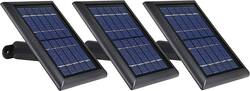
Wasserstein - Solar Panel for Arlo Ultra 2 and Arlo Pro 4 Surveillance Cameras (3-Pack) - Black
- General
- Product Name: Solar Panel for Arlo Ultra 2 and Arlo Pro 4 Surveillance Cameras (3-Pack)
- Brand: Wasserstein
- Model Number: ArloUltraSolarBlk3pkUS
- Color: Black
- Color Category: Black
- Power
- Storage Battery Included: false
- Features
- Mount Type: Wall
- Solar Panel Design: Rigid
- Inverter Included: false
- Dimensions
- Product Height: 2.6 inches (The out of box height of the item. Height is measured as the vertical distance from the bottom of the item to the top as it would be primarily used or placed.)
- Product Width: 8.3 inches (The out of box width of the item. Width is measured as the horizontal distance from one side of the item to the other as it would be primarily used or placed.)
- Product Length: 7.1 inches (The out of box length of the item. Length is measured as the longest dimension of the item.)
- Product Weight: 1.1 pounds (The out of box weight of the item.)
- Warranty
- Manufacturer's Warranty - Parts: Not available
- Manufacturer's Warranty - Labor: Not available
- Other
- UPC: 4895230303085
Power your Arlo surveillance camera with this three-pack of Wasserstein solar panels. The 360-degree wall mounts let you adjust panel orientation to optimize sunlight exposure, while the 13.1-foot-long magnetic camera charging cable offers flexible camera placement. These Wasserstein solar panels feature high-converting photovoltaic cells for fast charging, and the weather-resistant design supports outdoor use.
- Specially designed for Arlo Ultra 2 and Arlo Pro 4 surveillance cameras*: For use with your existing surveillance camera.
- 5V solar panel: Provides power to your device and eliminates the need to deal with complex wiring and battery replacement.
- 360° wall mount: Allows you to easily position your solar panel and ensures that it sits perfectly to maximize sunlight exposure.
- Extra-long 13.1' magnetic charging cable: Easily snaps into place to keep your cameras charged.
- Weather-resistant design: Ensures durability under different weather conditions.
- Easy installation: You can set up everything in just a few minutes.
Whats Included
- Wasserstein Solar Panel for Arlo Ultra 2 and Arlo Pro 4 Surveillance Cameras (3-Pack)
- 3 x 360-degree mounting brackets
- 3 x 13.1ft outdoor magnetic charging cables
- 9 x screws and wall anchors
- Owner's manual
A: this is an Arlo Camera firmware issue. They detect and disable the 3rd party-branded charger occasionally. The known solution to it will be disconnecting the charging cable and reconnecting again. please try to press in firmly when doing this. Please make sure the cable is fully inserted to the USB female connector. Additionally, because of Arlo’s firmware updates, you will need to update to the latest APP to see the screenshot to show the unit is charging. Can you also make sure that you have the latest/updated firmware? Lastly, can you check and make sure that the Arlo cable connector and camera connectors are clean without any dirt or rust as this might interfere with the charging process.
A: 13 ft is the longest we have since a longer cable will have high energy loss. A cable that's too long for the job can adversely affect the performance of your heavy-demand tools and appliances and could overheat. In addition, a long extension cord gets in the way, and depending on where you route it, is vulnerable to damage.
A: Please ensure you have done the following: 1. The Solar Panel is consistently in direct sunlight. It can absorb the most solar energy when it is in full sunlight for as much of the day as possible. The Solar Panel harvests energy from the sun to charge a connected Arlo camera. 2. Make sure that your solar panel is pointed toward the sun and is not obstructed by trees, buildings, or other obstacles. 3. Sudden changes in temperature may affect your Solar Panel’s charging abilities. 4. The magnetic charging cable is snugly connected to your camera. 5. The batteries have been fully charged to 100% before being connected to the solar panel. 6. Please take note that the Solar Panel is designed to keep your Arlo camera’s battery fully charged but heavy usage of your camera can drain the camera battery faster than the solar panel can recharge it. Additionally, because of Arlo’s firmware updates, you will need to update to the latest APP to see the screenshot to show the solar panel is charging.
A: Return or exchange them. If they do not get much sun at the proper angle they may charge slowly.
A: I never tried that. If there is a way to have to split the cord from the panel that may work.
A: I'd reference the manual for suggested ranges. I installed these in rhe fall and found that as it got colder some days they charge and some days they dont (actually tells you in the app). Experience shows that if the sun is out and bright it does go below 32, if cloudy then closer to 32. The battery held across those days and still felt that the panels were worth it. Have not had it be too hot yet.
A: I have left the extra wire bunched by the panel and have not had any fires or outages.
A: The Wasserstein Solar Panel specially designed for the Arlo Ultra comes with an outdoor magnetic charging cable. Also,our unique 360-degree wall mount allows you to easily position your solar panel and ensures that it is placed directly in maximum sunlight exposure. With its extra long 13.1ft/4m magnetic charging cable which is twice its previous length, you can set up your device in more convenient locations. If you have any more questions or come across any other issues, let us know, we will be happy to help. Have a great day, Wasserstein Team






















