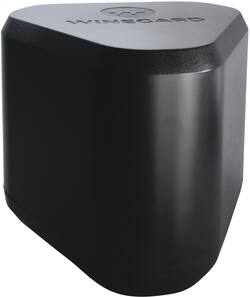
Winegard - Extreme 2.0 High Performance Outdoor Wi-Fi Range Extender - Black
- Key Specs
- Wi-Fi Speed: 3.5 gigabits per second (The maximum rate at which data is transferred between a network device and wireless router.)
- Wireless Standard: AC, N (The wireless networking protocol used by the device. Each iteration of the protocol is based on the 802.11 standard developed by the Institute of Electrical and Electronics Engineers (IEEE) Standards Association. Denoted by letters following 802.11 (802.11a, 802.11ac, etc.), each version, published in alphabetical order, encompasses all previous versions.)
- Wi-Fi Range: 20000 square feet (The device will provide a Wi-Fi connection to this approximate area.)
- Form Factor: Mountable (The size, arrangement, and physical configuration of the product.)
- Frequency Band: 2.4 GHz, 5.0 GHz (Bands may be grouped into categories such as low- and high-band VHF (Very High Frequency), low- and high-band UHF (Ultra High Frequency), or certain frequency channels (measured in MHz or GHz). Generally, higher frequencies transmit information faster but have shorter range than lower frequencies.)
- Antenna Type: Internal, Internal
- Number of LAN Ports: 1 (Number of devices able to be connected to the Local Area Network (LAN). LAN ports allow wired connections to other networking devices (wireless access points, range extenders, etc.) in order to share the internet connection received through a WAN port.)
- Wireless Networking Standard: Wi-Fi 5 (The wireless networking standard used by the device. Each iteration of the standard developed by the Wi-Fi Alliance corresponds to an existing IEEE 802.11 protocol; for example, standard 802.11ac (or AC) is termed Wi-Fi 5. Refers specifically to the standard the device is designed to use, but ultimately determines product interoperability and backward compatibility including previous versions.)
- General
- Brand: Winegard
- Model Number: RW-3035
- Product Name: Extreme 2.0 High Performance Outdoor Wi-Fi Range Extender
- Color: Black
- Network
- Wi-Fi Range: 20000 square feet (The device will provide a Wi-Fi connection to this approximate area.)
- Maximum Frequency: 5 gigahertz (The highest signal frequency that the device is able to amplify or transmit. Generally, the higher the frequency, the more data that can be transmitted and the more likely the signal is attenuated (weakened over distance/passing through buildings).)
- Wireless Networking Standard: Wi-Fi 5 (The wireless networking standard used by the device. Each iteration of the standard developed by the Wi-Fi Alliance corresponds to an existing IEEE 802.11 protocol; for example, standard 802.11ac (or AC) is termed Wi-Fi 5. Refers specifically to the standard the device is designed to use, but ultimately determines product interoperability and backward compatibility including previous versions.)
- Connection Type: Wireless
- Compatibility
- Brand Compatibility: Universal
- Security
- Security Features: 128-bit AES encryption with PSK support, Guest WiFi Network
- Dimensions
- Product Height: 8 inches (The out of box height of the item. Height is measured as the vertical distance from the bottom of the item to the top as it would be primarily used or placed.)
- Product Length: 9.35 inches (The out of box length of the item. Length is measured as the longest dimension of the item.)
- Product Width: 9.35 inches (The out of box width of the item. Width is measured as the horizontal distance from one side of the item to the other as it would be primarily used or placed.)
- Product Weight: 4.31 pounds (The out of box weight of the item.)
- Warranty
- Warranty - Parts: 1 year
- Warranty - Labor: 1 year
- Other
- UPC: 615798406202
Winegard Extreme 2.0 High-Performance Wireless-AC Access Point and Outdoor Wi-Fi Range Extender. The Extreme 2.0 Extender offers 1,000 ft. of boosted range - Winegard's best, and most secure, outdoor Wi-Fi solution.
- Wi-Fi connectivity range: Rated for maximum boosted Wi-Fi range up to 1,000 ft
- Smart solutions: Switch between access point, extender and bridge modes
- Simple setup: Fast and secure web-based setup will have you up and running in minutes!
- Mounting: Flexible adjustable options to mount outdoors
- Secure: Supports WPA, WPA2 and WPA3
- Wi-Fi connectivity range: Rated for maximum boosted Wi-Fi range up to 1,000 ft
- Smart solutions: Switch between access point, extender and bridge modes
- Simple setup: Fast and secure web-based setup will have you up and running in minutes!
- Mounting: Flexible adjustable options to mount outdoors
- Secure: Supports WPA, WPA2 and WPA3
Whats Included
- Extreme 2.0 High Performance Outdoor Wi-Fi Range Extender
- Extreme 2.0 High Performance Outdoor Wi-Fi Range Extender
A: Yes. The Winegard access point connects to the main router the same way a laptop or phone would connect and does not require the main router to be reset.
Q: Can I sign into rv resort Wi-Fi? Then change it to another location when traveling in RV
A: You can, but would not permanently mount this to your RV as the mount is not intended for that type of use.
Q: Is there a maximum speed this can handle? 750gb? gigabit?
A: undefined
Q: wil this connect to my hotspot on my phone to extend
A: undefined
A: Router is in the house and I got a small barn outside metal building will it work
Q: Is this wifi 6 compatible like Netgear orbi wifi 6?
A: Mine is connected to a Netgear Wifi6 router and working fine.
Q: unobstructed coverage distance and does it connect to router wirelessly
A: Wirelessly = yes. Not sure of coverage, i believe it says 1000 ft.