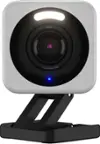
Wyze - Pan v2 Indoor Wired 1080p HD Securtiy Camera - White
- Key Specs
- Video Camera Resolution: Full HD (1080p) (Refers to the number of pixels, both horizontally and vertically, used to capture video/images. The higher the resolution the finer the detail that can be seen.)
- Field Of View: 130 degrees (The area of a target, measured as an angle from the location of viewing, that can be observed.)
- Night Vision: true
- Number Of Cameras Included: 1
- Camera Power Source: Cable with AC Adapter/Plug-in
- Works With: Amazon Alexa, Google Assistant (Compatible with or able to be connected to other smart devices or applications.)
- Number Of Channels: 1
- Maximum Operating Temperature: 113 degrees fahrenheit (The highest recommended ambient (surrounding) temperature in which the product can ideally operate stated by the manufacturer. Generally long-term exposure of the product to temperatures more than the maximum can result in ineffective operation.)
- Storage Type: Memory card, Cloud
- Indoor Or Outdoor Use: Indoor (Indicates the appropriate environment product was designed to be used in.)
- Minimum Operating Temperature: -5 degrees fahrenheit (The lowest recommended ambient (surrounding) temperature in which the product can ideally operate stated by the manufacturer. Generally long-term exposure of the product to temperatures less than the minimum can result in ineffective operation.)
- Audio Communication: 2-way (1-way communication devices allow a user to hear detected audio, while 2-way communication adds the ability for a user to talk back through the device.)
- General
- Brand: Wyze
- Model Number: WYZECP2
- Product Name: Pan v2 Indoor Wired 1080p HD Securtiy Camera
- Color: White
- Camera
- Video Camera Resolution: Full HD (1080p) (Refers to the number of pixels, both horizontally and vertically, used to capture video/images. The higher the resolution the finer the detail that can be seen.)
- Camera Resolution: 1080 (Refers to the number of pixels, both horizontally and vertically, used to capture video/images. The higher the resolution the finer the detail that can be seen.)
- Field Of View: 130 degrees (The area of a target, measured as an angle from the location of viewing, that can be observed.)
- Night Vision: true
- Night Vision Image: Color
- Camera Movement: Pan, Tilt
- Zoom Mode: Digital
- Number Of Cameras Included: 1
- Frame Rate: 20 frames per second (The frequency at which consecutive images can be captured. The higher the frame rate, the more detail that can be captured.)
- Day/Night Mode: true (Captures images/video with optimal clarity by automatically adjusting settings to various light levels.)
- Minimum Required Illumination: 0 lux (Refers to the minimum amount of light needed to view objects. Generally, the lower the number, the better the camera can detect objects in little to no light.)
- Number of IR LEDs: 8 (Quantity of infrared (IR) LED lights for emitting IR light and allowing the camera to detect objects in low light.)
- Camera Iris: Automatic, Manual (The iris is the opening on a camera that controls how much light reaches its image sensor, which in turn affects image/video clarity. Fixed and manual irises are generally suited for locations with consistent levels of light. Automatic and "P" (precise) irises automatically adjust in response to changing levels of light and are suited for a wider variety of environments. "P" irises feature additional capabilities for improving footage clarity.)
- Focal Length Control: Motorized zoom (Fixed cameras do not allow for adjustments to the focal length, and typically provide a wide angle view. Vari-focal cameras allow manual adjustments, while motorized zoom cameras can be adjusted from either the camera or control center.)
- Power
- Camera Power Source: Cable with AC Adapter/Plug-in
- Battery Backup: false (Provides power if the main power source is unavailable.)
- Voltage: 5 volts (Amount of power needed to support an electrical current.)
- Compatibility
- App Compatible: true (The product can be connected to a program or software application on a mobile device, which then receives collected data from the product.)
- Compatibility: Voice Control with Amazon Alexa and Google Assistant
- Operating System Compatibility: Android, Apple iOS
- Works With: Amazon Alexa, Google Assistant (Compatible with or able to be connected to other smart devices or applications.)
- Voice Assistant Built-in: Amazon Alexa, Google Assistant (A digital assistant built into the device that uses voice commands to answer questions and control smart devices.)
- Connectivity
- Camera Connectivity: Wireless (Security system cameras can be set up in several ways. Wired cameras require cables for power and footage transmission, while wire-free cameras don't need cables for either. Wireless cameras still require cables for receiving power but are able to transmit footage via a wireless network.)
- Recording & Playback
- Streaming Video: true (The ability to transmit a live video feed from the product.)
- Video Recording Capability: true
- Records Audio: true
- Subscription: Optional but not included
- Number Of Channels: 1
- Video Recording Prompt: Continuous Video Recording (CVR)
- Performance
- Maximum Operating Temperature: 113 degrees fahrenheit (The highest recommended ambient (surrounding) temperature in which the product can ideally operate stated by the manufacturer. Generally long-term exposure of the product to temperatures more than the maximum can result in ineffective operation.)
- Indoor Or Outdoor Use: Indoor (Indicates the appropriate environment product was designed to be used in.)
- Protective Qualities: Weather resistant, Water resistant
- Minimum Operating Temperature: -5 degrees fahrenheit (The lowest recommended ambient (surrounding) temperature in which the product can ideally operate stated by the manufacturer. Generally long-term exposure of the product to temperatures less than the minimum can result in ineffective operation.)
- Storage
- Storage Type: Memory card, Cloud
- Memory Card Type: microSD card
- Lighting
- Lighting Type: App-controlled
- Features
- Audio Communication: 2-way (1-way communication devices allow a user to hear detected audio, while 2-way communication adds the ability for a user to talk back through the device.)
- Auto-On Detection: Motion
- Mount Type: Flush mount, Freestanding
- Alarm Type: Audible, Visual
- Alarm Location: On camera, Via app
- Dimensions
- Product Height: 5.5 inches (The out of box height of the item. Height is measured as the vertical distance from the bottom of the item to the top as it would be primarily used or placed.)
- Product Weight: 1 pounds (The out of box weight of the item.)
- Sensor
- Sensors: Light sensor, Motion sensor, Proximity sensor, Sound sensor (Detects stimuli such as heat, light, sound, motion, or pressure and responds accordingly by operating a control or initiating a function of the device.)
- Motion Detection Range: 180 feet
- Included
- Cable(s) Included: true
- Other
- UPC: 850025015295
Are you ready for the next generation of awesome? Introducing Wyze Cam Pan v2, now with Color Night Vision! Say goodbye to losing sight when something moves outside the view of your camera. With its 110°/sec rotation speed, 360° horizontal range, and 93° vertical range, Wyze Cam Pan v2 delivers 360° coverage in under 3 seconds so you can see exactly what you want to see, when you want to see it. This camera is a favorite for busy households and pet owners.
- Pan, tilt and zoom: Control remotely using the Wyze app so you can see the whole room, fast. Or monitor a room automatically by setting 4 predefined waypoints. Panning has a 360° left/right rotation range and tilting has a 93° vertical up/down range.
- Now with color night vision: Record night time video in full, vivid color in environments up to 25x darker than traditional cameras. Pierce through darkness with the Starlight Sensor. This low-light amplifier shows dark areas in vivid, spectacular detail unseen even to the human eye.
- Two-way audio: Speak with anyone you care about (or don’t care about) through the Wyze app. Have real time conversations through your camera no matter where you are.
- Motion detection: Records video when motion and sound are detected and sends an alert to your phone. Look and listen for motion and sound. Wyze Cam sends your phone an alert and begins recording when either is detected.
- Livestream from anywhere in full 1080p HD: See inside your home in real time using your mobile device. Keep an eye on what (or who's) important.
Whats Included
- WYZE Cam Pan V2
- USB Power Cord
- Mount
- Power Adapter
A: Hi there! Yes, you can use the app as long as you have internet connection from your phone. It's not required to use your home WiFi for you to able to access the camera. Our products will require a 2.4GHz WiFi network signal in order to setup and communicate with the Wyze app. The cameras are primarily meant to work with an internet connection. The connection is what allows you to stream, get notifications and change settings via the Wyze App. However, you can use a WiFi network connection to set up and configure your Wyze Cam in the Wyze app. If you have additional questions, concerns, or would like to speak more about this please reach out to our Wizards team (https://wyzelabs.zendesk.com/hc/en-us) so we may help. Thank you and have a great day!
Q: can this camera be accessed directly thru a browser ?
A: Hello there! Thanks for your question. Yes, you'll be able to use Web View in a browser on a PC, Mac, Smart TV, tablets, etc. However, this is only available to Cam Plus users. We would also recommend taking a look at this article for more information: https://support.wyze.com/hc/en-us/articles/4409136365595 If you have any questions, concerns, or would like to speak more about your feedback please reach out to our Wizards team (https://wyzelabs.zendesk.com/hc/en-us) so we may help. Thank you and have a great day!
A: Hello there! Thanks for your question. You can install it in less than five minutes. You just need the Wyze app to view the camera individually or group it so that you can view all 4 cameras at the same time. We would recommend taking a look at this article for some information: https://support.wyze.com/hc/en-us/articles/4406722079003 We would recommend taking a look at this article for some tips: https://support.wyze.com/hc/en-us/articles/4406722079003 If you have any questions, concerns, or would like to speak more about your feedback please reach out to our Wizards team (https://wyzelabs.zendesk.com/hc/en-us) so we may help. Thank you and have a great day!
A: Hello there! Our camera will have a few recording options available. Using a microSD card with your camera gives you the ability to record continuous footage and recorded events directly to your local microSD card. We also have Cam Plus, which is an upgrade for Wyze Cam devices that adds Person Detection to your Complete Motion Capture videos. With this service, you'll be able to record full-length videos, receive real-time alerts when people are detected, and filter all of your video clips with people in them. If you have not already please reach out to our Wizards team (https://wyzelabs.zendesk.com/hc/en-us) so we may help out. You may tap on the Message icon in the bottom right-hand corner of the support site > fill out the questionnaire > choose the way in which you would like to speak with our team. Please include as much information on your issue as possible. Our products come with a 1-year manufacturer warranty, so if the device is determined to be defective we will be happy to exchange it for you. Thank you for your feedback and have a great day!
Q: Can this camera be mounted onto a ceiling?
A: Hi there! Depending on the type of mount, your Wyze Cam Pan can be safely mounted anywhere: ceilings, walls, desktops, and more. Follow the instructions in the Wyze Cam Pan Mounting Kit to mount your new Wyze Cam Pan. Wyze Cam Pan can be mounted upside down. To flip the display of your live stream, enter the Advanced Settings for your camera and toggle Rotate Image 180° on/off. Wyze Cam Pan can be mounted sideways, but there is no 90° rotation setting. If you have any questions, concerns, or would like to speak more about the product please reach out to our Wizards team (https://wyzelabs.zendesk.com/hc/en-us) so we may help. Thank you and have a great day!
Q: Hello, Does the camera record sound??
A: Hello! Wyze Cam Pan v2 can record sound or noise if it is loud enough for the camera to detect. But if the sound is minimal, it won't notify the camera for sound events. If you have any questions, concerns, or would like to speak more about the product please reach out to our Wizards team (https://wyzelabs.zendesk.com/hc/en-us) so we may help. Thank you and have a great day!
A: Hi there! Wyze Cam Pan v2 is powered by a provided USB cable and connects to the Internet via 2.4GHz WiFi. If you have any questions, concerns, or would like to speak more about the product please reach out to our Wizards team (https://wyzelabs.zendesk.com/hc/en-us) so we may help. Thank you and have a great day!
A: No, you can install a memory card and have constant recording that you view from your phone.