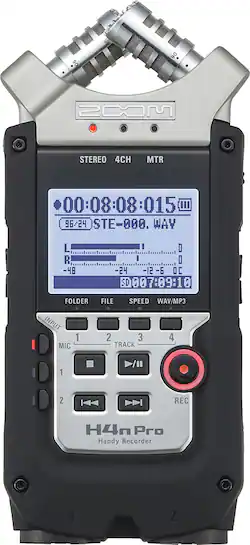
Zoom - H4N PRO Handy Recorder
- General
- Brand: Zoom
- Model Number: H4NPRO
- Product Name: H4N PRO Handy Recorder
- Warranty
- Warranty - Parts: Not available
- Warranty - Labor: Not available
- Other
- Product Width: 2.875 inches (The out of box width of the item. Width is measured as the horizontal distance from one side of the item to the other as it would be primarily used or placed.)
- Product Height: 6.2 inches (The out of box height of the item. Height is measured as the vertical distance from the bottom of the item to the top as it would be primarily used or placed.)
- Product Length: 1.46 inches (The out of box length of the item. Length is measured as the longest dimension of the item.)
- Product Weight: 10.37 ounces (The out of box weight of the item.)
- Memory Card Compatibility: Secure Digital, Secure Digital High Capacity (SDHC) (The type of memory card(s) recommended for use with the product.)
- Display Type: LCD
- Microphone Input: true (The device features an input for connecting an external microphone.)
- Batteries Included: true (Indicates whether the product comes with the required batteries for its operation.)
- Headphone Jack: true (The device features an interface that allows for the connection of headphones.)
- Maximum Recording Time: 555.5 hours
- Battery Chemistry: Nickel-metal hydride
- Battery Size: AA (The battery size required for operation.)
- Number of Batteries Required: 2
- Integrated Microphone: true
- Computer Compatibility: Mac, Windows
- Internal Memory: 0 gigabytes (Data storage capacity for built-in memory circuits.)
- Integrated Speaker(s): true
- Memory Card Slot: true
- Supported File Formats: MP3, WAV
- USB Connectivity: true
- Recording Type: Voice recorders
- 1-Touch Recording: true
- Memory Card Capacity: 32 gigabytes
- Number Of Recording Modes: 3
- DC 3V Input Jack Included: true
- Internal Memory Type: Flash memory
- Voice-Activated Recording: true
- Operation: Digital
- Safety Lock: true
- UPC: 884354016357
Capture sound with stunning clarity by using the Zoom H4n Pro audio recorder. It handles up to 140 dB, making it ideal for live performances, and its unidirectional mics adjust from 90 to 120 degrees for small spaces or wider ranges. Use the three recording modes on this Zoom H4n Pro audio recorder for podcasts, film audio, narrative and concerts.
- 4-track simultaneous recording: Helps ensure you catch everything in MP3 or WAV format and features time stamping, midsize decoding and phantom power to create high-quality records.
- Records directly to SD and SDHC memory cards up to 32GB: For simple storage and transfer (cards not included).
- Auto record, prerecord, stereo mode and Multi-track Mode: Help ensure you capture the moment.
- Built-in X/Y stereo microphone: Can be adjusted from 90° to 120°.
- Built-in monophonic speaker: Allows for quick playback reference.
- 1.9" backlit LCD: Ensures a clear view of settings.
- 1/8" stereo mini jack connector and 2 XLR/TRS combo jacks: For connecting microphones and line-level devices, such as mixers, portable music players and more.
- USB 2.0 interface: Enables a high-speed connection to a PC or Mac.
- Rubberized, ergonomic body: Perfect for use in the field or with a camera.
- 4-track simultaneous recording: Helps ensure you catch everything in MP3 or WAV format and features time stamping, midsize decoding and phantom power to create high-quality records.
- Records directly to SD and SDHC memory cards up to 32GB: For simple storage and transfer (cards not included).
- Auto record, prerecord, stereo mode and Multi-track Mode: Help ensure you capture the moment.
- Built-in X/Y stereo microphone: Can be adjusted from 90° to 120°.
- Built-in monophonic speaker: Allows for quick playback reference.
- 1.9" backlit LCD: Ensures a clear view of settings.
- 1/8" stereo mini jack connector and 2 XLR/TRS combo jacks: For connecting microphones and line-level devices, such as mixers, portable music players and more.
- USB 2.0 interface: Enables a high-speed connection to a PC or Mac.
- Rubberized, ergonomic body: Perfect for use in the field or with a camera.
Whats Included
- H4N PRO Handy Recorder
- Protective case
- Download license for Steinberg Cubase LE and WaveLab LE software
- 2 x AA batteries
- Owner's manual
- H4N PRO Handy Recorder
- Protective case
- Download license for Steinberg Cubase LE and WaveLab LE software
- 2 x AA batteries
- Owner's manual
Q: Is this recorder waterproof?
A: No, this model is not waterproof.
Q: DOES THE H4N PRO HANDY RECORDER COME WITH A AC/DC ADAPTER
A: No, the unit will not come with an AC adapter. I also suggest getting 4 rechargeable AA batteries. I haven't used more than 4 AA's shooting randomly during the day. The "Deadcat" windsock is a must have item if you are going to use it outside at all. **The H4N only has 2 microphones so it won't give you the flexibility to record in as many modes as the H2N without extra external mics** I picked the H4N for the incredible sound quality but it was a tough call between the H2N and H4N Pro for me. For my needs I'm glad I went with the N4H Pro.
Q: WHAT TYPE OF CARD U USED, BRAND AND HOW MAN GB, THAT IS BEST 4 THAT UNITE,
A: Any SD card will do. Must be 32gb or less though.
Q: Will it work with my Dell Computer? Will I need other equipment, if so what?
A: I used a SanDisk SD card with my Zoom Pro. It worked well with my Dell Computer. I didn't need any other equipment.
Q: can you connect this to a 5d mark II or mark III?
A: You can. There is a port on the left side that is a headphone / line out combo port. your can use a double ended 3.5mm aux cable to connect the recorder to your DLSR's line in / mic port so long as it has one.
Q: Are you able to overlay the four tracks?
A: Yes, The unit also comes with the Steinbergs's Cubase DAW.












