Amazon - Echo Show 8 (3rd Generation) 8-inch Smart Display with Alexa - Charcoal
- Key Specs
- Built-In Speakers: true
- Featured Streaming Services: Netflix, Prime Video (Streaming services and other programs are available on this device. Keep in mind, there may be more services supported than just those shown here.)
- General
- Brand: Amazon
- Model Number: B0BLS3Y632
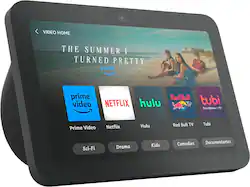
- Product Name: Echo Show 8 (3rd Generation) 8-inch Smart Display with Alexa
- Color: Charcoal
- Audio
- Built-In Speakers: true
- Featured Streaming Services: Netflix, Prime Video (Streaming services and other programs are available on this device. Keep in mind, there may be more services supported than just those shown here.)
- Number of Speakers: 2
- Voice
- Voice Assistant Built-in: Amazon Alexa (A digital assistant built into the device that uses voice commands to answer questions and control smart devices.)
- Connectivity
- Connectivity Technology: Bluetooth, Wi-Fi, Zigbee (The manner in which a device sends data to another device over a short distance.)
- Bluetooth Version: 5.1 (The Bluetooth specification formalized by the Bluetooth Special Interest Group. All versions of the Bluetooth standard are backwards compatible with previous versions.)
- Works With: Amazon Alexa (Compatible with or able to be connected to other smart devices or applications.)
- Wireless Connectivity: Bluetooth, Wi-Fi (The manner in which a device sends data to another device over a short distance without the use of wires or cables.)
- Operating System Compatibility: Fire OS
- Features
- Wake Word: Alexa (The term or phrase used to activate a device.)
- Processor Model: Amlogic POP1-R (Your computer's processor is like its brain. Working in combination with system memory, the power of the processor determines the complexity of software you can run, how many programs you can have open at the same time, and how fast those programs will run. Most computers feature an AMD, Intel or Snapdragon processor.)
- Power
- Power Source: Plug-in
- Display
- Display Screen: true
- Screen Size: 8 inches (Size of the screen, measured diagonally from corner to corner.)
- Touch Screen: true (Touch-screen devices make navigating more intuitive. Using a touch-screen display, you can do things such as tap to select, hold and drag to move items, swipe to scroll, and pinch to zoom.)
- Dimensions
- Product Height: 5.5 inches (The out of box height of the item. Height is measured as the vertical distance from the bottom of the item to the top as it would be primarily used or placed.)
- Product Width: 7.89 inches (The out of box width of the item. Width is measured as the horizontal distance from one side of the item to the other as it would be primarily used or placed.)
- Product Depth: 4.2 inches (The out of box depth of the item. Depth is measured as the distance from the front of the item to the back as it would be primarily used or placed.)
- Product Weight: 2.284 pounds (The out of box weight of the item.)
- Warranty
- Warranty - Parts: 1-year limited warranty and service included.
- Warranty - Labor: Not applicable
- Other
- UPC: 840268905323
Better Inside and Out — Entertainment is more immersive with spatial audio and an 8" HD touchscreen. Video calling is crisper with high-quality sound and a 13 MP camera. And your home is more connected than ever with the built-in smart home hub.
- Better inside and out: Entertainment is more immersive with spatial audio and an 8" HD touchscreen. Video calling is crisper with high-quality sound and a 13 MP camera. And your home is more connected than ever with the built-in smart home hub.
- Alexa+ Early Access is now on the Echo Show 8 (3rd Generation): Get access to a smarter, more useful Alexa when you set up this device.
- Vibrant sights, full sound: Content on Prime Video, Netflix, Fire TV Channels, and more comes to life with an HD display and room-filling spatial audio. Ask Alexa to stream Amazon Music, Apple Music, or Spotify. Subscriptions for some services required.
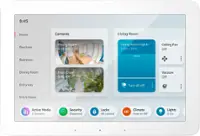
- Smart home, simplified: Pair and control devices compatible with Zigbee, Matter, and Thread without a separate smart home hub. Manage cameras, lights, and more using the display or your voice, or activate routines via motion. Also supports connectivity via Bluetooth and wifi.
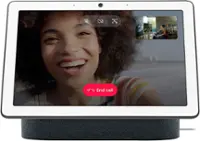
- Stay in the loop: Video call hands-free using your voice, or use the new Top Connections widget to call with one tap. It also lets you know when your closest friends and family are free to chat. Have more natural video conversations with a centered, auto-framing camera and noise reduction technology.
- Show off your good times: Amazon Photos turns your home screen into a digital frame of favorite memories, and adaptive color makes them look great in any light. Coming soon: Invite family and friends to share photos to your Echo Show.
- Do less to get more: Use your voice to set timers and update lists. Glance at your calendars and reminders. And with Adaptive Content, you’ll see more useful and engaging content when you’re near the device.
- Designed for sustainability: This device is made from 29% recycled materials. 99% of this device packaging is made of wood fiber-based materials from responsibly managed forests or recycled sources.
- Designed to protect your privacy: Amazon is not in the business of selling your personal information to others. Built with multiple layers of privacy controls including a mic/camera off button and a built-in camera shutter.
- Disclaimer: After Early Access, Alexa+ will be free with your Prime membership or available to non-Prime customers for $19.99/month. The original Alexa continues to be included with all Alexa enabled devices. Alexa+ Early Access requires a personal, US-based Amazon account with US English language set on all compatible Alexa+ devices. Access to Alexa+ when you purchase this device will be granted on the Amazon account you use to set up this device (certified refurbished or used devices excluded).
- Better inside and out: Entertainment is more immersive with spatial audio and an 8" HD touchscreen. Video calling is crisper with high-quality sound and a 13 MP camera. And your home is more connected than ever with the built-in smart home hub.
- Alexa+ Early Access is now on the Echo Show 8 (3rd Generation): Get access to a smarter, more useful Alexa when you set up this device.
- Vibrant sights, full sound: Content on Prime Video, Netflix, Fire TV Channels, and more comes to life with an HD display and room-filling spatial audio. Ask Alexa to stream Amazon Music, Apple Music, or Spotify. Subscriptions for some services required.
- Smart home, simplified: Pair and control devices compatible with Zigbee, Matter, and Thread without a separate smart home hub. Manage cameras, lights, and more using the display or your voice, or activate routines via motion. Also supports connectivity via Bluetooth and wifi.
- Stay in the loop: Video call hands-free using your voice, or use the new Top Connections widget to call with one tap. It also lets you know when your closest friends and family are free to chat. Have more natural video conversations with a centered, auto-framing camera and noise reduction technology.
- Show off your good times: Amazon Photos turns your home screen into a digital frame of favorite memories, and adaptive color makes them look great in any light. Coming soon: Invite family and friends to share photos to your Echo Show.
- Do less to get more: Use your voice to set timers and update lists. Glance at your calendars and reminders. And with Adaptive Content, you’ll see more useful and engaging content when you’re near the device.
- Designed for sustainability: This device is made from 29% recycled materials. 99% of this device packaging is made of wood fiber-based materials from responsibly managed forests or recycled sources.
- Designed to protect your privacy: Amazon is not in the business of selling your personal information to others. Built with multiple layers of privacy controls including a mic/camera off button and a built-in camera shutter.
- Disclaimer: After Early Access, Alexa+ will be free with your Prime membership or available to non-Prime customers for $19.99/month. The original Alexa continues to be included with all Alexa enabled devices. Alexa+ Early Access requires a personal, US-based Amazon account with US English language set on all compatible Alexa+ devices. Access to Alexa+ when you purchase this device will be granted on the Amazon account you use to set up this device (certified refurbished or used devices excluded).
Q: What do I need to use echo show
A: Hello Charcoal! The new Echo Show 8 has some great upgraded features. The device now has a 13 MP camera that is built to keep you in frame! The camera has auto-framing that can zoom and tilt to always keep you in frame and centered for video calls. You can also look in when you're away with the built-in camera. The Echo Show 8 gives you control of compatible devices like cameras, lights, and more using the interactive display, your voice, or your motion. I hope that helps explain some of the features of the Echo Show 8. Have a great day!
A: Hello Daryl, the Echo Show 8 does require constant power to operate. There is no battery available for this device. Have a great day!
A: Hi there! The Echo Show 8 3rd Generation should work just fine in Brazil, though you may need a different power adapter than the one that is included with the US version of the device. You'll still be limited to the normal services and features of an Alexa enabled device operating in Brazil though. Alexa definitely speaks Portuguese though, so no worries there. I hope that helps, have a great rest of your day!
Q: Does the Echoshow 8 and 5 have the same speaker, or is the in in 8 bigger?
A: No, the speaker is not as good as the previous version, so I put the older one back in its place.
A: Hi FloridaBob, Thanks for reaching out. I apologize for the inconvenience you're experiencing with your new 8" Echo Show. Time discrepancies can be frustrating, Here are a few things to try. Double-check the time zone: Even though you've set it to EST NY, try resetting it: Say "Alexa, open settings" Go to "Device Options" > "Date & Time" Ensure "Automatic Time Zone" is enabled If it is, try turning it off and manually selecting "Eastern Time (US & Canada)" Sync the time: Say "Alexa, sync my device" This should force the device to update its time from Amazon's servers Restart your Echo Show: Unplug the device from power for about 30 seconds, then plug it back in Check your Amazon account settings: Go to the Alexa app on your smartphone Tap on "Devices" > "Echo & Alexa" > select your new Echo Show Check the device settings to ensure the correct time zone is set Update your Echo Show: Say "Alexa, check for software updates" If an update is available, install it I hope these steps get help. Have a great day!
Q: Can multiple Alexa's be connected together?
A: Good Afternoon Lancemal14, Thanks for reaching out. All your Amazon smart speakers, including the Echo, Echo Dot, Echo Pop, Echo Show, or Echo Studio, can be connected to work in tandem with one another. Here’s how to set up multiple speakers to configure them for multi-room playback. Your first step is to set up the devices. Open the Alexa app and tap the Devices icon at the bottom. Select the plus (+) button in the top-right corner and then tap Add Device. Once the devices are set up you can click on the combine speakers or create a new group option on the top of the page. I hope this answers your question, have a great day!
Q: Does this device work with the Facebook Portal?
A: Hello rivera3628. Thank you for your question. You can open Facebook thru our internet browser named Silk. You can say, Alexa, open Facebook. You will then need to login Facebook. Have a great day!
Q: Is it available at the store
A: Good morning Jose, Thanks for reaching out! The Echo Show 8 (3rd Generation) is carried in Best Buy stores. You would have to check with the individual store you are interested in to see if they have it in stock at the moment. Have a great day!