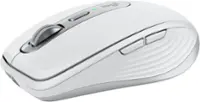
Apple - Magic Mouse - Multi-Touch Surface (USB-C) - Wireless - White Multi-Touch Surface
Color
White Multi-Touch Surface Apple - Magic Keyboard full size with Numeric Keypad (Lightning Port) - Silver/White$129.99
More Buying Options
Related Item

Specifications
- Connection TypeWireless
- Key Specs
- Connection Type: Wireless
- General
- Brand: Apple
- Model Number: MXK53AM/A
- Product Name: Magic Mouse - Multi-Touch Surface (USB-C)
- Color: White Multi-Touch Surface
- System Requirements: Bluetooth-enabled Mac with OS X 10.11 or later; iPad with iPadOS 13.4 or later (The software that a product must have for it to be able to integrate with another product.)
- Features
- Mouse Type: Standard
- Performance
- Tracking Method: Touchpad (There are several types of computer mice, optical and laser being among the most common. Optical mice detect less detail and provide more precise and accurate movement. Laser mice detect more detail and can be used on a wider variety of surfaces, but are more sensitive to small movements.)
- Connectivity
- Connection Type: Wireless
- Wireless Connectivity: Bluetooth (The manner in which a device sends data to another device over a short distance without the use of wires or cables.)
- Operating System Compatibility: Apple iPadOS, Mac
- Power
- Mouse Power Source: Battery-powered
- Rechargeable Battery (Mouse): true
- Charging Interface(s): USB-C (The connection for transmitting power to charge the device.)
- Battery Chemistry: Lithium-ion
- Dimensions
- Product Height: 0.85 inches (The out of box height of the item. Height is measured as the vertical distance from the bottom of the item to the top as it would be primarily used or placed.)
- Product Length: 4.47 inches (The out of box length of the item. Length is measured as the longest dimension of the item.)
- Product Width: 2.25 inches (The out of box width of the item. Width is measured as the horizontal distance from one side of the item to the other as it would be primarily used or placed.)
- Product Weight: 99 grams (The out of box weight of the item.)
- Warranty
- Warranty - Parts: Apple One (1) Year Limited Warranty
- Warranty - Labor: Apple One (1) Year Limited Warranty
- Other
- UPC: 195949655883
Magic Mouse is wireless and rechargeable, with an optimized foot design that lets it glide smoothly across your desk. The Multi-Touch surface allows you to perform simple gestures such as swiping between web pages and scrolling through documents. The rechargeable battery will power your Magic Mouse for about a month or more between charges.* It’s ready to go right out of the box and pairs automatically with your Mac. It features a USB-C port and includes a woven USB-C Charge Cable that lets you pair and charge by connecting to a USB-C port on your Mac, so you can charge all of your favorite devices with just a single cable.
- Compatible Mac Models: MacBook Air (2020 and later), MacBook Pro 14-inch (2021 and later), MacBook Pro 16-inch (2019 and later), MacBook Pro 13-inch (2020), Mac Studio (2022 and later), Mac mini (2018 and later), Mac Pro (2019 and later)
- Compatible iPad Models: iPad Pro 13-inch (M4 and later), iPad Pro 11-inch (1st generation and later), iPad Pro 12.9-inch (1st generation and later), iPad Air 13-inch (M2 and later), iPad Air 11-inch (M2 and later), iPad Air (4th generation and later), iPad (8th generation and later), iPad mini (5th generation and later)
- Compatible Mac Models: MacBook Air (2020 and later), MacBook Pro 14-inch (2021 and later), MacBook Pro 16-inch (2019 and later), MacBook Pro 13-inch (2020), Mac Studio (2022 and later), Mac mini (2018 and later), Mac Pro (2019 and later)
- Compatible iPad Models: iPad Pro 13-inch (M4 and later), iPad Pro 11-inch (1st generation and later), iPad Pro 12.9-inch (1st generation and later), iPad Air 13-inch (M2 and later), iPad Air 11-inch (M2 and later), iPad Air (4th generation and later), iPad (8th generation and later), iPad mini (5th generation and later)
Whats Included
- Magic Mouse
- USB-C Charge Cable
- Magic Mouse
- USB-C Charge Cable
Disclaimers
- *Testing conducted by Apple in August and September 2024 using preproduction Magic Mouse (USB-C) units, firmware, and software paired with preproduction 24-inch iMac systems with Apple M4. Testing consisted of full battery discharge while engaging the device on a paired iMac using automated equipment. Battery life depends on device settings, usage, and other factors.
- *Weight varies by configuration and manufacturing process.
- *Testing conducted by Apple in August and September 2024 using preproduction Magic Mouse (USB-C) units, firmware, and software paired with preproduction 24-inch iMac systems with Apple M4. Testing consisted of full battery discharge while engaging the device on a paired iMac using automated equipment. Battery life depends on device settings, usage, and other factors.
- *Weight varies by configuration and manufacturing process.
Q: Can you use the mouse with an iPad?
A: The Magic Mouse is compatible with iPads running iPadOS 13.4 or later.
Q: How long does the battery last on a single charge?
A: The rechargeable battery in the Magic Mouse will last about a month or more between charges.
A: The product weight is 99 grams.
Q: How does the mouse connect to a computer?
A: The Magic Mouse connects wirelessly using Bluetooth.
Q: What kind of gestures can you perform on the Multi-Touch surface?
A: The Multi-Touch surface lets you perform simple gestures like swiping between web pages and scrolling through documents.
A: That's right. You need the last OS to run this stupid thing to scroll. Why would Apple release this without it being able to work with older Mac's unless they want you to purchase a newer Mac for a stupid mouse! Unbelievable....but that's Apple for you.
Q: What keyboard and mouse work with the Mac mini m4?
A: I PREFER using *all* APPLE products because they are designed to work so well together. I recently upgraded to a brand new M4 in November 2024 when they were first released (trading in my M2 - which I purchased "refurbished"). I've always used the Apple Trackpad with my all 3 Mac desktops I've owned. The M4 is the 3rd one I've purchased in the past 10 years of using Mac Minis. In March 2025 I purchased a second brand new baseline M4 (my 4th) to use in another location where I spend a LOT of time daily so that I can also work easily in the second place. With that second location I purchased a Magic Mouse for the first time. It's small, very sleek. A perfect fit in my hand. The design is smooth and symetrical so it would work well for left or right handed people... but if you have VERY large hands you should go to a store IN PERSON to see if it's going to work for you. I was pleasantly surprised to see that the surface is a "mini trackpad" as you can use your finger to navigate your screen in a similar way that a trackpad works. Funny that when I purchased my first trackpad, I missed using a mouse... but after about 10 years now of using a trackpad, I prefer it to the mouse... even though the Magic Mouse is really terrific with the Multi-Touch surface. I assume that as I use the Magic Mouse more it will become second nature also. I ALSO USE an Apple Keyboard. I recently upgraded my old Apple Keyboard to one with a TOUCH ID button. Passwords make me WEARY but we're in a world where they are needed. The TOUCH ID is really helpful. I STRONGLY recommend it if you are also "password weary". It doesn't cover every single password but most. REALLY great. Since I purchased a second M4 for another location where I spend time, I haven't YET upgraded to the touch ID keyboard and am using my old keyboard. I will... soon... just as soon as I have more room in my budget. I just changed ISP's at home so I expect a Visa Gift card that will more than cover the cost of the touch ID keyboard upgrade. As an aside, I have never used APPLE screens for a desktop. In my home office I have 2 Acer screens - side by side - on a standing desk. I OFTEN need 2 screens as I work. They're also great for taking online classes as you can have one screen for doing the work in class and the other for paying attention in class. For the second "away from my home office" new Mac Mini, I'm using 2 "monitors" that are older TV's I already owned and was about to discard (or sell). I am using an Insignia 24 inch Fire TV for the main monitor and an Insignia 19 inch "dumb TV" mounted above the other in a storage cabinet in the second location. I debated buying monitors but since both older TV's have HDMI ports I can use a splitter (just as I have done with the monitors) to make them work as dual screens. Another helpful tip, is that there are small hubs that fit M4 and can house SSD memory. I just purchased 2TB of additional memory for ~ $100 from Best Buy and installed it, via an expansion hub for the Mac Mini M4. I got help putting it together from the GEEK SQUAD in person at the store. They are A GREAT HELP!! Much better than watching "youtube university" videos!
Q: does it have a charging cord with it and how do you plug it in and what do you plug it into
A: Yes. A USB-C to USB-C cord is included. A USB-C port is on the underside of the mouse for charging. If you need to charge, plan to do it when you do not need to use the mouse. Many have complained about not being able to use it while charging. It's a wireless mouse intended to be used wirelessly so it's a non-issue in my mind. You can plug the cord into a USB-C port on a computer or use a USB-C power adapter from a phone or other device to charge. I have the black version and love it. It replaced an old magic mouse that used AA batteries.
Compare similar products

Magic Mouse is wireless and rechargeable, with an optimized foot design that lets it glide smoothly across your desk. The Multi-Touch surface allows you to perform simple gestures such as swiping between web pages and scrolling through documents. The rechargeable battery will power your Magic Mouse for about a month or more between charges.* It’s ready to go right out of the box and pairs automatically with your Mac. It features a USB-C port and includes a woven USB-C Charge Cable that lets you pair and charge by connecting to a USB-C port on your Mac, so you can charge all of your favorite devices with just a single cable.

Discover the reliable Logitech M196 Bluetooth Wireless Mouse and declutter your workspace. This convenient portable mouse pairs to your laptop or tablet in seconds via Bluetooth—no dongle or port required. Enjoy up to 12-month battery life and auto sleep feature to help you go longer between AA battery changes. Small enough to toss in a bag, this comfortable Bluetooth travel mouse has an ambidextrous design that guides either your right or left hand into a natural position. The Logitech M196 Wireless Bluetooth Mouse is made to last with recycled plastic.

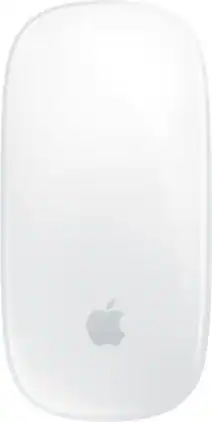
Magic Mouse is wireless and rechargeable, with an optimized foot design that lets it glide smoothly across your desk.The Multi-Touch surface allows you to perform simple gestures such as swiping between web pages and scrolling through documents.
| Pros for Apple - Magic Mouse - Multi-Touch Surface (USB-C) - Wireless - White Multi-Touch Surface | |||
|---|---|---|---|
| Overall Performance, Battery Life, Connectivity, Ease of Use, Design | Overall Performance, Connectivity, Battery Life, Portability, Weight | Button Functionality, Ergonomics | There were no pros for this product— |
| Cons for Apple - Magic Mouse - Multi-Touch Surface (USB-C) - Wireless - White Multi-Touch Surface | |||
| Port Placement, Scrolling, Size | There were no cons for this product— | There were no cons for this product— | There were no cons for this product— |
Specs
Reviews
Customers are saying
Customers are impressed with the Magic Mouse's long battery life and ease of use, frequently praising its sleek design and smooth gliding performance. However, some users experienced issues with the scrolling functionality and found the bottom-placed charging port inconvenient. Overall, the positive feedback on performance and design outweighs the reported concerns.
Customer Images
The vast majority of our reviews come from verified purchases. Reviews from customers may include My Best Buy members, employees, and Tech Insider Network members (as tagged). Select reviewers may receive discounted products, promotional considerations or entries into drawings for honest, helpful reviews.
- Rated 5 out of 5 stars
Nice sleek mouse, good for left or right hand.
This is my first Magic Mouse. Up to now I've just used tracpads for my Mac Mini. I made a choice this time to try the Magic Mouse for a second Mac Mini I've had to set up at a second location. I also saved a few $$$ by purchasing a "previously returned" mouse. The "MULTI-TOUCH SURFACE" is a great (and surprising) feature of this mouse! It's kind like a 'mini-tracpad'. Additionally, I appreciate the long battery life. It's small and has a good fit in my hand but for someone with very large hands, it might be TOO small. You know who you are so if your hands are large go see one in person before you buy. Larger hands may require a trackpad for better use and comfort. The only negative is that the charger port is on the bottom of the mouse. It's minor, but just slightly inconvenient. Since it does have such a LONG battery life it's easy enough to just turn over and charge it when you stop working. I've used Apple devices now for about 10 years. In the war between PCs and Macs, the Apple Devices were always touted as more intuitive for creative people. (and I fit in that category) I've used PC's for a couple of decades before that - even though I initially and always wanted to start with Apple. However, when I bought my first computer, I was taking classes and at that time the only computers compatible with my classes were PC's. I don't have strong preferences between either platform in 2025, and still find occasions when I need to use both. But the best thing about APPLE is how integrated all your devices are - automatically.
Posted by PhillyKat
- Rated 5 out of 5 stars
This mouse has such a nice, light touch
I really love this Apple mouse because it's low profile, easy to fit in the hand, and moves smoothly. It's easy to pair and connect to my MacBook, and the settings are easy to adjust. It's an attractive mouse, too, with a clean and slim look.
Posted by TraciG
- Rated 5 out of 5 stars
Magic Mouse
Great product! Smooth design ! Awesome battery life. Cannot go wrong with this product ! I highly recommend !
Posted by TimothyG