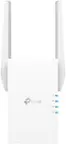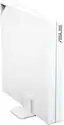
ASUS - RT-AX57 Go AX3000 Dual-Band Wi-Fi 6 Travel Router - White
Series
AX3000Color
WhiteMore Buying Options
Related Item

Highlights
- Key Specs
- Wi-Fi Mesh System: false (A single wireless network consisting of a main router (connected directly to a modem) that connects to a series of satellite modules or nodes placed around the home. Routers with this capability promote stronger, faster wireless signals as well as increase Wi-Fi coverage by reducing interference and eliminating dead zones.)
- Number Of LAN Ports: 1 (Number of devices able to be connected to the Local Area Network (LAN). LAN ports allow wired connections to other networking devices (wireless access points, range extenders, etc.) in order to share the internet connection received through a WAN port.)
- Wi-Fi Speed: 2.4 gigabits per second (The maximum rate at which data is transferred between a network device and wireless router.)
- Works With: Amazon Alexa (Compatible with or able to be connected to other smart devices or applications.)
- General
- Brand: ASUS
- Model Number: RT-AX57 Go
- Product Name: RT-AX57 Go AX3000 Dual-Band Wi-Fi 6 Travel Router
- Color: White
- Security
- Data Encryption: true
- Encryption Type: WPA-Personal, WPA2-Personal, WPA3-Personal, WPA-Enterprise, WPA2-Enterprise (The security protocols or certification programs that protect the Wi-Fi network.)
- Firewall Type: NAT (The method the firewall uses to filter and process data to increase network security, primarily by blocking malicious traffic requests while allowing legitimate traffic through.)
- Security Features: AiProtection network security / Instant Guard
- Parental Controls: true (Allows user to block unwanted content, signals, channels, networks, etc. from being received or accessed.)
- Network
- Quality Of Service (QoS) Traffic Prioritization: true (Allows a user to manage a device's network performance by configuring the types of traffic that receive top priority for transmission. High priority functions and applications receive maximum network performance, while low priority traffic receives minimum performance.)
- Band Technology: Dual (Refers to the number of frequency bands used to wirelessly transmit an internet signal. For example, dual-band devices may use one 2.4 and one 5 GHz band, while tri-band devices may use one 2.4 and two 5 GHz bands. Multiple bands also provide more flexibility for designating connected devices to specific band use.)
- Ethernet Standard: 10/100/1000 (Each standard is a variation of the IEEE 802.3 set of computer networking technologies known as Ethernet. New versions evolved to include higher bandwidth, different physical media, and other new and improved features. Standards are often denoted by speeds (in Megabits per second). For example, a 10/100/1000 Ethernet port transmits at 10 Mbps, 100 Mbps, and 1000 Mbps (1 Gbps).)
- Number of Antennas: 5
- Frequency Band: 2.4 GHz, 5.0 GHz (Bands may be grouped into categories such as low- and high-band VHF (Very High Frequency), low- and high-band UHF (Ultra High Frequency), or certain frequency channels (measured in MHz or GHz). Generally, higher frequencies transmit information faster but have shorter range than lower frequencies.)
- Wireless Networking Standard: Wi-Fi 6 (The wireless networking standard used by the device. Each iteration of the standard developed by the Wi-Fi Alliance corresponds to an existing IEEE 802.11 protocol; for example, standard 802.11ac (or AC) is termed Wi-Fi 5. Refers specifically to the standard the device is designed to use, but ultimately determines product interoperability and backward compatibility including previous versions.)
- Wireless Standard: AX, AC, N (The wireless networking protocol used by the device. Each iteration of the protocol is based on the 802.11 standard developed by the Institute of Electrical and Electronics Engineers (IEEE) Standards Association. Denoted by letters following 802.11 (802.11a, 802.11ac, etc.), each version, published in alphabetical order, encompasses all previous versions.)
- Input/Output Technology: MU-MIMO (Multi-user Multiple-Input Multiple Output) (Generally, multiple-input multiple-output communication technologies allow for more signals to be transmitted at a single time, which can improve the device's overall performance.)
- Number of 2.4Ghz Streams: 2 (A router's streams are like lanes on a highway. The more streams a router has, the less traffic congestion. Because the 2.4 GHz band is used to transmit wireless signals to a wide variety of devices, there is often high amounts of traffic on that stream. But with multiple streams, each can be designated to a specific device for optimal performance. For example, if one 2.4 GHz stream is assigned to one device, such as a desktop computer, it leaves the remaining streams open for guest users, devices that use more data, or devices with specific band compatibility.)
- Number of 5.0Ghz Streams: 2 (A router's streams are like lanes on a highway. The more streams a router has, the less traffic congestion. The 5.0 GHz band provides high speed, short-range data transmission and typically has less traffic than the 2.4 GHz band. With multiple streams, each can be designated to a specific device for optimal performance. For example, if one 5.0 GHz stream is assigned to one device, such as a streaming media player, it leaves the remaining streams open for guest users, devices that need less data, or devices with specific band compatibility.)
- Wi-Fi Mesh System: false (A single wireless network consisting of a main router (connected directly to a modem) that connects to a series of satellite modules or nodes placed around the home. Routers with this capability promote stronger, faster wireless signals as well as increase Wi-Fi coverage by reducing interference and eliminating dead zones.)
- Ethernet Switch: true (Connects multiple devices to expand the Local Area Network (LAN).)
- Certifications Listings & Approvals
- ENERGY STAR Certified: false (Devices carrying the ENERGY STAR service mark, such as computer products and peripherals, kitchen appliances, and other products, generally use 20% to 30% less energy than required by federal standards.)
- Features
- App Compatible: true (The product can be connected to a program or software application on a mobile device, which then receives collected data from the product.)
- App Name: ASUS Router APP
- Beamforming: true (A signal processing technique that enables a router to focus a Wi-Fi signal in a specific direction. The router determines where a connected device in the network is located and projects a stronger signal in that specific direction. This can result in faster and higher quality data transfer as well as reduced signal interference.)
- Integrated Modem: false
- Wireless: true
- Ports
- Number Of WAN Ports: 1 (Number of devices able to be connected to the Wide Area Network (WAN). This type of port may simply be labeled "Internet," and it allows the device to share its internet connection with all devices connected to it via LAN ports.)
- Port Type(s): RJ-45, USB (USB 2.0 connects external drives, gaming controllers, smartphones, MP3 players and other accessories.USB 3.0 transfers data faster than USB 2.0, but only when used with USB 3.0 devices.USB Type-C provides fast speeds and versatile power, featuring connectors with identical ends that plug in upside down or right side up. Adapters allow for video as well as backward compatibility.Thunderbolt provides ultra-high bandwidth for fast data transfer between devices featuring a Thunderbolt or MiniDisplayPort connection.HDMI allows you to connect a projector or display HD media on your HDTV or monitor.Media card slots allow you to transfer photos from your digital camera or camcorder.)
- Number Of LAN Ports: 1 (Number of devices able to be connected to the Local Area Network (LAN). LAN ports allow wired connections to other networking devices (wireless access points, range extenders, etc.) in order to share the internet connection received through a WAN port.)
- Speed
- Wired Speed: 1000 megabits per second (The maximum rate at which data is transferred between a network device and router using an Ethernet cable.)
- Wi-Fi Speed: 2.4 gigabits per second (The maximum rate at which data is transferred between a network device and wireless router.)
- Gigabit Ethernet Speed: true (Supports the gigabit Ethernet networking standard, which has a data rate of at least one gigabit per second, or 1,000 Mbps.)
- Compatibility
- Bluetooth Enabled: false (The device is capable of communicating with another device via Bluetooth, provided they are within the required range of each other. A Bluetooth-enabled device must also be the same Bluetooth version or higher than the accessory it is intended to pair with.)
- Works With: Amazon Alexa (Compatible with or able to be connected to other smart devices or applications.)
- Dimensions
- Product Height: 4.72 inches (The out of box height of the item. Height is measured as the vertical distance from the bottom of the item to the top as it would be primarily used or placed.)
- Product Length: 0.85 inches (The out of box length of the item. Length is measured as the longest dimension of the item.)
- Product Width: 4.72 inches (The out of box width of the item. Width is measured as the horizontal distance from one side of the item to the other as it would be primarily used or placed.)
- Product Weight: 0.46 pounds (The out of box weight of the item.)
- Warranty
- Warranty - Parts: 3 years
- Warranty - Labor: 3 years
- Other
- UPC: 197105193758
Stay connected on-the-road with the RT-AX57 Go’s versatile connectivity options, and enjoy secure Wi-Fi and convenient VPN wherever your journey takes you.
- Mobile Internet Access: Tri-mode connectivity for travel, work and home with 4G/5G mobile tethering, a private hotspot over public Wi-Fi (WISP mode), and router mode.
- Speed: Ultrafast Wi-Fi 6 with 160 MHz channel significantly increases network capacity to support up to 70 devices, with speeds of up to 3,000 Mbps.
- Security: Comprehensive VPN features with one-touch activation, supporting multiple protocols, up to 30 service providers, and site-to-site VPN.
- Comprehensive App: Manage all security features effortlessly using the highly rated ASUS Router mobile app, even when you are away. The setup and management of your router are also hassle-free.
- AiMesh: AiMesh extendable router enables whole home seamless roaming with rich, advanced features.
- Guest Access: A guest login page tailored for small businesses, with easy settings for branding visuals and targeted redirects to engage with customers in different ways*.
- One-Touch Function Switch: Activate your customized settings such as VPN, Wi-Fi, and LED lights.
- Device Portability: The RT-AX57 Go features a compact design, making it flexible enough to fit in any space. It's also easy to combine multiple AiMesh-compatible routers to extend your Wi-Fi coverage and meet your network needs.
Whats Included
- RT-AX57 Go
- Network Cable (RJ-45)
- Power Adapter
- Stand
- Flannel Bag
- Quick Start Guide
- Warranty Card
Product Manuals
Q: Does this router support MU-MIMO technology?
A: Yes, the RT-AX57 Go router supports MU-MIMO (Multi-user Multiple-Input Multiple Output) technology.
Q: Does this router have a firewall?
A: Yes, the RT-AX57 Go router comes equipped with a NAT firewall.
Q: What is the wireless standard used by this router?
A: The RT-AX57 Go router utilizes the AX wireless standard, also known as Wi-Fi 6.
Q: Can I manage this router remotely?
A: Yes, you can easily manage all the security features and settings of the router even when you're away using the ASUS Router mobile app.
Q: What is the maximum Wi-Fi speed of this router?
A: The RT-AX57 Go router offers a Wi-Fi speed of up to 2.4 gigabits per second.
Q: How many devices can this router support?
A: This router can support up to 100 connected devices.
Q: How much is your monthly fee?
A: undefined
Compare similar products

Stay connected on-the-road with the RT-AX57 Go’s versatile connectivity options, and enjoy secure Wi-Fi and convenient VPN wherever your journey takes you.

Enjoy unrivaled wireless performance across your home with a RP-AX58 dual-band range extender, which extends wireless coverage of up to 2,200 sq. ft. Get Wi-Fi where you couldn’t before!

Power up your on-the-go Wi-Fi with ASUS RT-BE58 Go — the ultimate Wi-Fi 7 travel router! Whether you're backpacking through a city, cruising on the open sea or working remotely in the airport, its versatile connectivity options, commercial-grade security, advanced VPN support and multi-SSID settings keep you and your crew connected anytime, anywhere!

Stay connected wherever you go with this TP-LINK wireless travel router. It provides Wi-Fi access with router, hotspot, range extender, client and access point modes to suit your needs, and it delivers a combined transfer rate of up to 733 Mbps. This TP-LINK wireless travel router includes a USB port for file sharing and device charging.
| Pros for ASUS - RT-AX57 Go AX3000 Dual-Band Wi-Fi 6 Travel Router - White | |||
|---|---|---|---|
| There were no pros for this product— | Overall Performance, Ease of use, Range, Setup, Speed | Overall Performance, Portability, Connectivity | There were no pros for this product— |
| Cons for ASUS - RT-AX57 Go AX3000 Dual-Band Wi-Fi 6 Travel Router - White | |||
| There were no cons for this product— | There were no cons for this product— | Reboot Time | There were no cons for this product— |
Specs




Reviews
Customer Images
The vast majority of our reviews come from verified purchases. Reviews from customers may include My Best Buy members, employees, and Tech Insider Network members (as tagged). Select reviewers may receive discounted products, promotional considerations or entries into drawings for honest, helpful reviews.
- Rated 5 out of 5 stars
Pretty awesome router!
+ Pretty easy setup with quick set up. + Also a massive number of advanced setting options for anyone who wants that. + The advanced configurations were easier to navigate than the last Netgear router I had before. + Full user manual available on Asus's Support page. Overall - very happy with this purchase! I was kinda surprised that it doesn't run on battery power - The "Reset" button on the back of it does a factory reset with just one push, no hold. So have done that accidentally. Make sure to back up the configuration from the admin panel!
Jack Posted
- Rated 5 out of 5 stars
Great product
The ASUS RT-AX57 Go is an awesome Wi-Fi 6 travel router for people on the go. Its standout feature is the VPN client, which keeps your connection safe and private, even on public Wi-Fi in unfamiliar places like hotels. You can connect the router to the hotel’s Wi-Fi and create your own secure Wi-Fi network, letting all your devices—like phones, laptops, and tablets—connect safely through it. It offers fast wifi speeds and works as a router, mobile hotspot. It also includes AiProtection for extra security. Setup is super easy with the ASUS app, making it perfect for secure travel. Best of all, its compact size makes it a fantastic travel device, easy to pack and carry anywhere.
Good Posted
- Rated 2 out of 5 stars
Absolutely maddening when changing modes
If you're used to the Asus router admin UI, then there shouldn't be too much to surprise you here. Except, when you change the operation mode (AP/Repeater/WISP/etc), your settings are wiped and need to be setup from scratch again. You can probably bypass a lot of work by saving config files to a place that is convenient to you, but this shouldn't be necessary to begin with. The range is good and it is small enough to easily slip into a suitcase. Given the mode change issues, I'm not sure I am planning to keep it. I will work with it a few more days and see if I can create a better flow for mode changes but it's not looking favorable at the moment.
crsofr Posted