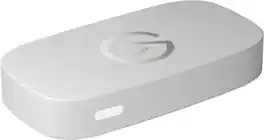
Elgato - Game Capture Neo — 4K60 HDR Passthrough, 1080p60 Capture – For Nintendo Switch 2, PS4/PS5/Xbox Switch/iPhone - White
Elgato - Game Capture Neo — 4K60 HDR Passthrough, 1080p60 Capture – For Nintendo Switch 2, PS4/PS5/Xbox Switch/iPhone - White
Related Item

Specifications
- Video Input(s)HDMIVideo Output(s)HDMIMaximum Supported Resolution (Video Capture)1080p (Full HD) @ 60 FPSCompatible Platform(s)PlayStation 5, PlayStation 4, Xbox, Nintendo Switch, Mac/Windows, Nintendo Switch 2
- Key Specs
- Video Input(s): HDMI
- Video Output(s): HDMI
- Maximum Supported Resolution (Video Capture): 1080p (Full HD) @ 60 FPS (The highest video resolution supported by the device to capture video from another source.)
- Compatible Platform(s): PlayStation 5, PlayStation 4, Xbox, Nintendo Switch, Mac/Windows, Nintendo Switch 2
- General
- Brand: Elgato
- Model Number: 10GBV9901
- Product Name: Elgato Game Capture Neo — 4K60 HDR Passthrough, 1080p60 Capture – For Nintendo Switch 2, PS4/PS5/Xbox Switch/iPhone
- Color: White
- Device Type: Standalone
- Connectivity
- Video Input(s): HDMI
- Audio Input(s): HDMI
- Video Output(s): HDMI
- Audio Output(s): HDMI
- Display
- Maximum Supported Resolution (Video Capture): 1080p (Full HD) @ 60 FPS (The highest video resolution supported by the device to capture video from another source.)
- Dimensions
- Product Height: 0.8 inches (The out of box height of the item. Height is measured as the vertical distance from the bottom of the item to the top as it would be primarily used or placed.)
- Product Width: 2.6 inches (The out of box width of the item. Width is measured as the horizontal distance from one side of the item to the other as it would be primarily used or placed.)
- Product Length: 4.8 inches (The out of box length of the item. Length is measured as the longest dimension of the item.)
- Product Weight: 0.2 pounds (The out of box weight of the item.)
- Compatibility
- Compatible Platform(s): PlayStation 5, PlayStation 4, Xbox, Nintendo Switch, Mac/Windows, Nintendo Switch 2
- Minimum System Requirements: Windows 10 (64-bit), macOS 12, iPadOS 17 (Requires USB-A to C adaptor or Dock) or newer/6th generation Intel Core i5 CPU (i5-6xxx) / AMD Ryzen 7 (or better)/Apple M1 or Intel i5-4xxx quad-core or better
- Warranty
- Warranty - Parts: 2 years
- Warranty - Labor: 2 years
- Other
- UPC: 840440401315
Great content made easy. Play stunning 4K60 HDR games without image quality loss or lag, and record or stream your adventures in beautiful Full HD 1080p60 resolution. Game Capture Neo sends two video signals from your console – one to your gaming screen and the other to your laptop, PC, Mac, or iPad. Capture everything you see and hear – gameplay, cutscenes, soundtrack – without watermarks or time limits, directly to your hard drive, YouTube, or Twitch. Stick to simple QuickTime recordings or develop your streaming expertise in OBS. As your skillset expands, Game Capture Neo evolves with your growing needs. So you can keep growing your community.
- Ready for your console: Capture Nintendo Switch 2, Playstation, Xbox, Steam Deck - anything.
- Tiny but Mighty: Premium Elgato Capture hardware the size of a smartphone.
- Easy Setup: Just connect your console, gaming screen, and computer or iPad.
- Super Compatible: Capture PlayStation, Xbox, Switch, or any console.
- 4K60 HDR Passthrough: No need to reduce your console resolution.
- 1080p60 Capture: Record or stream stunning Full HD content.
- Ultra-low Latency: Play your favorite titles without lag.
- Zero Limitations: No time limits, no watermarks, no subscriptions.
- Use Any App: Elgato capture software, QuickTime, OBS Studio, Discord, Microsoft Teams, Zoom.
- Stream to Any Platform: YouTube, Twitch, TikTok, Facebook Gaming, etc.
- Plug and Play: Driverless setup on laptop, PC, Mac, iPad.
Whats Included
- Elgato Game Capture Neo
- USB 3.0 C-to-C cable
A: Hi there! You’ll need a computer or an iPad with a USB-C 3.0 port to use Game Capture Neo. If you’re using an iPad, you can record with our Elgato Capture app.
A: Yes you can you use it gonna work for sure
A: You're gonna have to bump it up like $50 more to the 4K S to capture at 4K60 and capture that 5.1 Audio
Compare similar products
Great content made easy. Play stunning 4K60 HDR games without image quality loss or lag, and record or stream your adventures in beautiful Full HD 1080p60 resolution. Game Capture Neo sends two video signals from your console – one to your gaming screen and the other to your laptop, PC, Mac, or iPad. Capture everything you see and hear – gameplay, cutscenes, soundtrack – without watermarks or time limits, directly to your hard drive, YouTube, or Twitch. Stick to simple QuickTime recordings or develop your streaming expertise in OBS. As your skillset expands, Game Capture Neo evolves with your growing needs. So you can keep growing your community.

Showcase your gameplay at its best with Elgato Game Capture 4K S. Play and capture in crisp 4K60, ultra-smooth 1440p120, or even 1080p240—all with near-zero latency. With VRR passthrough, HDR10 capture on Windows, and analog audio input, this external USB-C card delivers pro-level features in a plug-and-play form factor. Whether you’re streaming or recording, it works seamlessly on Windows, macOS, and iPadOS—no drivers needed. 4K S is compatible with OBS Studio, Streamlabs, Discord, Zoom, and more. Connect your PS5, Xbox, or docked Switch 2, and share your gameplay in cinematic detail.

4K X is game capture at its best. Equipped with HDMI 2.1, our most powerful USB card lets you capture the latest titles up to 4K with HDR at 144 frames per second, or even 1080p240. Say goodbye to screen tearing with VRR passthrough. Enjoy ultra-low latency technology that keeps your broadcast and gameplay synced. 4K X works with almost any HDMI-compatible device, including PS5, Xbox Series X, Switch, Steam Deck, PC, Mac, even your iPhone 15. And it works seamlessly with leading broadcast apps like OBS, so you can stream like a pro on Twitch, YouTube, or Discord.

Short on ports? Now your Stream Deck + doubles as a USB Hub. Around back, connect up to four devices, from peripherals to external drives. It also powers your laptop, freeing the port you‘d nor?mally use for charging. Transfer files fast at speeds up to 5 Gb/s via USB-C, or use the convenient SD card reader on its side. USB Hub stows away and hides cables, keeping your workspace clean. Plus, your ports are always within arm’s reach, and it assembles in seconds—no drivers needed. Everything you need to expand and streamline your setup, all from one device.
| Pros for Elgato - Game Capture Neo — 4K60 HDR Passthrough, 1080p60 Capture – For Nintendo Switch 2, PS4/PS5/Xbox Switch/iPhone - White | |||
|---|---|---|---|
| Overall Performance, Video Quality, Compatibility, Setup, Ease of Use | Overall Performance, Video Quality, Compatibility, Latency | Overall Performance, Video Quality, Setup, Ease of use, HDMI | There were no pros for this product— |
| Cons for Elgato - Game Capture Neo — 4K60 HDR Passthrough, 1080p60 Capture – For Nintendo Switch 2, PS4/PS5/Xbox Switch/iPhone - White | |||
| Connectivity | There were no cons for this product— | Connectivity, Lag, Software | There were no cons for this product— |
Specs
Reviews
Customers are saying
Customers have good things to say about the Game Capture Neo, particularly its overall performance and ease of use. Users appreciate the video quality and find the design appealing. However, some customers have noted concerns regarding connectivity options.
Customer Images
The vast majority of our reviews come from verified purchases. Reviews from customers may include My Best Buy members, employees, and Tech Insider Network members (as tagged). Select reviewers may receive discounted products, promotional considerations or entries into drawings for honest, helpful reviews.
- Rated 5 out of 5 stars
I like it
Worked on my ps5 pretty well, and no input lag! The only thing is that the colors are a little different than on console but nothing that bothers me, great little card for a decent price. Remember to disable the HDCP setting in system before using this to stream as well :)
JayC Posted
- Rated 5 out of 5 stars
Best budget friendly Video Capture
It works at it should. I’m just happy I’m able to stream my Nintendo Switch 2 with my friends on discord and twitch. It does work easily with OBS and Streamlabs. With Streamlabs I did have an audio issue but I ended up having it fixed within a few minutes. It works with pretty much any console you have. The lag is not bad doesn’t really have a delay but it does at times. But for those price who can beat that. Also the program that you download to record your gameplay works great 120fps and 4k recording.
Chongo Posted
- Rated 5 out of 5 stars
Elgato Capture Card 5/5⭐️
I’m gonna keep this straight and real, for the price of $100 the Elgato capture card works perfectly with no flaws.
Marcas Posted