
Elgato - Stream Deck XL Wired Keypad with Back Lighting - Black
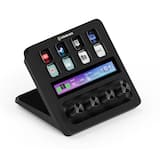
- Elgato - Stream Deck + Studio Controller with customizable touch strip and dials - Black$159.99$199.99
More Buying Options

Specifications
- Form FactorFull-sizeConnection TypeWired
- Key Specs
- Form Factor: Full-size (The size, arrangement, and physical configuration of the product.)
- Connection Type: Wired
- General
- Brand: Elgato
- Model Number: 10GAT9901
- Product Name: Stream Deck XL Wired Keypad with Back Lighting
- Color: Black
- Features
- Numeric Keypad: false
- Touchpad: false
- Keyboard Type: Keypad
- Palm Rest: false
- Spill Resistant: false (Designed to resist some degree of accidental liquid spill. The level of spill-resistance is indicated by the product manufacturer, but the degree of protection may not be guaranteed after normal wear of the product.)
- Foldable: false
- Functions
- Form Factor: Full-size (The size, arrangement, and physical configuration of the product.)
- Number Of Keys: 32
- Adjustable Tilt Function: false
- Multimedia Keys: false
- Internet Keys: false
- Connectivity
- Connection Type: Wired
- Wired Connectivity: USB-C
- Cable Length: 4.92 feet
- Detachable Cable: true
- Number Of USB Port(s): 4 (The total number of USB ports including all generations and versions.)
- Compatibility
- Operating System Compatibility: Windows, Mac
- Plug and Play Operation: true
- System Requirements: Windows 10 (64-bit); Apple MacOS X 10.13 or later (The software that a product must have for it to be able to integrate with another product.)
- Dimensions
- Product Height: 1.3 inches (The out of box height of the item. Height is measured as the vertical distance from the bottom of the item to the top as it would be primarily used or placed.)
- Product Width: 7.2 inches (The out of box width of the item. Width is measured as the horizontal distance from one side of the item to the other as it would be primarily used or placed.)
- Product Depth: 4.41 inches (The out of box depth of the item. Depth is measured as the distance from the front of the item to the back as it would be primarily used or placed.)
- Product Weight: 14.5 ounces (The out of box weight of the item.)
- Mouse
- Mouse Included: false
- Warranty
- Warranty - Parts: 2 years
- Warranty - Labor: 2 years
- Other
- UPC: 840006610373
Improve the quality of online broadcasts with this Elgato Stream Deck XL advanced stream controller. The included app makes it easy to assign custom functions to the 32 touch-sensitive keys for easy access to actions and effects. This Elgato Stream Deck XL advanced stream controller is compatible with a variety of popular live streaming services.
- 32 one-touch hot keys: To instantly access the Internet, e-mail, media player, volume control, and more.
- Backlit keys: Allow you to see your keyboard even in dim light.
- USB interface: Enables a simple wired connection to your computer.
- PC and Mac compatible: For use with your existing computer.
- 32 one-touch hot keys: To instantly access the Internet, e-mail, media player, volume control, and more.
- Backlit keys: Allow you to see your keyboard even in dim light.
- USB interface: Enables a simple wired connection to your computer.
- PC and Mac compatible: For use with your existing computer.
Whats Included
- Elgato Stream Deck XL - Keypad
- Magnet stand, USB-C to USB-A cable
- Elgato Stream Deck XL - Keypad
- Magnet stand, USB-C to USB-A cable
Q: Does the Elgato Stream Deck XL have a touchpad?
A: No, the Elgato Stream Deck XL does not have a touchpad.
Q: Is the Elgato Stream Deck XL compatible with both Windows and Mac computers?
A: Yes, the Elgato Stream Deck XL is compatible with both PC and Mac computers.
Q: How many hotkeys does the Elgato Stream Deck XL have?
A: The Elgato Stream Deck XL has 32 one-touch hotkeys.
Q: Does the Elgato Stream Deck XL have backlit keys?
A: Yes, the Elgato Stream Deck XL has backlit keys so you can see them in dim light.
Q: What is the cable length of the Elgato Stream Deck XL?
A: The cable length of the Elgato Stream Deck XL is 4.92 feet.
Q: What kind of interface does this stream controller use to connect to a computer?
A: This stream controller uses a USB interface for a simple wired connection.
Q: What is this used for...Do I need it in conjunction with a webcam
A: its basically a device that you can set macros up for streams and other things. I stream, and for my stream I have 6 or so themes that I use. one is just a webcam view, one just the game, one for stream starting, ending, taking a break etc. all of those thru stream labs you can set for hot keys like alt+f9 or something. a lot of times though you forget what hot key is what. this helps with that, plus makes if fast. so alt+f9 might be just my webcam. on the stream deck for themes I label it webcam and set it up as the hot key, alt+f9. so now when I press it while streaming, my stream will go to webcam only. you can also set it up to do websites, start/stop streaming, etc. can set it up for songs, if you use a mic like a blue yeti, and a sound board or something, you can set up different sounds. a lot you can do with it.
A: I downloaded the iphone app just to make sure that it would work with Revit and Navisworks before I bought the actual touchpad and it works great! I spoke with someone who is one of the heads of the software we use a couple of months ago about productivity and that when you are doing modeling eventually increasing your productivity gets down to minimizing mouse clicks. I love that The keys change with whichever software you are using. Hotkeys are nice but trying to remember what the shortcut is for a function that you may not use everyday can be cumbersome. I programmed a key to type in the shortcut for copy followed by the shortcut for snapping to center. That would normally be a total of 4 mouse clicks and I was able to take it down to 1. Hopefully I can get the company to purchase the stream deck otherwise I will most likely buy it on my own dime.
Compare similar products
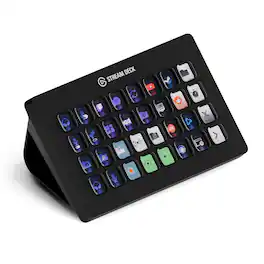
Improve the quality of online broadcasts with this Elgato Stream Deck XL advanced stream controller. The included app makes it easy to assign custom functions to the 32 touch-sensitive keys for easy access to actions and effects. This Elgato Stream Deck XL advanced stream controller is compatible with a variety of popular live streaming services.
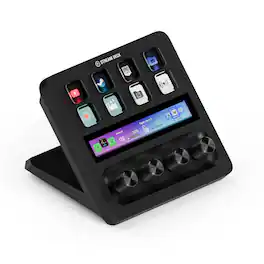
Iconic Stream Deck tech with LCD keys, dials, and touch strip. Fully customizable. Perfect for any workflow. Stream Deck + is your audio mixer, studio controller, production console – anything you want it to be. Trigger actions. Control mics and cameras. Adjust volume, lighting, and much more. Create limitless pages for different apps and swipe between them on the fly. Set up with ease in the Stream Deck app. Unlock Elgato Wave Link mixing software, and hit the Stream Deck Store for plugins, icon packs, thousands or royalty-free music tracks, sound effects, and more. With new plugins and updates added regularly, Stream Deck + evolves with your workflow.

Stream Deck gives you 15 LCD keys to control your apps and tools. Trigger actions, launch social posts, adjust audio, play sound clips, activate lights, and much more. Get visual feedback to confirm your commands. Set Stream Deck to automatically switch key configurations as you jump between apps. It’s the ultimate workflow hack, and it’s fully customizable. Personalize your Stream Deck with custom icons, screensavers, and a growing range of interchangeable faceplates. Use the app to configure keys with ease, and hit the Stream Deck Store for app plugins, icon packs, thousands of royalty free tracks, effects, and more.
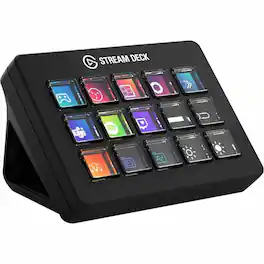
Same DNA, new feel. Stream Deck Scissor Keys is snappy, sleek, and oh-so-satisfying to press. With faster actuation and a streamlined design, every tap feels effortless, keeping you in the flow. Ready to press and go?
| Pros for Elgato - Stream Deck XL Wired Keypad with Back Lighting - Black | |||
|---|---|---|---|
| Ease of use, Customization, Overall Performance, Back Lighting, Button Count | Ease of use, Customization, Quality, Knobs, Volume Control | Ease of use, Overall Performance, Customization, LCD Keys, Software | There were no pros for this product— |
| Cons for Elgato - Stream Deck XL Wired Keypad with Back Lighting - Black | |||
| Price | There were no cons for this product— | Price, Button Quality, Stand | There were no cons for this product— |
Specs
Reviews
Customers are saying
Customers express satisfaction with the Stream Deck XL, highlighting its ease of use and customization options. The back lighting and number of buttons are also appreciated features. The primary concern mentioned by customers is the product's price.
Customer Images
The vast majority of our reviews come from verified purchases. Reviews from customers may include My Best Buy members, employees, and Tech Insider Network members (as tagged). Select reviewers may receive discounted products, promotional considerations or entries into drawings for honest, helpful reviews.
- Rated 5 out of 5 stars
I love it!!!
This is an amazing little device. I chose the 32 button XL because it seemed the best choice for the price. All the bottons are programable with lots of different apps. So far I use it with ecamm live and it’s great. I bought it for multiple uses. I have bottons programed to play intros, outros, transitions, and start other apps while live streaming. Switching between sources is just a botton away.
Jimmy Posted
- Rated 5 out of 5 stars
Ray video creater.
Game changer. Doubles workflow when using multiple apps and sites. With the addition of folders you can turn 32 into more functions than you can use. Websites, function, hotkeys all easy to use, so you can't get set up quickly. Had it for about a week and I keep adding and finding new ways to use Strem Deck.
RaymondL Posted
- Rated 5 out of 5 stars
Xl Stream Deck
I love this stream deck, it works well and is easy to set up. If you don’t like the color, you can purchase a cover for it online and it’s so fun!
SadieB Posted







