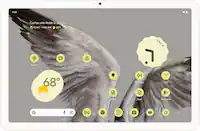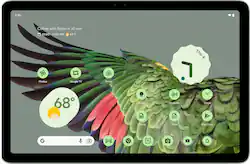
Google - Pixel Tablet - 11" Android Tablet - 128GB - WiFi - Hazel
- Key Specs
- Screen Size: 11 inches (Size of the screen, measured diagonally from corner to corner.)
- Screen Resolution: 2560 x 1600 (Screens come in a range of resolutions (measured in pixels, horizontal x vertical). The higher the resolution, the greater the picture quality.)
- Processor Model: Google Tensor G2 (Your computer's processor is like its brain. Working in combination with system memory, the power of the processor determines the complexity of software you can run, how many programs you can have open at the same time, and how fast those programs will run. Most computers feature an AMD, Intel or Snapdragon processor.)
- Total Storage Capacity: 128 gigabytes
- Operating System: Android 14 (The operating system manages all software and hardware, including files, memory and connected devices. Most importantly, it lets you interact with your device and your programs in a visual way; otherwise, you'd be typing computer code to get anything done.)
- Voice Assistant Built-in: Google Assistant (A digital assistant built into the device that uses voice commands to answer questions and control smart devices.)
- General
- Brand: Google
- Model Number: GA06158-US
- Product Name: Pixel Tablet - 11" Android Tablet - 128GB - WiFi
- Color: Hazel
- Model Family: Google Pixel Tablet
- Year of Release: 2024
- Display
- Screen Size: 11 inches (Size of the screen, measured diagonally from corner to corner.)
- Screen Resolution: 2560 x 1600 (Screens come in a range of resolutions (measured in pixels, horizontal x vertical). The higher the resolution, the greater the picture quality.)
- Processor
- Processor Model: Google Tensor G2 (Your computer's processor is like its brain. Working in combination with system memory, the power of the processor determines the complexity of software you can run, how many programs you can have open at the same time, and how fast those programs will run. Most computers feature an AMD, Intel or Snapdragon processor.)
- Storage
- Total Storage Capacity: 128 gigabytes
- Memory
- System Memory (RAM): 8 gigabytes (Random-access memory (RAM) is a computing device's short-term data storage, which allows active information to be accessed quickly. The size and type of RAM determines how efficiently the device can handle large amounts of information at one time. For example, gaming or video editing requires more RAM for optimal performance.)
- Type of Memory (RAM): LPDDR5 (Each type of RAM delivers a different level of speed, bandwidth, energy efficiency and performance.)
- Compatibility
- Operating System: Android 14 (The operating system manages all software and hardware, including files, memory and connected devices. Most importantly, it lets you interact with your device and your programs in a visual way; otherwise, you'd be typing computer code to get anything done.)
- Operating System Compatibility: Android
- Voice Assistant Built-in: Google Assistant (A digital assistant built into the device that uses voice commands to answer questions and control smart devices.)
- Power
- Charging Interface(s): USB-C (The connection for transmitting power to charge the device.)
- Camera
- Front-Facing Camera: true
- Rear-Facing Camera: true
- Dimensions
- Product Width: 6.65 inches (The out of box width of the item. Width is measured as the horizontal distance from one side of the item to the other as it would be primarily used or placed.)
- Product Depth: 10.15 inches (The out of box depth of the item. Depth is measured as the distance from the front of the item to the back as it would be primarily used or placed.)
- Product Weight: 1.08 ounces (The out of box weight of the item.)
- Other
- UPC: 193575038902
The Pixel Tablet is designed to be helpful at home and with work. Control your smart home, and say “Hey Google” for hands-free help, ¹. It’s powered by the Google Tensor G2 chip, and it’s the perfect companion to your Pixel phone.
- Android operating system: The Android apps you love are already optimized for your Pixel Tablet’s larger screen; it comes with Google TV so you can watch your favorite shows and movies, and it’s easy to cast content with Chromecast built in ²
- Beautiful 11-inch screen: The Pixel Tablet has a gorgeous 11-inch screen with brilliant colors and adaptive brightness – perfect for streaming your favorite movies and shows, and editing photos and videos. ³
- Storage for what matters most: 128 GB UFS 3.1 storage provides space for your contacts, music, photos and more. ⁴
- Google Tensor G2. Now in tablet form: The Pixel Tablet is the first tablet with the Google Tensor G2 chip built in. It features Google AI and enables fast and smooth streaming, high-quality video calls, accurate voice typing, efficient multitasking, and more.
- Crisp and clear video calls: The Pixel Tablet comes with Google Meet for HD video calling. ⁵ The camera follows you so you can move around the room while staying in frame.
- An easier way to share: With Nearby Share, you can quickly and securely share photos, videos, and more between your Pixel Tablet and other nearby phones and laptops. ⁶
- The info you need, at a glance: At a Glance shows you useful info right when you need it, like weather forecasts, event reminders, or package deliveries. ⁷
- It works seamlessly with other Pixel devices.: The Pixel Tablet effortlessly connect your Pixel phone, earbuds, watch, and tablet with each other; and easily switch audio between your Pixel phone, earbuds, and tablet. ⁸
- Reimagine your photos, right on your tablet.: Magic Editor in Google Photos makes complex edits easy. With a few taps, AI can change the background, move objects, and more.⁹
- Instant inspiration.: Gemini helps you kickstart productivity and creativity – brainstorm ideas, write notes, make plans, and more.⁺
- Circle to Search. Whoa.: Just circle what you want more info about, whether it’s an image, text, or video. Pixel finds it fast – right from the app you’re in.¹¹
- Android operating system: The Android apps you love are already optimized for your Pixel Tablet’s larger screen; it comes with Google TV so you can watch your favorite shows and movies, and it’s easy to cast content with Chromecast built in ²
- Beautiful 11-inch screen: The Pixel Tablet has a gorgeous 11-inch screen with brilliant colors and adaptive brightness – perfect for streaming your favorite movies and shows, and editing photos and videos. ³
- Storage for what matters most: 128 GB UFS 3.1 storage provides space for your contacts, music, photos and more. ⁴
- Google Tensor G2. Now in tablet form: The Pixel Tablet is the first tablet with the Google Tensor G2 chip built in. It features Google AI and enables fast and smooth streaming, high-quality video calls, accurate voice typing, efficient multitasking, and more.
- Crisp and clear video calls: The Pixel Tablet comes with Google Meet for HD video calling. ⁵ The camera follows you so you can move around the room while staying in frame.
- An easier way to share: With Nearby Share, you can quickly and securely share photos, videos, and more between your Pixel Tablet and other nearby phones and laptops. ⁶
- The info you need, at a glance: At a Glance shows you useful info right when you need it, like weather forecasts, event reminders, or package deliveries. ⁷
- It works seamlessly with other Pixel devices.: The Pixel Tablet effortlessly connect your Pixel phone, earbuds, watch, and tablet with each other; and easily switch audio between your Pixel phone, earbuds, and tablet. ⁸
- Reimagine your photos, right on your tablet.: Magic Editor in Google Photos makes complex edits easy. With a few taps, AI can change the background, move objects, and more.⁹
- Instant inspiration.: Gemini helps you kickstart productivity and creativity – brainstorm ideas, write notes, make plans, and more.⁺
- Circle to Search. Whoa.: Just circle what you want more info about, whether it’s an image, text, or video. Pixel finds it fast – right from the app you’re in.¹¹
Whats Included
- Pixel Tablet
- 1m USB-C to USB-C cable
- Safety & warranty booklet
- Support card
- Pixel Tablet
- 1m USB-C to USB-C cable
- Safety & warranty booklet
- Support card
Disclaimers
- ¹ Smart home features require compatible devices (sold separately).
- ² Subscriptions may be required for certain content.
- ³ Screen has rounded corners. When measured diagonally as a rectangle, screen is 11 inches. Actual viewable area is less. Subscriptions may be required to stream certain content.
- ⁴ Storage specifications refer to capacity before formatting. Actual formatted capacity will be less.
- ⁵ Requires compatible apps.
- ⁶ Requires compatible phones running on Android 6.0 or newer or Chromebooks running on Chrome OS 91 or newer.
- ⁷ Event reminders require compatible email app. Nest package delivery feature requires compatible Nest Doorbell (sold separately) and the Google Home app.
- ⁸ Watch, phone and earbuds sold separately. Fast pair requires location enabled. Devices must have been previously paired with Pixel Buds.
- ⁹ Results may vary.
- ⁺ Gemini mobile app available on select devices, languages, and countries. Internet connection required. Check responses for accuracy.
- ¹¹ Requires internet connection and compatible devices, apps, and surfaces. Results may vary depending on visual matches.
- ¹ Smart home features require compatible devices (sold separately).
- ² Subscriptions may be required for certain content.
- ³ Screen has rounded corners. When measured diagonally as a rectangle, screen is 11 inches. Actual viewable area is less. Subscriptions may be required to stream certain content.
- ⁴ Storage specifications refer to capacity before formatting. Actual formatted capacity will be less.
- ⁵ Requires compatible apps.
- ⁶ Requires compatible phones running on Android 6.0 or newer or Chromebooks running on Chrome OS 91 or newer.
- ⁷ Event reminders require compatible email app. Nest package delivery feature requires compatible Nest Doorbell (sold separately) and the Google Home app.
- ⁸ Watch, phone and earbuds sold separately. Fast pair requires location enabled. Devices must have been previously paired with Pixel Buds.
- ⁹ Results may vary.
- ⁺ Gemini mobile app available on select devices, languages, and countries. Internet connection required. Check responses for accuracy.
- ¹¹ Requires internet connection and compatible devices, apps, and surfaces. Results may vary depending on visual matches.
A: Hey there! You can charge your Pixel Tablet without the Speaker Dock. Simply use a USB cable. For more information, tap the link below: https://support.google.com/googlepixeltablet/answer/13554742?hl=en
Q: Can i read books on the tablet?
A: Of course. If you have installed an appropriate app like Libby (download ebooks from your library) or Kindle (for free and purchased books from Amazon). I read books and newspapers on my Pixel tablet all the time.
Q: Does this tablet have an SD slot for additional storage?
A: Hi Mike, thanks for sharing your concern. Our Pixel Tablet doesn't have a SD slot. But no worries we will be taking this comment in consideration for future developments. In the meantime, you can check out the Pixel Tablet specs here: https://store.google.com/us/product/pixel_tablet_specs?hl=en-US
Q: Does it have a port to plug in an earphones vrs using earbuds,?
A: Yes. USB C wired buds
Q: Can you download a movie and mirror it to a tv without wifi
A: Hi, Zzskgs. Yes, you can download a movie on your Google Pixel Tablet 11" and mirror it to a TV without Wi-Fi by using a wired connection like an HDMI cable to connect your tablet directly to the TV. To use this feature, you must use a display device that supports DisplayPort or HDMI to USB-C cable. To project content from your Pixel phone into a display device: 1. Plug the DisplayPort or HDMI cable into the display device. 2. Plug the USB-C cable into your Pixel phone. 3. Select the Mirror display dialogue that appears on your phone. 4. Follow the on-screen instructions. To get more information you can click the following link: https://support.google.com/pixelphone/answer/2865484
A: Unfortunately not, I was disappointed to know that it does not work as a 2nd monitor... Hopefully google addresses this issue and provides support for casting to it's display
Q: Does it work with Microsoft products
A: Yes
Q: Tamil typing is available just like pixel phone
A: Great question! The Pixel tablet should offer a seamless Tamil typing experience. Google's Gboard is the default keyboard on Pixel devices and it's known for its robust language support, including Tamil.