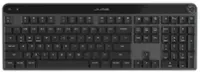
JLab - Flow Bundle Multi-device Wireless Ergonomic Keyboard and Mouse Set - Black
JLab - Flow Bundle Multi-device Wireless Ergonomic Keyboard and Mouse Set - Black
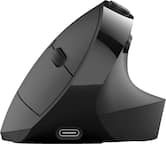
- JLab - JBuds Ergonomic Wireless Mouse - Wireless - Black$39.99

More Buying Options

Specifications
- Form FactorErgonomicConnection TypeWireless
- Key Specs
- Form Factor: Ergonomic (The size, arrangement, and physical configuration of the product.)
- Connection Type: Wireless
- General
- Brand: JLab
- Model Number: KMFLOWBUNDLE4
- Product Name: Flow Bundle Multi-device Wireless Ergonomic Keyboard and Mouse Set
- Color: Black
- Functions
- Form Factor: Ergonomic (The size, arrangement, and physical configuration of the product.)
- Connectivity
- Connection Type: Wireless
- Wireless Connectivity: Bluetooth (The manner in which a device sends data to another device over a short distance without the use of wires or cables.)
- Compatibility
- Operating System Compatibility: Universal
- Dimensions
- Product Height: 1.6 inches (The out of box height of the item. Height is measured as the vertical distance from the bottom of the item to the top as it would be primarily used or placed.)
- Product Width: 9 inches (The out of box width of the item. Width is measured as the horizontal distance from one side of the item to the other as it would be primarily used or placed.)
- Product Depth: 20 inches (The out of box depth of the item. Depth is measured as the distance from the front of the item to the back as it would be primarily used or placed.)
- Product Weight: 2.6 ounces (The out of box weight of the item.)
- Warranty
- Warranty - Parts: 2 years
- Warranty - Labor: 2 years
- Other
- UPC: 810119072870
Introducing the JLab Flow Keyboard & Mouse Bundle, where ergonomic design meets innovative technology. The Flow Keyboard's "flowing design" and the ambidextrous full-size mouse provide ultimate comfort for any workspace. Featuring a dedicated AI Button for configurable access to AI apps, customizable profiles via the JLab Work app, and versatile connectivity options, this bundle seamlessly meets your needs. With its Smart Media Knob and long-lasting battery life, the Flow Bundle offers the perfect blend of style, comfort, and functionality for work or play.
- Ergonomic Design: The Flow Keyboard features a flowing design that matches the natural curve of your hand, complemented by a soft, padded palm rest for added support. The full-sized ambidextrous mouse ensures enhanced comfort over long durations of use.
- AI Integration: Access the power of AI with just a click*. The dedicated AI button provides quick access to AI apps like Gemini, ChatGPT, and Copilot, programmable via the Work app.
- Flexible Connections: The Flow Bundle is compatible with three device connection options. You can pair with nearly any type of device using Bluetooth 5.2 or the USB-C dongle. We hate pairing confusion too, so we made it super easy for you to switch between saved devices. To keep connections simple, both the Flow Keyboard and Flow Mouse can connect to a single USB-C dongle, freeing up other ports.
- Custom User Profiles: Through the JLab Work app, program hotkeys for shortcuts to your favorite functions within any application. Save up to three unique profiles for different use cases, and switch between them effortlessly depending on what you're doing.
- Smart Media Knob: The media knob gives you quick control of your audio right from your Flow Keyboard. Whether you're answering an important phone call or finding the perfect song to get in the zone, it's only a click away—no mouse necessary.
- JLab Work Desktop App: Personalize your typing experience with the JLab Work desktop app. Save up to three unique profiles and program hotkeys for shortcuts to your favorite functions within any application, tailoring the Flow Keyboard to your specific needs and preferences. The JLab Work desktop app also provides customization of the Flow Mouse button functionality.
Whats Included
- Flow Keyboard
- Flow Mouse
- USB-C Dongle
- Quick Start Guide
Q: How many connection options does this keyboard and mouse bundle have?
A: This keyboard and mouse bundle has three device connection options.
Q: Does this keyboard have a dedicated AI button?
A: Yes, this keyboard has a dedicated AI Button for quick access to AI apps.
Q: What kind of wireless connectivity does the keyboard and mouse use?
A: The keyboard and mouse use Bluetooth for wireless connectivity.
Q: Does the keyboard have a media knob?
A: Yes, the keyboard has a smart media knob for audio control.
Q: Can I customize user profiles using an application?
A: Yes, you can customize user profiles through the JLab Work app.
Q: What is the parts warranty for this keyboard and mouse set?
A: The parts warranty for this keyboard and mouse set is two years.
Q: Is the design of the keyboard ergonomic?
A: Yes, the keyboard features an ergonomic flowing design.
Q: does this keyboard have a print screen button?
A: undefined
Compare similar products

Introducing the JLab Flow Keyboard & Mouse Bundle, where ergonomic design meets innovative technology. The Flow Keyboard's "flowing design" and the ambidextrous full-size mouse provide ultimate comfort for any workspace. Featuring a dedicated AI Button for configurable access to AI apps, customizable profiles via the JLab Work app, and versatile connectivity options, this bundle seamlessly meets your needs. With its Smart Media Knob and long-lasting battery life, the Flow Bundle offers the perfect blend of style, comfort, and functionality for work or play.
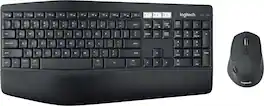
Experience next-level comfort and productivity with the MK850 Performance. Hyper-fast scrolling and a full-size keyboard help you get more done at your desk – and a cushioned palm rest, curved keyframe and contoured mouse let you power through in comfort. Type and switch seamlessly between your computer, tablet, and phone. And pair your mouse with up to 3 devices. The combo has been optimized for use with all your operating systems – including Windows, Mac, and Chrome OS.

Whether you just got a new computer or are simply upgrading your current setup, you can’t go wrong with this Insignia NS-PK4KCB23 Full-Size Wireless Ergonomic Membrane Keyboard. Its plug-and-play technology easily connects to your Windows, macOS or ChromeOS system with a simple USB dongle. An ergonomic design with wrist support makes it a comfortable to use for longer lengths of time. Membrane switch keys provide a smooth typing experience, while a full-size number pad helps you input information more accurately, and multimedia keys keep a variety of functions like audio controls within easy reach.
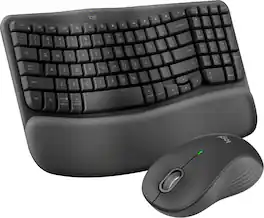
Experience day-long comfort and productivity with this wireless ergonomic keyboard and mouse combo. Typing feels instantly familiar on Wave Keys’ wavy keyframe design. The cushioned keyboard palm rest lifts pressure and improves wrist support. The Signature M550 L Wireless Mouse features a contoured shape and rubber side grip to keep medium- to large-sized hands comfortable throughout the day.
| Pros for JLab - Flow Bundle Multi-device Wireless Ergonomic Keyboard and Mouse Set - Black | |||
|---|---|---|---|
| Comfort, Design | Ease of use, Connectivity, Keyboard Quality, Battery Life | Ergonomics, Ease of use, Keyboard Size, Wireless, Price | Ergonomics, Ease of use, Connectivity, Palm Rest, Overall Performance |
| Cons for JLab - Flow Bundle Multi-device Wireless Ergonomic Keyboard and Mouse Set - Black | |||
| Connectivity | Lag, Price | Key Response | Keyboard Size, Key Spacing, Backlight |
Specs
Reviews
Customers are saying
Customers have good things to say about the comfort of the Flow Bundle Multi-device Wireless Ergonomic Keyboard and Mouse Set, with users particularly appreciating the feel of the split keyboard design. However, some customers have reported issues with connectivity to their devices.
Customer Images
The vast majority of our reviews come from verified purchases. Reviews from customers may include My Best Buy members, employees, and Tech Insider Network members (as tagged). Select reviewers may receive discounted products, promotional considerations or entries into drawings for honest, helpful reviews.
- Rated 4 out of 5 stars
Keyboard and mouse-very nice for the wrists
So far it is working. Had to take it in to the geek squad to set it up proper. I didn't put the little control into the right slot in the back of the computer. The key board is much nicer and better on my hands than the one that came with the computer, Like the desgin a lot for the wrists
BarbaraD Posted
- Rated 4 out of 5 stars
Great keyboard, could be greater!
Great keyboard, mouse is meh... While I commend J-Labs on the quality and feel of this keyboard, the mouse they chose to package it with was the biggest regret about the purchase. If only the mouse had forward and back buttons, it would have been five stars. About the keyboard, you can connect three devices, which is nice for me as my personal computer sits in the same office and shares the same monitors with my work computer, which makes switching devices easy. The keys are actually particularly good. I must say for a membrane keyboard they did an excellent job mimicking a mechanical keystroke. I enjoy typing on this keyboard and the padded wrist rest was well done, the material feels high quality and also comfortable to use all day. On occasion there will be a random uncommanded letter that will appear when typing, but that's not a huge deal it happens so seldom it's possible that interference could be causing that. I don't seem to experience the issue when using Bluetooth with the keyboard only on the dongle does this happen. The mouse also shares the three device connectivity. Unlike Logitech, you cannot assign the three connection as all Bluetooth or all Unifying Receiver, you get dongle in position one then two Bluetooth positions. Again J-Labs needs to update their J-Lab works software to work via Bluetooth as you cannot make adjustments to the keyboard while pared in Bluetooth mode. overall a great ergonomic keyboard with a great typing feel that rivals that of mechanical types. Would recommend, but be aware of the items I mentioned above, Why four stars and not 3? Because I believe J-labs is making a serious, albeit not perfect, dive into the peripheral market and I love that about them. I think they have the potential to make a great rival to Logitech in the office keyboard word.
JPROCH Posted
- Rated 5 out of 5 stars
Keyboard review
The keyboard design and layout reduces hand and wrist strain making data entry a much more pleasurable process. The design reduces mistakes and improves accuracy for a more efficient and productive workflow.
DavidM Posted