Everything for Back to School — and then someShop now

Skip to contentGo to Product Search
Main Content

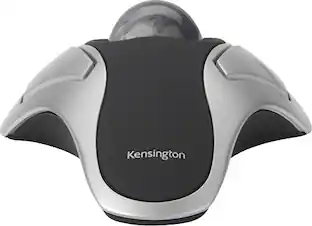
Kensington - Orbit 72337 Optical Gaming Ambidextrous Mouse with Scroll Ring - Wired - Black and Blue

Model: K72337US
SKU: 10117379
Sold & shipped by

About this product

All-day comfort and scrolling come together in the Kensington Orbit Trackball with Scroll Ring. The scroll ring allows you to fly through web pages and documents. And all while delivering comfort and space savings no mouse can match.

Features
  • Scroll Ring and Medium Ball

    Spin the dial to move up and down web pages or documents with complete ease. The blue 40mm ball has been specially designed with an absolute spherical, hard surface for precise tracking and control.

  • KensingtonWorks Customization

    Free downloadable software provides an even more personalized experience, giving you the ability to assign a wide variety of program functions to each of the 2 buttons, as well as adjusting cursor and scrolling speeds

  • Optical Tracking Technology

    Provides precise cursor movement for superior accuracy so you can get where you want on the screen quickly with less hand movement, improving productivity and efficiency

  • Detachable Wrist Rest

    Soft cushioning cradles the hand and wrist in ergonomic comfort for pain-free productivity during extended periods of activity on the computer

  • Ambidextrous Design

    Works equally well for both right-handed and left-handed users to get the most out of their trackball

See all features
Specifications
  • Connection Type
    Wired
Sponsored

Reviews

Rating 4.3 out of 5 stars with 12 reviews

5 star rating. 7 reviews4 star rating. 3 reviews2 star rating. 2 reviews
83% would recommend to a friend

The vast majority of our reviews come from verified purchases. Reviews from customers may include My Best Buy members, employees, and Tech Insider Network members (as tagged). Select reviewers may receive discounted products, promotional considerations or entries into drawings for honest, helpful reviews.

  • Rated 5 out of 5 stars

    Best scolling mouse of any kind.

    Trackballs have two advantages. First you do not have to move it, find it, or make room to use it. Most trackaballs have a quick removal of the ball for cleaning. Dust, grit, etc. mess up optical mice including trackballs. The ball lifts out, and a cleaning wipe athen replace ball only takes seconds. The scroll ring is much better thann any scroll wheel. Precise quick movement of ball and ring is superior to almost any other product.

    This review is from Kensington - Orbit 72337 Optical Gaming Ambidextrous Mouse with Scroll Ring - Wired - Black and Blue

    Posted by SECornerUSA

  • Rated 5 out of 5 stars

    Great Trackball

    This track ball is great. I like the scroll ring and the removable rest for your wrist. The track ball is a great alternative to a mouse when you have a desk that can get a little cluttered at times. The track ball doesn't need any room to be used. You can set it on top of papers if needed and it will work just fine.

    This review is from Kensington - Orbit 72337 Optical Gaming Ambidextrous Mouse with Scroll Ring - Wired - Black and Blue

    Posted by azshooter45

  • Rated 4 out of 5 stars

    Great mouse for the price

    I bought this mouse because I use 3 monitors for mixing and mastering music. The ball design allows for very efficient scrolling and movement. The only complaint I have is it has been making my fingers a little sore like I did a hand work out. Maybe after a few months I'll get used to it, not sure. For the price it was a great deal and nice addition to my studio .

    This review is from Kensington - Orbit 72337 Optical Gaming Ambidextrous Mouse with Scroll Ring - Wired - Black and Blue

    Posted by Nikademo

  • Rated 4 out of 5 stars

    Great Trackball with a few reservations...

    1st a little history on the trackballs I've tried is necessary so you can understand why I like this trackball and compare it to some others out there. A few years ago, I originally used wired Logitech Trackmans that I loved on several PCs at home and work. When they eventually went bad, I found out that the wired form of this mouse was no longer sold by Logitech and that no other wired trackballs used a ball for the thumb. So I paid more than I wanted to and bought a Logitech M570 wireless trackball as it was almost identical to the wired one with a thumb ball. I loved the way that mouse felt in the hand and preferred using the thumb to move the cursor. It also had a very functional scroll wheel just like on most mice. However I had tons of problems with the M570 constantly disconnecting itself because it thought it was out of range of the PC which set 3-4 feet away under my desk. The battery would also not last even a month of use. So when the M570 switches went bad, I decided to go back to a wired trackball. The only choices I could find in a wired trackball used the center fingers to move the ball rather than the thumb ball I was used to. So I was going to have to relearn the operation using the middle fingers. The 1st choice I bought and tried was the Logitech Marble. I quickly learned to use the middle fingers to control the ball and the transition was quick. But this trackball had no scroll wheel and no way to simulate one without doing several uncomfortable clicks on mouse buttons first. This was a deal breaker for me and I used it less than a month before wanting to replace it with something that had a scroll wheel. Almost all the programs I use need the scroll wheel to function well. Very few trackballs now have the scroll wheel. I found and researched this Kensington Orbit trackball with scroll ring on the BB site and ordered it to tryout. Overall it is a good trackball with a few reservations. The size is quite large and you have to place your hand higher up on it than with the Logitech. Due to it's wide size and scroll ring around the ball, the buttons are farther apart and the buttons sit about 3/4" directly on either side of the ball. This was a little awkward to get used to the wide button spread. I would have also preferred the buttons be longer and extend farther back like on the Logitech so there's less feeling for them. I preferred the Logitech Marble's shape and button size better. The scroll ring also takes a bit of getting used to. It's a very light touch sensitive ring that is easily bumped while operating the ball and unintentionally moved. But I'm getting more used to the different hand and finger placement and the bumps are getting less frequent. For a gamer this very sensitive scroll ring is probably what they would want. For someone scrolling through a document it can be annoying. The slowest scroll wheel setting is still not slow enough for smooth document scrolling. It involves a good deal of moving the wheel too far and then back again. But again, this can be relearned. I would have preferred that the scroll ring have a little resistance to it and click as a mouse scroll wheel does. But I can see the way this one is would probably be better for a gamer who needs to react fast. The ball is smooth and using downloaded software from Kensington, it is quite customizable. There are two buttons and then both buttons clicked together are considered a 3rd button for software settings. You also have options in this software to modify actions by holding down keyboard keys while you click. So the software is a nice addition to customize this trackball to being the way you want it. The Orbit also came with a rubbery wrist rest which I like and use. It's a matter of taste whether you will like this or not. Depends on how you sit when you use this. Of course adding it makes an already large footprint even larger. And what I also like is that this is a wired USB mouse so you don't need to be replacing batteries or dealing with the out-of-range issues that plagued the Logitech wireless M570 I used. In summary, I like the feel and hand-fit and functionality of the Logitech M570 the best. But it's wireless malfunctions and regular need to have new batteries was annoying. The Logitech Trackman Marble would have been my next choice for the fit in the hand. But not having a scroll wheel/ring and the lack of it's software to easily simulate it made it useless to me. The Kensington Orbit with scroll ring takes a little getting used to in hand placement and desk footprint but overall is the one I choose to use. I will be getting two more for my other laptop and work PC.

    This review is from Kensington - Orbit 72337 Optical Gaming Ambidextrous Mouse with Scroll Ring - Wired - Black and Blue

    Posted by Graystone55

  • Rated 5 out of 5 stars

    DVR one handed operation and review

    we use this as a one handed forward and reverse direct playback for reviewing security cameras, easy to use and able to operate right off my hips sitting or standing. I am certain it would be helpful on a computer as well

    This review is from Kensington - Orbit 72337 Optical Gaming Ambidextrous Mouse with Scroll Ring - Wired - Black and Blue

    Posted by motai70

  • Customer reviews from bestbuy-ca

    Syndicated rating, 3 out of 5 stars with 2 reviews on bestbuy-ca.

    See all bestbuy-ca reviews
From the Manufacturer

Compare similar products

Kensington - Orbit 72337 Optical Gaming Ambidextrous Mouse with Scroll Ring - Wired - Black and Blue
4.3(12)

All-day comfort and scrolling come together in the Kensington Orbit Trackball with Scroll Ring. The scroll ring allows you to fly through web pages and documents. And all while delivering comfort and space savings no mouse can match.

Kensington - Orbit Wireless Trackball with Scroll Ring - Optical - Wireless - Bluetooth/Radio Frequency - 2.40 GHz - Wired - Black

The Kensington trackball legacy continues with the latest addition to the patented Orbit Trackball with Scroll Ring - the Orbit Wireless Trackball with Scroll Ring. You asked for wireless, and we delivered, with the same great features that have made the Orbit Trackball with Scroll Ring so popular, including a patented scroll ring that allows you to scroll up & down pages with ease; customizable buttons; dual wireless connectivity offering the flexibility of 2.4 GHz and Bluetooth (3.0 and LE), with 128-bit AES government-grade encryption security; four DPI settings (400, 800, 1,200, or 1,600) that let you easily adjust the cursor speed to fit your needs; a detachable wrist rest; ambidextrous design; and plug-and-play ease for Mac or PC More from the Manufacturer
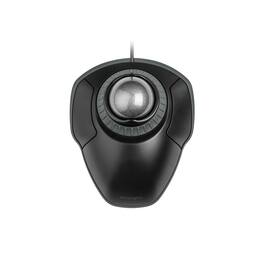
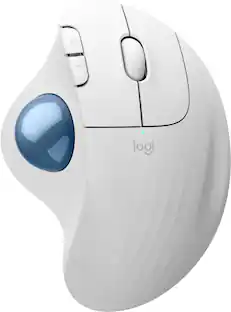
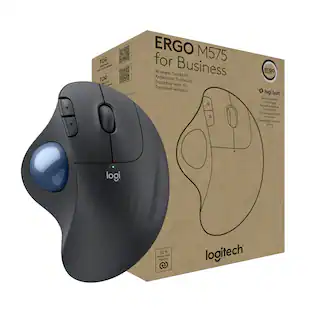
Logitech - ERGO M575 S Wireless Ergonomic Trackball Mouse - Wireless - Black

Minimize movement and maximize comfort with the Logitech ERGO M575S wireless trackball mouse. Thumb control lets you move the cursor without moving your arm, while the sculpted ergonomic design fully supports your hand and keeps your forearm in a more natural position. This wireless ergonomic mouse has been developed by Logi Ergo Lab experts, user-tested and certified by ergonomists to give you 25% less muscle strain in your forearm . The smooth and responsive thumb control can be used anywhere – and since it doesn’t need to be moved, the ERGO M575S is perfect for tight setups and busy desks.

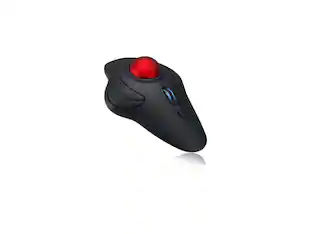
Kensington - Orbit Wireless Laser Trackball Mouse - Black
4.4(58)

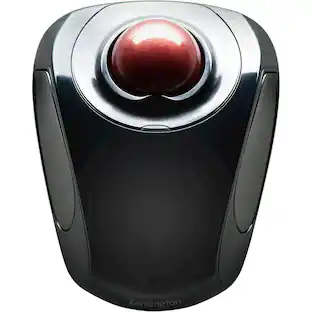
Tackle complex tasks or browse documents effortlessly with this Orbit wireless mobile trackball. An ergonomic setup and ambidextrous design allow for comfortable use, while the touch operation provides accurate, efficient scrolling. Customize the two buttons using free downloadable software for even greater ease of operation. A wireless USB nano receiver makes it easy to connect this Orbit wireless mobile trackball to a PC or Mac device.

Pros for Kensington - Orbit 72337 Optical Gaming Ambidextrous Mouse with Scroll Ring - Wired - Black and Blue
There were no pros for this productThere were no pros for this productErgonomics, Overall Performance, Ease of Use, Connectivity, Battery LifeThere were no pros for this product
Cons for Kensington - Orbit 72337 Optical Gaming Ambidextrous Mouse with Scroll Ring - Wired - Black and Blue
There were no cons for this productThere were no cons for this productCursor ControlThere were no cons for this product

Specs

Questions & Answers
  • Does this mouse come with a wrist rest?

    Yes, the Kensington Orbit Trackball includes a detachable wrist rest for added comfort during extended use.

    This question and answer was generated by AI based on customer and product data.
  • Does this mouse have a scroll wheel?

    Yes, this trackball mouse has a scroll ring that you spin to move up and down web pages and documents.

    This question and answer was generated by AI based on customer and product data.
  • What kind of tracking technology does this mouse use?

    This mouse uses optical tracking technology for precise cursor movement.

    This question and answer was generated by AI based on customer and product data.
  • Can I customize the button functions on this mouse?

    Yes, you can customize the button functions using the KensingtonWorks software, which allows you to assign a variety of program functions to each button.

    This question and answer was generated by AI based on customer and product data.
  • Is this mouse designed for right-handed or left-handed users?

    The Kensington Orbit Trackball is an ambidextrous design, making it suitable for both right and left-handed users.

    This question and answer was generated by AI based on customer and product data.
Ask a question
No content

Customers often buy these together

Sponsored

Finance Options

My Best Buy® Credit Card
Buy Now, Pay Later

Finance Options

My Best Buy® Credit Card
Buy Now, Pay Later