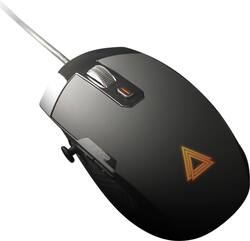
Lexip - Pu94 Wired Gaming Mouse - Wired - Black
Model: JVAPCM00430
SKU: 6361782
This item is no longer available in new condition. See similar items below
- Key Specs
- Lighting Type: None
- Maximum Sensitivity: 12000 dots per inch (Mouse sensitivity is measured in dots per inch (DPI). The higher the DPI, the more sensitive the mouse is and may be more useful for high-density pixel screens. Lower DPI typically means more precision and accuracy in mouse movement.)
- Connection Type: Wired
- General
- Brand: Lexip
- Model Number: JVAPCM00430
- Product Name: Pu94 Wired Gaming Mouse
- Color: Black
- System Requirements: Apple MacOS, Microsoft Windows (The software that a product must have for it to be able to integrate with another product.)
- Features
- Mouse Type: Gaming
- Lighting Type: None
- Performance
- Mouse Operation: Button(s), Thumb joystick
- Tracking Method: Laser (There are several types of computer mice, optical and laser being among the most common. Optical mice detect less detail and provide more precise and accurate movement. Laser mice detect more detail and can be used on a wider variety of surfaces, but are more sensitive to small movements.)
- Maximum Sensitivity: 12000 dots per inch (Mouse sensitivity is measured in dots per inch (DPI). The higher the DPI, the more sensitive the mouse is and may be more useful for high-density pixel screens. Lower DPI typically means more precision and accuracy in mouse movement.)
- Connectivity
- Connection Type: Wired
- Wired Connectivity: USB-A
- Operating System Compatibility: Mac, Windows
- Power
- Mouse Power Source: Wired
- Dimensions
- Product Height: 9 inches (The out of box height of the item. Height is measured as the vertical distance from the bottom of the item to the top as it would be primarily used or placed.)
- Product Length: 9 inches (The out of box length of the item. Length is measured as the longest dimension of the item.)
- Product Width: 3 inches (The out of box width of the item. Width is measured as the horizontal distance from one side of the item to the other as it would be primarily used or placed.)
- Product Weight: 1 grams (The out of box weight of the item.)
- Warranty
- Warranty - Parts: 2 years
- Warranty - Labor: 2 years
- Other
- UPC: 3760210998951
Take out your enemies with sharp accuracy by using this Lexip Pu94 wired gaming mouse. The ergonomic construction provides a comfortable grip during marathon gaming sessions, and the wired design helps ensure low latency. This Lexip Pu94 wired gaming mouse boasts a laser sensor for pin-point precision, and the programmable buttons enable customization.
- Omron switch technology: Provides absolute accuracy and an incredibly long life.
- Wired connection: This mouse connects to your computer using a USB port.
- Laser technology: This mouse uses a laser to detect movement with accuracy across a variety of surface types, including glass.
- Maximum of 12000 dpi: Lets you find the perfect sensitivity.
- 6 programmable buttons: 2 on the side, 2 above (index/major), 1 knob and 1 top backlit button for personalized control.
- Thumb joystick: Allows you to combine actions, fight with complex combos, control their map or vehicle, all performed with a single hand.
- Ceramic feet: For smoother sliding and better control of movements during high speed use (for FPS in particular).
- High-quality cover: With soft surface treatment on the top, rubber grip on the sides for fast movements.
- Compatible with most Windows and Mac computers: Works across a wide array of computers.
- Omron switch technology: Provides absolute accuracy and an incredibly long life.
- Wired connection: This mouse connects to your computer using a USB port.
- Laser technology: This mouse uses a laser to detect movement with accuracy across a variety of surface types, including glass.
- Maximum of 12000 dpi: Lets you find the perfect sensitivity.
- 6 programmable buttons: 2 on the side, 2 above (index/major), 1 knob and 1 top backlit button for personalized control.
- Thumb joystick: Allows you to combine actions, fight with complex combos, control their map or vehicle, all performed with a single hand.
- Ceramic feet: For smoother sliding and better control of movements during high speed use (for FPS in particular).
- High-quality cover: With soft surface treatment on the top, rubber grip on the sides for fast movements.
- Compatible with most Windows and Mac computers: Works across a wide array of computers.
Whats Included
- Lexip Pu94 Wired Gaming Mouse
- Lexip Pu94 Wired Gaming Mouse