Customer Ratings & Reviews


- Model:
- JVAPCM00430
- SKU:
- 6361782
to a friend
Customers are saying
Customers are pleased with the Pu94 Wired Gaming Mouse's smooth glide, precise movement, and comfortable design, praising features like the ceramic feet and high DPI settings. However, some users found the software needed improvement and the side joystick challenging to master. The unique design, while appreciated by some, presented a learning curve for others.
This summary was generated by AI based on customer reviews.
- Pros mentioned:DpiCons mentioned:Software

One of a kind mouse, with a learning curve
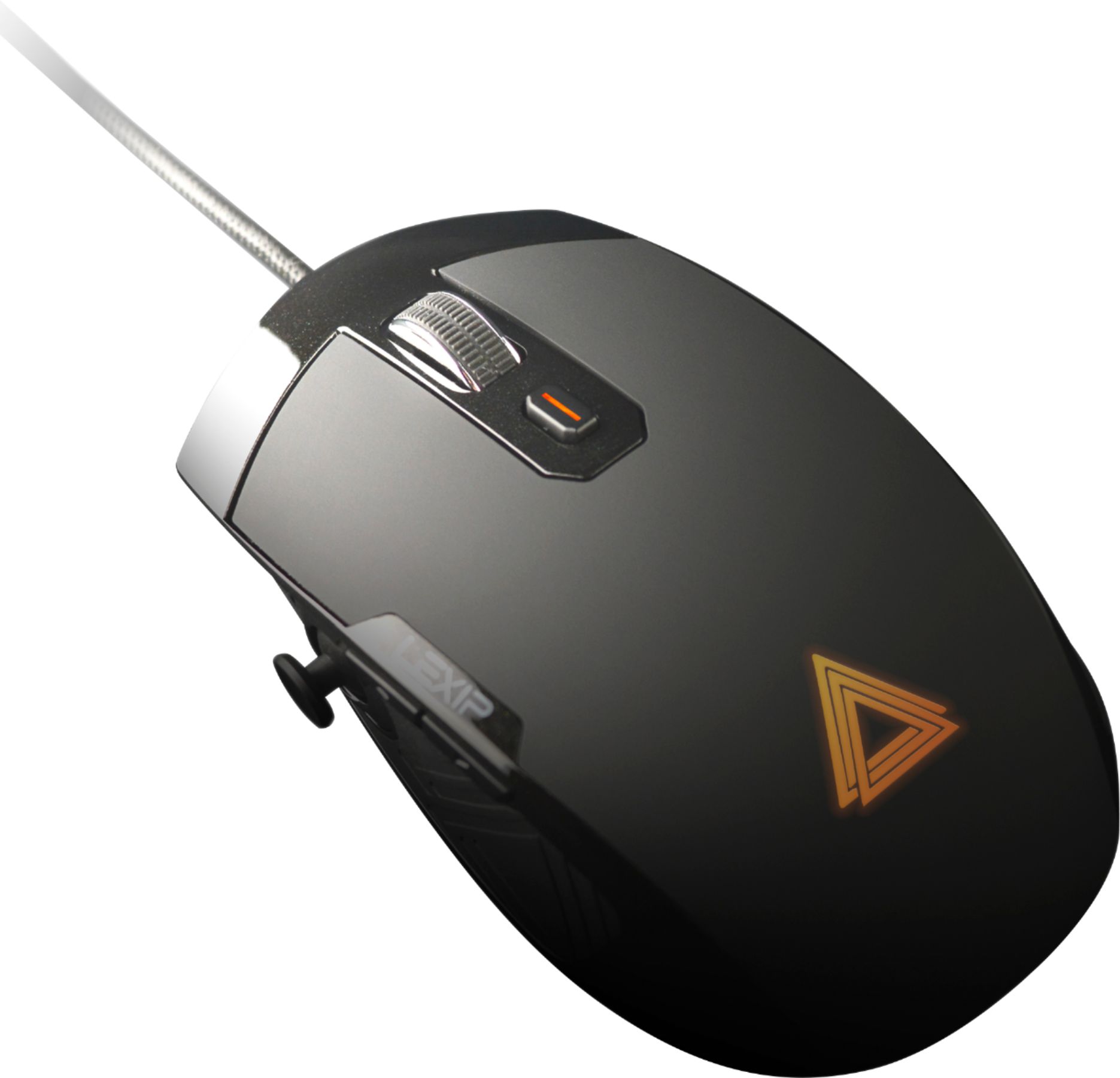
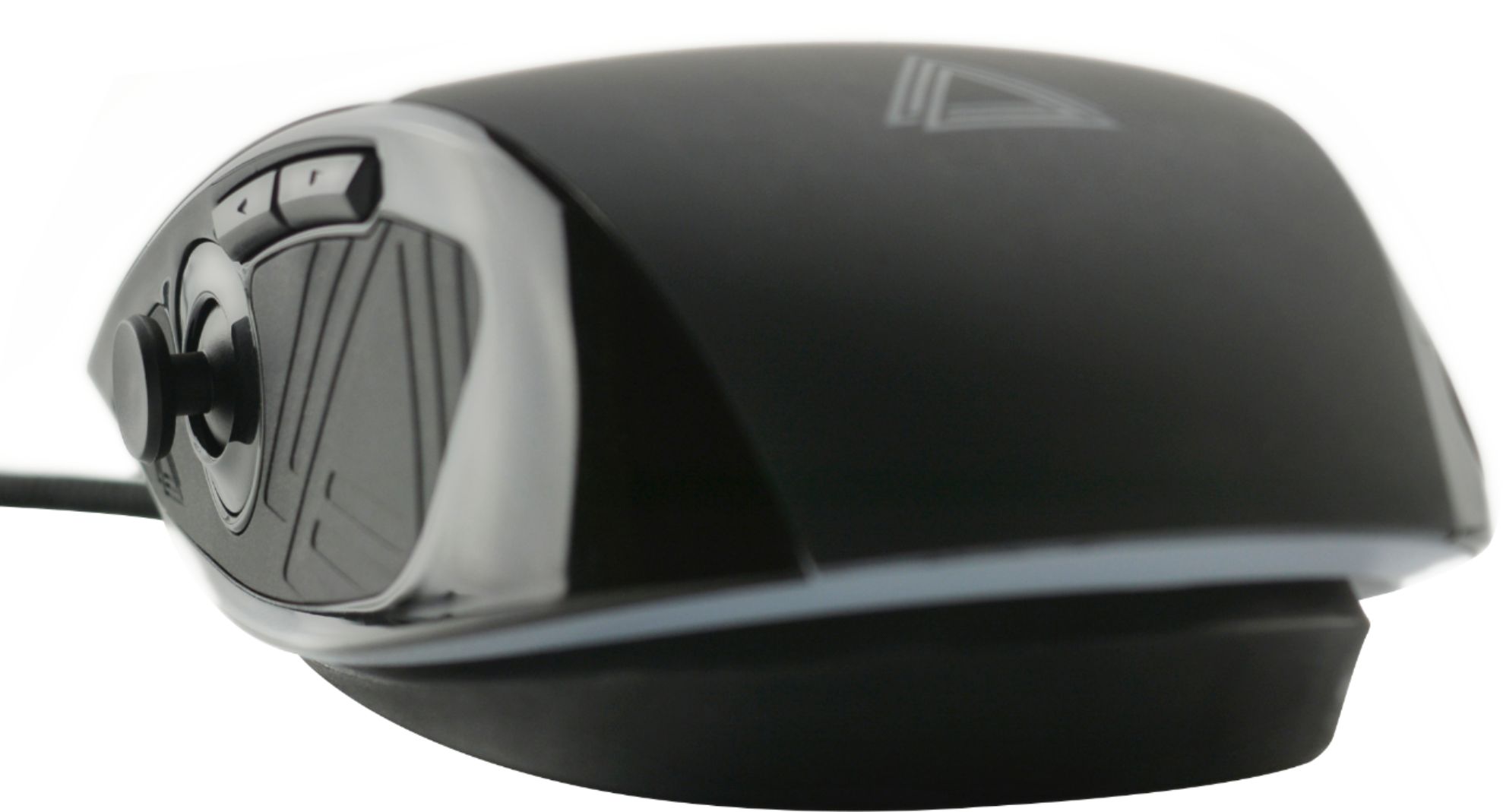
|Posted .This reviewer received promo considerations or sweepstakes entry for writing a review.Upon first use of this mouse, it was a bit frustrating, even felt a bit overwhelming. However, once I fine tuned the settings and had the profile set for specific applications, it’s rather interesting. Though it is intuitive and simple to use, it does take some learning, especially in configuring it the way you want it. It also takes a little bit of adjusting as to how you use a mouse. I explained it to a friend that it is like having a flight stick under your mouse with a joystick at your thumb. All of the buttons, (left/right click, 2 on the side, one on top and the click of the mouse wheel) to include the scroll wheel, the joystick and tilt axis are all programmable to your desire once you download and install the Lexip Control Panel. You can change any of these to be a joystick direction, normal mouse functions, specific arrow keys or to switch DPI. You can also make any of them be a shortcut such as Shift/CTRL/ALT/Win keys plus another key or up to 4 keys. This can be a single unique click, a progressive click or held. An example being Unique: One time ABCD per click. Progressive: ABCDABCDABCD as long as held. Held: ABCDDDDDDDDD as long as held. An issue I have, and I have submitted feedback for this, is the settings are instantly applied to the profile you have selected. Which really made things frustrating when I would bump the axis and it scrolls keys in the dropdown menu. I found the easiest way to avoid that is to go to the options tab and set the deadzone really high till ready to fine tune it. There really needs to be an apply, save, or undo, especially when you realize you modified the wrong profile, not available in control panel 1.1.2. There are some available profiles on their lexip.co site, not the lexip.us, for specific games, you just have to assign them to the game executable so that they are used for that specific game when loaded. Even if you don’t get the profiles, the list of applications and games give you a good example of how you can use the joystick and axis functions. Prime example, in some games where WASD are directional movement, you can use the joystick and where you have rotate, which might be Q & E you can set for the left/right tilt of the mouse. In one game I set the forward/backwards tilt for the zoom in/out which by default was the mouse scroll and found it easier to manage than scrolling. Works nicely for anything that has a 3D environment where you can move the camera around. Through the Lexip control panel you can change the DPI from a super slow 50 up to a slight flick across the screen at 12,000 DPI and set one of the buttons to cycle through 4 different speeds of your choice. With the ceramic feet it glides along on any smooth surface, almost like is has rollers on a hard surface. The one drawback I have is that it is not the most comfortable mouse to use. The way it is designed, in order to use the joystick, your hand has to rest on the mouse, which feels right. However, since the whole mouse rocks there is a front edge of the mouse, where the left/right click is, as a solid bar so that you can tilt forward without clicking the mouse. The problem is that my fingers now sit too far forward to click which requires my hand to move back off the mouse, where I can’t reach the joystick, or I have to claw hook my fingers into the buttons. I could use the middle of my finger to try and click, but felt like a strain on my hand and slower than normal. Also, the dead space requires some fine tuning as I constantly found myself rotating when I go to slide the mouse. Just the slightest twist to move your hand, you never notice on a normal mouse. However, having too much dead space made me feel like I was forcing my hand in some directions just to get the movement to trigger. It is certainly a unique mouse and does provide a function which some could find useful. However, it requires the software on the computer you want to use it on and it takes some adjusting and patience in setup.
I would recommend this to a friend - Pros mentioned:DpiCons mentioned:Joystick
Great Concept, but Gimmicky
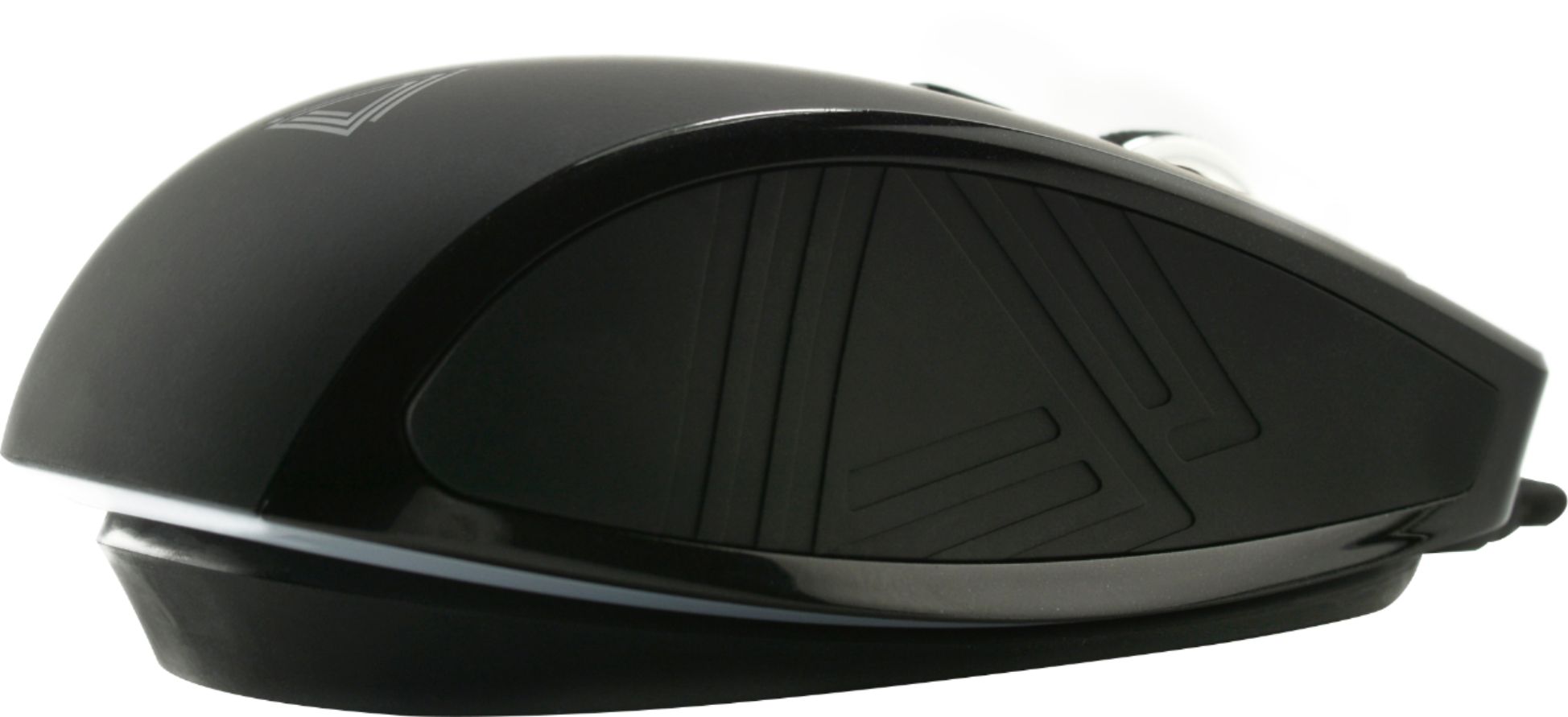
|Posted .This reviewer received promo considerations or sweepstakes entry for writing a review.In an era where every gaming peripheral designer is trying to include more & more features – some that affect game play with new features or options, some to make the mouse look more “sexy” while sitting idle on your desk – the Lexip Pu94 tries to accomplish both. Unfortunately, it misses the mark with features that, while interesting and designed to “gain an edge”, directly other critical functions. The Pu94 (the elemental symbol and number for Plutonium) claims its edge by adding “2 joysticks” to the mouse itself – one an actual joystick on the left side where traditionally a gaming button is located, and the second is the whole top shell of the mouse housing which rocks on an axis over top of the mouse bottom. The intention here is to give you additional control options in various programs, not just games but also professional applications like those used for CAD drawings and photo/video editing. For example, in CAD programs you can use the side-mounted joystick to pan around an image without having to do a more traditional CTRL+click+mouse move to pan a drawing in 3D. The multiple control options are guided by “Profiles” which can be downloaded or hand-created by the user in the Lexip Control Panel software (required installation otherwise this won’t do anything more than a stock $4 mouse on the school supplies aisle at Safeway). The profiles are detected for the program you’re launching, and you can have a profile for individual apps (Chrome, IE, FireFox, Word, PowerPoint, specific game, etc.) or “All Software” (anything else that doesn't have a program-specific profile). So what the joystick or buttons do in 1 program can be different from what it does in a game or other program. This gives you nearly unlimited functionality for different movement or viewing options. Other control surfaces are similar to other mice – scroller wheel, back & forward side-mounted thumb buttons, middle finger button just below the scroller wheel. The mouse moves INCREDIBLY smoothly across a surface thanks to 6 ceramic pads on the bottom (which can also be purchased separately either to replace the Pu94 pads or to use on your non-Lexip devices). Movement speed is controlled with the Control Panel software, easily moved from 10-12,000 DPI with a slider, and can be controlled per-program (“Profiles”). I found the ability of the Control Panel software to lower the speed of the movement when using Photoshop helpful, giving me slower mouse movement & more control over precise editing jobs. Despite having a separate cord to connect to your computer, it is NOT wireless/battery operated. You have to use the included micro USB cable to hook it up, which begs to question why add the weight of a removable cable connector instead of just hard-wiring the cord into the mouse body? MISSING THE MARK: While adding 2 additional “joystick” control surfaces to the mouse sounds like a great thing, it wasn’t executed well. Starting with the thumb/side-mounted joystick: When holding the mouse normally, the joystick is too far forward to reach with your thumb. This requires you to slide your hand forward on the mouse, which then places your 2 “mouse fingers” over the outer frame of the mouse, preventing you from using the mouse buttons unless you curl your fingers into a non-human pose. (See photos). Additionally, the “push in” button of the joystick is so hard to push there is no way to activate the button of the joystick without directly changing whatever situation you have arrived at using the joystick in the first place. The outer frame around the front edge of the mouse should have been removed. Had they removed that frame and made the left & right mouse buttons go all of the way to the edge, the issue with moving your hand forward on the mouse to use the joystick would have been completely avoided. Additionally, the “rocking” of the mouse shell in your hand can cause inadvertent movements. I used the rocking for controlling “look around” moves in FPS games, giving me the ability to look left, right, up, and down without actually sliding the mouse on the surface. All I had to do was rock my hand in various directions. This was WAY cool. However, when you go to move the mouse, unless you have the inhuman ability to keep your wrist locked, as you move the mouse around so does the rocking of the top. So let’s say you’re trying to move in an FPS. Moving the mouse forward results in a backward pressure on the rocking joystick, so as you’re running forward your find your view drifting up. This can be somewhat controlled in the Control Panel by adding what they call “dead zone” – a percentage of movement from center that is ignored. But you find yourself reaching a point there is more dead zone than usable area, negating the feature. The Control Panel software, which again is required to get anything more than basic left & right button functions from the mouse, features a plethora of spelling errors. While this doesn’t necessarily affect its use, it is indicative of poor quality control. “Profile” is again & again spelled “Profil”, which I believe is due to the fact this is a French company manufacturing it and they never bothered to have someone spellcheck it. They also refer to “Microsoft Window” in the software, again something minor but shows they didn’t bother to do basic checks on the program before sending it out. Control profiles for new games or applications can (in theory) be downloaded from Lexip’s site, but ONLY from the European site. When you go to “Profils” and choose “New Profil” > “Download a Profil” you are launched to Lexip’s website, which immediately warns that you’re using the European site & asks if you want to use the North American site. When you say yes, you get what looks like the same site, but there are no profiles on the NA site to download. You have to go back to the European site to get the new profiles. Again, just bad UX design. I also caught the mouse “reinstalling” itself several times during use, even though nothing was disconnected or other changes made. It did it while the mouse was sitting idle, so I was never able to see if this was something where connectivity was lost that would have jammed me up in a game, but clearly there is an issue with the mouse-to-PC interface, whether it’s the connector, cord, or software. SUMMARY: The Lexip Pu94 touts itself as the “most funded gaming mouse in Kickstarter history”. I think people, specifically gamers, are always looking for that extra edge in their online play, and the gimmick of a couple of extra control surfaces being added attracted supporters. But the location of the oddly-placed joysticks ends up being just that – gimmicks. In the end, the joysticks became nothing more than distractions that I found myself not using, resorting back to use of this mouse as a simple mouse.
No, I would not recommend this to a friend - Pros mentioned:Ceramic feet, Dpi
The Perfect Mouse for Precision, Speed, Control
|Posted .This reviewer received promo considerations or sweepstakes entry for writing a review.This is without a doubt the best mouse that I have ever owned for working with AutoCAD. I know it’s designed for gaming, but when using AutoCAD, Revit, Solidworks, Adobe Premier and Illustrator, or any other program that needs exact precision, this is perfect! Usually I’m not interested in a wired mouse, but now I realize that a good solidly designed wired mouse can add to increased speed and precision. The Pu94 Wired Gaming Mouse by Lexip is such and has many pros. I really cannot find anything negative or lacking. To start off, this is the first mouse design to ever merge two joy sticks into one 3-D product. Not only does it have a thumb switch, it has a built in 360-degree pivot. This pivot is designed to facilitate faster movement, more definitive control, and precision. All these features are great and wonderful, and I appreciate the use of everyone; however, to me it may also be the first truly ergonomic mouse ever manufactured because its use provides orbital movement of the wrist. In doing so, the body’s use of synovial fluid forces lubrication of the wrist joints. Why is this important? Synovial fluid keeps bones apart to avoid deterioration of cartilage layers. It also provides a cushioning effect by shielding the bones and cartilage from damage during impact. Even more, it is important to filter nutrients for articular cartilage and help prevent toxins and other harmful substances from entering the joint cavity. When the synovial fluid is squeezed out by this full rotation movement the cartilage surfaces remain lubricated, and this diminishes or slows the progression of carpal tunnel. When synovial fluid loses its fluidity and becomes sticky and thick, the joints break down, become inflamed and painful. In addition to these two joy sticks (the internal rotation and the thumb stick), the mouse is designed with 1 RGB backlit button behind the scroll wheel on the top. The button type is Omron and there are also two other buttons on the top (Index/major) and 2 buttons on the side. Designed to be totally customizable to increase speed and eliminate certain keyboard shortcuts, everything including the sensitivity of the controls and laser movement can be programmed through the Control Panel which can be downloaded through the website www.Lexip.us. Another great feature of this mouse is that the mouse recalls the settings and recognizes the software if the parameters for each control has been saved while using the different software programs. Let me repeat, the mouse can be programmed to different software programs and it will recall the settings for each program. The RGB backlight is also controlled through the Control Panel. It can be set to either be animated or fixed and is a nice finishing touch for a great design. The product is designed with laser sensors capable of up to 12000 dpi (ADNS-9800). The soft surface treatment on the top and rubber grips on the sides not only provide for faster movement but are very comfortable to the hand. The ceramic feet add a new dimension by allowing for a smoother slide and better control of movements during high speed use. Precision and quality appear to be the main objectives of this design and it seems to have meet and exceeded expectations. I’ve been working with Autodesk and Adobe products for almost 30 years and I have never owned or used a mouse that had such precision as this one. I highly recommend it. Apparently, others think it’s a great concept and design too, because incidentally, this mouse holds the record of being the most funded gaming mouse ever funded through Kickstarter.
I would recommend this to a friend Innovation meets Necessity and Functionality
|Posted .This reviewer received promo considerations or sweepstakes entry for writing a review.The Lexip - Pu94 Wired Gaming Mouse - Black is a new expression of the traditional mouse. Blending old-school gaming and mouse point and click with modern gaming and technology, the Pu94 is a whole new experience. Multiple inputs: left and right buttons, scroll wheel, are joined by a thumb joystick and a rotational input from the body of the mouse as well. I found the concept to be exciting and full of potential. I found the practicality of the mouse a bit less. I used it on a variety of games but found that it really only has full functionality on games that have full 360 fields of view components such as space (ST:Online) or shooter games. I still found that the rotation was not enough for me and I went back to the keyboard for correcting my ship's course left and right. Up and Down was great. For other games (Destiny 2) it was a bit cumbersome and not as effective as another gaming mouse as it was hard to get used to the functionality of the mouse compared to the more natural feel and function of other options. The rotation input of the mouse has no function or use in this type of game. The ceramic pads were awesome! Literally a smooth as glass on nearly any surface minimizing drag and resistance. I was very impressed with the 6 pad design. The light effects are subtle but right for the device. PROS - Quality build - Unique design and functionality for the most extreme gamer's edge - Ceramic pads are amazing - Detachable power cord is nice for storage and portability - Precision and Accuracy CONS - Limited games where the full features are usable or necessary - The rotating base of the mouse is a bit awkward and distracting at first, drawing away from accuracy and precision gaming. Should diminish over time. If you are looking for a new level in your gaming or competitive edge, you may benefit from adding the Pu94 to your gaming system. It will take a bit of learning, but it does have an upside for those who play games that can utilize the full features of this mouse.
I would recommend this to a friend- Pros mentioned:Ceramic feet
The first big advances in the mouse in many years
|Posted .This reviewer received promo considerations or sweepstakes entry for writing a review.It is funny, the mouse design has been around since by history standards the mouse went mainstream in the early 1980's. It was meant to click big things, so accuracy was not a big deal and of course users took time to figure out how to navigate using this new contraption. And over the years, we've seen things like scroll wheels, side buttons, and even wireless mice. What I've noticed, and I'm in my mid-50's now, is that with the advent of bigger and more advanced applications, websites, operating systems, etc. that more and more precise accuracy is required to click off the right box, the right underline, etc. And the mice I have cannot quite get that precise. They may be laser mice, but the feet are usually just plastic or whatever and don't give you a precise movement. Clicking is very mechanical and clicky, not smooth. What I like about this mouse most is the ceramic feet (Well I think they are ceramic) because it glides with ease, it gives precision a new perspective. It makes moving it so accurate I spend less time missing the target because of a more clumsy mouse. Now, aside from that, the other major advancement is the side joystick. I get trigger finger and hand pain from having to spin that darn wheel what seems like non-stop to get through things. I know, there is a setting to just let it scroll and all that, but that isn't very accurate or easy to use. This side joystick takes a bit of getting used to, but works very well. On top of that, the whole mouse sits and floats above the platform that it sits upon, therefore making it another joystick. So that is super cool, and very flexible for whatever you are using it for. In my case, and using this for work is important because I tend to do a lot in AutoCAD. AutoCAD requires such precision drawing out lines and placing objects, resizing objects, etc. that most of the time you have to enlarge your drawing space and that is time consuming zooming in and out to do these tasks when you are working with hundreds of objects, lines, etc. So from an AutoCAD perspective, or any operating system, application, form, webpage, etc. this has made me feel much less frustrated because of the precision of the mouse. And frankly the joystick on the side is the new scroll wheel of this decade, and it makes a big difference to me. I've been suffering from trigger finger, partially from mouse clicks, but also from that darn scroll wheel. Using big trackballs don't help, and hitting the down arrow just eats up too much time. There's a software program you can download from their site (it is a France based product/company and so is the download) to change up options, lighting, etc. That is worthy of your time, so you can really personalize this to meet your specific needs. Don't dismiss this as a gamer only item - it isn't. It is a great tool for business too, and frankly I find myself looking forward to the day's computer activities vs. dreading the day to day frustration of using a mouse that was not designed to keep up with today's full content on webpages, forms, etc. Give it a try, I can assure you that you will find what I have said is true and if not, you can return it to Best Buy. I only wish I had found this sooner, my hand and fingers would have appreciated it!
I would recommend this to a friend - Cons mentioned:Software
Mouse with a learning curve
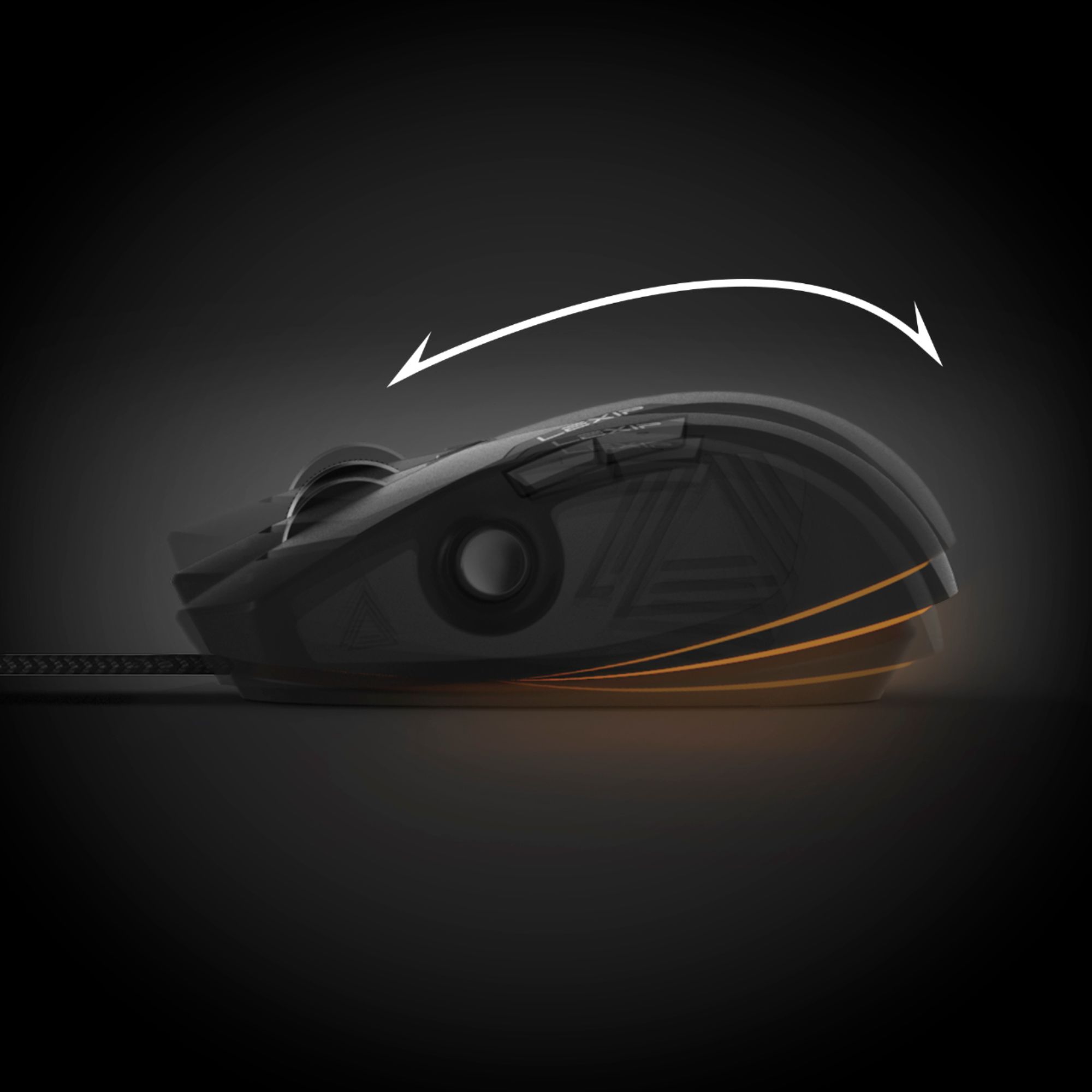
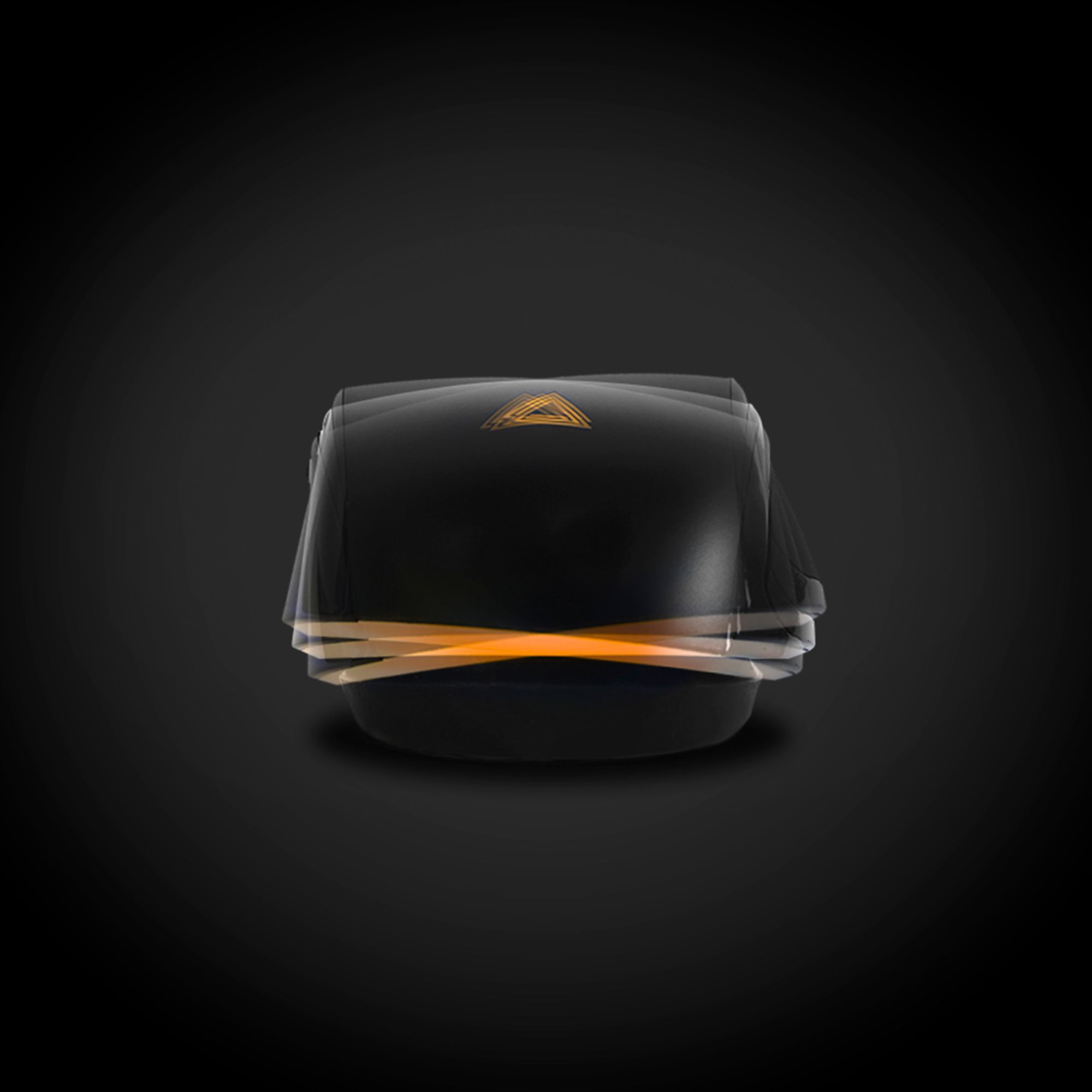
|Posted .This reviewer received promo considerations or sweepstakes entry for writing a review.---SETUP--- As soon as you plug in the mouse, it works like a regular mouse. To unlock its potential, you must go to the Lexip website and download the control panel to fully customize every button, joystick, and unique movement this mouse has to offer. ---FEATURES--- The key feature of this mouse is that is has “2” joysticks in it. There is a clearly visible joystick where your thumb rests, (if you’re a right handed gamer) and the other joystick is within the case that houses the scroll wheel and right/left click buttons. Imagine your mouse on a rocking chair that not only tilts forward and backward but also left and right and any direction in-between. Additionally, the mouse glides on 6 ceramic pads, truly making it feel like the smoothest mouse I’ve used. ---PERFORMANCE--- The performance of the mouse in combination with the software is a bit of a hit and a miss. The software has some kinks to work out and can improve over time. There are tutorial videos on how to transfer your game save directory file to have it change to that custom setting when you open it, but it doesn’t work all the time. Additionally, you have to go in there and fully customize the mouse to suit your needs before you can get gaming, and that is time consuming, especially if you have a lot of games and limited gaming time. I tried this mouse out with City Skylines, Subnautica, Surviving Mars, and Ace Combat 7. As a side note, I also tried it with Google Suite, Microsoft Office, Canva (graphic design web page) and general browsing. For games like City Skyline and Surviving Mars, it was great to set the thumbstick to zoom in/out and the rocking mechanism to rotate the camera. On Ace Combat 7, I turned on expert flight mode and, after an hour of fine-tuning, I was able to move the mouse’s rocking base to simulate the airplane turn in that same motion as my mouse. That felt good, but it was still a big learning curve after setting it up. I was eventually able to finish a mission in that mode, but I felt like it was too much of a hassle. One of the greatest features comes from the software itself. Any button can be set to as a shortcut in a unique press, a progressive command, or a held option. I found the unique option helpful when using Canva, Google Suite, and Microsoft Office. I do a lot of copying and pasting and I just programmed one of the side buttons to CTRL+X and CTRL+V. For video games, the progressive can be very helpful in games like PUBG, where there are a lot of menu options to go through. You can press the specific keys you want the game to activate in the order that you want them with every click. For hold, you can choose what keys you want to be held as long as you remain holding the programmed mouse button. ---EXPECTATIONS--- The product somewhat meets my expectations. I was a little excited to get gaming with this mouse as soon as I got it, but with more and more of its use, my excitement dwindled. Because of how the mouse it made, you have to rest your hand on the mouse to use the rocking feature. That is great in a flight-sim game, but for other games, your index and middle fingers will be too far out from the right and left click buttons, making it uncomfortable to move them back to click. Since there’s no way to have the software auto-identify the game you are using, you have to set up a profile for each game or software. The website does offer some pre-made profiles that you can download, but the website isn’t quite ready either. The game “Surviving Mars” on the website can be found as “Surviving March.” However, I found it more useful on image editing or office use software, surprisingly, but not enough to want me to make it my new permanent mouse. ---VALUE--- The price for the Lexip Mouse in terms of value depends on how much use you will get out of it. It you can, test it at the store before you buy, because it is not for everyone. ---APPROVAL--- It is difficult to recommend a product that, over time, can greatly improve if the software is improved. As it is, I wouldn’t recommend it to many gamers who are already set in their ways with their mice, but perhaps new to PC gamers who don’t have established habits might want to go big with this mouse purchase and make this be your only learning curve.
No, I would not recommend this to a friend - Pros mentioned:Ceramic feet
The Latest And Greatest Mouse!
|Posted .This reviewer received promo considerations or sweepstakes entry for writing a review.There is a bit of a learning curve to this mouse, as it is very unique. This is a wired mouse that requires a USB port. They have not come out with a wireless version as of yet. For real gamers this being wired is great because there is no lag. Personally, I prefer the freedom of a wireless mouse. Having said that, the uniqueness of this mouse makes up for it. The mouse is made of good sturdy material, well crafted and has a unique design. This mouse features a thumb joystick that I haven’t seen anywhere else. If you don't like using the middle mouse wheel to scroll, then this is totally worth trying out. The mouse has six programmable buttons, two on the top for your index and middle fingers, 2 on the left side, the thumb joystick knob and one more at the top behind the wheel. This mouse also tilts. It kind of takes the place of a joystick when using a flight simulator program or similar programs. You can easily zoom in/out within games, programs, etc. by simply tilting the mouse forward or backward. It took a bit of getting used to, but I like it better than a joystick for flight simulator gaming. You need to go to the Lexip site and download the software for this mouse, so that you are able to set up all of your programmable buttons and customize the lighting to your preference. I personally like the 2 color option in 2 shades of red so that it looks like the mouse is pulsating. There are ceramic feet on this mouse which makes moving it around so smooth it feels like it is floating on air. It seems to make my moves faster, smoother and more precise. There are programs other than gaming I have tried out with this mouse. Photo editing with this mouse seemed so much easier and more accurate.
I would recommend this to a friend - Pros mentioned:Comfort
High Tech Gaming Mouse
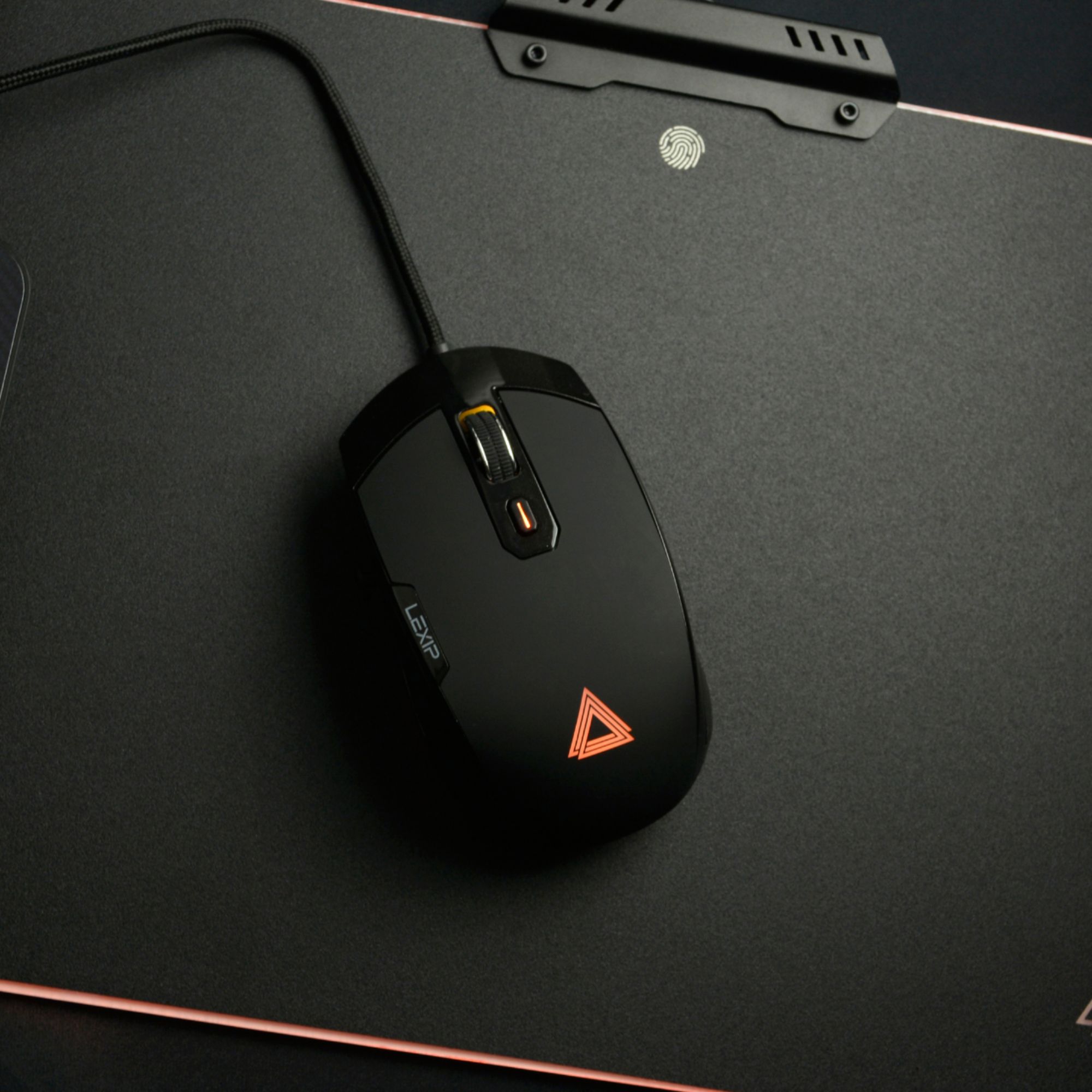
|Posted .This reviewer received promo considerations or sweepstakes entry for writing a review.The Lexip Pu94 Wired Gaming Mouse is next level for a gaming mouse. The first thing I noticed was the joystick on the left side of the mouse. It has perfect placement for your thumb and is very smooth when rotating it around. The wired gaming mouse’s cord is (1.6m) definitely long enough and sturdy enough with its woven design to give you a long life with use. Besides the beauty of the gaming mouse with its RGB backlighting (solid or mixed), the gaming mouse is extremely comfortable for your hand. It has a rubberized soft touch top and the width of the Lexip Pu94 was great for the spread of my hand. The buttons on the gaming mouse are touch sensitive. I used the Lexip Pu94 on Everspace (downloaded from Steam). The accuracy was pinpoint when moving the mouse around and the buttons were easy to reach. I really enjoyed using the mouse that kept my hand from getting fatigued after an extended playing experience on the game. There are also 6 buttons that are made to be programmed for playing at your best. They are as follows: 2 on the side, 2 on top, clickable wheel and a button on top. Using the software, Lexip Control Panel, allows you to make assignment changes to your mouse buttons. The Lexip Control Panel also is the place where you can adjust color, speed and sensitivity. Now you can’t blame the gaming mouse if you fail! If you choose to use this gaming mouse for other uses on your computer, the mouse automatically works like a regular mouse by default. Amazingly the gaming mouse offers even more for your bang for your buck. A laser (12,000 dpi) helps guide the sensitivity of the gaming mouse as well as 6 ceramic pads on the bottom that ease movement when playing games or browsing the web. These buttons help to move the Lexip Pu94 gaming mouse on all kinds of surfaces. It is pretty amazing how well it moves on with to without a mouse pad. I used it on my glass top table and experienced no issues. Lastly the gaming mouse can adjust by swivel and tilt to aid your in game efforts. That is a great example of how the incredible this Lexip Pu94 gaming mouse is. Overall the Lexip Pu94, for me, was an excellent aid in game play and a gaming mouse that should be considered if you are in the market.
I would recommend this to a friend - Pros mentioned:Rgb lighting
Smooth, comfortable gaming mouse. Great for CAD...
|Posted .This reviewer received promo considerations or sweepstakes entry for writing a review.Smooth, comfortable gaming mouse. Great for CAD and general office use. After I downloaded the control panel from the US site, installed on my CAD workstation, I was able to program the side joystick and buttons. I think the RGB light effects are cool. Use the control panel software to change colors and functions. There is a second joystick function built into the rocking base. It kind-of tilts forward and backwards, left and right, say 20-degrees. It's programmed through the control panel (downloaded software free). This is a wired mouse, but that's okay since you want to be able to select the profile for the buttons from the control panel say you change from WORK mode ( CAD , EXCEL,PowerPoint) to GAMING mode. I ran Autodesk's Architecture 2020 (ACAD), Inventor 2020, Navisworks Freedom, Excel, word, chrome, explorer, all with no problems. Very comfortable and easy point picking, pan and zoom worked great. Extra programmable button right behind the scroll wheel/button. Two left side buttons for your use too. The side joystick functions nicely as a zoom in and out function. All in all I liked the grippy feel of the materials used on the side and top of the mouse. Easy to grasp and maneuver inside drawings and the desktop. Can't wait too see what I'll program the buttons for in my daily use. Love the smooth scrolling center wheel. Also the ceramic discs on the bottom glide over everything smoothly and effortlessly. The manual needs a little editing: its says the cable is a USB-C (its not). Also says to get the software from WWW.lexip.fr , don't, but go to www.lexip.us instead. My video will be live at: https://youtu.be/Us6js4LS_nQ
I would recommend this to a friend Learning curve, but beneficial in specific uses
|Posted .This reviewer received promo considerations or sweepstakes entry for writing a review.This is a mouse that is as unique in its uses as are its looks and namesake. The idea of a mouse with this, succinctly put, is to be able to accomplish better three dimensional and multi-axis control over program functions you are interfacing with on your computer, be it game controls, Blender models, etc. The way the mouse accomplishes this is unique in that the mouse itself has tilting functions along the x and y axis (just like joysticks on arcade machines), toggle control with the side control stick, and finally with the usual multi-directional tracking most mice have these days. To this end, with practice, the mouse is marvelous at what it is trying to accomplish. Games like Civilization V are so much easier to manage and navigate with the side toggle instead of arrow keys on your keyboard. With the software, mapping the axis and toggle controls to do what you want in various use cases is made simple, all while using what is honestly a cool, conversation starting mouse among fellow nerds. Overall, I would rate this mouse highly for anyone who is wanting to branch out on their productivity work-control and is looking for a different feel and/or edge in games!
I would recommend this to a friendPrecise mouse.
|Posted .This reviewer received promo considerations or sweepstakes entry for writing a review.At first glance the mouse seemed a bit large, but after plugging it in and trying it out it felt nice in my hand. It looks nice. It lights up with an Amber light. The ceramic feet/bottom allows it to glide nicely on surfaces. I used this mouse on my work machine. I used it with the following software(s): Adobe Pro Civil 3D - ACAD MS word, Excel, outlook Windows 10 OS In ACAD the joystick zoom function is really helpful. I am able to zoom in and out as fast or slow as I want. It's precision is really nice to snap on lines and draw different objects. For Adobe, word, Excel, and outlook. The joystick allowed me to scroll faster. The other buttons I could not assign as my work machine is on admin lock down so I could not go in and program them. I would recommend this mouse with the feel, function, and precision it offers. It also looks really nice too.
I would recommend this to a friend- Cons mentioned:Software
Versatile, but buggy and uncomfortable.
|Posted .This reviewer received promo considerations or sweepstakes entry for writing a review.Pro: -Fully customizable and versatile -Glide feet is smooth Con: -Bad ergonomic, claw grip only -Buggy software -Tilt function can often be activated by accident Full disclosure, the first mouse they sent me was defective and it took a lot of trouble and time to get them to send a replacement. Not sure if that reflects on how their normal customer support work, but it’s worth a mentioned. Who is this mouse for? First, if you have wrist problems, this mouse is NOT for you. You’ll be twisting and straining your wrist to use this. This mouse is geared more towards gamers that play simulation or strategy games, like the Sims 4 and City Skylines, where you have to pan and rotate the camera often. This is also good with 3D applications allowing you to rotate and pan the viewports, as well as assigning a lot of shortcuts. I fit into both of these categories, and I really wanted to like this mouse as it has the potential to be really helpful, but the inconsistency of the tilt axis and bad ergonomic just didn’t work for me. The mouse has its uses and potentially can make things easier, depending on your uses and application, but it’s not for everybody. It can take a bit to get used to it. The body on the tilt axis can feel wobbly and can be easily triggered (even with the deadspot maxed out) when moving or lifting the mouse. The ergonomic isn’t well designed. The joystick is a bit small and slippery and is just out of reach making you have to move your grip upwards, but for some reason, the left and right mouse buttons doesn’t extend all the way out and have a thick border in front, so you have to switch to a claw grip. Trying to use the joystick with the claw grip is just awkward. All the buttons, functions, sensitivity, and RGB can be customized. You can bind key combinations, shortcuts, or mouse movements to any of the buttons/tilt making it very versatile. You can download profiles or create your own. The software can be quite buggy though. Automatic profile switching may not work properly, and sometimes the profile just stops working. There are also times when the mouse just doesn’t move at all and I have to disconnect and reconnect it. When updating or uninstalling, I would get an infinite loop of error windows and have to force close. Using the mouse can either be a boon or really frustrating. Being able to control the camera and shortcuts with just the mouse can streamline your gameplay/workflow, but the inconsistency of the tilt axis activation can be just as disruptive. In 3ds Max, just moving the mouse can cause you to click on another viewport, or offset the camera, which was really frustrating. In gaming, you may accidentally activate an action if you clicked the button too hard, but other times you really have to tilt hard to trigger it. I was excited when I first got this mouse to use it for 3D modeling. It is versatile and can be set to do a lot of shortcuts, but it isn’t reliable enough for me to switch over. The tilt is too easy to be unintentionally activated, the ergonomic is uncomfortable for palm grips, and control panel is buggy.
No, I would not recommend this to a friend I like the joystick
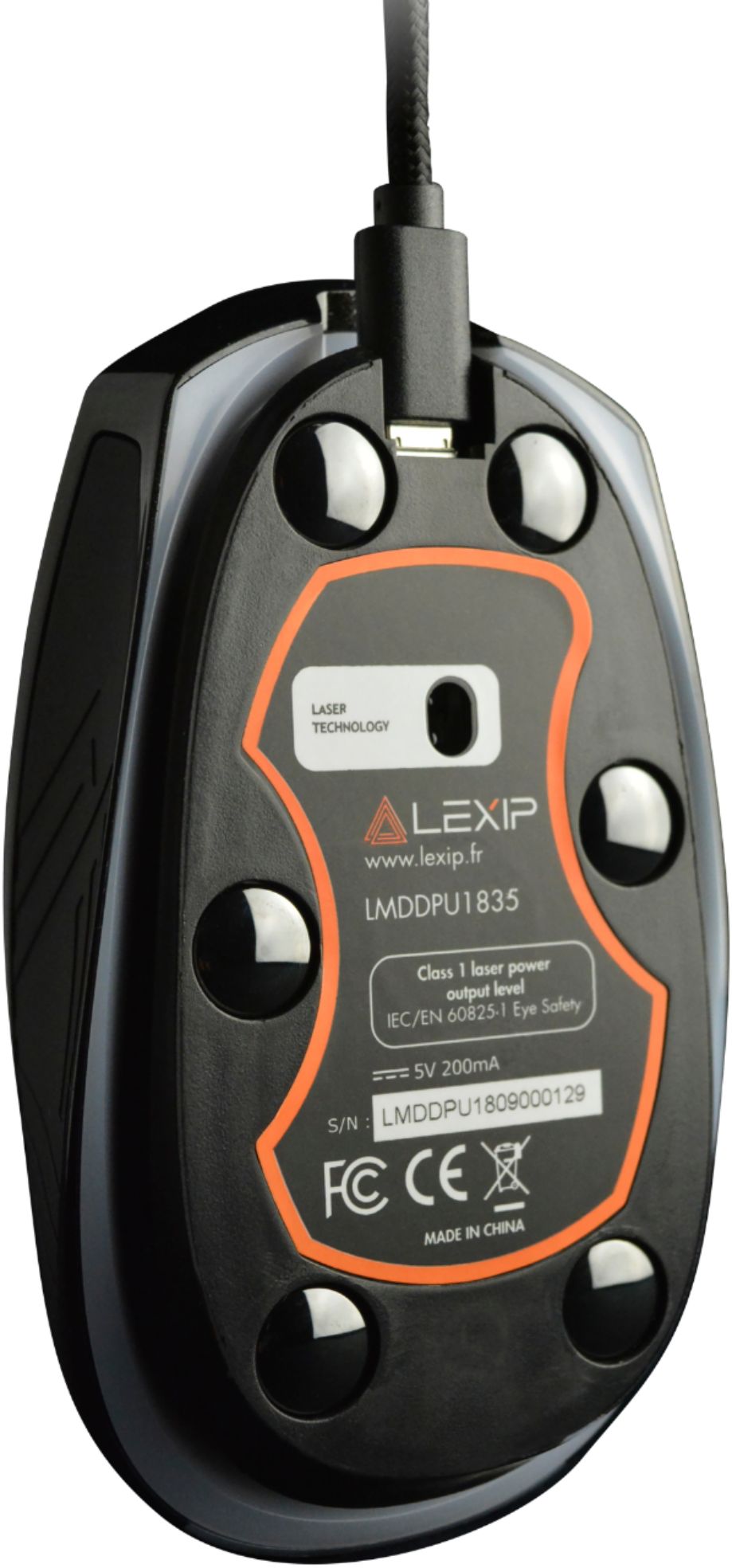
|Posted .This reviewer received promo considerations or sweepstakes entry for writing a review.My first impression was the packaging was nice. The top seems to latch (magnet?) and upon opening it up, you see the mouse. Folding it completely open allows you to just slide everything out. It includes the mouse and a braided USB cable (It is a micro USB, not USB C). I really like this mouse. I replaced my Fnatic Clutch 2 with the PU94. I moved the Fnatic to my Mac Mini. The PU94 is on my everyday Ryzen 7 PC. The mouse just glides nicely with the ceramic pads. I love being able to use either the scroll wheel or the joystick to move the screen/page. It's a bit awkward at first, but your thumb takes to it pretty easily. Once it becomes habit I'll set the axis forward/backward to another setting. It's set at none out of the box. I have a pic of the settings below. You can rock the mouse and set it to joystick, mouse, arrow keys or to switch DPI. I also like the shape of the mouse. I don't have huge hands, but I wear a man's large glove easily. This compact mouse fits and the hump towards the back sits in my palm at a good angle. Then there are the thumb buttons. I love that they placed them high up on the mouse above the joystick. Most mice don't play nice with my thumb and I end up turning the buttons off. These buttons are high enough that it takes effort to find them. Now I won't just accidentally hit them and go back or forth. The USB cord is detachable. You'll almost forget that it's a wired mouse and think you need to charge it. Nope, just plug it in. Head over to the Lexip website: h##ps://lexip.us/products/lexip-pu94-gaming-mouse and download the control panel. It's two lines below the add to cart button at the top of the page. The control panel lets you set numerous profiles for different applications. It also has a button tab that adjusts DPI, mouse sensitivity, creating shortcuts, setting the thumb and top button action as well as the axis for the tilt feature. You then have lighting options and the option to have the app start up with Windows. I have a couple of pics I'll post of the app. I would highly recommend this mouse. I think it fits my hand very well, I like the control placement, the ease that it glides with the ceramic feet and using the joystick will be something I won't want to do without. I'm sure adding the tilt will either be wonderful or like thumb buttons on other mice, it'll drive me nuts and I'll turn it back off. Either way, I have to try it out once I'm comfortable with all the options I have out of the box. Oh, lastly, the scroll wheel doesn't have a hard click, but it does have noticeable notches that easily go by, but they are felt if that's something you look for in a mouse.
I would recommend this to a friend- Cons mentioned:Joystick, Software
decent hardware, quirky software
|Posted .This reviewer received promo considerations or sweepstakes entry for writing a review.The Lexip PU94 seemed like an interesting gaming mouse, especially with the side joystick and the flexible base. The hardware is of good build quality, but the placement of buttons on the top of the mouse is questionable. I often found myself having to reposition my large hand to be able to operate the top L/R mouse buttons as well as the back and forward ones on the left side. Now I should note that the buttons are all remappable using the Lexip Control Panel and this is where the challenges began. The installation software defaults to French, but that can be changed, but I seemed to have to translate on the fly to get the install to work properly. Also as with any other software that interacts with hardware it generally requires Administrator privileges to install. However, I found the default installation to be quirky, often requiring the mouse to be unplugged and plugged back in to operate correctly. In addition, the software installation routine is problematic and to effectively use the Control Panel software it needs to run with elevated (Administrator) rights, it will not function as a regular non restricted user. This is a problem as I do not normally login to my rig with elevated privileges and am very cognizant of when a program or web browsing session pops up and requests Admin rights. I even tried installing the software in its own the C:\users\public\lexip directory and it still had issues. Also the install routine places a rudimentary shortcut on your Desktop that references LEXIP Control panel EXE, literally no more sophisticated than if you created a shortcut to an EXE on your Desktop. Overall the mouse functions pretty well and glides smoothly over all surfaces (especially with the ceramic glide feet). I could not successfully map keyboard combinations to the up and down joystick movement (I tried creating a profile for the video editing program I use – PowerDirector) without success. Pros: - Innovative design, maybe too much so - Solid hardware Cons: - Poor installation routine, not ready for prime time. - Control Panel does not run without Admin privileges. - Needs a persistent personality to get the software to run, as a consumer I should not be a beta tester for your software. - Had problems mapping button to certain keyboard shortcuts.
No, I would not recommend this to a friend - Pros mentioned:Rgb lighting
Most unique mouse I've ever felt or used!
|Posted .This reviewer received promo considerations or sweepstakes entry for writing a review.Upon receiving this mouse and setting it up I quickly found out that this was unlike any other mouse I've had or used. Most mice have the typical left and right click with a jog dial on top and sometimes the two buttons on the side as well. It sits flat with a laser sensor under the bottom. This mouse literally floats and pivots on an axis and as well as all of the standard buttons I listed above it also has a small joystick on the left where your thumb rests for control.. and the mouse itself acts as a joystick too. Instead of sitting flat you can literally tilt it front back and left and right giving you extreme control! Without even moving the mouse itself Another feature I loved was the RGB lighting you have the option of changing the color or cycle to however you want it to do. The only negative I'd say is the fact that it's wired and not wireless. I am so used to having and using a wireless mouse now that's annoying when you're moving the mouse and the wire gets hung up on something when moving it. Other than this is an amazing mouse and I'd highly recommend to anyone looking for a new mouse
I would recommend this to a friend Better For Younger More Malleable Minds and Hands
|Posted .This reviewer received promo considerations or sweepstakes entry for writing a review.The Lexip Pu94 Wired Gaming Mouse has some interesting features which attempt to make your gaming or creating easier and more accurate. For me, it turns out, I just end up using it like I would a cheap, ordinary mouse. The problem for me is that I am so used to using a regular old mouse with two top buttons and a scroll wheel, that I can't train my brain to use the other features on the Pu94. The Pu94 has a mouse tilt feature, a joystick on the left side, two left side buttons, left click, right click, scroll wheel, and center button. My mind is not malleable enough to remember to use these buttons and my hand's muscle memory doesn't want to go to them either; so they are all wasted on me. The Pu94 is an attractive mouse and is fairly comfortable in my hand. It has adjustable LED lighting both underneath and on top of the mouse. The software that comes with ithe mouse seems to update too frequently for my liking though. For a younger, more accepting mind, they may make all the difference, but for me, I'll stick with a more traditional mouse.
No, I would not recommend this to a friendToo much Going on
|Posted .This reviewer received promo considerations or sweepstakes entry for writing a review.So I have tried this Lexip Pu94 mouse out. I am not a hard-core gamer, but I do play Pubg, and other 1st person shooters. I work with ArcGIS and Auto Cad at work and use a whole mess of Adobe apps for photography. But I just don't get it. It seems like they wanted to use a joystick where a trackball would go, if you had anything there at all. The Tilting mouse made it more difficult to use, it would over track or completely turn you around. The mouse is small, and the left and right button stop ½ inch away from the end, you have to have most of your hand off of the mouse to use them. If you have your fingers in the right position, then the joystick is too far away. This must be made with someone with small hands. Maybe I am used to a larger mouse, but I found it very uncomfortable for long hours of play or working in CAD
No, I would not recommend this to a friend- Pros mentioned:Cable, DpiCons mentioned:Software
Unique and a really good mouse with caveats
|Posted .This reviewer received promo considerations or sweepstakes entry for writing a review.The Lexip Pu94 is an interesting mouse. Some manufacturers attempt to load a mouse up with a ton of buttons, and some keep it dead simple. The Lexip Pu94 attempts to blend multiple axis on top of the standard mousing directions and scroll wheel into a do-it-all mouse. The concept here is to use both a full range of 3d motion (tilt forward, backward, left, right) along with a joystick for maximum control and degrees of freedom. It’s an interesting concept, and one that I believe is worth exploring, but is it right for you? First of all the mouse seems excellently built. Rubberized surfaces are found where gripping, and the mouse surface for palm and buttons is that slight rubberized coating offering a smooth texture. The mouse wheel is excellent and clicky. The core mousing features are solid. The cable is braided and of decent length. Branding is front and center, but not obtuse. Where the Pu94 stands out is that the main mouse housing floats on top of a tiltable axis. This means putting pressure on the front of the mouse causes it to slightly angle forward, and likewise backwards and side to side. This axis works just like an analogue joystick (and can be programmed as such). Around on the left side, you’ll find a joystick, it too offers a full range of motion and can be another axis of a joystick. Essentially you can control as many axis as an Xbox controller. Oddly this joystick is made of hard matte plastic, which is a completely different surface than anywhere else on the mouse. This extra control opens up the possibility of many different control schemes. Conceivably, this could also be a device those without the use of a hand could use to play many games whose control schemes might pose a problem. Now would I attempt to play Dark Souls with this mouse along… not quite. As with many custom input devices, the usage of them takes adaptation. I’ve used a few alternative control schemes/niche devices in the past. They can be quite successful if they are used with consistency. The problem comes when you use another computer setup and lose some of that adaptation. However, this may not be a concern for many who only have one setup. The Pu94 really wants a claw grip. Palming generally ends up in the tilt axis being slightly affected, but it really depends on the weight you put on it. Claw allows you to access the joystick at will, and position your hand far enough forward for your index and middle finger to rest either on buttons or the front bumper that is used to help articulate forward tilt. The bumper sets itself apart by being made of glossy plastic that is unmistakably distinguishable from the buttons. Depending on if the joystick and tilt are important you may find yourself shimmying up and down about a quarter of an inch to reach each feature. That may not sound like much, but it can be disorienting if your attempting to do multiple actions quickly. Again, I think it's something that takes time and adaptation. The sensor of the mouse is a ADNS-9800. This laser sensor is a high performance gaming sensor. It is famous for acceleration issues on certain surfaces, but honestly I highly doubt you’d notice. It offers programmability of DPI from 50-12000 DPI. This is more than you’d ever really want, but the control is impressive. The implementation here is overall quite solid, and it’s tracking ability on hard surfaces is much better than many optical mice. Tracking on hard surfaces does seem to be where this mouse shines. If you play on wood, or laminate, the mouse glides on its ceramic feet like no other. It makes a tiny bit of noise, but so far the feet are one of the stand out features as well. On a pad the ceramic feet glide extremely smoothly. In theory, they should outlast the mouse. It’s impressive, but has one downside: the cable can cause phantom mouse movement since the gliding is so smooth. Lighting is really pretty excellent as well. Given the mouse’s height due to the tilt axis, you can actually get a bit of an undercarriage lighting. This coupled with the logo and button offer subtle but pleasing aesthetic. The lighting can be customized with the LCP, or Lexip Control Panel to either be one color, oscillating between 2 colors, or a rainbow. Unfortunately that appears to be the extent of the lighting control. It does offer per app customization however. Speaking of the application, there are 13 screens in the buttons section to adjust settings from DPI, to what macro is simulated when tilting the mouse. The amount of control approaches insanity. I attempted to map some functions to each game, but I found having the joystick emulate arrow keys was helpful, almost everywhere. Even writing this review, I found myself using the joystick to move the cursor around the document. It helps that many games map arrow keys to useful axis controls for the mouse. Lexip software definitely has some growing to do. While the overall presentation is quite good, it annoying lets me know every day that it’s up to date with a modal window on my desktop. There doesn’t appear to be a setting to turn off auto updating either. It sounds from other reviews that it has come a long way, and overall I found the user experience pretty good considering the level of customization. Now, is it right for you? I think that depends on what type of games you play. I play some competitive (ok, I suck, Gold 3) Starcraft 2, and I found using the joystick for screen movement was actually pretty effective. The problem for me was trust. Trust I could find the buttons, execute selects, and click fast enough (SC2 is a fast game). When playing games like Cities Skylines where rotation and control are welcome - and the pace isn’t quite as hectic, I found the mouse quite helpful. Using this mouse for RTS or turn based builders might be its calling. Fast paced shooters suffered from the “too much going on” problem that the joystick and axis added. However disabling most features in these games and just focusing on the buttons/axis of a traditional mouse worked well. Gripping the mouse towards the backend felt natural and got the joystick/front bumper out of the way. I did try mapping the joystick to WASD cluster to see if it was possible to play CS:GO without a keyboard. I was actually quite successful given the handicap. I found the sensor quite adept at this game as well. Overall the Pu94 represents a swiss army mouse in a lot of ways. It doesn’t try to be an MMO mouse, but rather add some real spatial control to the right hand. Unfortunately, it’s definitely right hand only, as there is no natural way to use the joystick with your pinky or ring finger (that said many left handers use a right hand mouse anyway). Build is solid, but I do worry about how rubberized surfaces age. If you’re looking for a mouse that offers some additional control, but can get out of the way when you just need a good sensor and buttons, the Pu94 actually delivers. Given the price, you really need to weigh those extra axis to determine if they'll add up to value for the mouse for you. The additional axis can take a bit of getting used to, but they are far from unintuitive - actually finding myself adjusting quite well. It’s actually a really good mouse with caveats.
I would recommend this to a friend - Cons mentioned:Joystick, Learning curve
Not good for gaming
||Posted . Owned for 1 month when reviewed.This reviewer received promo considerations or sweepstakes entry for writing a review.The usefulness of this mouse is in 3D applications... I guess. I can't imagine it being more intuitive than a controller or some other multi-axis analog input device. The support for games is very low, and it only becomes slightly useful with 3rd-party re-mapping software. I found it hard to NOT trigger the shell joystick when moving the mouse, but that will vary by person and setup depending on how you distribute your weight on the mouse. The side joystick would be nice--if its directions made any sense. They aren't laid out how you would think. Bottom lin: gamers, look elsewhere. Those using 3D software for modeling, definitely keep an eye on the return window as this device has a learning curve.
No, I would not recommend this to a friend Great Mouse, Chord Stinks
||Posted . Owned for 5 months when reviewed.This reviewer received promo considerations or sweepstakes entry for writing a review.I've been enjoying this mouse for a few months now, the joystick on the side is very convenient for scrolling and browsing, I haven't found a game where it will fit yet, but it's a great idea. The mouse does take some time to get used to because you have the extra joystick maneuvering. The chord though that comes with the mouse has broken, it is a woven braided chord and doesn't have much protection. I have had to use a new USB chord to in order to use the mouse.
I would recommend this to a friend