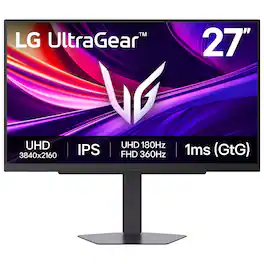
LG - UltraGear 27" IPS Dual Mode (4K UHD 180Hz, FHD 360Hz), 1ms, NVIDIA G-SYNC, AMD Freesync Gaming Monitor (HDMI, DP, USB-C) - Black
LG - UltraGear 27" IPS Dual Mode (4K UHD 180Hz, FHD 360Hz), 1ms, NVIDIA G-SYNC, AMD Freesync Gaming Monitor (HDMI, DP, USB-C) - Black
FREE shipping to
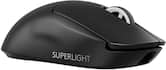
- Logitech - PRO X SUPERLIGHT 2 SE LIGHTSPEED Lightweight Wireless Gaming Mouse with Optical HERO 2 Sensor 44,000 DPI for PC - Wireless - Black$139.99
More Buying Options

Highlights
- Key Specs
- Refresh Rate: 180Hz (The number of frames per second the device can produce natively without enhancement. Higher rates help produce smooth, seamless pictures.)
- Maximum Resolution: 3840 x 2160 (Maximum resolution refers to the highest number of pixels that a screen can process and display. Higher resolution signals produce more detailed images.)
- Response Time: 1 milliseconds (The speed at which pixels can change colors is called response time. It is measured in milliseconds (ms).)
- Panel Type: IPS (Technology that affects response time and image quality.)
- Synchronization Technology: G-SYNC Compatible (NVIDIA Adaptive Sync), FreeSync Premium (AMD Adaptive Sync) (Generally, these technologies allow syncing between a computer/console game's frame rate and the device's refresh rate for a smoother display without tearing.)
- Screen Size: 27 inches (Size of the screen, measured diagonally from corner to corner.)
- Display Connector(s): 1 x DisplayPort, 2 x HDMI 2.1 (The number and type of connectors used to connect to an external display.)
- General
- Brand: LG
- Model Number: 27G810A-B
- Product Name: UltraGear 27" IPS Dual Mode (4K UHD 180Hz, FHD 360Hz), 1ms, NVIDIA G-SYNC, AMD Freesync Gaming Monitor (HDMI, DP, USB-C)
- Color: Black
- Operating System Compatibility: Not Applicable, Not Applicable, Not Applicable, Not Applicable, Not Applicable
- Display
- Refresh Rate: 180Hz (The number of frames per second the device can produce natively without enhancement. Higher rates help produce smooth, seamless pictures.)
- Maximum Resolution: 3840 x 2160 (Maximum resolution refers to the highest number of pixels that a screen can process and display. Higher resolution signals produce more detailed images.)
- Contrast Ratio: 1000:1 (Measured difference between a displayed image's brightest whites and darkest blacks. The larger the first number, the more detail and color that can be displayed.)
- Response Time: 1 milliseconds (The speed at which pixels can change colors is called response time. It is measured in milliseconds (ms).)
- Display Type: LED
- Panel Type: IPS (Technology that affects response time and image quality.)
- Synchronization Technology: G-SYNC Compatible (NVIDIA Adaptive Sync), FreeSync Premium (AMD Adaptive Sync) (Generally, these technologies allow syncing between a computer/console game's frame rate and the device's refresh rate for a smoother display without tearing.)
- Aspect Ratio: 16:9 (The measurement of the width of a screen compared to the height of a screen, expressed as a ratio.)
- Curved Screen: false
- Pixel Density: 163 pixels per inch (The number of pixels present per inch on the device's display. Higher pixel density improves the clarity and sharpness of the displayed image.)
- Brightness: 400 candela per square meter (A measure of the total light output.)
- Screen Size: 27 inches (Size of the screen, measured diagonally from corner to corner.)
- High Dynamic Range (HDR): true (An HDR-compatible 4K TV or other HDR-compatible product displays HDR video content when it's available from sources like 4K Ultra HD Blu-ray Discs and 4K streaming services.)
- High Dynamic Range Format: VESA Certified DisplayHDR 400, HDR 10 (There are a few HDR formats that tell the TV or other HDR-compatible product how to best utilize its capabilities to display HDR content. HDR technology can support one or multiple formats, each with various benefits to picture quality.)
- Horizontal Viewing Angle: 178 degrees (The maximum angle at which the display can be viewed with acceptable visual performance from either side.)
- Vertical Viewing Angle: 178 degrees (The maximum angle at which the display can be viewed with acceptable visual performance from above or below.)
- Connectivity
- Number of DisplayPort Inputs (Total): 1
- Number of HDMI Inputs (Total): 2
- Display Connector(s): 1 x DisplayPort, 2 x HDMI 2.1 (The number and type of connectors used to connect to an external display.)
- Number of USB Ports (Total): 3
- USB Ports: 3 x USB-C (The number and type of USB ports the product has.)
- Headphone Jack: true (The device features an interface that allows for the connection of headphones.)
- Compatibility
- Wall Mountable: true (The product is able to be secured to a wall. Some products are designed ready to mount, while others may require additional hardware/accessories for installation.)
- VESA Wall Mount Standard: 100mm x 100mm (VESA wall mount standards refer to the spacing of screw holes built into a TV in order to fit with standard TV wall mounts. These standards are implemented into most TVs and monitors.)
- Features
- Tiltable: true
- Adjustable Stand Height: true
- Built-In Webcam: false
- Integrated Speaker(s): false
- Dimensions
- Product Height With Stand: 21 inches
- Product Height Without Stand: 14.6 inches
- Product Width: 24.2 inches (The out of box width of the item. Width is measured as the horizontal distance from one side of the item to the other as it would be primarily used or placed.)
- Product Depth (With Stand): 8.7 inches
- Product Depth Without Stand: 2 inches
- Product Weight: 16.3 pounds (The out of box weight of the item.)
- Stand Included: true
- Power
- Power Consumption: 32.83 watts
- Certifications Listings & Approvals
- ENERGY STAR Certified: false (Devices carrying the ENERGY STAR service mark, such as computer products and peripherals, kitchen appliances, and other products, generally use 20% to 30% less energy than required by federal standards.)
- EPEAT Qualified: false (The Electronic Product Environmental Assessment Tool (EPEAT) was designed to provide an environmental assessment tool for purchasers. In order to qualify for EPEAT, a product must meet all 23 required criteria.)
- Warranty
- Warranty - Parts: 1 Year Parts and Labor
- Warranty - Labor: 1 Year Parts and Labor
- Other
- UPC: 195174131411
It's time to upgrade your setup with the 27 Inch 4K UHD IPS UltraGear gaming monitor, delivering crisp ultra high (3840 x 2160) resolution, vibrant color with up to 95% DCI-P3 coverage, and striking contrast through VESA DisplayHDR 400. Every detail is vivid, sharp, and designed to elevate your gaming and streaming experience. Stay ahead with a 144Hz refresh rate and lightning-fast 1ms (GtG) response time, ensuring smooth, responsive gameplay. Adaptive sync technologies—NVIDIA G-SYNC compatibility and AMD FreeSync Premium—keep every frame fluid and tear-free. Dual Mode lets you take control of your gaming experience. Enjoy graphically stunning story-driven adventures in 4K UHD at up to180Hz immersing yourself in epic visuals and rich detail. Or game in Full HD at an electrifying 360Hz for ultra-responsive gameplay¹. Stay battle-ready with dual HDMI, DisplayPort 1.4, USB upstream and two downstream ports, plus a 4-pole headphone jack. A slim bezel, fully adjustable stand bring both performance and style to your ultimate gaming setup.
- 27” 4K Gaming—Speed Meets Clarity: UltraGear's 27-inch 4K UHD gaming monitor delivers stunning native resolution with incredible clarity. With Dual Mode, you choose your edge: play in 4K at 180Hz for fluid detail, or choose Full HD at 360Hz for lightning-fast speed. A 1ms GtG response time keeps every motion crisp and razor sharp.
- Breathtaking UHD Clarity, Bold Colors, and DisplayHDR 400 Brilliance: Stunning 4K UHD on a 27” IPS display with up to 95% DCI-P3 color coverage. Experience deeper blacks, vibrant hues, and enhanced contrast with VESA DisplayHDR 400, delivering breathtaking detail and crisp visuals for captivating gaming and entertainment.
- Dual Mode: 4K UHD 180Hz or Full HD 360Hz: Dual Mode lets you take control of your gaming experience. Enjoy graphically stunning story-driven adventures in 4K UHD at up to 180Hz immersing yourself in epic visuals and rich detail. Or press the hotkey to switch to Full HD at an electrifying 360Hz for ultra-responsive gameplay in FPS, MOBA, or racing titles.¹
- 1ms Response (GtG) for Crisp Gameplay: 1ms Response Time (GtG) keeps fast-paced gameplay sharp by minimizing blur and ghosting. Whether you're tracking enemies or racing to the finish, every frame stays crisp—giving you the edge when it matters most.
- Ultimate Frame Sync: FreeSync Premium & G-SYNC Compatible: Say goodbye to screen tearing and stutter. With AMD FreeSync Premium and NVIDIA G-SYNC compatibility, this UltraGear monitor delivers ultra-smooth, tear-free visuals, giving you perfect frame sync across PC and next-gen console gaming.
- Dynamic Action Sync: Don’t miss a beat. Dynamic Action Sync helps you spot the action and strike fast by reducing input lag and boosting responsiveness.
- Never In the Dark with Black Stabilizer: Never get caught off guard. Black Stabilizer enhances visibility in low-light scenes so you can spot threats before they see you.
- Advantage of Accuracy with Crosshair: Crosshair offers an accuracy advantage with center-display crosshairs that provide enhanced vision and precision for increased accuracy in first-person shooter games.
- 4-Pole Jack & DTS HP:X: Gaming Audio Unleashed: Experience lifelike 3D audio with DTS Headphone², pushing out spatial sound to make you feel even more part of the game. The 4-pole headphone jack combines stereo audio and mic input, delivering crisp sound and clear game-play comms through a single connection.
- Battlestation Upgrade Adjustable to Gamer Specs: Go big with the narrow bezel, 27” IPS screen. UltraGear's sleek, slim design offers adjustable height, tilt, swivel and pivot control for your ideal view.
- Serious Connectivity for Serious Gamers: UltraGear is built for next-gen consoles or PC with dual HDMI, DP 1.4, USB upstream and two downstream ports³.
Whats Included
- Monitor
- Power Cable
- HDMI Cable
- DisplayPort Cable
Product Manuals
Disclaimers
- ¹Actual refresh rates may vary depending on computer graphics specifications and configurations.
- ²Headphones sold separately. For DTS patents, see http://patents.dts.com. Manufactured under license from DTS, Inc. or its affiliates. DTS trademarks and logos are registered trademarks or trademarks of DTS, Inc. in the United States and other countries. ALL RIGHTS RESERVED.
- ³Graphics card that supports DisplayPort 1.4 or HDMI 2.1 are required to achieve up to 144Hz refresh rate support. Graphics card sold separately.
Q: Does this monitor have daisy chain capability? What cables are needed?
A: The LG 27-inch UltraGear™ IPS 4K UHD 180Hz or FHD 360Hz Dual-Mode NVIDIA G-Sync Compatible Gaming Monitor, Model # 27G810A-B, does not have a DisplayPort Output. It only has a DisplayPort Input (ver. 1.4), so it does not support daisy chaining. HDMI ports on monitors do not support daisy-chaining. Daisy-chaining requires a specialized technology called Multi-Stream Transport (MST), which is native to DisplayPort 1.2+ or Thunderbolt, allowing one output to drive multiple monitors. To daisy chain, you must use DisplayPort or USB-C (with DisplayPort Alt Mode) from the computer to the first monitor, then daisy-chain to subsequent monitors using DisplayPort. Note that macOS does not support daisy-chaining via MST; it requires direct connections or Thunderbolt...^Ivan.
Q: What does the Display port support, 1.2. 1.4, etc? Thank you.
A: The DisplayPort for the LG 27-inch UltraGear™ IPS 4K UHD 180Hz or FHD 360Hz Dual-Mode NVIDIA G-Sync Compatible Gaming Monitor, Model # 27G810A-B, is DisplayPort version 1.4...^Ivan.
A: We are sorry to read that your recently purchased LG 27-inch UltraGear™ IPS 4K UHD 180Hz or FHD 360Hz Dual-Mode NVIDIA G-Sync Compatible Gaming Monitor, Model # 27G810A-B, did not meet your expectations, and we sincerely apologize for any inconvenience. Dull or washed-out monitor colors on a MacBook Air, especially with external displays, are often caused by incorrect color profile detection (limited vs. full range), enabling HDR, or improper scaling. You can try adjusting the color profile on your MacBook Air by navigating to System Settings > Displays, selecting the external display, and trying changing the "Color profile" to "Color LCD" or calibrating it using the Display Calibrator Assistant. You can also try testing alternatives like Generic RGB Profile" to see if saturation improves. macOS may detect monitors as limited range (washed out) rather than full range. Use tools like BetterDisplay to force full RGB. Turn off True Tone in System Settings > Displays to see if that improves color accuracy. Disable HDR in display settings, as it can sometimes make colors look washed out. If the issue persists, ensure the monitor's on-screen display (OSD) settings are set to RGB and not YPbPr...^Ivan.
A: I have had my monitor a little while now. Have never heard a noise. Have had the screen running for hours on end as well.
A: The -B at the end of the model number for the LG - UltraGear 27" IPS Dual Mode (4K UHD 180Hz, FHD 360Hz), 1ms, NVIDIA G-SYNC, AMD Freesync Gaming Monitor (HDMI, DP, USB-C) - Black Model # 27G810A-B, is the color designation for the monitor's cabinet -B for Black). Since the monitor is only available with a black cabinet, most retail and online sites drop the -B at the end, but it is the same monitor...^Ivan.
Q: Is this monitor good for static photo editing?
A: As indicated in it's header, the LG - UltraGear™ 27" IPS Dual Mode (4K UHD 180Hz, FHD 360Hz), 1ms, NVIDIA G-SYNC, AMD Freesync Gaming Monitor (HDMI, DP, USB-C) - Black, Model # 27G810A-B, has a native 4K UHD (3840 x 2160) resolution, and although it is a gaming monitor, as with any other 4K monitorit will be suitable for static photo editing due to its higher resolution and pixel density. The higher resolution and pixel density of a 4K monitor allow for more detailed and accurate editing of images. This is particularly beneficial for photo editing tasks that require precise adjustments to colors, sharpness, and other visual elements. Additionally, 4K monitors often come with better color accuracy and a wider color gamut, which is essential for professional-quality photo editing...^Ivan.
Q: Hi, when the resolution is set to 1440p (2K) how much will be the max refresh rate? Thank you!
A: 180hz as long as you have the correct display port cable.
Q: Hello does this monitor support PS5 VRR and ALLM?
A: Hi there. We understand your inquiry about the gaming features of the LG monitor model 27G810A-B when used with a PS5. The 27G810A-B features HDMI 2.1 ports and is listed as supporting VRR (Variable Refresh Rate) in its specifications, which is compatible with the PS5's VRR feature. While the monitor supports many advanced gaming features and has HDMI 2.1, the inclusion of ALLM (Auto Low Latency Mode) is not specifically listed in the current specifications. It does, however, feature Dynamic Action Sync, which is designed to minimize input lag. https://www.bestbuy.com/product/lg-ultragear-27-ips-dual-mode-4k-uhd-180hz-fhd-360hz-1ms-nvidia-g-sync-amd-freesync-gaming-monitor-hdmi-dp-usb-c-black/JJ8VPZKP8S If you have any further questions about connecting or optimizing your console experience, please contact us on [email protected], and our team will be more than happy to assist you. —Renzo
Compare similar products
It's time to upgrade your setup with the 27 Inch 4K UHD IPS UltraGear gaming monitor, delivering crisp ultra high (3840 x 2160) resolution, vibrant color with up to 95% DCI-P3 coverage, and striking contrast through VESA DisplayHDR 400. Every detail is vivid, sharp, and designed to elevate your gaming and streaming experience. Stay ahead with a 144Hz refresh rate and lightning-fast 1ms (GtG) response time, ensuring smooth, responsive gameplay. Adaptive sync technologies—NVIDIA G-SYNC compatibility and AMD FreeSync Premium—keep every frame fluid and tear-free. Dual Mode lets you take control of your gaming experience. Enjoy graphically stunning story-driven adventures in 4K UHD at up to180Hz immersing yourself in epic visuals and rich detail. Or game in Full HD at an electrifying 360Hz for ultra-responsive gameplay¹. Stay battle-ready with dual HDMI, DisplayPort 1.4, USB upstream and two downstream ports, plus a 4-pole headphone jack. A slim bezel, fully adjustable stand bring both performance and style to your ultimate gaming setup.
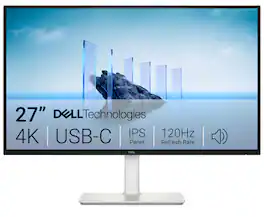
Dell 27 Plus 4K USB-C Monitor - S2725QC. Whether you're watching movies or playing games, enjoy an immersive viewing experience with improved eye comfort on a 4-star certified monitor*.

Take command of every battle with a 32" 4K UHD (3840 x 2160) glossy OLED display engineered for gamers who demand more. Experience the ultimate balance of clarity and speed with Dual-Mode refresh rates—crisp 4K UHD at 165Hz for immersive story-driven play, or Full HD at an electrifying 330Hz¹ when every millisecond counts. With an ultra-fast 0.03ms response time, you’ll react instantly, keeping gameplay sharp and responsive. VESA DisplayHDR True Black 400 and up to 98.5% DCI-P3 color coverage reveal stunning contrast, deep blacks, and vivid detail that bring worlds to life. NVIDIA G-SYNC compatablity and AMD FreeSync Premium Pro keeps frames smooth and tear-free. Complete with a tilt, swivel, height, and pivot adjustable stand, this UltraGear OLED monitor adapts to your perfect setup. Built for performance, precision, and comfort—it’s everything you need to stay ahead of the competition.

Smart Display. Serious Performance. Seamless Entertainment. Upgrade your desktop with the 27-inch LG UHD 4K Smart Monitor. The UHD (3840 x 2160) IPS display with up to 90% DCI-P3 color coverage and HDR support brings sharp detail and brilliant color to everything from spreadsheets to content streaming, video calls and cloud gaming. With built-in webOS24 and a dedicated remote, you get easy, instant access to your favorite streaming platforms like Netflix, Prime Video, Disney+, and more—plus 300+ free LG Channels. Game directly in the cloud with NVIDIA GeForce NOW, Amazon Luna, or Blacknut¹—no console or PC required. Need to get stuff done? The Switch app makes multitasking easy. Divide the screen into up to six sections, customize layouts, or launch video calls with a hotkey—all while switching effortlessly between your PC and the built-in smart features². Built-in stereo speakers deliver bold, immersive sound. The ergonomic stand tilt adjusts to your ideal viewing angle, while USB Type-C with 65W power delivery, two HDMI ports, and two USB inputs make it easy to connect everything you need. Whether you're working, creating, or kicking back—this monitor does it all.
| Pros for LG - UltraGear 27" IPS Dual Mode (4K UHD 180Hz, FHD 360Hz), 1ms, NVIDIA G-SYNC, AMD Freesync Gaming Monitor (HDMI, DP, USB-C) - Black | |||
|---|---|---|---|
| Refresh Rate, Color Quality, Resolution, HDR Performance, Stand Stability | Refresh Rate, Overall Performance, Screen Quality, Connectivity, Adjustability | Refresh Rate, Picture Quality, OLED Quality, Black Levels, Performance | Overall Performance |
| Cons for LG - UltraGear 27" IPS Dual Mode (4K UHD 180Hz, FHD 360Hz), 1ms, NVIDIA G-SYNC, AMD Freesync Gaming Monitor (HDMI, DP, USB-C) - Black | |||
| There were no cons for this product— | There were no cons for this product— | Flickering | There were no cons for this product— |
Specs
Reviews
Customers are saying
Customers love the UltraGear 27" IPS Dual Mode Gaming Monitor for its build quality. Users are impressed with the high definition and great image quality it provides. There are no cons listed for this product.
Customer Images
The vast majority of our reviews come from verified purchases. Reviews from customers may include My Best Buy members, employees, and Tech Insider Network members (as tagged). Select reviewers may receive discounted products, promotional considerations or entries into drawings for honest, helpful reviews.
- Rated 5 out of 5 stars
Excellent Budget Monitor
It is an excellent monitor for its price-level. It has great color rendition, great refresh rate, and for office use, the document or writing is crisp and clear. Of course, it is not an OLED display, but the quality is very good, and I am not missing my other OLED monitor as much.
TheSmittenGeek Posted
- Rated 5 out of 5 stars
Impressive Monitor
Coming from an older 144hz monitor this one is so much better. The fact you can switch between 4K and FHD with the push of a button is pretty nice. Very sharp and responsive.
TerryC Posted
- Rated 5 out of 5 stars
Best Gaming Monitor for the Value
I got this monitor as I wanted to play with my PS5, Switch 2 and Lenovo LOQ together. It was an easy setup with the provided HDMI and Displayport cables and I did not need to change the settings other than the brightness. I got it on sale for $300 and that was a steal. I would definitely recommend to get it if it's on sale.
Niamoni Posted