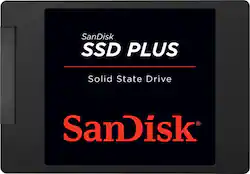
SANDISK - PLUS 240GB Internal SATA Solid State Drive
- Key Specs
- Storage Capacity: 240 gigabytes (Measured in megabytes (MB), gigabytes (GB) and terabytes (TB), this is the amount available for storing files, music, movies, photos and more. The total includes the capacity of the hard disk drive and solid state drive if both are included on the computer.)
- Storage Drive Type: SSD (Traditional, mechanical hard disk drives are the most common type of storage because they're relatively inexpensive and offer huge capacities. However, they also generate both noise and heat. Solid state drives, also known as SSDs, are many times faster than hard disk drives and have no moving parts to wear out, but typically offer less capacity for the same price.)
- Maximum Read Speed: 530 megabytes per second (The greatest speed at which the device can read information; for example, opening files.)
- Maximum Write Speed: 440 megabytes per second (The greatest speed at which the device can write information; for example, saving files.)
- Form Factor: 2.5 in.
- Interface(s): SATA (Refers to the types of connections that devices use to interact and communicate with each other.)
- General
- Brand: SANDISK
- Model Number: SDSSDA-240G-G26
- Product Name: PLUS 240GB Internal SATA Solid State Drive
- Capacity
- Storage Capacity: 240 gigabytes (Measured in megabytes (MB), gigabytes (GB) and terabytes (TB), this is the amount available for storing files, music, movies, photos and more. The total includes the capacity of the hard disk drive and solid state drive if both are included on the computer.)
- Performance
- Storage Drive Type: SSD (Traditional, mechanical hard disk drives are the most common type of storage because they're relatively inexpensive and offer huge capacities. However, they also generate both noise and heat. Solid state drives, also known as SSDs, are many times faster than hard disk drives and have no moving parts to wear out, but typically offer less capacity for the same price.)
- Maximum Read Speed: 530 megabytes per second (The greatest speed at which the device can read information; for example, opening files.)
- Maximum Write Speed: 440 megabytes per second (The greatest speed at which the device can write information; for example, saving files.)
- Compatibility
- Internal Or External: Internal
- Product Compatibility: Desktop computers, Laptop computers
- Form Factor: 2.5 in.
- Interface(s): SATA (Refers to the types of connections that devices use to interact and communicate with each other.)
- Bare Drive: true (Drive is sold without any pre-installed software.)
- Features
- Security Features: None
- Data Encryption: false
- Usage: Performance computing, Everyday computing
- Memory
- NAND Flash Memory Type: SLC (Single Level Cell (SLC) stores 1 bit of data per memory cell; Multi Level Cell (MLC) stores 2 bits per cell, Triple Level Cell (TLC) 3 bits, and Quad Level Cell (QLC) 4 bits. Vertical NAND (V-NAND) or 3D NAND stores more data by layering cells vertically. Similarly, there are 3D MLC, 3D TLC and 3D QLC stacked cells.)
- Dimensions
- Product Height: 0.28 inches (The out of box height of the item. Height is measured as the vertical distance from the bottom of the item to the top as it would be primarily used or placed.)
- Product Width: 2.75 inches (The out of box width of the item. Width is measured as the horizontal distance from one side of the item to the other as it would be primarily used or placed.)
- Product Weight: 0.08 ounces (The out of box weight of the item.)
- Included
- Included Software: SanDisk SSD Dashboard
- Warranty
- Warranty - Parts: 3 years
- Warranty - Labor: 3 years
- Other
- UPC: 619659146726
SanDisk, a pioneer in solid state storage technologies and the brand pros trust, delivers improved speed and performance with the SanDisk SSD Plus. With sequential read speeds of up to 530MB/s, this solid state drive performs faster than a typical hard disk drive. You'll appreciate faster startups, shutdowns, data transfers, and application response times than with a hard disk drive. The SanDisk SSD Plus also offers quiet, reliable performance, and dashboard status monitoring for your favorite media applications.
- 240GB storage capacity: Provides ample storage space for your music, movies and more.
- SATA lll interface: Offers simple connection to your computer.
- Data transfer rates up to 530 MB/s: For quick response when updating files.
- Shock-resistant: For increased durability.
- Compatible with PC: For use with your existing computer.
Whats Included
- SanDisk PLUS 240GB Internal SATA Solid State Drive
- SanDisk SSD Dashboard software
A: You can download Ease US ToDo to clone.
A: this is indeed a SLC drive best buy advertises speeds to 600 MB/s but i have an unopened one still in package that clearly states "up to 530MB/s seq read speed" so either best buy did something to improve the speed or they are advertising wrong speed.
A: Yes , but you would need to have a windows disk and your key to reinstall,since the other one will not show up . (DOA)
Q: Can i use for my iMac 2014?. Thanks.
A: Yes, I installed them in med 2013's and in one 2014 15 " they are easy to install and then make a Genius bar appointment and the tech will reload the software OS you had on your machine and then you can go home and install your back up. Make sure you have a backup before removing the hard drive.
Q: How does one install the Sandisk - 240gb Internal Sata Solid State Drive Plus For Laptops?
A: You should probably do a Google search for replacing the hard drive on your particular make/model of laptop. There are lots of tutorials out there for many different laptops. The generic instructions are: 1. Clone the existing hard drive onto the SSD connected to the computer using a USB adapter. 2. Open the laptop and remove the existing drive. 3. Insert and connect the SSD in the old drive's place. 4. Boot normally. If you don't want to/can't clone the old hard drive's contents to the new SSD, you can do a fresh install of Windows instead, but your data will need to be transferred to the new drive somehow if you want it.
A: According to Amazon specs... It is a 7mm drive.
Q: Will this drive work with a mac mini computer? Also does it have cloning software?
A: This drive can be installed in a Mac mini, but does not include any software. There are plenty of apps available to do the cloning though.
A: I would use a USB external drive to get data off an old laptop HD instead. The SSD is a SATA drive, so you would need some kind of SATA plug and a way to get power to the drive too. A USB would be much easier.
People also viewed
 $504.99The price was $679.99
 $349.99The price was $700.99
Today's top picks
 $199.99The price was $249.99
 $2,449.99The price was $3,199.99
 $449.99The price was $829.99
 $999.98The price was $1,639.98
 $789.99The price was $1,049.99









