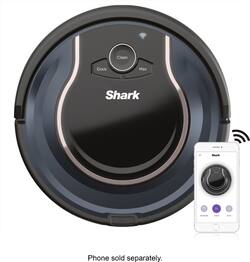
The Shark ION Robot Vacuum R76 with Wi-Fi has many great features and cleans well for a semi-autonomous device.
It has about an hour of battery which doesn’t sound like much but in my 2600 square foot home (it only covers one floor at a time), it gets through most if not all of it in that time although I am not sure if it gets 100% coverage.
It can mostly be left to its own devices if you set up the schedule and I can see when mine has been out and about from the little tire marks in the carpeted rooms.
The Shark has a small dust canister but I’ve yet to fill it in a day and it is easy to remove from the vacuum although I had hoped for an easier method to open the canister to empty – it’s a pinch-and-hope-it opens method which is simple but not as effective as it probably could be.
The brush roll appears to work well without over brushing the carpet or rugs. The sweepers at the front also work well to push debris into the path of the vacuum so it can be collected as the Shark ION passes over it.
I am not sure about the robot’s logic in terms of what path to take but it does mostly work. It can certainly look very random although sometimes when it sets out, it appears to know where it wants to at least start and then depending on what it bumps into can dictate where it actually goes next as it will not only maneuver around objects but also go off to different areas as it changes direction.
More expensive robots will map the rooms so you could literally send them to clean a room, which they will do in a very methodical, almost like mowing-lawn-manner. This robot is not as sophisticated so it is a bit more hit-and-miss but in its way, it is still fairly effective.
I don’t know what its logic is set to but it does appear to measure how far it is from objects it has bumped into and uses this information to navigate and find new areas to clean.
I had a gripe in terms of docking but I seem to have figured it out now. I noticed at first that my Shark ION would happily clean for an hour or so and then I would get an error message on my phone saying the cliff sensors were blocked. I would come home and find the robot vac not quite up on the charger. If you backed it up (use the phone app to send it out to clean again and then tell it to dock) it would try again and successfully dock and start charging. I noticed that if you moved the dock a bit, it had a higher success rate so I think what happened was I put the dock on a bit of wood floor that was uneven and it somehow threw the robot’s sensors off. Anyway, if you encounter this, just move the dock slightly as it can make quite the difference. I did not have any problem when I moved the dock upstairs and used it on a carpeted area, just the wood floor in my kitchen where the dock normally resides.
It is quite entertaining to watch the robot vacuum do its thing and we have often just fired it up to see it in action. It is quiet and you can easily watch TV at a normal volume without it disturbing things.
The Shark ION is very impressive when upstairs and navigating around the stairs. The cliff sensors make sure it does not tumble down the stairs, potentially fatal for the vacuum, and I watched it carefully move around in that vicinity while trying to get to its dock nearby. It slowed it down a little as it had less room to maneuver but never came close to falling off.
I love how it can get to spots I never can with my other vacuum cleaners – it will go under beds, tables, couches and many other places and we had no problems with it dealing with tall rugs, low hanging bed spreads etc. and it was even able to climb over a ring beneath a metal table and vacuum under there. It will sometimes have to work a bit to bump its way out of tight spots but seems to figure it out relatively quickly.
We have only seen it have one (very minor) disaster so far where we accidentally left a phone charging cable out. It pulled it into the rotating brush roll and stopped before it wound all the way round. We found it under a couch where the cable had been plugged in. Side note that if you can’t find the vacuum, you can press a button in the Shark app and the robot will beep at you to let you know where it can be found – very useful in this case. We retrieved it, got the cable out easily and it was all set to go back to cleaning or head back to the dock to charge.
Speaking of docking, the robot takes about 3 hours or so to charge up to 100% and will run for around an hour before heading back to the dock to recharge. I think it still has about 50% or so charge left after an hour but it is probably playing it safe to leave enough charge to locate a charger that might be some distance away. It appears to hunt for a signal that is coming from the dock in line of sight so it may need to move quite a way, in a random fashion, to find the line-of-sight signal.
Once it does locate it, you see it slow down and start to line up with the dock and it is quite impressive to watch it find it from way across the house and then roll in to dock. It will play a happy little tune when it successfully docks and starts charging and also plays tunes when it starts cleaning or is heading back to the dock.
I like that you can control the Shark ION from the app as well as its onboard buttons. Sometimes you just want it to start cleaning and not have to find the phone to start it. It is also possible to use voice control if you set it up for Google Assistant or Alexa but I haven’t felt the need for that yet.
In terms of power and durability, we found a small sock in the dust canister today which it must have sucked up yesterday on one of its runs. I would have expected it to stall with that in the works but it had pushed it half into the canister, continued cleaning and then gone back to the dock when the charge ran low. Not something we want to repeat but impressive that it did not slow it down.
I would certainly recommend following Shark’s suggestions to make sure the spaces you want it to clean are clear of anything that could cause it problems. There are just two adults in our home and no children’s toys or pets and their accessories, so we are a fairly easy home for a robot vacuum. You can use the supplied magnetic barrier strips to dissuade the robot from visiting certain areas but we did not feel we needed to use them as most of our spaces are clear anyway.
All in all, we find the Shark ION a welcome addition to our home, when used to maintain the floors through the week. I will continue to vacuum the floors with a conventional vacuum on weekends as we still notice that the Shark can’t seem to pull out material that is in the carpet fiber like sock bits. For our kitchen though, with hardwood floors, it is a great bonus to have it pick up bits from food prep before we get to it days later.