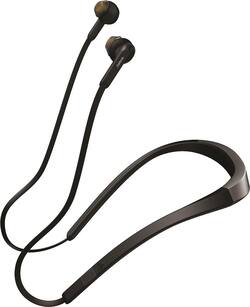
Jabra - Elite 25e Wireless In-Ear Headphones - Silver
- Key Specs
- Sound Mode: Stereo
- Connection Type: Wireless
- Wireless Connectivity: Bluetooth (The manner in which a device sends data to another device over a short distance without the use of wires or cables.)
- True Wireless: false (These headphones not only lack wires between the device and headphones, they also lack wires between the headphones themselves. (true wireless is really only possible with in-ear headphones))
- Water Resistant: true (Resists some degree of water penetration.)
- Built-In Microphone: true
- Headphone Fit: Behind the neck, In-Ear
- Battery Life: 18 hours (Battery life will vary depending on the product configuration, product model, applications loaded on the product, power management setting of the product and the product features used by the customer. As with all batteries, the maximum capacity of this battery will decrease with time and usage.)
- Battery Charge Time: 2 hours (Battery charge time will vary depending on the product configuration, product model, applications loaded on the product, power management setting of the product and the product features used by the customer. Charging time will likely decrease with time and usage of the battery.)
- General
- Product Name: Elite 25e Wireless In-Ear Headphones
- Brand: Jabra
- Ear Cushions: true
- Model Number: 100-98400001-14
- Audio
- Sound Isolating: false
- Sensitivity: 92 decibels adjusted
- Sound Mode: Stereo
- Driver Size: 10 millimeters
- Connectivity
- Connection Type: Wireless
- Wireless Connectivity: Bluetooth (The manner in which a device sends data to another device over a short distance without the use of wires or cables.)
- True Wireless: false (These headphones not only lack wires between the device and headphones, they also lack wires between the headphones themselves. (true wireless is really only possible with in-ear headphones))
- Bluetooth Version: 4.1 (The Bluetooth specification formalized by the Bluetooth Special Interest Group. All versions of the Bluetooth standard are backwards compatible with previous versions.)
- Features
- Water Resistant: true (Resists some degree of water penetration.)
- Built-In Microphone: true
- Stand-By Time: 22 days (Amount of time it takes for the device to deplete a single battery charge when powered on but not in active use. This length of time is dependent on the network environment the device is connected to, if applicable, and the applications running.)
- Design
- Headphone Fit: Behind the neck, In-Ear
- Style: Travel
- Power
- Rechargeable: true
- Battery Life: 18 hours (Battery life will vary depending on the product configuration, product model, applications loaded on the product, power management setting of the product and the product features used by the customer. As with all batteries, the maximum capacity of this battery will decrease with time and usage.)
- Battery Charge Time: 2 hours (Battery charge time will vary depending on the product configuration, product model, applications loaded on the product, power management setting of the product and the product features used by the customer. Charging time will likely decrease with time and usage of the battery.)
- Other
- UPC: 615822010603
Enjoy crisp, clear audio with this Jabra Elite 25e stereo headphones. It delivers up to 18 hours on a single charge and recharges in as little as 2 hours, and it's water-resistant, making it ideal for outdoor use. This Jabra Elite 25e stereo headphones has a contoured neckband, providing a secure, comfortable fit.
- In-ear design: Fits securely and directs music into your ears for full, uninterrupted audio.
- Bluetooth interface: Enables simple wireless pairing with your Bluetooth-enabled device.
- Rechargeable battery: Offers up to 18 hours of use on a charge.
- In-line microphone: Lets you enjoy hands-free calls.
- Water-resistant housing: Helps prevent sweat and water from entering the headphones.
- 10mm drivers: Deliver powerful sound.
- Stereo design: Delivers crisp tones.
Whats Included
- 2 sets of extra EarGels (S, L)
- Jabra Elite 25e Wireless In-Ear Headphones
- Quick start guide
- Registration leaflet
- USB cable
- Warning leaflet
- Warranty leaflet
A: No for showers......maybe rain splashes....
A: I use mine off and on all day. I can go 2-3 days without changing them. They really seem to last a long time off a single charge.
Q: Are the ear buds magnetic so they stick together when they’re not in your ear?
A: Yes, the buds are magnetic and will stick together when not in use.
A: Hello Tula! To power on your Jabra Elite 25e, press and hold the "multi-function" button (located between the "volume down" and "volume up" buttons) for 3 seconds. The LED on your Jabra Elite 25e will flash green to indicate that the device is powered on. Should you have any additional questions about your Jabra Elite 25e, please contact our support team: https://www.jabra.com/contact/support/jabra-support-consumer.
A: i have a samsung phone. to connect to my samsung i just press and hold down bluetooth button.
A: Did you install the app for the headset on your phone? It works with the headset and allows you to use these functions based on the settings you choose
A: Hi Toni- Please contact the Jabra Support team: https://www.jabra.com/supportpages/jabra-elite-75t/100-99090000-02/contact-support at your earliest convenience. We are happy to provide you with the best assistance, and we hope to hear from you soon.
Q: Can you answer calls on your Jabber client with a button on the headset?
A: Hi Badbaron- Unfortunately, you cannot answer phone calls directly from the headset. Please feel free to check out the User Manual through this direct link we have provided you: https://www.jabra.com/supportpages/jabra-elite-25e#/TECH#100-98400000-02. The User Manual shows an overview on the multi-function buttons on the Jabra Elite 25e. Thank you for your question.























