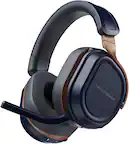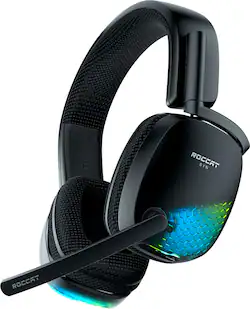
ROCCAT - SYN Pro Air Wireless PC Gaming Headset with AIMO RGB Lighting - Black
- Key Specs
- Noise Cancelling (Active): false
- Sound Mode: Surround 7.1, Surround 5.1, Surround, Stereo, Other
- Connection Type: Wireless
- Wireless Connectivity: Radio Frequency (RF) (The manner in which a device sends data to another device over a short distance without the use of wires or cables.)
- True Wireless: false (These headphones not only lack wires between the device and headphones, they also lack wires between the headphones themselves. (true wireless is really only possible with in-ear headphones))
- Water Resistant: false (Resists some degree of water penetration.)
- Built-In Microphone: true
- Carrying Case: false
- Microphone Features: Detachable, Adjustable, Noise cancelling
- Headphone Fit: Over-the-Ear
- Adjustable Headband: true
- Compatible Platform(s): Windows
- General
- Product Name: SYN Pro Air Wireless PC Gaming Headset with AIMO RGB Lighting
- Brand: ROCCAT
- Model Number: ROC-14-150-01
- Color: Black
- Audio
- Noise Cancelling (Active): false
- Sound Isolating: true
- Environmental Noise Control: false (A technology that automatically or manually adjusts, or eliminates, ambient background sound to allow conversational voices to be heard clearer.)
- Integrated Amplifier: true
- Volume Limiting Function: false
- Sound Mode: Surround 7.1, Surround 5.1, Surround, Stereo, Other
- Connectivity
- Connection Type: Wireless
- Wireless Connectivity: Radio Frequency (RF) (The manner in which a device sends data to another device over a short distance without the use of wires or cables.)
- True Wireless: false (These headphones not only lack wires between the device and headphones, they also lack wires between the headphones themselves. (true wireless is really only possible with in-ear headphones))
- Features
- Water Resistant: false (Resists some degree of water penetration.)
- Built-In Microphone: true
- Carrying Case: false
- Microphone Features: Detachable, Adjustable, Noise cancelling
- Controls: Mute, Volume
- Customizable Lighting: true
- Lighting Type: RGB
- Design
- Headphone Fit: Over-the-Ear
- Style: Gaming
- Adjustable Headband: true
- Power
- Rechargeable: true
- Charging Accessory Included: Cable
- Charging Interface(s): USB Type C (The connection for transmitting power to charge the device.)
- On/Off Switch: Yes
- Compatibility
- Compatible Platform(s): Windows
- Warranty
- Manufacturer's Warranty - Parts: Not provided
- Manufacturer's Warranty - Labor: Not provided
- Other
- UPC: 731855541508
The ROCCAT Syn Pro Air wireless PC gaming headset delivers immersive 3D Audio surround sound for next-level PC gaming. Hear game audio from all directions, including from above and below with exclusive 3D Audio surround sound. Syn Pro Air is also equipped with Turtle Beach patented Superhuman Hearing sound setting - proven to improve your game play by 40%. Stellar Wireless technology provides an exceptional 2.4Ghz low-latency wireless connection for PC, plus an included USB-A to USB-C adapter lets you connect to other devices with ease. The long-lasting 24-hour battery lets you play all day, and night, and rapid charging provides 5 hours of battery life on just 15 minutes of charge. Stay cool under pressure thanks to athletic fabric-wrapped memory foam ear cushions with ProSpecs technology. Adjust between 16.8 million vivid colors in two different lighting zones visible through the Bionic Shell earcups and sync up with other ROCCAT AIMO-compatible devices. Download NEON on PC for even further customization and configuration including 3D Audio, custom 10-band audio EQ settings, activate Superhuman Hearing, adjust lighting and more.
- Immersive 3D Audio: ROCCAT exclusive 3D Audio takes surround sound to the next level, delivering immersive spatial audio from all directions. Customize your 3D Audio experience within the NEON driver software for 10-band EQ adjustment to tune your headset.
- Precision-Tuned Nanoclear Drivers: Hear crisp highs and thundering lows with 50mm Nanoclear speakers from Turtle Beach, tuned to maximize 3D Audio.
- Superhuman Hearing: With Turtle Beach's exclusive Superhuman Hearing sound setting, you'll have the competitive advantage by being able to hear all the subtle yet game-changing sounds, like enemy footsteps, weapon reloads, and vehicles off in the distance.
- Stellar Wireless Technology: Exceptional signal strength provides a reliable, low-latency 2.4GHz wireless connection via USB transmitter. Plus, an included USB-A to USB-C adapter lets you connect to other devices with ease.
- 24-Hour Power: Long-lasting 24-hour battery life lets you play all-day and night on one continuous charge. And for those times you forget? USB-C rapid charge gets you back in the game without delay – with 15 minutes charge giving you 5 hours of battery life.
- Unmatched Comfort: Soft memory foam ear cushions with ProSpecs glasses-friendly technology wrapped in moisture-wicking athletic weave fabric keep heat and sweat at bay. Plus, the perfect fit headband provides a snug fit for guaranteed comfort.
- Clear Comms: The flip-to-mute, TruSpeak noise-cancelling mic provides clear, undistorted chat, and is easily removable for travel or when not chatting.
- Built to Last: A robust, yet lightweight headband structure with lay-flat yokes provides a long-lasting, durable design. With just the right amount of clamping force the Syn Pro Air provides a secure fit over years of usage.
- AIMO Illumination: Adjust between 16.8 million vivid colors in two different lighting zones visible through the Bionic Shell earcups. Sync up with other AIMO-compatible devices to present vivid lighting scenarios right out of the box, without the need for extensive configuration.
- Powered by NEON: Download NEON on PC for further configuration including 3D Audio, custom 10-band audio EQ settings, activate Superhuman Hearing, adjust lighting and more.
- Convenient Controls: Intuitive on-ear controls for master volume, and mic monitoring allow for simple audio adjustments on the fly.
- 2 Year Warranty: 2-year manufacturer warranty for peace of mind
A: We are sorry to hear that you encountered some sort of inconvenience with your ROCCAT headset's microphone. Please take the time to reach out directly to ROCCAT's Support Team so they can gather more details about your experience with your headset and assist with troubleshooting or replacement service if necessary under their manufacturer's warranty. That team can be reached directly from the Support section of the main ROCCAT website. Thank you and have a wonderful day!
Q: Will these work with PS4/ps5 and what's the driver size?
A: Yes, but the headset volume controls won’t work. The drivers are 50mm.
A: Hi James, thank you for your question. If you are having issues with the output of the headset, please first make sure that it is selected as your default device in the playback section of your Windows sound control panel. You can access this through a right click on the speaker symbol on your taskbar. It might also help to install Neon (if you haven't done so) and make sure that the headset is running the latest firmware. Should you still experience issues, our support staff is more than happy to help you find a solution. You can reach out through the Support section on our homepage.
Q: Will it work with a xbox 1?
A: No, it claimed to be compatible but does not connect to my Xbox.
Q: Can you flip the microphone up to mute it?
A: Yes you can
Q: honestly the worst headset I've ever had to deal with.
A: not sure why cuz it works well for me.
A: I believe so because you can also remove the mic stem so you don’t have to use it and just replace it on your computer that your using the arm mic one