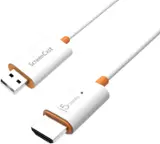
Aluratek - PicStick Wireless HDTV Photo/Video Viewer-Upgrade a TV to a Digital Photo Frame - Black
More Buying Options
Related Item

About This Item
- General
- Brand: Aluratek
- Model Number: APWHS01F
- Product Name: PicStick Wireless HDTV Photo/Video Viewer-Upgrade a TV to a Digital Photo Frame
- Color: Black
- Features
- Powered: true
- Connectivity
- Wireless: true
- Input(s): 1 x USB-A
- Output(s): 1 x HDMI
- Dimensions
- Product Height: 1.25 inches (The out of box height of the item. Height is measured as the vertical distance from the bottom of the item to the top as it would be primarily used or placed.)
- Product Width: 3.9 inches (The out of box width of the item. Width is measured as the horizontal distance from one side of the item to the other as it would be primarily used or placed.)
- Product Depth: 0.5 inches (The out of box depth of the item. Depth is measured as the distance from the front of the item to the back as it would be primarily used or placed.)
- Warranty
- Warranty - Parts: 1 year
- Warranty - Labor: 1 year
- Other
- UPC: 812658015554
The PicStick takes the frame out of digital photo frame by revolutionizing photo sharing and viewing. Transform a big screen TV into a digital photo frame by displaying photos and videos on your HDTV straight from the PicStick. With a simple setup and WiFi connection, you can effortlessly create captivating photo slideshows of a recent family vacation and share a video of a family milestone for yourself or for family members who live in another part of the world. Plug in the PicStick to the TV’s HDMI port, connect the power supply and then connect to a WiFi network. Download the Frametime app on an Apple or Android smartphone and pair muliple phones securely to the PicStick. Paired users can share photos and videos from the Frametime app and send them to the PicStick to be displayed on your chosen PicStick or traditional Aluratek digital photo frame. Grandparents, family and friends can easily enjoy shared content on their PicStick enabled TV. With the PicStick’s built-in memory (media files are not stored in a cloud) you can store thousands of photos and videos. Navigation through the images and vidoes are done with the included remote control. Enjoy the convenience of privately and securely sharing your precious memories on the a big screen TV.
- Remotely share photos and videos from anywhere in the world with friends and family.: The PicStick connects via an HDMI port to a TV or display and WiFi network.
- WiFi: Connect to Wifi and receive images and videos instantly from the mobile App.
- Mobile App: Download the Frametime app on your Apple or Android smartphone. Securely pair multiple phones via the app to the PicStick. Multiple users can share images and videos with the PicStick owner. No subscriptions or in-app purchases
- Remote Control: Included remote control allows for easy navigation of your images and videos
- USB Port: Simply plug in a USB thumb drive to the USB port on the back of the PicStick to access and share photos, videos and even audio files. Provides expansion memory to PicStick(up to 512GB)
- HDMI Connectivity: Connect to the HDMI port of a TV or monitor and power it with included USB cable and power adapter
- Digital Signage: The PicStick makes for a great way to present photo slideshows or a video message for business meetings, school lessons, special events, restaurant menu boards, etc
Whats Included
- PicStick Module
- Remote Control
- USB Power Adapter
- HDMI Extender
- Infrared Remote Signal Repeater Extender
- USB Cable
Product Manuals
Q: Can you control the PicStick using a smartphone app?
A: Yes, you can control the PicStick with a smartphone. You will need to download the Frametime app on your Apple or Android smartphone to select photos and videos to send to the PicStick.
Q: How does the PicStick connect to a WiFi network?
A: You will need to plug the PicStick into your TV's HDMI port and then connect to a WiFi network.
Q: Is there a way to delete files from the PicStick?
A: The PicStick has built-in memory that allows you to store thousands of photos and videos. You can manage these files directly on your TV using the included remote control.
Q: Does the PicStick require a separate power supply?
A: The Aluratek PicStick Wireless HDTV Photo/Video Viewer needs to be connected to a power supply.
Q: How much memory does it hold?
A: I believe the PicStick has 32GB of memory. It can be used like a USB thumb drive for computer yet can also be used for your photos to show on TV.
A: Scan them with your phone or computer
Q: Will this support portrait mode orientation if a tv isounted vertically?
A: To be honest I am not sure. The unit can show portrait and landscape photos and video, but how it would react to the TV being mounted vertically vs horizontally I guess depends more on the TV.
Reviews
Customers are saying
Customers frequently mention the PicStick's HDMI connectivity and ease of use, highlighting the simple setup process. The remote control and video quality are also well-received features. However, some customers have noted concerns regarding the app's stability.
Customer Images
The vast majority of our reviews come from verified purchases. Reviews from customers may include My Best Buy members, employees, and Tech Insider Network members (as tagged). Select reviewers may receive discounted products, promotional considerations or entries into drawings for honest, helpful reviews.
Compare similar products

The PicStick takes the frame out of digital photo frame by revolutionizing photo sharing and viewing. Transform a big screen TV into a digital photo frame by displaying photos and videos on your HDTV straight from the PicStick. With a simple setup and WiFi connection, you can effortlessly create captivating photo slideshows of a recent family vacation and share a video of a family milestone for yourself or for family members who live in another part of the world. Plug in the PicStick to the TV’s HDMI port, connect the power supply and then connect to a WiFi network. Download the Frametime app on an Apple or Android smartphone and pair muliple phones securely to the PicStick. Paired users can share photos and videos from the Frametime app and send them to the PicStick to be displayed on your chosen PicStick or traditional Aluratek digital photo frame. Grandparents, family and friends can easily enjoy shared content on their PicStick enabled TV. With the PicStick’s built-in memory (media files are not stored in a cloud) you can store thousands of photos and videos. Navigation through the images and vidoes are done with the included remote control. Enjoy the convenience of privately and securely sharing your precious memories on the a big screen TV.

Stream in Full HD - Enjoy fast, affordable streaming in Full HD, and control it all with the Alexa Voice Remote.

Our most powerful streaming stick - Elevate your entertainment experience with a powerful processor for lightning-fast app starts and fluid navigation.
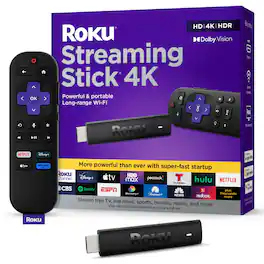
Roku Streaming Stick 4K is the easiest way to give any 4K TV the ultimate upgrade to America’s #1 TV streaming platform*. Start streaming in a snap and enjoy 500+ free TV channels with live news, weather, sports coverage, and more. Watch your favorites in stunning 4K, Dolby Vision, and rich HDR10+ colors packed into this slim Roku player with long-range Wi-Fi. The sleek, portable design won’t block neighboring HDMI ports, so you can switch from streaming to gaming with ease. Plus, it stays hidden behind your TV, keeping wires neatly out of sight. *Based on hours streamed—Hypothesis Group
| Pros for Aluratek - PicStick Wireless HDTV Photo/Video Viewer-Upgrade a TV to a Digital Photo Frame - Black | |||
|---|---|---|---|
| Ease of use, Storage, HDMI, Remote, Video Quality | Overall Performance, Setup, Ease of Use, App Compatibility, Connectivity | Overall Performance, Ease of use, Setup, Storage, Speed | Ease of use, Overall Performance, Wi-Fi, Remote Control, Price |
| Cons for Aluratek - PicStick Wireless HDTV Photo/Video Viewer-Upgrade a TV to a Digital Photo Frame - Black | |||
| App Stability | There were no cons for this product— | Compatibility, Lag, User Interface | Compatibility, Battery Life, Overheating |