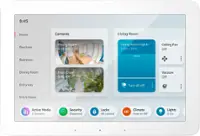
Skylight - Calendar 2: 15 Inch Touchscreen Smart Calendar and Chore Chart - White
Skylight - Calendar 2: 15 Inch Touchscreen Smart Calendar and Chore Chart - White
Color
WhiteRelated Item

- General
- Brand: Skylight
- Model Number: 152UEBA
- Product Name: Calendar 2: 15 Inch Touchscreen Smart Calendar and Chore Chart
- Color: White
- Dimensions
- Product Width: 9.375 inches (The out of box width of the item. Width is measured as the horizontal distance from one side of the item to the other as it would be primarily used or placed.)
- Product Height: 1.25 inches (The out of box height of the item. Height is measured as the vertical distance from the bottom of the item to the top as it would be primarily used or placed.)
- Product Depth: 15 inches (The out of box depth of the item. Depth is measured as the distance from the front of the item to the back as it would be primarily used or placed.)
- Product Weight: 6 pounds (The out of box weight of the item.)
- Imaging
- Image Resolution (Display): 1920 x 1080 (Refers to the number of pixels, both horizontally and vertically, used to either capture an image or display it. The higher the resolution the finer the image details.)
- Compatibility
- Memory Card Compatibility: None (The type of memory card(s) recommended for use with the product.)
- Interface(s): None (Refers to the types of connections that devices use to interact and communicate with each other.)
- Minimum System Requirements: Not Applicable
- Wireless Connectivity: Wi-Fi (The manner in which a device sends data to another device over a short distance without the use of wires or cables.)
- Features
- Screen Size: 15 inches (Size of the screen, measured diagonally from corner to corner.)
- Built-in Storage: 16 gigabytes
- Warranty
- Warranty - Parts: 120 Days
- Warranty - Labor: 120 Days
- Other
- UPC: 850067427476
Skylight Calendar 2 - 15" Digital Calendar with removable Shadowbox Frame. Daily Planner, Touchscreen Smart Display for Family Schedules, Work, and Office. Get the whole family organized with chore charts, meal planning, and customizable lists on a WiFi-connected system with a beautiful and intuitive digital display.
- Skylight All-in-one Smart Home WiFi Touchscreen Digital Calendar: Effortlessly organzie the whole family with the touchscreen display for all your calendar events, chores meal plans and tasks.
- Quick Set-up: Simply plug it in, connect to Wi-Fi, and sync your calendars – all your events will automatically populate and sync. Add events or chores directly on the device or use the free to download mobile app. Support available at email [email protected].
- Stay effortlessly organized with seamless calendar syncing:: Automatically connect with Google Calendar, iCloud Calendar, Outlook, and more. Empower your family’s independence with the interactive Tasks Manager, turning daily routines and chores into fun, healthy habits. Stay organized at a glance with customizable color-coding and flexible day, week, month, or schedule views.
- Beautiful and Intuitive HD Smart Display:: 15” touchscreen wall mount in portrait or landscape to fit your space, as well as 180° adjustable tabletop stand in landscape.Touch screen display that allows easy schedule creation, viewing and display.
- Simplify your family’s routine with smart features designed to make life smoother:: Plan meals with ease so you’ll never hear “What’s for dinner?” again. Motivate kids and celebrate progress with the built-in Rewards system that turns good habits into fun achievements. And let Magic Import do the work for you — automatically transforming emails, PDFs, and photos into calendar events. Upgrade to Plus to unlock these powerful tools and bring a little extra magic to every day. Sold separately.
- Skylight All-in-one Smart Home WiFi Touchscreen Digital Calendar: Effortlessly organzie the whole family with the touchscreen display for all your calendar events, chores meal plans and tasks.
- Quick Set-up: Simply plug it in, connect to Wi-Fi, and sync your calendars – all your events will automatically populate and sync. Add events or chores directly on the device or use the free to download mobile app. Support available at email [email protected].
- Stay effortlessly organized with seamless calendar syncing:: Automatically connect with Google Calendar, iCloud Calendar, Outlook, and more. Empower your family’s independence with the interactive Tasks Manager, turning daily routines and chores into fun, healthy habits. Stay organized at a glance with customizable color-coding and flexible day, week, month, or schedule views.
- Beautiful and Intuitive HD Smart Display:: 15” touchscreen wall mount in portrait or landscape to fit your space, as well as 180° adjustable tabletop stand in landscape.Touch screen display that allows easy schedule creation, viewing and display.
- Simplify your family’s routine with smart features designed to make life smoother:: Plan meals with ease so you’ll never hear “What’s for dinner?” again. Motivate kids and celebrate progress with the built-in Rewards system that turns good habits into fun achievements. And let Magic Import do the work for you — automatically transforming emails, PDFs, and photos into calendar events. Upgrade to Plus to unlock these powerful tools and bring a little extra magic to every day. Sold separately.
Whats Included
- Skylight Calendar
- Detachable Decorative Frame
- Mounting Brackets & Screws
- Power Adapter
- Skylight Calendar
- Detachable Decorative Frame
- Mounting Brackets & Screws
- Power Adapter
Q: How are recipes downloaded to this device.
A: Hi there! Recipes are available with the optional Calendar Plus subscription. Once you have Plus, you can add recipes through the Skylight app in a few different ways. You can enter them manually, paste a recipe URL, forward a recipe by email, upload or take a photo, or even use the microphone to add one.
A: Hi there! The Skylight Calendar does not include a built in battery and needs to stay plugged in using the included power adapter to operate. This helps ensure the screen stays on and the Calendar stays updated for your family throughout the day.
A: Hi there! The 15 inch Calendar 2 includes several hardware upgrades compared to the original 15 inch Calendar. These upgrades include interchangeable Snap Frames, a redesigned tabletop stand, and improved processing power. Both devices run the same Skylight software, so they offer the same core features and functionality. A subscription is not required to use the Calendar or receive software updates. The core features such as calendar syncing, event management, and basic chore tracking are available without a subscription. Calendar Plus is optional and adds additional features like chores with rewards and stars, meal planning, and other advanced tools for families who want them.
Compare similar products
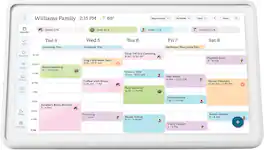
Skylight Calendar 2 - 15" Digital Calendar with removable Shadowbox Frame. Daily Planner, Touchscreen Smart Display for Family Schedules, Work, and Office. Get the whole family organized with chore charts, meal planning, and customizable lists on a WiFi-connected system with a beautiful and intuitive digital display.

Skylight Calendar is an innovative touchscreen display for all your calendar events, to-do’s, grocery list, and chores to help you organize your family’s busy schedule. It has a 15” touch screen that displays your family’s schedule in HD clarity making it a beautiful centerpiece for your home. It is the perfect size for a kitchen counter or can be mounted on a wall. High-quality metal stand and wall mount included.

Skylight Calendar Max 27-Inch Digital Calendar & Daily Planner, Touchscreen Smart Display For Work, Office and Family Schedules

Our largest smart display yet - A stunning 21" Full-HD (up to 1080p) smart display with built-in Fire TV and Alexa that's built to show you more.
| Pros for Skylight - Calendar 2: 15 Inch Touchscreen Smart Calendar and Chore Chart - White | |||
|---|---|---|---|
| There were no pros for this product— | There were no pros for this product— | There were no pros for this product— | Overall Performance, Screen Size, Ease of Use, Connectivity, Design |
| Cons for Skylight - Calendar 2: 15 Inch Touchscreen Smart Calendar and Chore Chart - White | |||
| There were no cons for this product— | There were no cons for this product— | There were no cons for this product— | Remote |
Specs
Reviews
Customer Images
The vast majority of our reviews come from verified purchases. Reviews from customers may include My Best Buy members, employees, and Tech Insider Network members (as tagged). Select reviewers may receive discounted products, promotional considerations or entries into drawings for honest, helpful reviews.
- Rated 5 out of 5 stars
New family calendar
The Skylight Calendar 2 15-inch Smart Family Calendar has been a great addition to our home. The kids love using it, and it’s really helpful for keeping everyone’s schedules in one place. Just make sure you have a good internet connection since it relies on Wi-Fi to stay updated. Overall it’s simple, useful, and works well for a busy family.
DavidF Posted
- Rated 4 out of 5 stars
Skylight Calendar
The Skylight Calendar has a very nice interface. It really helps with keeping our family on schedule and not forgetting things. My main gripes with the product are the following: - it was a pain to connect to wifi. I ended up having to create a guest wifi network to connect it to the wifi. This was after removing all the security on my main wifi network. For whatever reason it’s a pain to connect and many others seem to have this problem. - syncing with my phone calendar has been a challenge as well. When I have tried it the process has failed and tells me to try again later. Overall we are happy with this product, but there are some improvements that can be made to better the user experience.
JHF1990 Posted
- Rated 5 out of 5 stars
Well worth it if you have kids
This thing works exactly how they say it will best part is the kids can keep track of their own activities and it will show multiple colors if two people are doing the same thing (like the parent driving one kid to the activity. Well worth the money
Benjamin Posted