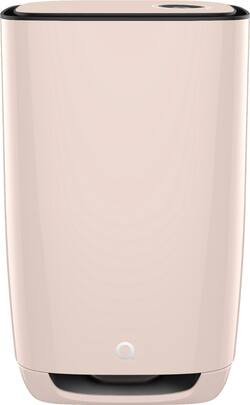
Aeris Cleantec - Aair 3-in-1 Pro HEPA Air Purifier - Peach
- Key Specs
- Recommended Room Size: 750 square feet (The recommended area size in which the product is designed to operate and produce optimal results, such as the desired heating or cooling. Generally, running a unit too big or too small for the space will result in ineffective operation and wasted energy.)
- App Compatible: true (The product can be connected to a program or software application on a mobile device, which then receives collected data from the product.)
- Wireless Connectivity: Wi-Fi (The manner in which a device sends data to another device over a short distance without the use of wires or cables.)
- Air Purifier Type: Personal
- Air Quality Indicator Light(s): true (Lights indicate when the air quality level reaches or deviates from the desired setting.)
- Ionizing: false (Uses ions to remove pollutants from the air.)
- Filter Type: HEPA, Activated carbon, Removable
- Clean Air Delivery Rate (CADR): 390 (The peformance metric for the air purifier testing standard developed by the Association of Home Appliance Manufacturers (AHAM). The Clean Air Delivery Rate (CADR) indicates an air purifier's ability to reduce pollutants and allergens. Generally, the higher the number, the faster the filtration.)
- General
- Product Name: Aair 3-in-1 Pro HEPA Air Purifier
- Brand: Aeris Cleantec
- Model Number: AA-PE-31-110-US-EU-00-00
- Color: Peach
- Dimensions
- Recommended Room Size: 750 square feet (The recommended area size in which the product is designed to operate and produce optimal results, such as the desired heating or cooling. Generally, running a unit too big or too small for the space will result in ineffective operation and wasted energy.)
- Product Height: 15 inches (The out of box height of the item. Height is measured as the vertical distance from the bottom of the item to the top as it would be primarily used or placed.)
- Product Width: 24 inches (The out of box width of the item. Width is measured as the horizontal distance from one side of the item to the other as it would be primarily used or placed.)
- Product Depth: 15 inches (The out of box depth of the item. Depth is measured as the distance from the front of the item to the back as it would be primarily used or placed.)
- Product Weight: 37 pounds (The out of box weight of the item.)
- Compatibility
- App Compatible: true (The product can be connected to a program or software application on a mobile device, which then receives collected data from the product.)
- Wireless Connectivity: Wi-Fi (The manner in which a device sends data to another device over a short distance without the use of wires or cables.)
- Features
- Air Purifier Type: Personal
- Air Quality Indicator Light(s): true (Lights indicate when the air quality level reaches or deviates from the desired setting.)
- Ionizing: false (Uses ions to remove pollutants from the air.)
- Number Of Fan Speeds: 6
- Temperature Control: false
- Programmable Timer: true
- Remote Control: false
- Filter Info
- Filter Type: HEPA, Activated carbon, Removable
- Filter Included: true
- Filter Model Number: G900387956
- Filter Indicator Light(s): true
- Certifications Listings & Approvals
- ENERGY STAR Certified: false (Devices carrying the ENERGY STAR service mark, such as computer products and peripherals, kitchen appliances, and other products, generally use 20% to 30% less energy than required by federal standards.)
- Clean Air Delivery Rate (CADR): 390 (The peformance metric for the air purifier testing standard developed by the Association of Home Appliance Manufacturers (AHAM). The Clean Air Delivery Rate (CADR) indicates an air purifier's ability to reduce pollutants and allergens. Generally, the higher the number, the faster the filtration.)
- AHAM Certified: false (Products with the AHAM Verifide mark have been tested and rated by the Association of Home Appliance Manufacturers (AHAM) for their ability to reduce pollutants and allergens in the air.)
- Other
- UPC: 7640174260171
Aair 3-in-1 Pro HEPA Air Purifier
- True HEPA Filtration: Removes 99.95% of pollutants, down to .1 microns.
- The air purifier that does it all: For living rooms, businesses, conference rooms, and general usage. For rooms 750 sq feet and beyond.
- Big and powerful: With a CADR of 390 cubic feet/minute certified according to testing standards, the aair 3-in-1 Pro is designed to work in rooms 750 ft² and beyond, making it ideal for large bedrooms, living rooms and offices.
- Whisper quiet: The aair 3-in-1 Pro's lowest setting is as quiet as a whisper.
- Built in AQI Meter and AI: The aair 3-in-1 adapts to your life using advanced sensors and software. The longer you own it, the better it runs and the less energy it uses. The AQI meter automatically tells you the air quality in your room or office
Whats Included
- Air Purifier
- Filter
- Manual
Documents
- Product Manual
Q: Is this a good filter to collect soot in the air from a woodstove?
A: I would say yes. I bought this over the summer when the air here was filled with smoke from wild fires and it cleaned up the inside air wonderfully
Q: How do I order the phone that I obviously need to get the readings and is sold separatly
A: Let me assure you that you don't need a phone to get the AQI readings from the air purifier. It's on the unit's display on the control panel. You do not need a phone or the mobile app to use the air purifier. With that said, you can use any Android or iPhone OS with our mobile app. You don't need to buy a special phone if you already own one. You simply download our mobile app from your device's app store and follow the directions. I hope that is helpful.
A: The "3in1" refers to the different types of filtration and cleaning. The unit has HEPA filtration, charcoal filtration, and our antimicrobial filter media that is ISO tested for efficiency.
A: The 2 after ft, means square feet. It's just another way to abbreviate "sq. ft.". With an 8 ft ceiling the maximum square foot is 1500 and that is with the unit filtering that volume of twice an hour. Filtering the air every 30 minutes is the minimum we recommend. 750 ft² with 8 ft ceiling will filter the air 4 times per hour.
Q: How often does the filter need to be changed and what is the operating cost for the year?
A: I believe when used 24/7 it requires filter replacement once a year. The filter is expensive at about $200. but when compared with other units' filters costing $45. to $65. each that need to be replaced quarterly its actually less expensive to maintain annually than other units. Electrical costs are minimal as it is a "Energy Saver" device.
Q: The unit stop on its own and doesn’t turn back on.
A: I have had this issue and it typically takes me removing the lid and snapping back on to get it to operate.
Q: Does this product remove toxins from second hand cigarette smoke?
A: Yes! The aair 3-in-1 Pro filter has almost 2 lbs of activated charcoal and activated alumina which will remove a wide range of chemicals from the air.
A: Quick answer is Yes!. If the unit is in smart mode, it will increase the fan speed when it detects the air is bad. However, you can manually turn the fan speed down to whatever speed you desire. You will need to put the unit back into smart mode when you determine you want it back on smart mode.