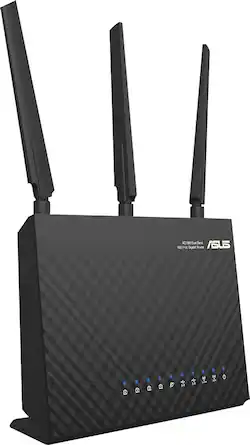
ASUS - WirelessAC1900 Dual-Band Gigabit Wireless Router - Black
- General
- Product Name: WirelessAC1900 Dual-Band Gigabit Wireless Router
- Brand: ASUS
- Model Number: RT-AC68P
- Security
- Data Encryption: true
- Encryption Type: WEP, WPA, WPA2-PSK, WPA2-Enterprise, WPA-Enterprise (The security protocols or certification programs that protect the Wi-Fi network.)
- Firewall Type: None (The method the firewall uses to filter and process data to increase network security, primarily by blocking malicious traffic requests while allowing legitimate traffic through.)
- Network
- Ethernet Standard: 10/100/1000 (Each standard is a variation of the IEEE 802.3 set of computer networking technologies known as Ethernet. New versions evolved to include higher bandwidth, different physical media, and other new and improved features. Standards are often denoted by speeds (in Megabits per second). For example, a 10/100/1000 Ethernet port transmits at 10 Mbps, 100 Mbps, and 1000 Mbps (1 Gbps).)
- Number Of Connected Devices: 7
- Number of Antennas: 3
- Frequency Band: 2.4 GHz (Bands may be grouped into categories such as low- and high-band VHF (Very High Frequency), low- and high-band UHF (Ultra High Frequency), or certain frequency channels (measured in MHz or GHz). Generally, higher frequencies transmit information faster but have shorter range than lower frequencies.)
- Wireless Networking Standard: Wi-Fi 5 (The wireless networking standard used by the device. Each iteration of the standard developed by the Wi-Fi Alliance corresponds to an existing IEEE 802.11 protocol; for example, standard 802.11ac (or AC) is termed Wi-Fi 5. Refers specifically to the standard the device is designed to use, but ultimately determines product interoperability and backward compatibility including previous versions.)
- Wireless Standard: AC (The wireless networking protocol used by the device. Each iteration of the protocol is based on the 802.11 standard developed by the Institute of Electrical and Electronics Engineers (IEEE) Standards Association. Denoted by letters following 802.11 (802.11a, 802.11ac, etc.), each version, published in alphabetical order, encompasses all previous versions.)
- Number of 2.4Ghz Streams: 1 (A router's streams are like lanes on a highway. The more streams a router has, the less traffic congestion. Because the 2.4 GHz band is used to transmit wireless signals to a wide variety of devices, there is often high amounts of traffic on that stream. But with multiple streams, each can be designated to a specific device for optimal performance. For example, if one 2.4 GHz stream is assigned to one device, such as a desktop computer, it leaves the remaining streams open for guest users, devices that use more data, or devices with specific band compatibility.)
- Number of 5.0Ghz Streams: 1 (A router's streams are like lanes on a highway. The more streams a router has, the less traffic congestion. The 5.0 GHz band provides high speed, short-range data transmission and typically has less traffic than the 2.4 GHz band. With multiple streams, each can be designated to a specific device for optimal performance. For example, if one 5.0 GHz stream is assigned to one device, such as a streaming media player, it leaves the remaining streams open for guest users, devices that need less data, or devices with specific band compatibility.)
- Ethernet Switch: true (Connects multiple devices to expand the Local Area Network (LAN).)
- Certifications Listings & Approvals
- ENERGY STAR Certified: false (Devices carrying the ENERGY STAR service mark, such as computer products and peripherals, kitchen appliances, and other products, generally use 20% to 30% less energy than required by federal standards.)
- Features
- Wireless: true
- Ports
- Number Of WAN Ports: 1 (Number of devices able to be connected to the Wide Area Network (WAN). This type of port may simply be labeled "Internet," and it allows the device to share its internet connection with all devices connected to it via LAN ports.)
- Port Type(s): RJ-45, USB (USB 2.0 connects external drives, gaming controllers, smartphones, MP3 players and other accessories.USB 3.0 transfers data faster than USB 2.0, but only when used with USB 3.0 devices.USB Type-C provides fast speeds and versatile power, featuring connectors with identical ends that plug in upside down or right side up. Adapters allow for video as well as backward compatibility.Thunderbolt provides ultra-high bandwidth for fast data transfer between devices featuring a Thunderbolt or MiniDisplayPort connection.HDMI allows you to connect a projector or display HD media on your HDTV or monitor.Media card slots allow you to transfer photos from your digital camera or camcorder.)
- Speed
- Gigabit Ethernet Speed: true (Supports the gigabit Ethernet networking standard, which has a data rate of at least one gigabit per second, or 1,000 Mbps.)
- Dimensions
- Product Height: 3.3 inches (The out of box height of the item. Height is measured as the vertical distance from the bottom of the item to the top as it would be primarily used or placed.)
- Product Length: 6.3 inches (The out of box length of the item. Length is measured as the longest dimension of the item.)
- Product Width: 8.7 inches (The out of box width of the item. Width is measured as the horizontal distance from one side of the item to the other as it would be primarily used or placed.)
- Product Weight: 1.4 pounds (The out of box weight of the item.)
- Warranty
- Manufacturer's Warranty - Parts: 2 years limited
- Manufacturer's Warranty - Labor: 2 years limited
- Other
- UPC: 886227672462
Easily connect your devices to your wireless network with this Asus RT-AC68P router, which features TurboQAM technology and AiRadar to provide an efficient, reliable signal with up to 1900 Mbps data transfer rates on 2.4GHz and 5.0GHz bands.
- Wireless-AC1900 technology: Utilizes TurboQAM technology and 3 detachable dual-band antennas to deliver enhanced Wi-Fi connectivity.
- Up to 1300 Mbps at 5.0GHz and up to 600 Mbps at 2.4GHz: Provide combined data transfer rates of up to 1900 Mbps, so you can stream 4K content, enjoy online gaming and perform other bandwidth-intensive tasks while maintaining a clear signal.
- Compatible with 802.11ac: Backward compatible with 802.11a/b/g/n networks, so you can upgrade easily.
- AiRadar: Offers directional signal focus for enhanced strength and stability on both the 2.4GHz and 5.0GHz bands.
- AiCloud: Lets you use the router to access, store and share your files between connected devices.
- 128MB flash memory: Plus 256MB DDR3 RAM promotes optimal performance.
- 4 Gigabit LAN ports: Along with 1 Gigabit WAN port for wired connectivity.
- 1 USB 3.0 port and 1 USB 2.0 port: Allow you to connect a printer and enjoy 3G and 4G file sharing.
- Encryption: Includes 64/128-bit WEP, WPA/WPA2-PSK, WPA/WPA2-Enterprise and WPS (Wi-Fi Protected Setup) to keep your network secure.
- QoS (Quality of Service): Along with a DHCP server, Web-based administration, a system event log and save/restore configuration file for simple management.
- Router setup wizard: Plus firmware restoration, device discovery and a printer setup utility for easy installation and setup.
Whats Included
- Asus WirelessAC1900 Dual-Band Gigabit Wireless Router
- RJ-45 cable, power adapter, 3 dual-band antennas, support CD
- Owner's manual
Q: This router specified that it has a max of 7 connected devices. Does it really have this limitation?
A: Wired, that's about right: 4 Ethernet connections (LAN), 1 Internet connection (WAN), and 2 USB ports for hard drives or printers. Wirelessly, it should support whatever you have. We had 10+ wireless devices connected without a problem.
Q: what is the differece between the asus RT-AC68 U & ausu RT-AC68 W and the asus RT-AC68P ?
A: "U" or "R" is the black online version that Amazon, etc. sells. "W" is the white colored version of "U". They have a dual core 800Mhz chipset. "P" is v2 of "U/R/W" -- has faster/better chipset, dual core 1Ghz, and fixes problems with USB 3 storage.
Q: What is the best router for home use
A: Without question, the ASUS RT-AC68P. This thing rocks and won't be obsolete next year. Works with ALL my devices on 2.4GHz and all my devices that support 5GHz (both Wireless N and Wireless AC). It also gives you wireless storage (attach USB 3.0 HDD to USB 3.0 port) and wireless printing (USB2.0). It's easy to use (the management UI is easy to navigate) and it has a TON of nice tweakable features. If you don't want to mess with anything you still get excellent performance and it has a nice First-Run Setup wizard to make things easy. GREAT product!
Q: Does this router run on 2.4 GHZ and 5 GHZ at the same time.
A: Yes, it does. Different devices will detect one or both bands depending on the device's specs. For instance, my computer can use either. But, my son's HP Stream only sees the 2.4.
A: Some considerations to improve your situation. First, please think in terms of bandwidth demands per device. That is, video and gaming takes a lot of bandwidth (BW), voice (like Vonage, Skype, vchat) a bit less, browsing and email demands much less and messaging demands are irrelevant. Then ask if these demands are going on simultaneously. If so, which demands and from what sources are these demands occurring? The best thing to do for the high BW and low latency demands is to use hardwired connections to these locations; best examples being the boxes, play station, steaming DVDs, TVs, roku's, AppleTV, PCs used for streAming, etc).. Reason is you get 10x more performance and no noticeable contention over the hardwired connections in comparison to the wireless capabilities of your 1 wireless router. It also leaves only those wireless-only devices (phones and tablets) to use the wireless spectrum of your router. Next, realize your router has 2 bands. 2.4ghz and the 5ghz bands. Divide up which devices will use which bands so they share the BW capacity of BOTH BANDS in a reasonable manner. If you need more wireless capacity, then get two wireless routers and divide the demand loads across the 4 available wireless bands of both routers - hey, you might actually get to use your DLink and an ASUS to support your 16 devices. The name of the game here is to manage the available wireless capacity. If you don't you'll not arrive at a happy place. It's the 10 pounds into a 5 pound bag problem you have, not a product technology problem. Additional configuration options can me asserted to provide BW allocation per device in the QOS options of your router but in the end, you'll need the wireless BW capacity to be available for your devices. So spectrum budget manage is the key. Hope you follow the engineering aspects of why and what needs to be done. RegArds..m
Q: What is the range from the router to devices? (TV, Bose Radio)
A: The range is very good. I have the router at one end of my 2700 sq foot house and i am receiving 4 bars on all device on opposite end of the house. Even at the edge of my property 12,000 sq feet, im getting enough signal to stream HD movies
Q: Does this router work with Windows XP and also Windows 10?
A: Yes, the router is compatible with both Windows Xp and Windows 10.
Q: is this router comparable with comcast xfinity modem?
A: Yes, the router is compatible with a Comcase Xfinity Modem.




















