Backbone - One - PlayStation Edition (Lightning) - Mobile Gaming Controller for iPhone - White
FREE shipping to
 Backbone - One Carrying Case - PlayStation Edition - White$24.99
Related Item

Specifications
- WirelessYesBattery SizeNot ApplicableCompatible Platform(s)Universal
- Key Specs
- Wireless: true
- Battery Size: Not Applicable (The battery size required for operation.)
- Compatible Platform(s): Universal
- General
- Brand: Backbone
- Model Number: BB-02-W-S
- Product Name: One - PlayStation Edition (Lightning) - Mobile Gaming Controller for iPhone
- Color: White
- Features
- Product Type: Controller
- Headset Jack: true
- Rumble Vibration: false
- Analog Joysticks: true
- Button Mapping: true
- Connectivity
- Wireless: true
- Motion-Sensing Technology: false (By using accelerometers or other sensors, devices are able to track motion and provide input.)
- Power
- Rechargeable Battery: false
- Battery Size: Not Applicable (The battery size required for operation.)
- Dimensions
- Product Height: 3.7 inches (The out of box height of the item. Height is measured as the vertical distance from the bottom of the item to the top as it would be primarily used or placed.)
- Product Width: 1.28 inches (The out of box width of the item. Width is measured as the horizontal distance from one side of the item to the other as it would be primarily used or placed.)
- Product Length: 6.94 inches (The out of box length of the item. Length is measured as the longest dimension of the item.)
- Product Weight: 0.3 pounds (The out of box weight of the item.)
- Compatibility
- Compatible Platform(s): Universal
- Warranty
- Warranty - Parts: 1 year limited
- Warranty - Labor: 1 year limited
- Other
- UPC: 860003568200
Inspired by the look and feel of the PS DualSense wireless controller, the Backbone One PlayStation Edition transforms your iPhone into the ultimate gaming console. Snap in your phone and play any game or service that supports controllers, including Apple Arcade, GeForce NOW or even stream from PlayStation with PS Remote Play or PC. The Backbone app organizes your content library and game streaming services into an integrated user experience. Uncover a new world of premium gaming in seconds.
- Play virtually any game, anywhere: Choose from free App Store games like Call of Duty: Mobile and Roblox, stream through cloud gaming services such as Xbox Game Pass, Apple Arcade, GeForce NOW and Amazon Luna, or play games with Remote Play from your PlayStation or PC. ¹
- Console quality on the go: Meticulously crafted to be comfortable and portable, our compact design features ultra wide analog triggers, highly accurate thumbsticks and responsive D-pad and buttons.
- Works with most iPhone models: Compatible with iPhone models that have a Lightning connector. Adapter included for enhanced experience on iPhone 14, 14 Plus, 14 Pro, 14 Pro Max, 13 Pro and 13 Pro Max.
- Lightning port: Play longer with pass-through charging that lets you play and charge simultaneously. Use your Backbone One as a wired controller with a PC or iPad with our Play On Any Screen feature.
- Low-latency connection: Experience ultra-responsive gameplay with a direct connection to your iPhone's Lightning port.
- Headset jack: 3.5mm stereo headset jack with microphone support for in-game chat.
- Backbone app: The Backbone App organizes your gaming content library and streaming services into an integrated user experience. Explore new games, connect to cloud gaming and access Remote Play from your console or PC all in the Backbone app.
- Capture gameplay: Record and share gameplay video and screenshots with Smart Record (Backbone+ subscription required).
- Backbone+ trial included: Receive 1 free month Backbone+ trial subscription. Unlock 20+ app features including Smart Record and Play on Any Screen, perks and in-game rewards and services and extended warranty support. A subscription is not required to use your Backbone One controller. ²
- 3 Free Months of Apple Arcade: Access to over 200+ games including NBA 2K23, Hello Kitty Island, TNMT and Sneaky Sasquatch. Code issued digitally during product set up. Valid to only first time free trial subscribers or existing free trial users.³
- Designed in collaboration with PlayStation: Inspired by the PS5 DualSense controller, the Backbone One PlayStation Edition features special integrations with the PlayStation and PlayStation App like the ability to play PS4 and PS5 games on your mobile device via PS Remote Play. Even install games onto your console remotely so you can play them later. Backbone One is the perfect way to extend and expand your PlayStation gaming experience.
- Disclaimers: ¹ Games and services available may vary by country.
- Play virtually any game, anywhere: Choose from free App Store games like Call of Duty: Mobile and Roblox, stream through cloud gaming services such as Xbox Game Pass, Apple Arcade, GeForce NOW and Amazon Luna, or play games with Remote Play from your PlayStation or PC. ¹
- Console quality on the go: Meticulously crafted to be comfortable and portable, our compact design features ultra wide analog triggers, highly accurate thumbsticks and responsive D-pad and buttons.
- Works with most iPhone models: Compatible with iPhone models that have a Lightning connector. Adapter included for enhanced experience on iPhone 14, 14 Plus, 14 Pro, 14 Pro Max, 13 Pro and 13 Pro Max.
- Lightning port: Play longer with pass-through charging that lets you play and charge simultaneously. Use your Backbone One as a wired controller with a PC or iPad with our Play On Any Screen feature.
- Low-latency connection: Experience ultra-responsive gameplay with a direct connection to your iPhone's Lightning port.
- Headset jack: 3.5mm stereo headset jack with microphone support for in-game chat.
- Backbone app: The Backbone App organizes your gaming content library and streaming services into an integrated user experience. Explore new games, connect to cloud gaming and access Remote Play from your console or PC all in the Backbone app.
- Capture gameplay: Record and share gameplay video and screenshots with Smart Record (Backbone+ subscription required).
- Backbone+ trial included: Receive 1 free month Backbone+ trial subscription. Unlock 20+ app features including Smart Record and Play on Any Screen, perks and in-game rewards and services and extended warranty support. A subscription is not required to use your Backbone One controller. ²
- 3 Free Months of Apple Arcade: Access to over 200+ games including NBA 2K23, Hello Kitty Island, TNMT and Sneaky Sasquatch. Code issued digitally during product set up. Valid to only first time free trial subscribers or existing free trial users.³
- Designed in collaboration with PlayStation: Inspired by the PS5 DualSense controller, the Backbone One PlayStation Edition features special integrations with the PlayStation and PlayStation App like the ability to play PS4 and PS5 games on your mobile device via PS Remote Play. Even install games onto your console remotely so you can play them later. Backbone One is the perfect way to extend and expand your PlayStation gaming experience.
- Disclaimers: ¹ Games and services available may vary by country.
Whats Included
- Backbone One - PlayStation Edition Device (Lightning)
- Quick Start Guide
- Safety Sheet
- Adapter
- Backbone One - PlayStation Edition Device (Lightning)
- Quick Start Guide
- Safety Sheet
- Adapter
Q: Does the Backbone One controller work with all iPhone models?
A: It is compatible with iPhone models that have a Lightning connector, and an adapter is included for enhanced experience on iPhone 14, 14 Plus, 14 Pro, 14 Pro Max, 13 Pro, and 13 Pro Max.
Q: What is the primary function of the Backbone One PlayStation Edition?
A: The Backbone One PlayStation Edition transforms your iPhone into the ultimate gaming console.
Q: Does the Backbone One require batteries?
A: No, it does not use batteries as it's directly powered by the iPhone.
Q: Can I use a headset with the Backbone One controller?
A: Yes, it has a 3.5mm stereo headset jack with microphone support for in-game chat.
Q: How does the Backbone One connect to an iPhone?
A: It connects to your iPhone's Lightning port for ultra-responsive gameplay.
Q: Can I charge my iPhone while using the Backbone One?
A: Yes, it allows pass-through charging, so you can play and charge simultaneously.
Q: What is the duration of the free Apple Arcade trial included with this controller?
A: This controller comes with 3 free months of Apple Arcade.
Compare similar products
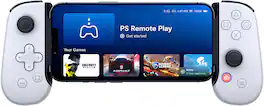
Inspired by the look and feel of the PS DualSense wireless controller, the Backbone One PlayStation Edition transforms your iPhone into the ultimate gaming console. Snap in your phone and play any game or service that supports controllers, including Apple Arcade, GeForce NOW or even stream from PlayStation with PS Remote Play or PC. The Backbone app organizes your content library and game streaming services into an integrated user experience. Uncover a new world of premium gaming in seconds.
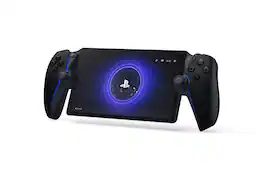
Play your PS5® console over Wi-Fi with console quality controls using PlayStation Portal™ Remote Player. Put Your PS5 in the Palm of Your Hand: PlayStation Portal™ Remote Player gives you access to the games on your PS5® console over a Wi-Fi network, letting you jump into gaming on a gorgeous 8” LCD screen capable of 1080p resolution play at 60fps, all without needing to play on a TV. Play Your Game Collection with Remote Play: PlayStation Portal™ Remote Player can play compatible games you have installed on your PS5® console, including your favorite games for PS5 and PS4. Enjoy Cloud Streaming for PS5® Games with PlayStation Plus®Premium: Stream select titles from the Game Catalog, Classics Catalog, and even select digital PS5® games in Your Library from PlayStation™Store, without needing to wait for downloads. Experience Breathtaking Immersion with DualSense® Wireless Controller Features and 3D Audio: Feel the incredible immersion of haptic feedback and adaptive triggers in supported games, and surround yourself with sound via Tempest 3D AudioTech in supported games when a compatible audio device is connected.

Inspired by the look and feel of the PS DualSense wireless controller, the Backbone One PlayStation Edition transforms your iPhone device into the ultimate gaming console. Snap in your iPhone and play any game or service that supports controllers, including App Store, GeForce NOW or even stream from PlayStation with PS Remote Play or PC. Our Second Generation device features two sets of magnetic adapters that allow for even better phone fit along with a reshaped D-pad which enhances responsiveness, resulting in superior feel and control across multiple genres of gameplay. The Backbone app organizes your content library and game streaming services into an integrated user experience. Uncover a new world of premium gaming in seconds.
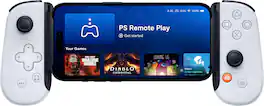
Inspired by the look and feel of the PS DualSense wireless controller, the Backbone One PlayStation Edition transforms your iPhone or Android device into the ultimate gaming console. Snap in your phone and play any game or service that supports controllers, including Google Play Store, GeForce NOW or even stream from PlayStation with PS Remote Play or PC. Our Second Generation device features two sets of magnetic adapters that allow for even better phone fit along with a reshaped D-pad which enhances responsiveness, resulting in superior feel and control across multiple genres of gameplay. The Backbone app organizes your content library and game streaming services into an integrated user experience. Uncover a new world of premium gaming in seconds.
| Pros for Backbone - One - PlayStation Edition (Lightning) - Mobile Gaming Controller for iPhone - White | |||
|---|---|---|---|
| Compatibility, Ease of use, Quality, Remote Play, Design | Overall Performance, Portability, Comfort, Screen Quality, Battery Life | Overall Performance, Portability, Button Responsiveness | Overall Performance, Portability, Compatibility, Comfort, Button Quality |
| Cons for Backbone - One - PlayStation Edition (Lightning) - Mobile Gaming Controller for iPhone - White | |||
| Connection, Fit, Lag, Subscription, App | Connectivity, Input Lag, Frame Rate | Connectivity, Compatibility | Connectivity, Size |
Specs
Reviews
Customers are saying
Customers are pleased with the ease of use, compatibility, and quality of the One - PlayStation Edition mobile gaming controller. Many appreciate the smooth remote play functionality and the controller's comfortable design. However, some users experienced lag and connection issues, while others found the fit inconsistent for certain phone models. Concerns were also raised regarding the app and its subscription model.
Customer Images
The vast majority of our reviews come from verified purchases. Reviews from customers may include My Best Buy members, employees, and Tech Insider Network members (as tagged). Select reviewers may receive discounted products, promotional considerations or entries into drawings for honest, helpful reviews.
- Rated 5 out of 5 stars
Best Mobile controller + PS branding
The Backbone is so good that Razer Kishi (it’s competitor copied their design for their V2). It’s the best mobile controller out to date. This is for IOS only with a low latency connection via lightning port. Great for iPhone 13-12-11 (up to 6). Hopefully 14 as well but that will depend on design, including lightning port. Not for Android though a version is releasing in November. This controller turns your iPhone into a Switch (more comfortable to hold IMO). Buttons feel good & clicky. This PS version (white) is identical to the previous version (black) functionality wise but with button updates (PS Instead of Xbox layout). The clear button coating borrows from the DualSense as well. Lastly, the PS logo replaces Backbone’s logo on the back bar. Basically, this is a PS brand loyalty update. A couple of tips, to access PS Menu hold down Backbone button for 2 seconds or 1 second to access the Custom Control center. During PS remote play, you can use the iPhone’s Zoom feature to fill out the entire screen (same way Apple Arcade games do). Usefulness will depend on the game. Last item worth mentioning is the software. If you’re new to Backbone, you’ll love the app as it turns your phone into a mini console! This is likely why Sony partnered with them (PS5-Vita-ish). This used to be free but now requires a yearly subscription, though not needed to use the controller. Overall, best mobile controller you can buy in 2022 with PS button layout & branding.
Posted by OJSilk
- Rated 5 out of 5 stars
Disconnect HDMI cable from Console! Trust Me!
The product itself is great! So I will rate it 5 stars. When it comes to connections and lag, I found that physically removing the hdmi cable from the console SIGNIFICANTLY reduces lag and performance. My experience using the backbone at home is an overall 8/10. I've tested at work with AT&T 5G and the performance was on the poor side. I work at a mall and at the time it was the weekend before Christmas so I dont know if the amount of people in one area was the cause for this. If you're gonna be connected to a good wifi connection when away from home with good download speeds, then I say you're good. Although if you're traveling and plan on using your 5G, I'd think twice before purchasing. I'd also like to note that $100 is pretty steep for a controller in my opinion that doesn't have any vibrations at all. The backbone app is not amazing. I only use it to get to my PS5 remote play app. ----------- If anyone is wondering: my download speeds at home vary throughout the day. I get anywhere between 80-150mbps. Upload speeds are roughly 30-80mbps. I live in a rural area so my options out here aren't great. Mentioning this in case is it all helpful to folks in my situation. If you have speeds greater than mine, I'd say your Remote Play experience will be great!
Posted by LuisT
- Rated 4 out of 5 stars
Fantastic and WORKS with the NEW 14 PRO MAX!!!
Awesome mobile gaming device/controller. Works with the new IPhone 14 Pro Max. Just need to use the 13 pro max adapter included with the controller! I would get the warranty Best Buy offers just in case of accidents. Quality over all, it feels solid. Let’s see how the bottoms and sticks hold up after 9 -12 months.
Posted by Toddfather